Explore how to use Trickster to accelerate your projects. If you’re new to Trickster, start with the Quick Start and Where to Place Trickster, then Configuring Trickster. Running on Kubernetes? The Kubernetes section covers deploying Trickster and using it as a Gateway API and Ingress controller.
This is the multi-page printable view of this section. Click here to print.
Documentation
- 1: Getting Started
- 1.1: Quick Start
- 1.2: Where to Place Trickster
- 1.3: Configuring Trickster
- 2: Backends
- 2.1: Using Multiple Backends with a single Trickster instance
- 2.2: Health Checks
- 2.3: Authenticator
- 2.4: AWS Integration
- 3: Listeners & TLS
- 3.1: TLS Support
- 3.2: HTTP/3
- 3.3: Apache Arrow Flight SQL Listeners
- 4: Caching
- 4.1: Cache Overview
- 4.2: Trickster Caching Retention Policies
- 4.3: Chunked Caching
- 4.4: Negative Caching
- 5: Object Caching
- 6: Time Series Caching
- 6.1: Supported Providers
- 6.2: Per-Query Time Series Instructions
- 6.3: Query Range Limits
- 6.4: Timeseries Request Sharding
- 6.5: Providers
- 6.5.1: Prometheus Support
- 6.5.2: ClickHouse Support
- 6.5.3: InfluxDB Support
- 6.5.4: Apache Druid Support
- 6.5.5: Graphite Provider
- 6.5.6: MySQL Provider
- 7: Routing & Load Balancing
- 7.1: Application Load Balancer
- 7.2: ALB Autodiscovery
- 7.3: Rule Backend
- 8: Request Handling
- 8.1: Customizing HTTP Path Behavior
- 8.2: Request Rewriters
- 8.3: Request Body Handling Customizations
- 8.4: Cross-Origin Resource Sharing
- 8.5: Simulated Latency
- 9: Kubernetes
- 9.1: Deploying on Kubernetes
- 9.2: Kubernetes Gateway API
- 9.3: Kubernetes Ingress v1
- 9.4: Kubernetes Cache Policy
- 9.5: Kubernetes Controller RBAC
- 10: Observability
- 10.1: Trickster Metrics
- 10.2: Distributed Tracing via OpenTelemetry
- 10.3: Access and Error Logs
- 10.4: X-Trickster-Result Header
- 11: Release Notes
- 11.1: Trickster 2.1
- 11.2: Trickster 2.0
1 - Getting Started
How to get up and running with Trickster.
1.1 - Quick Start
Try Trickster with Docker Compose and minimal setup.
This composition creates service containers for Prometheus, Grafana, Jaeger, Zipkin, Redis, Trickster and Mockster that together demonstrate several basic end-to-end configurations for running Trickster in your environment with different cache and tracing provider options.
If you have any of these services running locally already, you may run into port conflicts and need to temporarily spin down the conflicting processes.
Prerequisites
You should already have the following installed:
Starting the demo
Clone the Trickster Github project.
In the
tricksterdirectory, change your working directory to./examples/docker-composewith the following command:cd examples/docker-composeTo run the demo from the demo directory, enter the following command:
docker-compose up -dYou can interact with each of the services on their exposed ports (as defined in Compose file), or by running
docker logs $container_name,docker attach $container_name, etc.
Exploring Trickster
Grafana
Once the composition is running, we recommend exploring with Grafana, at http://127.0.0.1:3000/. Grafana is pre-configured with datasources and a sample dashboard that are ready-to-use for the demo.
Jaeger UI
Jaeger UI is available at http://127.0.0.1:16686, which provides visualization of traces shipped by Trickster and Grafana. The more you use trickster-based data sources in Grafana, the more traces you will see in Jaeger. This composition runs the Jaeger All-in-One container. Trickster ships some traces to the Agent and others directly to the Collector, so as to demonstrate both capabilities. The Trickster config determines which upstream origin ships which traces where.
For a variety of configurations and other bootstrap data, review the various files in the docker-compose-data folder. This might be useful for configuring and using Trickster (or any of these other fantastic projects) in your own deployments. Try adding, removing, or changing some of the trickster configurations in ./docker-compose-data/trickster-config/trickster.yaml and then docker exec docker-compose_trickster_1 kill -1 1 into the Trickster container to apply the changes, or restart the environment altogether with docker-compose restart. Just be sure to make a backup of the original config first, so you don’t have to download it again later.
Example Datasources
The sim-* datasources generate on-the-fly simulation data for any possible time range, so you can immediately use them after starting up the environment. Note, however, that the simulated data is not representative of reality in any way.
The non-sim Prometheus container that backs the prom-* datasources polls the newly-running environment to generate metrics that will then populate the dashboard. Since the Prometheus container only collects and stores metrics while the environment is running, you’ll need to wait a minute or two for those datasources to show any data on the dashoard in real-time.
Getting Real Dashboard Data
Using datasources backed by the real Prometheus and Trickster (the prom-trickster-* datasources), rather than the simulator, to explore the dashboard is more desirable for the demo. It better conveys the shape and nature of the Trickster-specific metrics that might be unfamiliar. However, since there is no historical data in the demo composition, that creates an upfront barrier.
Keeping the dashboard open and auto-refreshing against any trickster-labeled datasource will help to generate real metrics in Trickster, such as request rates, cache hit rates, etc. Prometheus will collect and store those metrics, and the Grafana dashboard will query and render those metrics. So by keeping the demo dashboard open and refreshing, you are helping to generate the very metrics that the dashboard presents, making the demo much more visually useful while being very meta.
In addition to generating metrics, using the trickster-labeled datasources generates traces that are viewable in Jaeger UI, as described above.
Stopping the Demo and Cleaning Up
To stop and remove the demo, run docker-compose down in the ./examples/docker-compose directory.
1.2 - Where to Place Trickster
Depending upon the size of your existing or planned deployment, there are several placement configurations available. These designs are suggestions based on common usage, and you may find alternative or hybrid placement configurations that make the most sense for your situation, based on the activity of your Dashboard and TSDB instance(s).
Single “Everything”

Single “Everything” is the most common placement model. In this configuration, you have one optional dashboard endpoint, one Trickster endpoint and one HTTP or TSDB endpoint. Behind each endpoint, you may have a single instance or a cluster. Each component is only aware of the other component’s endpoint exposure and not the underlying configuration. This configuration represents a one-for-one-for-one deployment of your Dashboard, Origin, and Trickster endpoints.
Multiple Backends

In a Multiple Backend placement, you have one dashboard endpoint, one Trickster endpoint, and multiple TSDB and/or HTTP endpoints. Trickster is aware of each upstream endpoint and treats each as a unique backend to which it proxies and caches data independently from the others. Trickster routes a request to a specific backend based on Host Header or URL Path in the client request.
This setup may benefit situations where you have one or more static file server origins serving HTML, CSS and JavaScript assets and/or one or more API endpoints, all supporting a common platform.
For Time Series Dashboard acceleration, this is a good configuration to use when you have a single dashboard that displays data about multiple redundant clusters (each with its own TSDB), or when you have a single dashboard representing information about many different kinds of systems. For example, if you operate a “Dashboard as a Service” solution under which many teams use your Dashboard system by designing their own dashboard screens and bringing their own databases, a single Trickster endpoint can be used to accelerate dashboards for all of your customers.
You will need to configure each Trickster-to-TSDB mapping separately in your dashboard application as a separately named TSDB data source. Refer to the multi-origin documentation for configuring multi-origin support in Trickster and Grafana.
In this configuration, be aware that the default ‘memory’ cache may be underpowered depending on the number of customers, as well as the size and number of queries that need to be cached by each customer. Refer to the caches document to select and configure the caching layers as needed to meet your specific situation.
Multi-Trickster
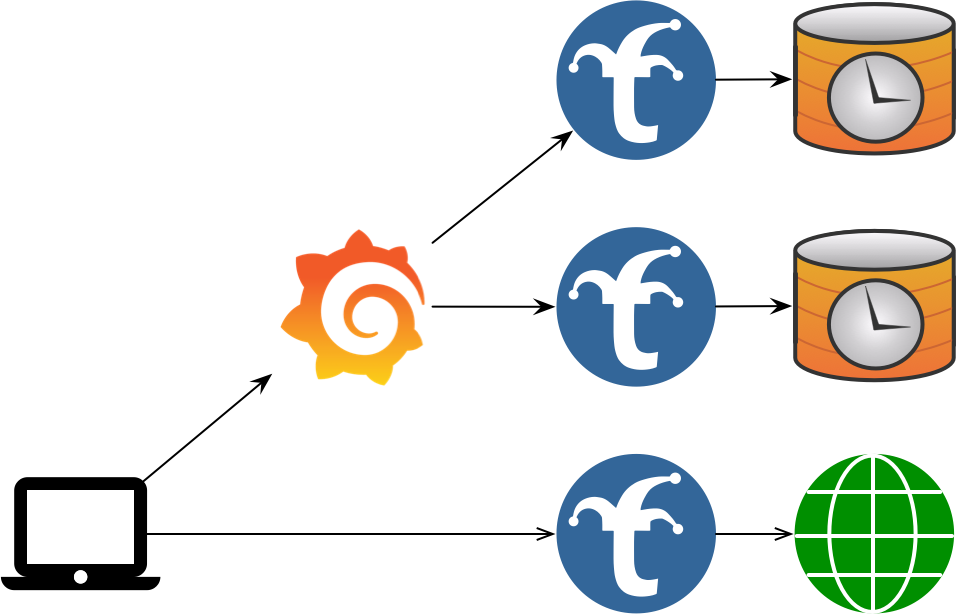
In a Multi-Trickster configuration, you have one dashboard endpoint, multiple Trickster endpoints, and multiple TSDB or HTTP endpoints, with each Trickster Endpoint having a one-to-one mapping to a TSDB/HTTP Endpoint as a pair. This is a good design if Multiple Backends is not performant enough for the amount of activity associated with your solution (e.g., you need more Tricksters). If the Dashboard system owner is different from the TSDB system owner, either party could own and operate the Trickster instance.
1.3 - Configuring Trickster
There are 3 ways to configure Trickster, listed here in the order of evaluation.
- Configuration File
- Environment Variables
- Command Line Arguments
Note that while the Configuration file provides a very robust number of knobs you can adjust, the ENV and CLI Args options support only basic use cases.
Internal Defaults
Internal Defaults are set for all configuration values, and are overridden by the configuration methods described below. All Internal Defaults are described in examples/conf/example.full.yaml comments.
Configuration Files
Trickster accepts a -config /path/to/trickster.yaml command line argument to specify a custom configuration file. The path can also name a directory containing configuration files. If a provided path cannot be accessed by Trickster, it will exit with a fatal error.
When a -config parameter is not provided, Trickster will check for the presence of a config file at /etc/trickster/trickster.yaml and load it if present, or proceed with the Internal Defaults if not present.
Refer to examples/conf/example.full.yaml for full documentation on format of a configuration file.
Multiple Configuration Files
When -config names a file, Trickster loads that file first and then loads supported files from a sibling conf.d directory, if the directory exists. The primary file can select a different include directory:
main:
  config_include_directory: config-parts
A relative config_include_directory is resolved from the directory containing the primary file. An explicitly configured include directory must exist. Only the primary file can set this option; included files cannot redirect configuration discovery.
When -config names a directory, Trickster loads supported files directly from that directory. The directory must contain at least one supported file, and files in this mode cannot set main.config_include_directory.
In both modes, Trickster:
- Loads only direct regular files whose names do not start with
., with.conf,.yaml, or.ymlextensions matched case-insensitively. - Loads directory entries in ascending lexical filename order. The primary file, when present, always comes first.
- Recursively merges mappings. A later scalar or sequence replaces the earlier value, while a later mapping adds to or overrides individual keys in the earlier mapping.
- Requires each file participating in a multi-source configuration to have a mapping root, one YAML document, and no duplicate keys.
For example, a fragment containing only backends.prometheus.origin_url can change that field without removing the other fields under the prometheus backend. Use null, rather than an empty mapping, when a later file must clear an earlier mapping value.
Reserved Names
Some object-name prefixes are reserved in every named section (backends, caches, listeners, discovery, rules, request_rewriters, negative_caches, tracing, and authenticators) for configuration that Trickster generates internally at runtime. A file or fragment that defines a name with a reserved prefix fails to load. The reserved prefixes are:
| Prefix | Producer |
|---|---|
kgw-- | Kubernetes Gateway/Ingress controller |
Generated configuration is merged after all files and fragments, with the same deep-merge behavior. It may only add objects under the named sections above, so it can never change main, frontend, logging, metrics, or mgmt settings or replace a file-defined object. A change to the generated configuration makes the running configuration stale for reload purposes in the same way as a change to a file, and every reload (SIGHUP, the reload handler, and auto_reload_interval) carries the current generated configuration forward.
Configuring Secrets or Sensitive Information
Trickster supports Environment variable substitution in its configuration file where sensitive information is expected.
- Supported via the following fields:
caches[*].redis.password,backends[*].healthcheck.headers,backends[*].cors.headers,backends[*].paths[*].cors.headers,backends[*].paths[*].request_headers,backends[*].paths[*].request_params,backends[*].paths[*].response_headers,backends[*].alb.user_router.users[*].to_credential,authenticators[*].users,discovery[*].headers
Usage ${ENV_VAR_NAME}, example:
caches:
  default:
    redis:
      password: "${MY_REDIS_PW}"
Environment Variables
Trickster will then check for and evaluate the following Environment Variables:
TRK_ORIGIN_URL=http://prometheus.example.com:9090- The default origin URL for proxying all http requestsTRK_ORIGIN_TYPE=prometheus- The type of supported backend serverTRK_LOG_LEVEL=INFO- Level of Logging that Trickster will outputTRK_PROXY_PORT=8480-Listener port for the HTTP Proxy EndpointTRK_METRICS_PORT=8481- Listener port for the Metrics and pprof debugging HTTP Endpoint
Command Line Arguments
Finally, Trickster will check for and evaluate the following Command Line Arguments:
-log-level INFO- Level of Logging that Trickster will output-config /path/to/trickster.yaml- See Configuration Files section above-origin-url http://prometheus.example.com:9090- The default origin URL for proxying all http requests-provider prometheus- The type of supported backend server-proxy-port 8480- Listener port for the HTTP Proxy Endpoint-metrics-port 8481- Listener port for the Metrics and pprof debugging HTTP Endpoint
Inbound Listeners
The top-level listeners map configures inbound listeners. Trickster always auto-defines three entries using the existing defaults: default, metrics, and mgmt.
Native MySQL listeners have additional protocol, authentication, TLS, and
session-lifecycle requirements. See the MySQL Provider Guide before
configuring protocol: mysql.
ClickHouse Native listeners use protocol: clickhouse; see the
ClickHouse Support Guide for ingress, origin, and TLS options.
listeners:
  default:
    address: ""
    port: 8480
    tls_address: ""
    tls_port: 8483
    connections_limit: 0
    read_header_timeout: 10s
  private_api:
    protocol: http
    address: 127.0.0.1
    port: 9080

backends:
  default:
    listener_names: [default, private_api]
    provider: prometheus
    origin_url: http://prometheus:9090
  private:
    listener_names: [private_api]
    provider: reverseproxy
    origin_url: http://private-origin
listener_names binds a backend to one or more compatible listeners. An ordinary unbound backend uses default; internal routing targets remain unexposed. A backend cannot select the reserved mgmt or metrics listeners, and validation fails for undefined or provider-incompatible listeners.
Each native listener maps to exactly one backend. Multiple HTTP listeners can share a backend, and ClickHouse can bind the same backend to HTTP and ClickHouse Native listeners.
A user-defined listener with no mapped backend is not started and produces a warning. A configured TLS port is enabled only when at least one backend mapped to that listener provides a valid frontend certificate and key in its tls section; otherwise Trickster disables that TLS port and logs a warning.
Trusted Proxies
A listener behind a load balancer or another proxy sees that proxy’s address
as the connection peer. trusted_proxies lists the addresses and CIDRs of
the proxies in front of a listener; for a connection from one of them,
Trickster resolves the client’s address from the forwarding headers it
sent, taking the nearest Forwarded (for=) or X-Forwarded-For address
that is not itself a trusted proxy, or X-Real-IP when neither header is
present. A connection from any other peer is attributed to the peer itself,
whatever headers it carries, so a client cannot claim an address by sending
its own X-Forwarded-For. The resolved address is what the
access log records as %h and %a, and
what max_query_range rejections are logged against.
proxy_protocol: true accepts a PROXY protocol v1 or v2 header ahead of each
connection, which is how many load balancers pass the client’s address
through a TCP proxy. The header is honored from every peer when
trusted_proxies is empty, and only from a trusted proxy otherwise; a
connection from any other peer is read as plain traffic. The header
precedes the TLS handshake, so it works on a listener’s TLS port too, and
the address it carries is the connection peer for everything that follows,
including trusted_proxies matching. A connection that sends no header
within 10 seconds is closed. Enabling or disabling the PROXY protocol, or
changing trusted_proxies while it is enabled, restarts the listener on
reload; changing trusted_proxies alone is applied without a restart.
listeners:
  default:
    port: 8480
    proxy_protocol: true
    trusted_proxies: [10.0.0.0/8, 192.168.1.5]
Stream Listeners
A listener whose protocol is tcp, tls or udp relays what it receives
without reading it. A tcp listener relays each accepted connection’s bytes
to its one mapped backend, and a udp listener relays each client’s
datagrams to its one mapped backend over a session of its own, so replies
find their way back. A tls listener relays TLS connections unterminated:
it reads the server name the client offers in its ClientHello, selects the
mapped backend whose hosts name it (a precise host first, then the longest
wildcard, *.example.com spanning one label and **.example.com any
number), or the one mapped backend with no hosts as the catch-all, and
then relays the whole connection, ClientHello included, so the backend
terminates TLS itself. A connection whose server name nothing routes, or
whose first bytes are not a ClientHello, is closed. A tls listener never
holds a certificate, so tls_port and tls_runtime_certs do not apply to
it; every stream listener uses port and address alone.
A stream listener’s backend is a reverseproxy (rp) backend, whose
origin_url supplies the host and port to dial and nothing more (the scheme
may be tcp:// or udp://), or an alb backend using the rr mechanism,
whose pool members are such backends. Each connection or session is
committed to one pool member chosen by weighted round robin, as an HTTP
request is; a member that cannot be dialed refuses its share rather than
passing it to a sibling, so it is health checks or discovery readiness that
take a dead member out of rotation. A member whose origin host is under the
reserved .invalid domain, which can never resolve, refuses its share
without a lookup, which is how a share that must be refused is expressed. A
discovery-backed ALB works too, and a scheme of tcp or udp on its
query keeps the discovered members’ origins honest. No cache, path, handler
or HTTP setting applies to a stream backend.
listeners:
  postgres:
    protocol: tcp
    port: 5432
    stream:
      connect_timeout: 5s
      idle_timeout: 30m
  sni:
    protocol: tls
    port: 8443
  dns:
    protocol: udp
    port: 53

backends:
  primary:
    provider: rp
    origin_url: tcp://db-primary:5432
    listener_names: [postgres]
  shop:
    provider: rp
    origin_url: tcp://shop-tls:8443
    hosts: [shop.example.com]
    listener_names: [sni]
  other:
    provider: rp
    origin_url: tcp://catch-all-tls:8443
    listener_names: [sni]
  resolver:
    provider: rp
    origin_url: udp://10.0.0.53:53
    listener_names: [dns]
The stream block tunes the relay: connect_timeout (default 10s) bounds
the name lookup and dial of the backend and, on a tls listener, the wait
for the client’s ClientHello; idle_timeout closes a connection over which
no byte has moved in either direction for that long (default none), and ends
a UDP session that has carried no datagram for that long (default 60s,
since a datagram flow has no close of its own). The idle timeout is the
connection’s: a client receiving a stream while sending nothing, or sending
one to a backend that answers only at the end, is not idle, while a write
blocked for the whole period is a stalled receiver and ends the connection.
Either side may half-close: a backend that finishes sending while the client
still has data to send is relayed as TCP allows, PROXY protocol and
connection limit included.
connections_limit bounds the connections a tcp or tls listener relays
at once, an accept beyond it waiting for one to end as on an HTTP listener,
and bounds the sessions a udp listener holds at once, a datagram from a
new client beyond it being dropped and counted as refused; a udp
listener with no limit holds at most 1024 sessions, since every open session
keeps an upstream socket, two workers and a reply buffer. The socket’s
receive loop never waits on the network: each session’s datagrams are queued
for a writer of its own, which relays them in order, so a backend that stops
accepting writes stalls that client alone. A session may hold sixteen
datagrams for its writer, and every session together eight megabytes, the
datagram each writer is in the middle of writing included; a datagram
beyond either is dropped and counted, as is one whose write blocked
for a full second, in trickster_proxy_stream_dropped_datagrams_total. A
session is opened on its worker too, so a slow or failing name lookup for
one client delays no other client’s datagrams and no shutdown; the datagrams
the client sent meanwhile are kept, up to four per session and a megabyte
across every session still opening, and relayed once the backend is reached,
ahead of anything sent later. At most 128 sessions open and 32 resolve or
dial at once, a resolved backend name being reused for thirty seconds, and a
datagram from a new client beyond those is dropped. A client
whose backend cannot be reached is remembered for five seconds, dropping
what it sends, rather than looked up again per datagram; such a client holds
no session slot and nothing it sends prolongs the memory, so a sender of
unreachable flows cannot refuse real ones. proxy_protocol and
trusted_proxies apply to tcp and tls listeners as to HTTP ones.
Changing a stream listener’s backends or stream block on reload swaps the
routing in place; connections already relayed keep the backend they reached.
A stream listener is drained on shutdown like any other: it stops accepting
connections, or datagrams from new clients, keeps relaying the established
connections and sessions until they end or the drain timeout passes, then
closes both sides of every relay and ends every pending dial.
A tcp, tls, http or https endpoint binds a TCP port and a udp
endpoint, like an HTTP/3 endpoint, a UDP port, so a tcp and a udp
listener may share a port number; validation refuses two endpoints of one
transport on one address and port.
The top-level frontend section and listener address/port fields under metrics and mgmt remain supported during the compatibility period. Trickster logs deprecation warnings when those legacy listener settings are used. When the same built-in listener is present in listeners, its new configuration takes precedence.
Configuration Validation
Trickster can validate configuration files by running trickster -validate-config -config /path/to/config. Trickster will load the file or directory and exit with the validation result, without running the configuration.
Reloading the Configuration
Trickster can gracefully reload its configuration sources from disk without impacting the uptime and responsiveness of the application.
Trickster supports manual reloads by requesting an HTTP endpoint or sending a SIGHUP (e.g., kill -1 $TRICKSTER_PID) to the Trickster process. It can also poll the effective configuration sources automatically. In all cases, at least one effective configuration source must have changed since the configuration was loaded.
Automatic Config Reload
Trickster can poll its effective configuration sources and reload after a change. This is disabled by default. Set mgmt.auto_reload_interval to a positive duration to enable it:
mgmt:
  auto_reload_interval: 10s
Polling uses the same validation and graceful reload path as SIGHUP and the management endpoint. The interval itself is reloadable, so a successful configuration update can change or disable automatic reloads. Polling is suitable for Kubernetes ConfigMap projected volumes, whose atomic symlink updates are not reliably represented as writes to the mounted file by filesystem notification APIs.
Config Reload via SIGHUP
Once you have made the desired modifications to your config file, send a SIGHUP to the Trickster process by running kill -1 $TRICKSTER_PID. The Trickster log will indicate whether the reload attempt was successful or not.
Config Reload via HTTP Endpoint
Trickster provides an HTTP Endpoint for viewing the running Configuration, as well as requesting a configuration reload.
The reload endpoint is configured by default to listen on address 127.0.0.1 and port 8484, at /trickster/config/reload. These values can be customized, as demonstrated in the example.full.yaml The examples in this section will assume the defaults. Set the port to -1 to disable the reload HTTP interface altogether.
To reload the config, simply make a GET request to the reload endpoint. If an underlying configuration source has changed, or a supported file has been added to or removed from a configured directory, the configuration will be reloaded and the caller will receive a success response. If the configuration sources have not changed, the caller will receive an unsuccessful response, and reloading will be disabled for the duration of the Reload Rate Limiter. By default, this is 3 seconds, but can be customized as demonstrated in the example config file.
If a listener address or port changes, Trickster drains the old listener before starting its replacement. Listeners whose network settings do not change retain their open sockets and receive the refreshed router in place. Removed or newly unused listeners are drained and stopped, while newly mapped listeners are started. The drain period is configurable and defaults to 30 seconds. The Drain Timeout also applies to old log files when a new log filename is provided.
Graceful Shutdown and Readiness
On SIGTERM or SIGINT, Trickster shuts down in three steps:
- The readiness endpoint (default
/trickster/ready, configurable viamgmt.ready_handler_path) immediately begins returning503 draining. It is served on every proxy listener and on the management listener, and otherwise returns200 readyonly while every listener is serving. When thekubernetessection is configured it also returns503 not programmedfrom before the listeners open until the controller’s first translation is serving (a translation the data plane rejects programs nothing), so a new pod is not routed to before the routes it exists to serve are in place. - Listeners keep accepting connections for
mgmt.shutdown_delay(default0s) so load balancers that poll readiness can stop routing new traffic here first. - Listeners stop accepting and in-flight requests are given up to
mgmt.shutdown_drain_timeout(default: the value ofreload_drain_timeout, 30 seconds) to complete, after which any remaining connections are closed.
A second SIGTERM or SIGINT during the delay or drain closes all connections immediately.
/trickster/ping is a liveness check only; it returns 200 whenever the process can serve HTTP, including during a drain. In Kubernetes, use /trickster/ping for the liveness probe and /trickster/ready for the readiness probe. Pod deletion removes the pod from Service endpoints concurrently with sending SIGTERM, so either set shutdown_delay or add a preStop sleep of a few seconds to let endpoint updates propagate before the listeners close, and set terminationGracePeriodSeconds to at least the preStop sleep plus shutdown_delay plus shutdown_drain_timeout, with a few seconds of margin. deploy/kube/deployment.yaml shows this configuration.
View the Running Configuration
Trickster also provides a http://127.0.0.1:8484/trickster/config endpoint, which returns the yaml output of the currently-running Trickster configuration. The YAML-formatted configuration will include all defaults populated, overlaid with any configuration file settings, command-line arguments and or applicable environment variables. By default, this interface is available only on the management listener. Set mgmt.config_handler_listener to metrics, both, or off to change where it is exposed. This path is configurable as demonstrated in the example config file.
Trickster also provides a sanitized view of the running configuration at http://127.0.0.1:8484/trickster/config/sanitized. If the config_handler_path is customized, append /sanitized to the configured path. The sanitized output deep-copies the running configuration, renames cache, backend, listener, and tracing resources by provider and sequence number (for example, prom-1, prom-2, alb-1, memory-1, listener-1, otlp-1), renames authenticators as auth1, auth2, etc., updates references to those resources in backend, path, ALB, rule, cache, tracing, listener, and authenticator mappings, replaces backend origin_url, Redis endpoint and endpoints, tracing endpoint, and Host-related request rewriter values with example.com, redacts per-path request and response header values, and replaces embedded authenticator users with user1: redacted, user2: redacted, etc. This endpoint is intended for sharing running configuration details in support requests without exposing private infrastructure names, origin endpoints, or user credentials.
Kubernetes Gateway and Ingress Controller
Trickster can act as a Kubernetes Gateway API and Ingress controller, programming its own data plane from the cluster’s routing objects. The controller does not exist unless the top-level kubernetes section is present; a Trickster that is not a gateway holds no watches, elects no leader, and generates no configuration. A complete deployment (RBAC, classes, ConfigMap, Deployment, Service) is in deploy/kube and described in kubernetes-deploy.md.
kubernetes:
  enabled: true                 # default true when the section is present
  connection:
    in_cluster: true
  gateway_class_controller_name: trickstercache.org/gateway-controller
  ingress_class: trickster
  watch_namespaces: []          # empty watches every namespace
  resync_interval: 10m
  debounce_window: 1s
  read_only: false              # true makes no writes to the cluster at all
  leader_election:
    enabled: true
    name: trickster-gateway-controller
  ingress:
    listener_names: [web, websecure]   # empty serves them on the default frontend
  published_service:
    namespace: trickster
    name: trickster-gateway
  defaults:
    routing_mode: service       # required: service or endpoint
    cache_name: default
    negative_cache_name: api-errors
    tracing_name: otlp          # operator-only; no annotation for these
    req_rewriter_name: strip-internal-headers
    authenticator_name: gateway-auth
    health_mode: provider
    healthcheck:                # the active probe used when health_mode is probe
      path: /healthz
      interval: 5s
defaults.routing_mode is required and has no default. In service mode a generated backend sends traffic to the Service’s cluster IP and kube-proxy load balances it. In endpoint mode Trickster discovers the Service’s endpoints and load balances across them itself, which is what makes zero-error rolling deploys and per-endpoint health possible. The two have different failure modes, so Trickster refuses to guess: a configuration that omits the mode fails validation rather than silently picking one. In endpoint mode, defaults.health_mode decides whether discovered endpoints are trusted on their EndpointSlice readiness (provider, the default) or actively probed (probe), and defaults.healthcheck is the probe used in the latter case; unset, it probes the origin’s root every 5 seconds.
gateway_class_controller_name is the name this instance claims GatewayClasses with, and is also matched against an IngressClass’s spec.controller. Objects belonging to any other controller are ignored entirely and never receive status, because writing status onto another controller’s object is worse than ignoring it. An Ingress with no spec.ingressClassName is claimed only when one of this controller’s IngressClasses is annotated ingressclass.kubernetes.io/is-default-class: "true".
watch_namespaces and namespace_selector both narrow which namespaces the controller reads, and are mutually exclusive. watch_namespaces narrows the watches themselves, so a namespace-scoped RBAC grant is sufficient. namespace_selector watches all namespaces and filters by the namespace’s labels, which additionally requires cluster-wide read access to namespaces.
ingress.listener_names are the listeners claimed Ingresses are served on, named exactly as a backend names the listeners it is served on. A Gateway declares its own ports, but an Ingress has no way to, so its listeners are configured in the listeners section like any other and named here; naming none serves them on the default frontend, which is where a backend that names no listener is served. See kubernetes-ingress.md for how Ingress objects are translated and for the trickstercache.org/* annotations, and kubernetes-gateway.md for how Gateway API objects are translated, including how a GatewayClass’s parametersRef overrides defaults for its Gateways.
defaults names objects defined elsewhere in the configuration — a cache, a negative cache, a tracer, a request rewriter, an authenticator — and a name that is not defined fails startup, the same way a backend’s would. A route may override cache_name and negative_cache_name by annotation; the rest are operator settings only, because selecting a tracer is infrastructure and selecting an authenticator is a capability. See kubernetes-ingress.md. Caching behavior beyond what an annotation may carry — a time series provider, the cache key, the result header — is attached with the TricksterCachePolicy resource; see kubernetes-cache-policy.md.
read_only, leader_election and published_service govern what the controller writes back to the cluster. Every replica programs its own data plane; status on the claimed objects, and Events describing what could not be done with them, are written by one replica, elected over a Lease named by leader_election, or by every replica when leader_election.enabled is false. read_only: true writes nothing and needs no write permission. published_service names the Service whose addresses are published into Gateway and Ingress status; it is watched in its own namespace, which need not be a watched one. defaults.tracing_name also selects the tracer the controller’s own reconcile spans report to. See kubernetes-gateway.md for what is written and metrics.md for the controller’s metrics.
Generated objects are named with the reserved kgw-- prefix. Configuration files may not define an object with that prefix and the controller may not generate one without it, so generated and hand-written configuration can never collide in either direction. See kubernetes-rbac.md for the permissions the controller needs.
2 - Backends
Configuring the upstream origins that Trickster accelerates: multiple backends, health checks, authentication and AWS request signing.
2.1 - Using Multiple Backends with a single Trickster instance
Trickster supports proxying to multiple backends in a single Trickster instance, by examining the inbound request and using a multiplexer to direct the proxied request to the correct upstream origin, in the same way that web servers support virtual hosting.
There are 2 ways to route to multiple backends.
- HTTP Pathing
- DNS Aliasing
Basic Usage
To utilize multiple backends, you must craft a Trickster configuration file to be read when Trickster starts up - operating with environment variables or command line arguments only supports accelerating a single backend. The example.full.yaml provides good documentation and commented sections demonstrating multiple backends. The config file should be placed in /etc/trickster/trickster.yaml unless you specify a different path when starting Trickster with the -config command line argument.
Each backend that your Trickster instance supports must be explicitly enumerated in the configuration file. Trickster does not support open proxying.
Example backend configuration:
backends:
  my-backend-01: # routed via http://trickster:8480/my-backend-01/
    provider: prometheus
    origin_url: http://my-origin-01.example.com

  my-backend-02: # routed via http://trickster:8480/my-backend-02/
    hosts: [ my-fqdn-02.example.com ] # or http://my-fqdn-02.example.com:8480/
    provider: prometheus
    origin_url: http://my-origin-02.example.com

  my-backend-03:
    path_routing_disabled: true # only routable via Host header, an ALB, or a Rule
    hosts: [ my-fqdn-03.example.com ] # or http://my-fqdn-03.example.com:8480/
    provider: prometheus
    origin_url: http://my-origin-02.example.com
Default Backend
Whether proxying to one or more upstreams, Trickster has the concept of a “default” backend, which means it does not require a specific DNS hostname in the request, or a specific URL path, in order to proxy the request to a known backend. When a default backend is configured, if the inbound request does not match any mapped backends by path or FQDN, the request will automatically be routed through the default backend. You are probably familiar with this behavior from when you first tried out Trickster with the using command line arguments.
Here’s an example: if you have Trickster configured with a backend named foo that proxies to http://foo/ and is configured as the default backend, then requesting http://trickster/image.jpg will initiate a proxy request to http://foo/image.jpg, without requiring the path be prefixed with /foo. But requesting to http://trickster/foo/image.jpg would also work.
The default backend can be configured by setting is_default: true for the backend you have elected to make the default. Having a default backend is optional. In a single-backend configuration, Trickster will automatically set the sole backend as is_default: true unless you explicitly set is_default: false in the configuration file. If you have multiple backends, and don’t wish to have a default backend, you can just omit the value for all backends. If you set is_default: true for more than one backend, Trickster will exit with a fatal error on startup.
Path-based Routing Configurations
In this mode, Trickster will use a single FQDN but still map to multiple upstream backends by path. This is the simplest setup and requires the least amount of work. The client will indicate which backend is desired in URL Path for the request.
Example Path-based Configuration with Multiple Backends:
backends:
  # backend1 backend
  backend1:
    origin_url: 'http://prometheus.example.com:9090'
    provider: prometheus
    cache_name: default
    is_default: true
  # "foo" backend
  foo:
    origin_url: 'http://influxdb-foo.example.com:9090'
    provider: influxdb
    cache_name: default
  # "bar" backend
  bar:
    origin_url: 'http://prometheus-bar.example.com:9090'
    provider: prometheus
    cache_name: default
Using HTTP Path as the Backend Routing Indicator
The client prefixes the Trickster request path with the Backend Name.
This is the recommended method for integrating with applications like Grafana.
Example Client Request URLs:
To Request from Origin
foo: http://trickster.example.com:8480/foo/query?query=xxxTo Request from Origin
bar: http://trickster.example.com:8480/bar/query?query=xxxTo Request from Origin
backend1as default: http://trickster.example.com:8480/query?query=xxxTo Request from Origin
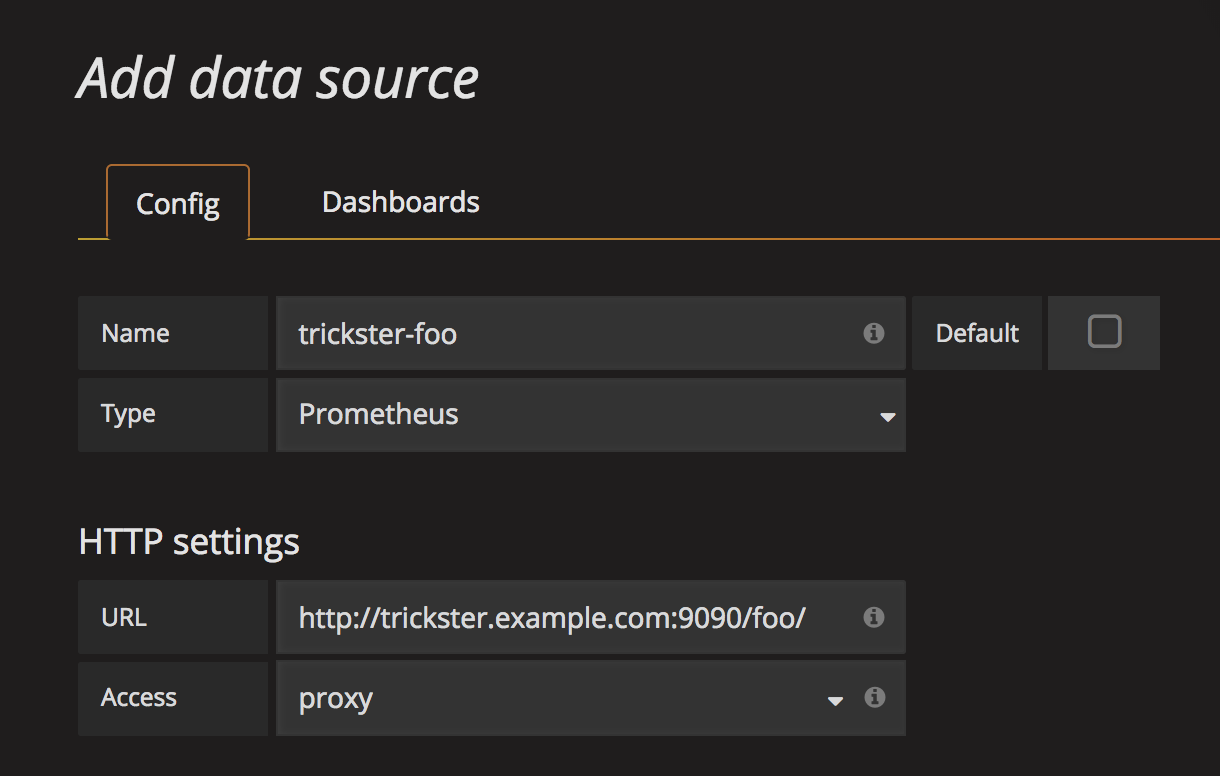
backend1(Method 2, with Origin Name): http://trickster.example.com:8480/backend1/query?query=xxxConfiguring Grafana to request from backend
foovia Trickster:
DNS Alias Configuration
In this mode, multiple DNS records point to a single Trickster instance. The FQDN used by the client to reach Trickster is mapped to specific backend configurations using the hosts list. In this mode, the URL Path is not considered during Backend Selection.
Host matching is case-insensitive and ignores the port. An entry may also be a single-label wildcard such as *.example.com, which matches foo.example.com but not example.com or a.b.example.com, or an any-depth wildcard such as **.example.com, which matches foo.example.com and a.b.example.com but not example.com; an exact entry on another backend always wins over a wildcard, and a *. entry wins over a **. entry for the same domain. A * anywhere else in an entry is rejected at load time. See Host Resolution for the full precedence order.
Example DNS-based Backend Configuration:
backends:
  # backend1 backend
  backend1:
    hosts: # users can route to this backend via these FQDNs, or via `/backend1`
      - 1.example.com
      - 2.example.com
    origin_url: 'http://prometheus.example.com:9090'
    provider: prometheus
    cache_name: default
    is_default: true
  # "foo" backend
  foo:
    hosts: # users can route to this backend via these FQDNs, or via `/foo`
      - trickster-foo.example.com
    origin_url: 'http://prometheus-foo.example.com:9090'
    provider: prometheus
    cache_name: default
  # "bar" backend
  bar:
    hosts: # users can route to this backend via these FQDNs, or via `/bar`
      - trickster-bar.example.com
    origin_url: 'http://prometheus-bar.example.com:9090'
    provider: prometheus
    cache_name: default
Example Client Request URLs:
To Request from Origin
foo: http://trickster-foo.example.com:8480/query?query=xxxTo Request from Origin
bar: http://trickster-bar.example.com:8480/query?query=xxxTo Request from Origin
backend1as default: http://trickster.example.com:8480/query?query=xxxTo Request from Origin
backend1(Method 2, via FQDN): http://backend1.example.com:8480/query?query=xxx
Note: It is currently possible to specify the same FQDN in multiple backend configurations. You should not do this (obviously). A future enhancement will cause Trickster to exit fatally upon detection at startup.
Disabling Path-based Routing for a Backend
You may wish for a backend to be inaccessible via the /backend_name/ path, and only by Hostname or as the target of a rule or ALB. You can disable path routing by setting path_routing_disabled: true for the backend, as in this example, which requires the Request’s Host header match 1.example.com or 2.example.com in order to be routed to the backend:
backends:
  backend1:
    hosts:
      - 1.example.com
      - 2.example.com
    origin_url: 'http://prometheus.example.com:9090'
    provider: prometheus
    cache_name: default
    is_default: false
    path_routing_disabled: true # this will disable routing through /backend1
2.2 - Health Checks
Trickster Service Health - Ping Endpoint
Trickster provides a /trickster/ping endpoint that returns a response of 200 OK and the word pong if Trickster is up and running. The /trickster/ping endpoint does not check any proxy configurations or upstream origins. The path to the Ping endpoint is configurable, see the configuration documentation for more information.
Upstream Connection Health - Backend Health Endpoints
Trickster offers health endpoints for monitoring the health of the Trickster service with respect to its upstream connection to origin servers.
General Endpoint
The main health check path is /trickster/health, which by default will return a text/plain summary of the backend health. You can request YAML or JSON format using the appropriate Accept header, or by providing a ?json or ?yaml query param.
Backend-Specific Endpoints
Each HTTP backend’s health check path is /trickster/health/BACKEND_NAME. For example, if your backend is named foo, you can perform a health check of the upstream server at http://<trickster_address:port>/trickster/health/foo. Native-protocol backends publish their scheduled status through the general endpoint without registering a synthetic HTTP origin route.
The backend health path prefix /trickster/health/ is customizable. See the example.full.yaml for more info about setting the health_handler_path configuration, or refer to this example:
mgmt:
  # this overrides the default '/trickster/health' to '/-/trickster/health'
  health_handler_path: /-/trickster/health
The behavior of a health request will vary based on the Backend provider, as each has their own health check protocol. For example, with Prometheus, Trickster makes a request to /query?query=up and (hopefully) receives a 200 OK, while for InfluxDB the request is to /ping which returns a 204 No Content.
Supported TSDB Providers are pre-configured in Trickster to perform a suitable health check operation, however these can be overridden in the configuration file.
For non-TSDB Backends, the default behavior is to make a GET request to http://origin_url:port/ and expect a 2xx response. However, all aspects of the Health Check request and expected response are configurable per-Backend.
Native MySQL Health Checks
The MySQL backend uses the same interval scheduler, timeout, transition
thresholds, status registry, metrics, reload carryover, and shutdown lifecycle
as HTTP health checks. Each probe opens a fresh connection with the backend’s
configured origin credentials and TLS policy, completes authentication,
executes COM_PING, and closes the connection.
backends:
  mysql1:
    provider: mysql
    origin_url: mysql://health-user:password@mysql.example:3306/analytics
    healthcheck:
      interval: 5s
      timeout: 3s
      failure_threshold: 3
      recovery_threshold: 3
Only interval, timeout, failure_threshold, and recovery_threshold apply
to native probes. HTTP verbs, paths, headers, bodies, and expected HTTP response
options are configuration errors for MySQL. Diagnostics exposed in health
status and logs are limited to sanitized authentication, TLS, timeout,
refused-connection, connection, and server-error categories.
Basic Health Check Configuration Example
backends:
  server1:
    provider: reverseproxycache
    origin_url: http://server1
    healthcheck: # all values below are optional
      verb: HEAD
      path: /health
Health Check With Exhaustive Request/Response Options
backends:
server1:
provider: reverseproxy
origin_url: http://server1
healthcheck: # all values below are optional
#
## customizing the health check request
#
verb: HEAD
scheme: https
host: alternate-hostname.example.com
path: /health
query: param1=value1¶m2=value2
headers:
User-Agent: health-check-agent
# if using a POST or PUT method, you can provide a string body
# body: "my health check body"
#
## customizing the expected response
#
# hc fails if a response takes longer than 1s
timeout: 1000ms
# hc fails if the response code is not in the list
expected_codes: [ 200, 204, 206, 301, 302, 304 ]
#
# hc fails if these response headers are not present and have the expected value
expected_headers:
X-Health-Check-Status: success
# hc fails if the stringified response body does not match the expected value
expected_body: "pass"
See more examples in example.full.yaml.
Health Check Integrations with Application Load Balancers
By default, a Backend will only initiate a health check on-demand, upon receiving a request to its health endpoint.
To facilitate integrations with the Trickster Application Load Balancer provider, additional options provide for 1) timed interval health checks and 2) thresholding for consecutive successful or unsuccessful health checks that determine the backend’s overall health status.
Example Health Check Configuration for use in ALB
backends:
  server1:
    provider: reverseproxy
    origin_url: http://server1
    healthcheck:
      path: /health
      timeout: 1000ms      # timeout should be <= interval
      # for ALB integration:
      interval: 1000ms     # auto-poll health every 1s
      failure_threshold: 3  # backend is unhealthy after 3 consecutive failures
      recovery_threshold: 3 # backend is healthy after 3 consecutive successes
The Prometheus default probe is /api/v1/query?query=up. Some multi-tenant Prometheus gateways reject an unbounded up with 400 bad_data: "too many series found", which keeps the member out of any ALB pool it belongs to. Override healthcheck.query with a bounded expression the backend accepts (for example query=vector(1)) when probing such backends.
Other Ways to Monitor Health
In addition to the out-of-the-box health checks to determine up-or-down status, you may want to setup alarms and thresholds based on the metrics instrumented by Trickster. See metrics.md for collecting performance metrics about Trickster.
2.3 - Authenticator
Trickster 2.x provides an Authenticator capability that allows you to protect Backends with an Authentication layer.
Authenticator resources are defined globally by name, and then mapped into any Backend and/or Path configuration as needed. Authenticator users can be loaded from htpasswd or csv files, or directly in the Trickster config file. You can provide credentials in plaintext, bcrypt, apache md5-script, as well as legacy formats rsa-256 and rsa-512.
Authenticators work with all Backend provider types. Requests are handled by their respective Authenticators before all other Handlers (e.g., Caches, Rules, Request Rewrites, ALB Routes, etc.).
Native MySQL listeners terminate mysql_native_password authentication and
have stricter credential-source requirements than HTTP authenticators. See the
MySQL Provider Guide.
If a request is routed via a Trickster ALB or Rule Backend through to multiple other Backends - each having different Authenticator configurations - the authentication behavior is currently undefined. In an upcoming Beta release, we will define this use case to either use the Authenticator config (if set) of the very first Backend that handled the request; or to use the first defined Authenticator regardless of how deep into the Backend chain it is.
By default, when an Authenticator handles and successfully authenticates a request, the request’s Auth credentials (e.g., Authorization Header for Basic Auth) are stripped before the request is cloned for any necessary proxying. Setting proxy_preserve: true will preserve these headers instead of stripping them.
Path Protection
When you map an Authenticator to a Backend, all Paths defined for that Backend are protected by the Authenticator. However, you can override the Authenticator on a per-Path basis by including the authenticator_name in a Path config. To bypass a Backend-wide Authenticator in a Path config, use authenticator_name: none. This allows for a few possibilities:
A Backend config with a default / Backend-wide Authenticator that has:
- specific Paths that do not require Authentication
- specific Paths mapped to different Authenticators than the default
A Backend config with no Authenticator defined (so all Paths by default are unprotected) that has:
- specific Paths mapped to different Authenticators than the default
See the example Backend configs below for more details.
Authenticator Providers
Trickster’s Authenticator feature currently supports Basic Auth and ClickHouse-compatible authentication. It was designed with extensibility in mind should there be value in adding additional Authentication providers.
Basic Auth Provider
Basic Auth is supported by using provider: basic in the Authenticator config.
By setting the showLoginForm: true config (see example_auth_1 in the blob below), Trickster will return a WWW-Authenticate: Basic realm="custom-realm-name" header on any request that requires but fails authentication, causing the login form to pop up. When showLoginForm is not present or non-true, Trickster responds with a 401 Unauthorized but does not ask the Basic Auth login form to show.
The realm attribute value defaults to the Authenticator name (e.g., example_auth_1) but can be overridden with the realm config as in the example.
If the user data changes (e.g. updated users_file contents or updated embedded users list), you must send a SIGHUP or other means to reload the Trickster config before the new user pool is processed.
ClickHouse Auth Provider
ClickHouse Auth is supported by using provider: clickhouse in the Authenticator config.
ClickHouse authentication is the same as Basic Auth, except you can also provide user and password URL params.
Example Authenticator Configs
# NOTE: Required options unrelated to Authenticators have been omitted from this
# example. It does not represent a fully-functioning Trickster Config.
# See the 'examples' directory for working copy/paste config examples.

backends:
  backend01:
    provider: reverseproxy # authenticators work with all backend providers
    authenticator_name: example_auth_1 # protects backend01 with example_auth_1 authenticator
    origin_url: https://example.com
    paths:
      - path: / # all requests are protected by example_auth_1
        match_type: prefix
        handler: proxy

  backend02:
    provider: reverseproxy # no backend-wide authenticator
    origin_url: https://example.com
    paths:
      - path: / # requests will be allowed without auth except the 2 Paths below
        match_type: prefix
        handler: proxy
      - path: /private/
        authenticator_name: example_auth_2 # example_auth_2 protects this path only
        handler: proxy
      - path: /admin/
        authenticator_name: example_auth_3 # example_auth_3 protects this path only
        handler: proxy

  backend03:
    provider: reverseproxycache
    authenticator_name: example_auth_1 # protects backend03 with example_auth_1 authenticator
    origin_url: https://example.com
    paths:
      - path: / # requests will be challenged by example_auth_1 except the 2 Paths below
        match_type: prefix
        handler: proxy
      - path: /public/
        authenticator_name: none # requests to /public will be allowed without auth
        handler: proxy
      - path: /app/admin/
        authenticator_name: example_auth_2 # example_auth_2 protects this path, not auth_1
        handler: proxy

authenticators:
  # example_auth_1 loads users from a CSV and embeds a supplemental plaintext manifest
  # It also shows the login form to client browsers when login has failed
  example_auth_1:
    provider: basic # http basic auth (required)
    proxy_preserve: true # don't strip auth headers when proxying this request upstream
    users_file: /path/to/user-manifest.csv # optional users source file
    users_file_format: csv # required when users_file is set
    users: # optional embedded users manifest (username: credential)
      user1: red123
    config: # optional provider-specific configs
      showLoginForm: true # with basic auth, causes the browser to show the login form
      realm: custom-realm-name # realm would be example_auth_1 if not overridden here

  # example_auth_2 loads users from an htpasswd file (assumed bcrypted credentials)
  example_auth_2:
    provider: basic
    users_file: /path/to/user-manifest.htpasswd # optional users source file
    users_file_format: htpasswd # required when users_file is set

  # example_auth_3 loads users from the embedded users manifest, credentials already bcrypted
  example_auth_3:
    provider: basic
    users:
      user1: $2y$asf;j2ihj0h8vabjkwdqbv29hq

  # example_auth_4 loads users from the embedded manifest, credentials injected from env,
  # and supports ClickHouse query params (user/password) in addition to Basic Auth
  example_auth_4:
    provider: clickhouse
    users:
      user1: ${USER1_PASSWORD_ENV} # ${ENV_NAME} substitution is supported
2.4 - AWS Integration
Trickster uses AWS credentials and SigV4 request signing in two places, and both are configured the same way:
- Signing outbound requests to an origin — the
sigv4block on a backend, below. - Autodiscovery of AWS resources — the
awsdiscovery provider, which reads an AWS API to keep an ALB pool current.
Credentials
Leaving the credential fields empty selects the standard AWS credential chain, in the order the AWS SDK resolves it:
- Environment variables (
AWS_ACCESS_KEY_ID,AWS_SECRET_ACCESS_KEY,AWS_SESSION_TOKEN) - The shared credentials and config files (
~/.aws/credentials,~/.aws/config), honoringprofile - Web-identity tokens — this is how EKS IAM Roles for Service Accounts (IRSA) and EKS Pod Identity work
- AWS SSO
- The EC2 instance metadata service (IMDSv2)
Prefer the chain over static keys wherever the platform provides one: on EKS use IRSA or Pod Identity, on EC2 use an instance profile. Static keys are supported for environments that have nothing else.
Credentials are resolved lazily, on the first signed request, and only a successful resolution is cached. Trickster therefore starts even when the instance metadata service is briefly unreachable, and a momentary metadata failure does not permanently disable signing.
Region
region may be set explicitly. When it is not, it is resolved from
AWS_REGION / AWS_DEFAULT_REGION, the shared config file, or instance
metadata. If none of those yields one, requests fail with an error naming
every source that was tried.
The sigv4 Backend Block
sigv4 signs Trickster’s outbound requests to a backend’s origin.
backends:
  amp:
    provider: prometheus
    origin_url: https://aps-workspaces.us-east-1.amazonaws.com/workspaces/ws-abc123
    sigv4:
      region: us-east-1
      # credentials omitted: use the chain (IRSA, instance profile, ...)
      # access_key: AKIA...
      # secret_key: ...        # redacted in config dumps and the health page
      # profile: production
      # role_arn: arn:aws:iam::123456789012:role/TricksterRead
      # service: aps           # default; see below
| option | meaning |
|---|---|
region | region to sign for; resolved from the environment when unset |
access_key, secret_key | a static credential pair — both or neither |
profile | a profile in the shared config file |
role_arn | a role to assume with whatever the chain resolves first |
service | the AWS service to sign for; defaults to aps |
The service default is aps — Amazon Managed Service for Prometheus.
That is deliberate: earlier releases could sign for nothing else, so every
existing config keeps working unchanged. Set service to sign for a
different AWS service (es for OpenSearch, and so on).
access_key and secret_key must be provided together. A config supplying
only one fails at startup rather than silently falling through to the
chain and authenticating as a different principal.
secret_key is redacted wherever configuration is emitted — the config
dump, the management API, logs, and error messages.
Amazon Managed Service for Prometheus
The common case. Point a prometheus backend at the workspace’s query URL
and add a sigv4 block; Trickster caches and accelerates AMP queries as it
does any other Prometheus origin.
backends:
  amp:
    provider: prometheus
    origin_url: https://aps-workspaces.us-east-1.amazonaws.com/workspaces/ws-abc123
    sigv4:
      region: us-east-1
The IAM principal needs aps:QueryMetrics, aps:GetSeries,
aps:GetLabels, and aps:GetMetricMetadata on the workspace.
Notes
- SigV4 signs a hash of the request body, so Trickster buffers a request
body in order to sign it. This applies only to backends with a
sigv4block. - SigV4 is not supported for the ClickHouse native protocol, which is not HTTP; configuring both fails at startup.
IAM for Autodiscovery
The aws discovery provider needs read-only permission for whichever
aws.service it is configured with.
aws.service | required IAM actions |
|---|---|
ec2 | ec2:DescribeInstances |
ecs | ecs:ListTasks, ecs:DescribeTasks |
A minimal policy for service: ec2:
{
  "Version": "2012-10-17",
  "Statement": [{
    "Effect": "Allow",
    "Action": "ec2:DescribeInstances",
    "Resource": "*"
  }]
}
ec2:DescribeInstances does not support resource-level permissions, so the
resource must be *; narrow the scope with a condition key if your
environment requires it. ecs:ListTasks and ecs:DescribeTasks can be
scoped to a cluster with the ecs:cluster condition key. Trickster only
ever reads.
3 - Listeners & TLS
Inbound listeners and the protocols they serve: TLS certificates, HTTP/3 and Apache Arrow Flight SQL. Base listener settings, trusted proxies and TCP/UDP stream listeners are described in Configuring Trickster.
3.1 - TLS Support
Trickster supports TLS on both the frontend server and backend clients.
Basics
To enable the TLS server, specify the tls_port, and optionally, the tls_address in one of the listeners of your config file. For example:
listeners:
  # default is built-in and is the default listener for backends
  # it uses these values by default:
  default:
    port: 8480
    tls_port: 8483
    # listen on all interfaces
    tls_address: ''
Note, Trickster will only start listening on a TLS port if at least one origin mapped to the named listener has a valid certificate and key configured.
Each origin section of a Trickster config file can be augmented with the optional tls section to modify TLS behavior for front-end and back-end requests. For example:
backends:
  example: # example backend
    tls:   # TLS settings for example backend
      # frontend configs
      full_chain_cert_path: '/path/to/my/cert.pem'
      private_key_path: '/path/to/my/key.pem'
      # backend configs
      insecure_skip_verify: true
      certificate_authority_paths: [ '/path/to/ca1.pem', '/path/to/ca2.pem' ]
      certificate_authority_pem: |
        -----BEGIN CERTIFICATE-----
        ...an inline CA bundle, for material that arrives as configuration...
        -----END CERTIFICATE-----
      server_name: origin.internal.example.com
      exclude_system_roots: true
      client_cert_path: '/path/to/client/cert.pem'
      client_key_path: '/path/to/client/key.pem'
Server Configs - used when responding to clients
Each backend contributes up to 1 certificate and key pair, as configured in the TLS section of the backend config (demonstrated above). A listener serves the certificates of all backends mapped to it, selecting per-handshake by SNI (see Certificate Selection (SNI) below), so a single TLS listener can serve many hostnames.
If the path to any configured Certificate or Key file is unreachable or unparsable, Trickster will exit upon startup with an error providing reasonable context.
You may use the same TLS certificate and key for multiple backends, depending upon how your Trickster configurations are laid out. Any certificates configured by Trickster must match the hostname header of the inbound http request (exactly, or by wildcard interpolation), or clients will likely reject the certificate for security issues.
Certificate Selection (SNI)
When a listener has multiple certificates, Trickster selects the certificate for each TLS handshake in this order:
- Exact match of the client’s SNI hostname against a certificate’s Subject Alternative Names
- Wildcard match (e.g. a
*.example.comcertificate forfoo.example.com) - A linear compatibility scan (covers clients that send no SNI, and IP SANs)
- The listener’s first certificate, if nothing else matches
The exact and wildcard lookups are index-based, so per-handshake selection cost is independent of the number of certificates a listener serves.
Automatic Certificate Rotation Detection
Trickster automatically detects when a serving certificate is renewed in place on disk — same file paths, config untouched, as performed by tools like certbot or cert-manager — and hot-swaps the renewed certificate into the live listener. This is entirely independent of configuration reloads: no manual reload, auto_reload_interval, or config change is required.
- Detection is hybrid: filesystem events (via fsnotify) trigger a near-immediate check where the platform and filesystem support them, and a timer-based poll runs regardless — both as the fallback for deployments where filesystem events don’t work (e.g. some network and FUSE filesystems) and as a self-healing backstop for missed events. If event watching is unavailable, detection silently degrades to poll-only.
- Every check compares file contents (not modification times or event payloads), so detection works across platforms and through the atomic symlink swaps used by Kubernetes Secret and projected volumes.
- The certificate, key (and any associated CA bundle) files are watched and validated as one unit: if a poll observes a mid-rotation partial state (e.g. the cert file updated before the key file), the mismatched pair is never served; the last-good pair keeps serving and the change is retried on the next poll.
- Read errors and invalid content never disable detection: the watcher keeps retrying, logs a warning after sustained failures, and the last-good certificate keeps serving. Deleting the files is treated as a persistent failure, not as certificate removal.
- Startup behavior is unchanged: an unreadable or invalid configured certificate is still a fatal startup error. Only post-startup source failures are tolerated.
Rotation detection is on by default and is configured per listener. tls_watch_interval sets the fallback/backstop poll cadence (default 30s); filesystem events, where available, apply rotations within moments regardless of the interval. Setting the interval to 0 disables rotation detection entirely (events included):
listeners:
  default:
    tls_port: 8483
    # backstop poll interval for the cert/key files of mapped backends
    # (default 30s); filesystem events accelerate detection where supported.
    # set to 0 to disable automatic rotation detection.
    tls_watch_interval: 30s
Note: automatic rotation detection currently applies to HTTP(S) listeners. Native-protocol listeners (e.g. mysql) pick up rotated certificates on config reload.
Hot Swap and No-Close Semantics
Certificate swaps — whether from a config reload or automatic rotation detection — never restart, drain, or rebind the listener:
- The certificate is consulted only at handshake time, so established connections (including keep-alive connections and in-flight requests) are untouched by a swap; they continue on the certificate they were handshaken with until they close naturally.
- Only new handshakes see the new certificate.
Runtime Certificates
A listener normally serves TLS only when a mapped backend provides a certificate and key file. Setting tls_runtime_certs: true on a listener serves its tls_port even when no backend provides a file pair, so certificates can be supplied to the running process instead, for example by the Kubernetes Gateway/Ingress controller from TLS Secrets:
listeners:
  default:
    port: 8480
    tls_port: 8483
    tls_runtime_certs: true
Such a listener starts with an empty certificate store and fails handshakes until the first certificate is supplied. Certificates supplied at runtime are validated with the same pair-coherence checks as files, participate in SNI selection alongside any file-sourced certificates on the same listener, appear in the certificate inventory with source memory, and survive configuration reloads and file rotations: a reload replaces only the config-sourced certificates, and a rotation replaces only the file-sourced ones. tls_runtime_certs is valid only on http listeners.
Certificate Inventory (mgmt)
The mgmt listener exposes a read-only, per-listener certificate inventory at /trickster/certificates (configurable via mgmt.certificates_handler_path). Each entry reports the certificate’s id, source kind (file, memory or config), common name, subject alternative names, validity window and last-load time. The inventory never includes key material.
Observability
Certificate rotation and inventory are covered by the following metrics: trickster_tls_certificate_expiration_time_seconds, trickster_tls_certificate_last_load_time_seconds, trickster_tls_certificate_swaps_total, trickster_tls_certificate_validation_failures_total, trickster_tls_watcher_errors_total, and trickster_tls_certificate_store_size. See metrics.md and the example alerting rules in examples/alerting for cert-expiry, sustained-validation-failure and watcher-staleness alerts.
Client Configs - used when proxying to an origin
Each backend’s TLS configuration can also configure the https client used for making requests against the origin as demonstrated above.
insecure_skip_verify will instruct the http client to ignore hostname verification issues with the upstream origin’s certificate, and process the request anyway. This is analogous to -k | --insecure in curl.
certificate_authority_paths will provide the http client with a list of certificate authorities (used in addition to any OS-provided root CA’s) to use when determining the trust of an upstream origin’s TLS certificate. In all cases, the Root CA’s installed to the operating system on which Trickster is running are used for trust by the client.
certificate_authority_pem adds certificate authorities the same way, from a PEM bundle written inline in the configuration rather than read from a file, for material that arrives as configuration (a Kubernetes BackendTLSPolicy’s CA bundle, for instance). A bundle holding no parsable certificate fails validation.
exclude_system_roots: true makes the configured certificate authorities (certificate_authority_paths and certificate_authority_pem) the only ones trusted for the origin, rather than additions to the operating system’s. Use it when the origin must present a certificate from one specific private authority and a certificate from any public authority would be an error. It requires at least one authority to be configured, since excluding the system roots with none would trust nothing.
server_name sets the hostname sent as SNI and verified against the origin’s certificate, when it differs from the host in origin_url — an origin reached by IP or by an internal alias whose certificate names something else. It changes nothing about where the connection goes or which Host header is sent.
To us Mutual Authentication with an upstream origin server, configure Trickster with Client Certificates using client_cert_path and client_key_path parameters, as shown above. You will likely need to also configure a custom CA in certificate_authority_paths to represent your certificate signer, unless it has been added to the underlying Operating System’s CA list.
3.2 - HTTP/3
Trickster can serve any HTTP listener’s routes over HTTP/3 (RFC 9114) in addition to HTTP/1.1 and HTTP/2, using QUIC over UDP.
HTTP/3 helps most where Trickster acts as an edge cache: loss recovery without head-of-line blocking benefits parallel byte-range fetches, and connection migration keeps a client’s session alive as it changes networks.
Enabling
HTTP/3 attaches to an existing http listener that already serves TLS. QUIC has
no cleartext mode, so a listener without a working TLS endpoint cannot serve it.
listeners:
  default:
    port: 8480
    tls_port: 8483
    http3:
      enabled: true
That is the whole configuration for the common case. The UDP endpoint defaults to the same address and port as the TLS endpoint, so clients find HTTP/3 where they already found HTTPS.
Options
| Field | Default | Description |
|---|---|---|
enabled | false | Serves this listener’s routes over HTTP/3. |
address | the listener’s tls_address | IP for the UDP socket. |
port | the listener’s tls_port | UDP port to bind. |
advertised_port | port | Port published in Alt-Svc. Set this when a load balancer or NAT presents a different port to clients than the one bound here. |
listeners:
  default:
    tls_address: 0.0.0.0
    tls_port: 8483
    http3:
      enabled: true
      port: 8443          # bind UDP/8443
      advertised_port: 443 # but tell clients to use 443
TLS certificates come from the backends mapped to the listener, exactly as they do for the TLS/TCP endpoint — see TLS. HTTP/3 uses the same certificates; no separate configuration is needed.
How clients discover HTTP/3
Browsers and most clients do not attempt HTTP/3 first. They connect over
TCP and look for an Alt-Svc response header naming an HTTP/3 endpoint:
Alt-Svc: h3=":8443"; ma=2592000
Trickster adds this header to every response from the listener’s TLS/TCP endpoint while HTTP/3 is enabled, so adoption is automatic and gradual. The TCP endpoint keeps serving HTTP/1.1 and HTTP/2 for clients that do not upgrade.
Protocol-upgrade requests (Connection: Upgrade) are not advertised, since such
a request hijacks its connection before response headers matter.
Limitations
- No protocol upgrades. HTTP/3 has no equivalent of the HTTP/1.1
101 Switching Protocolshandshake; RFC 9114 4.2 makes connection-specific headers malformed. WebSockets over HTTP/3 use Extended CONNECT (RFC 9220), which is not implemented. Send WebSocket traffic over the TCP endpoint, which supports it fully. - Inbound only. Trickster speaks HTTP/1.1 or HTTP/2 to origins regardless of
the protocol a client used to reach it. This matches Traefik; among major
proxies only Envoy implements HTTP/3 to upstreams, and it needs
Alt-Svccaching plus TCP fallback to do so safely. - UDP must reach the listener. Some networks block or throttle UDP/443. Clients that cannot establish QUIC silently keep using TCP, so this degrades rather than fails.
Operating notes
UDP receive buffer
QUIC moves far more data through a single socket than typical UDP workloads, and the kernel default receive buffer is often too small. On Linux, raise it:
sysctl -w net.core.rmem_max=7500000
sysctl -w net.core.wmem_max=7500000
Without this, a warning is logged at startup. In containers that cannot change
sysctls the warning is unactionable and can be silenced with
QUIC_GO_DISABLE_RECEIVE_BUFFER_WARNING=1.
Reloads
The HTTP/3 listener participates in the same reload and drain lifecycle as every other listener. Route changes are hot-swapped without rebinding the socket; changing the bound or advertised port restarts just that endpoint.
Trying it locally
Most systems ship a curl built without HTTP/3 (curl --version | grep HTTP3
to check). Trickster includes a small client so this is not a prerequisite:
make dev-certs                     # self-signed cert for localhost
go run ./hack/h3-client -url https://127.0.0.1:8483/ -ca docs/developer/environment/certs/trickster-dev.crt
The client prints the negotiated protocol, so HTTP/3.0 200 OK confirms the
request was served over QUIC.
3.3 - Apache Arrow Flight SQL Listeners
Trickster can serve Apache Arrow Flight SQL — the gRPC-based query protocol spoken by ADBC drivers, Grafana’s SQL-mode datasources, and the Arrow-native client SDKs — as a caching proxy in front of a Flight SQL-capable origin. The protocol support is vendor-neutral; each backend provider that adopts it supplies only its origin-specific wiring. InfluxDB 3.x is the first supported provider (see InfluxDB Support for its specifics and examples).
Enabling a Flight SQL listener
Define a listener with the flight-sql protocol and map exactly one
compatible backend to it through the backend’s listener_names:
listeners:
  my-flight:
    protocol: flight-sql   # Apache Arrow Flight SQL over gRPC
    port: 8485
backends:
  influx3:
    provider: influxdb
    origin_url: 'http://influxdb3:8181/'
    listener_names: [ default, my-flight ]
Flight SQL listeners share Trickster’s standard listener lifecycle:
connection limits (connections_limit), graceful drain on SIGTERM, and
config reload (SIGHUP) — a reload with an unchanged backend configuration
keeps serving on the existing socket, while a changed configuration drains
the old server (closing its upstream connection) and rebinds.
TLS
The listener serves TLS when the mapped backend’s tls block presents a
certificate and key, with in-place certificate rotation on config reload;
without one it serves plaintext gRPC. The upstream dial is TLS-capable via
provider options (for InfluxDB, influxdb.flight_upstream_tls).
Caching model
Every cache entry is scoped to the backend name plus a per-tenant namespace
derived from the request metadata the provider declares (for InfluxDB:
database, bucket-name, and a hash of authorization), mirroring the
scope the upstream itself grants — tenants never share entries, and
credentials never appear in cache keys.
Statement queries are served through three tiers:
- Delta proxy cache — statements the provider’s SQL analyzer classifies
as delta-cacheable are cached by time extent: repeat and overlapping
queries fetch only missing sub-ranges from the origin, and responses are
rebuilt into Arrow record batches conforming to the response’s original
schema (types, column order, nullability, and schema metadata are
preserved). A statement’s
ORDER BYis carried through reconstruction, so a delta hit returns rows in the order the statement asked for; ordering terms that do not resolve to a select-list output fall to the next tier. Responses whose schemas the delta model cannot represent fall automatically to the next tier as well. - Object cache — everything else cacheable is stored as the verbatim Arrow IPC byte stream and returned byte-identically, with a short, provider-configured lifetime. Metadata RPCs use this tier.
- Proxy — nondeterministic and non-SELECT statements are never cached.
Serving-cost characteristics of the tiers are recorded in Flight SQL Cache Tier Benchmarks.
Supported RPC surface
- Statement execution (
GetFlightInfoStatement/DoGetStatement). - Result-set schema requests (
GetSchemaStatement/GetSchemaPreparedStatement), which ADBC drivers probe on connect. When the origin itself does not implement its schema RPC (InfluxDB 3 Core among them), the schema is derived by executing the statement through the object cache, so the probe’s cost folds into the execution the client performs next. - Catalog metadata (
GetTables,GetCatalogs,GetDbSchemas,GetTableTypes,GetSqlInfo), proxied and cached per tenant. - Type and key discovery (
GetXdbcTypeInfo,GetPrimaryKeys,GetImportedKeys,GetExportedKeys,GetCrossReference), which JDBC- and ODBC-shaped clients probe during metadata discovery, likewise proxied and cached per tenant and per request shape. - The prepared-statement lifecycle (create, bind, execute, close). A parameterless prepared statement is served through the same three statement tiers — sharing cache entries with ad-hoc executions of the same text — while parameterized executions are cached whole, keyed by the bound parameter hash. Statements abandoned by disconnected clients are closed upstream after 15 minutes of inactivity.
A FlightInfo whose result the origin partitions across several endpoints is
consumed in full: every endpoint’s ticket is resolved in order, and an
endpoint that advertises its own location is retrieved from that location
only when its exact host:port authority is explicitly allowlisted by the
provider. This opt-in is required because request metadata, including
credentials, is forwarded to the alternate host. A TLS primary is never
downgraded to a plaintext alternate. Alternate connection caches are bounded
(16 clients by default). Partitions that disagree on schema are refused rather
than served partially.
Writes/updates/ingest, transactions, savepoints, Substrait plans, query
cancellation, endpoint renewal, and session options return gRPC
Unimplemented — they are outside a read-through cache’s contract. Clients
requiring them should connect to the origin directly. Prepared-statement
bindings are accepted as a single record batch; a client streaming several
batches for one binding receives Unimplemented rather than a silently
truncated binding.
Response size bound
Responses are buffered whole so they can be cached, so a single very large
query would otherwise be able to exhaust the process heap. Each upstream
response is bounded at 128MiB by default; a response exceeding the bound is
refused with gRPC ResourceExhausted rather than being buffered. Providers
expose the bound as a backend option (for InfluxDB,
influxdb.flight_max_response_bytes; a negative value removes it). A separate
aggregate budget bounds response bytes concurrently assembled or streamed
(512MiB by default; influxdb.flight_max_buffered_bytes for InfluxDB).
Metrics
Statement executions record cache outcomes to the native SQL metrics under
the flightsql dialect label: trickster_sql_query_cache_total
(cache_mode x cache_status), the standard proxy request/points/duration
metrics, trickster_sql_query_rewrite_failures_total for extent-rendering
failures, and cache-error events on the shared cache metrics. See
Metrics.
Architecture (for provider implementers)
The protocol lives in vendor-neutral packages:
pkg/proxy/flightsql— the gRPC protocol server, caching statement/ metadata/prepared handling, and the upstream client. A provider supplies: the upstream address and TLS posture;ForwardMetadataKeys(which inbound gRPC metadata flows to the origin); aKeyScopercovering every forwarded key that affects results; and optionally aDeltaConfigcarrying its SQL dialect analyzer to enable the delta tier.pkg/proxy/engines/nativedelta— the transport-agnostic delta-proxy-cache engine (shared with the MySQL native listener), driven by the frozenpkg/parsing/sqlanalyzerdialect contract.pkg/timeseries/dataset/arrow— dataset ⇄ Arrow record batch conversion used by the delta tier.
pkg/backends/influxdb/native_listener.go is the reference wiring: a
provider integrates by implementing the native.Adapter interface
(declaring Protocol() == "flight-sql" and its own BackendProvider()) and
constructing the flightsql server from its backend options.
4 - Caching
Cache data stores and behaviors common to all of Trickster’s caching modes.
4.1 - Cache Overview
Supported Caches
There are several cache types supported by Trickster
- In-Memory (default)
- Filesystem
- bbolt
- BadgerDB
- Redis (basic, cluster, and sentinel)
The sample configuration (examples/conf/example.full.yaml) demonstrates how to select and configure a particular cache type, as well as how to configure generic cache configurations such as Retention Policy.
In-Memory
In-Memory Cache is the default type that Trickster will implement if none of the other cache types are configured. The In-Memory cache utilizes a Golang sync.Map object for caching, which ensures atomic reads/writes against the cache with no possibility of data collisions. This option is good for both development environments and most smaller dashboard deployments.
When running Trickster in a Docker container, ensure your node hosting the container has enough memory available to accommodate the cache size of your footprint, or your container may be shut down by Docker with an Out of Memory error (#137). Similarly, when orchestrating with Kubernetes, set resource allocations accordingly.
Filesystem
The Filesystem Cache is a popular option when you have larger dashboard setup (e.g., many different dashboards with many varying queries, Dashboard as a Service for several teams running their own Prometheus instances, etc.) that requires more storage space than you wish to accommodate in RAM. A Filesystem Cache configuration keeps the Trickster RAM footprint small, and is generally comparable in performance to In-Memory. Trickster performance can be degraded when using the Filesystem Cache if disk i/o becomes a bottleneck (e.g., many concurrent dashboard users).
The default Filesystem Cache path is /tmp/trickster. The sample configuration demonstrates how to specify a custom cache path. Ensure that the user account running Trickster has read/write access to the custom directory or the application will exit on startup upon testing filesystem access. All users generally have access to /tmp so there is no concern about permissions in the default case.
bbolt
The BoltDB Cache is a popular key/value store, created by Ben Johnson. CoreOS’s bbolt fork is the version implemented in Trickster. A bbolt store is a filesystem-based solution that stores the entire database in a single file. Trickster, by default, creates the database at trickster.db and uses a bucket name of ’trickster’ for storing key/value data. See the example config file for details on customizing this aspect of your Trickster deployment. The same guidance about filesystem permissions described in the Filesystem Cache section above apply to a bbolt Cache.
BadgerDB
BadgerDB works similarly to bbolt, in that it is a filesystem-based key/value datastore. BadgerDB provides its own native object lifecycle management (TTL) and other additional features that distinguish it from bbolt. See the configuration for more info on using BadgerDB with Trickster.
Redis
Note: Trickster does not come with a Redis server. You must provide a pre-existing Redis endpoint for Trickster to use.
Redis is a good option for larger dashboard setups that also have heavy user traffic, where you might see degraded performance with a Filesystem Cache. This allows Trickster to scale better than a Filesystem Cache, but you will need to provide your own Redis instance at which to point your Trickster instance. The default Redis endpoint is redis:6379, and should work for most docker and kube deployments with containers or services named redis. The sample configuration demonstrates how to customize the Redis endpoint. In addition to supporting TCP endpoints, Trickster supports Unix sockets for Trickster and Redis running on the same VM or bare-metal host.
Ensure that your Redis instance is located close to your Trickster instance in order to minimize additional roundtrip latency.
In addition to basic Redis, Trickster also supports Redis Cluster and Redis Sentinel. Refer to the sample configuration for customizing the Redis client type.
Trickster supports Redis servers that use TLS encryption by setting use_tls: true in the config. Refer to the sample configuration for more info.
Purging an Item from the Cache
You can purge an item from the cache by making a call to the purge endpoint, as follows:
http://${trickster-address}:${mgmt-port}/trickster/purge/path/${backendName}/${path/to/purge}
For example, if you want to purge /api/v1/labels from backend prom1, a curl might look like:
curl http://localhost:8484/trickster/purge/path/prom1/api/v1/labels
Purging the Full Cache
Full Cache purges should not be necessary, but in the event that you wish to do so, the following steps should be followed based upon your selected Cache Type.
A future release will provide a mechanism to fully purge the cache (regardless of the underlying cache type) without stopping a running Trickster instance.
Purging In-Memory Cache
Since this cache type runs inside the virtual memory allocated to the Trickster process, bouncing the Trickster process or container will effectively purge the cache.
Purging Filesystem Cache
To completely purge a Filesystem-based Cache, you will need to:
- Docker/Kube: delete the Trickster container (or mounted volume) and run a new one
- Metal/VM: Stop the Trickster process and manually run
rm -rf /tmp/trickster(or your custom-configured directory).
Purging Redis Cache
Connect to your Redis instance and issue a FLUSH command. Note that if your Redis instance supports more applications than Trickster, a FLUSH will clear the cache for all dependent applications.
Purging bbolt Cache
Stop the Trickster process and delete the configured bbolt file.
Purging BadgerDB Cache
Stop the Trickster process and delete the configured BadgerDB path.
Cache Status
Trickster reports several cache statuses in metrics, logs, tracing, and the X-Trickster-Result response header, which are listed and described in the table below.
| Status | Description |
|---|---|
| kmiss | The requested object was not in cache and was fetched from the origin |
| rmiss | Object is in cache, but the specific data range requested (timestamps or byte ranges) was not |
| hit | The object was fully cached and served from cache to the client |
| phit | The object was cached for some of the data requested, but not all |
| nchit | The response was served from the Negative Cache |
| rhit | The object was served from cache to the client, after being revalidated for freshness against the origin |
| purge | The cache key was purged as directed by a request or response header |
| proxy-only | The request was proxied 1:1 to the origin and not cached |
| proxy-error | The upstream request needed to fulfill an associated client request returned an error |
| error | Trickster encountered a cache lookup or cache handling error |
| proxy-hit | The request joined an existing in-flight origin fetch for the same cache key |
4.2 - Trickster Caching Retention Policies
Basic HTTP Backends
Trickster will respect HTTP 1.0, 1.1 and 2.0 caching directives from both the downstream client and the upstream origin when determining object cacheability and TTL. You can override the TTL by setting a custom Cache-Control header on a per-Path Config basis.
Cache Object Evictions
If you use a Trickster-managed cache (Memory, Filesystem, bbolt), then a maximum cache size is maintained by Trickster. You can configure the maximum size in number of bytes, number of objects, or both. See the example configuration for more information.
Once the cache has reached its configured maximum size of objects or bytes, Trickster will undergo an eviction routine that removes cache objects until the size has fallen below the configured maximums. Trickster-managed caches maintain a last access time for each cache object, and utilizes a Least Recently Used (LRU) methodology when selecting objects for eviction.
Caches whose object lifetimes are not managed internally by Trickster (Redis, BadgerDB) will use their own policies and methodologies for evicting cache records.
Time Series Backends
For non-time series responses from a TSDB, Trickster will adhere to HTTP caching rules as directed by the downstream client and upstream origin.
For time series data responses, Trickster will cache as follows:
TTL Settings
TTL settings for each Backend configured in Trickster can be customized independently of each other, and separate TTL configurations are available for timeseries objects, and fast forward data. See examples/conf/example.full.yaml for more info on configuring default TTLs.
Time Series Data Retention
Separately from the TTL of a time series cache object, Trickster allows you to control the size of each timeseries object, represented as a count of maximum timestamps in the cache object, on a per origin basis. This configuration is known as the timeseries_retention_factor (TRF), and has a default of 1024. Most dashboards for most users request and display approximately 300-to-400 timestamps, so the default TRF allows users to still recall recently-displayed data from the Trickster cache for a period of time after the data has aged off of real-time views.
If you have users with a high-resolution dashboard configuration (e.g., a 24-hour view with a 1-minute step, amounting to 1440 data points per graph), then you may benefit from increasing the timeseries_retention_factor accordingly. If you use a managed cache (see caches) and increase the timeseries_retention_factor, the overall size of your cache will not change; the result will be fewer objects in cache, with the timeseries objects having a larger share of the overall cache size with more aged data.
Time Series Data Evictions
Once the TRF is reached for a time series cache object, Trickster will undergo a timestamp eviction process for the record in question. Unlike the Cache Object Eviction, which removes an object from cache completely, TRF evictions examine the data set contained in a cache object and remove timestamped data in order to reduce the object size down to the TRF.
Time Series Data Evictions apply to all cached time series data sets, regardless of whether or not the cache object lifecycle is managed by Trickster.
Trickster provides two eviction methodologies (timeseries_eviction_method) for time series data eviction: oldest (default) and lru, and is configurable per-origin.
When timeseries_eviction_method is set to oldest, Trickster maintains time series data by calculating the “oldest cacheable timestamp” value upon each request, using time.Now().Add(step * timeseries_retention_factor * -1). Any queries for data older than the oldest cacheable timestamp are intelligently offloaded to the proxy since they will never be cached, and no data that is older than the oldest cacheable timestamp will be stored in the query’s cache record.
When timeseries_eviction_method is set to lru, Trickster will not calculate an oldest cacheable timestamp, but rather maintain a last-accessed time for each timestamp in the cache object, and evict the Least-Recently-Used items in order to maintain the cache size.
The advantage of the oldest methodology better cache performance, at the cost of not caching very old data. Thus, Trickster will be more performant computationally while providing a slightly lower cache hit rate. The lru methodology, since it requires accessing the cache on every request and maintaining access times for every timestamp, is computationally more expensive, but can achieve a higher cache hit rate since it permits caching data of any age, so long as it is accessed frequently enough to avoid eviction.
Most users will find the oldest methodology to meet their needs, so it is recommended to use lru only if you have a specific use case (e.g., dashboards with data from a diverse set of time ranges, where caching only relatively young data does not suffice).
4.3 - Chunked Caching
Overview
In some caching setups, users may want to increase timeseries_retention_factor or timeseries_ttl forms a given backend to a very large size (e.g., a duration of days or weeks). This can cause issues if the cache provider is
filesystem or redis, because the entire time series is loaded to extract
even just a few data points. Eventually, this could negate the effects of
caching altogether.
To mitigate this, Trickster supports chunking cache data, by splitting large datasets into subdivisions of a configurable maximum size. The chunks are reconstituted upon retrieval. Only the chunks needed to service a client request are accessed, rather than the entire time series cache object.
Chunking can be configured per-cache and applies to both timeseries and byterange data.
Configuration
Chunked caching can be enabled and disabled using use_cache_chunking:
fs1:
    provider: filesystem
    use_cache_chunking: true
    timeseries_chunk_factor: 420
    byterange_chunk_size: 4096
timeseries_chunk_factor determines the maximum extent of timerange chunks, and byterange_chunk_size determines the maximum size of byterange chunks. See Detail for more information.
Detail
Timeseries
Timeseries chunking splits the timeseries to be cached into parts with the same duration, but not necessarily the same literal size.
- Determine a chunk duration by multiplying the timerange step by
timerange_chunk_factor(default 420) - Determine the smallest possible extent that is aligned to the epoch along the chunk duration, while containing the entire timeseries
- To write: Write each chunk size subextent under a subkey
- To read: Read each subkey and merge the timeseries results
Byterange
Byterange chunking splits the byterange into pieces with the same literal size. There are also some extra steps compared to the timeseries implementation to preserve the integrity of both full and partial responses being cached.
- Determine a chunk size from
byterange_chunk_size(default 4096) - Determine a range from the cache read/write request using the provided range or content length
- Failure to determine a range on write results in an error
- Failure to determine a range on read will read until the query fails
- Determine a maximum range aligned along the chunk size that contains the entire byterange
- To write: Write each chunk size range with
RangePartsof all provided ranges cropped to that chunk range, under a subkey - To read: Read each subkey and reconstitute a body from
RangeParts, if able
Full Example
This example has one Prometheus backend with a memory cache that has chunking enabled. The memory cache uses 380 as its timeseries chunk factor, and doesn’t define a byterange chunk size, so the default of 4096 will be used.
caches:
  mem1:
    provider: memory
    index:
      max_size_objects: 512
      max_size_backoff_objects: 128
    use_cache_chunking: true
    timeseries_chunk_factor: 380

backends:
  prom1:
    latency_max: 150ms
    latency_min: 50ms
    provider: prometheus
    origin_url: 'http://127.0.0.1:9090'
    cache_name: mem1

logging:
  log_level: warn
4.4 - Negative Caching
Negative Caching means to cache undesired HTTP responses for a very short period of time, in order to prevent overwhelming a system that would otherwise scale normally when desired, cacheable HTTP responses are being returned. For example, Trickster can be configured to cache 404 Not Found or 500 Internal Server Error responses for a short period of time, to ensure that a thundering herd of HTTP requests for a non-existent object, or unexpected downtime of a critical service, do not create an i/o bottleneck in your application pipeline.
Trickster supports negative caching of any status code >= 300 and < 600, on a per-Backend basis. In your Trickster configuration file, associate the desired Negative Cache Map to the desired Backend config. See the example.full.yaml, or refer to the snippet below for more information.
The Negative Cache Map must be an all-inclusive list of explicit status codes; there is currently no wildcard or status code range support for Negative Caching entries. By default, the Negative Cache Map is empty for all backend configs. The Negative Cache only applies to Cacheable Objects, and does not apply to Proxy-Only configurations.
For any response code handled by the Negative Cache, the response object’s effective cache TTL is explicitly overridden to the value of that code’s Negative Cache TTL, regardless of any response headers provided by the Backend concerning cacheability. All response headers are left in-tact and unmodified by Trickster’s Negative Cache, such that Negative Caching is transparent to the client. The X-Trickster-Result response header will indicate a response was served from the Negative Cache by providing a cache status of nchit.
Multiple negative cache configurations can be defined, and are referenced by name in the backend config. By default, a backend will use the ‘default’ Negative Cache config, which, by default is empty. The default can be easily populated in the config file, and additional configs can easily be added, as demonstrated below.
The format of a negative cache map entry is 'status_code': ttl.
Example Negative Caching Config
negative_caches:
  default:
    '404': 3s # cache 404 responses for 3 seconds
  foo:
    '404': 3s
    '500': 5s # caches 404 response for 3 seconds, and 500/502 for 5 seconds
    '502': 5s

backends:
  default:
    provider: rpc
    # by default will assume negative_cache_name = 'default'
  another:
    provider: rpc
    negative_cache_name: foo
5 - Object Caching
Accelerating generic HTTP objects with Trickster’s Reverse Proxy Cache.
5.1 - Byte Range Request Support
Trickster’s HTTP Reverse Proxy Cache offers best-in-class acceleration and caching of Byte Range Requests.
Much like its Time Series Delta Proxy Cache, Trickster’s Reverse Proxy Cache will determine what ranges are cached, and only request from the origin any uncached ranges needed to service the client request, reconstituting the ranges within the cache object. This ensures minimal response time for all Range requests.
In addition to supporting requests with a single Range (Range: bytes=0-5) Trickster also supports Multipart Range Requests (Range: bytes=0-5, 10-20).
Fronting Origins That Do Not Support Multipart Range Requests
In the event that an upstream origin supports serving a single Range, but does not support serving Multipart Range Requests, which is quite common, Trickster can transparently enable that support on behalf of the origin. To do so, Trickster offers a unique feature called Upstream Range Dearticulation, that will separate any ranges needed from the origin into individual, parallel HTTP requests, which are reconstituted by Trickster. This behavior can be enabled for any origin that only supports serving a single Range, by setting the origin configuration value dearticulate_upstream_ranges = true, as in this example:
backends:
  default:
    provider: reverseproxycache
    origin_url: 'http://example.com/'
    dearticulate_upstream_ranges: true
If you know that your clients will be making Range requests (even if they are not Multipart), check to ensure the configured origin supports Multipart Range requests. Use curl to request any static object from the origin, for which you know the size, and include a Multipart Range request; like curl -v -H 'Range: bytes=0-1, 3-4' 'http://example.com/object.js'. If the origin returns 200 OK and the entire object body, instead of 206 Partial Content and a multipart body, enable Upstream Range Dearticulation to ensure optimal performance.
This is important because a partial hit could result in multiple ranges being needed from the origin - even for a single-Range client request, depending upon what ranges are already in cache. If Upstream Range Dearticulation is disabled in this case, full objects could be unnecessarily returned from the Origin to Trickster, instead of small delta ranges, irrespective of the object’s overall size. This may or may not impact your use case.
Rule of thumb: If the origin does not support Multipart requests, enable Upstream Range Dearticulation in Trickster to compensate. Conversely, if the origin does support Multipart requests, do not enable Upstream Range Dearticulation.
Disabling Multipart Ranges to Clients
One of the great benefits of using Upstream Range Dearticulation is that it transparently enables Multipart Range support for clients, when fronting any origin that already supports serving just a single Range.
There may, however, be cases where you do not want to enable Multipart Range support for clients (since its paired Origin does not), but need Upstream Range Dearticulation to optimize Partial Hit fulfillments. For those cases, Trickster offers a setting to disable Multipart Range support for clients, while Upstream Range Dearticulation is enabled. Set multipart_ranges_disabled = true, as in the below example, and Trickster will strip Multipart Range Request headers, which will result in a 200 OK response with the full body. Client single Range requests are unaffected by this setting. This should only be set if you have a specific use case where clients should not be able to make multipart Range requests.
backends:
  default:
    provider: reverseproxycache
    origin_url: 'http://example.com/'
    dearticulate_upstream_ranges: true
    multipart_ranges_disabled: true
Partial Hit with Object Revalidation
As explained above, whenever the client makes a Range request, and only part of the Range is in the Trickster cache, Trickster will fetch the uncached Ranges from the Origin, then reconstitute and cache all of the accumulated Ranges, while also replying to the client with its requested Ranges.
In the event that a cache object returns 1) a partial hit, 2) that is no longer fresh, 3) but can be revalidated, based on a) the Origin’s provided caching directives or b) overridden by the Trickster operator’s explicit path-based Header configs; Trickster will revalidate the client’s requested-but-cached range from the origin with the appropriate revalidation headers.
In a Partial Hit with Revalidation, the revalidation request is made as a separate, parallel request to the origin alongside the uncached range request(s). If the revalidation succeeds, the cached range is merged with the newly-fetched range as if it had never expired. If the revalidation fails, the Origin will return the range needed by the client that was previously cached, or potentially the entire object - either of which are used to complete the ranges needed by the client and update the cache and caching policy for the object.
Range Miss with Object Revalidation
Trickster recognizes when an object exists in cache, but has none of the client’s requested Ranges. This is a state that lies between Cache Miss and Partial Hit, and is known as “Range Miss.” Range Misses can happen frequently on Range-requested objects.
When a Range Miss occurs against an object that also requires revalidation, Trickster will not initiate a parallel revalidation request, since none of the client’s requested Ranges are actually eligible for revalidation. Instead, Trickster will use the Response Headers returned by the Range Miss Request to perform a local revalidation of the cache object. If the object is revalidated, the new Ranges are merged with the cached Ranges before writing to cache based on the newly received Caching Policy. If the object is not revalidated, the cache object is created anew solely from the Range Miss Response.
Multiple Parts Require Revalidation
A situation can arise where there is a partial cache hit has multiple ranges that require revalidation before they can be used to satisfy the client. In these cases, Trickster will check if Upstream Range Dearticulation is enabled for the origin to determine how to resolve this condition. If Upstream Range Dearticulation is not enabled, Trickster trusts that the upstream origin will support Multipart Range Requests, and will include just the client’s needed-and-cached-but-expired ranges in the revalidation request. If Upstream Range Dearticulation is enabled, Trickster will forward, without modification, the client’s requested Ranges to the revalidation request to the origin. This behavior means Trickster currently does not support multiple parallel revalidation requests. Whenever the cache object requires revalidation, there will be only 1 revalidation request upstream, and 0 to N additional parallel upstream range requests as required to fulfill a partial hit.
If-Range Not Yet Supported
Trickster currently does not support revalidation based on If-Range request headers, for use with partial download resumptions by clients. If-Range headers are simply ignored by Trickster and passed through to the origin, which can result in unexpected behavior with the Trickster cache for that object.
We plan to provide full support for If-Range as part of Trickster 1.1 or 2.0
Mockster Byte Range
For verification of Trickster’s compatibility with Byte Range Requests (as well as Time Series data), we created a golang library and accompanying standalone application dubbed Mockster. Mockster’s Byte Range library simply prints out the Lorem ipsum ... sample text, pared down to the requested range or multipart ranges, with a few bells and whistles that allow you to customize its response for unit testing purposes. We make extensive use of Mockster in unit testing to verify the integrity of Trickster’s output after performing operations like merging disparate range parts, extracting ranges from other ranges, or from a full body, compressing adjacent ranges into a single range in the cache, etc.
It is fairly straightforward to run or import Mockster into your own applications. For examples of using it for Unit Testing, check out /internal/proxy/engines/objectproxycache_test.go.
5.2 - Collapsed Forwarding
Collapsed Forwarding is feature common among Reverse Proxy Cache solutions like Squid, Varnish and Apache Traffic Server. It works by ensuring only a single request to the upstream origin is performed for any object on a cache miss or revalidation attempt, no matter how many users are requesting the object at the same time.
Trickster has support for two types of Collapsed Forwarding: Basic (default) and Progressive
Basic Collapsed Forwarding
Basic Collapsed Forwarding is the default functionality for Trickster, and works by waitlisting all requests for a cacheable object while a cache miss is being serviced for the object, and then serving the waitlisted requests once the cache has been populated.
The feature is further detailed in the following diagram:
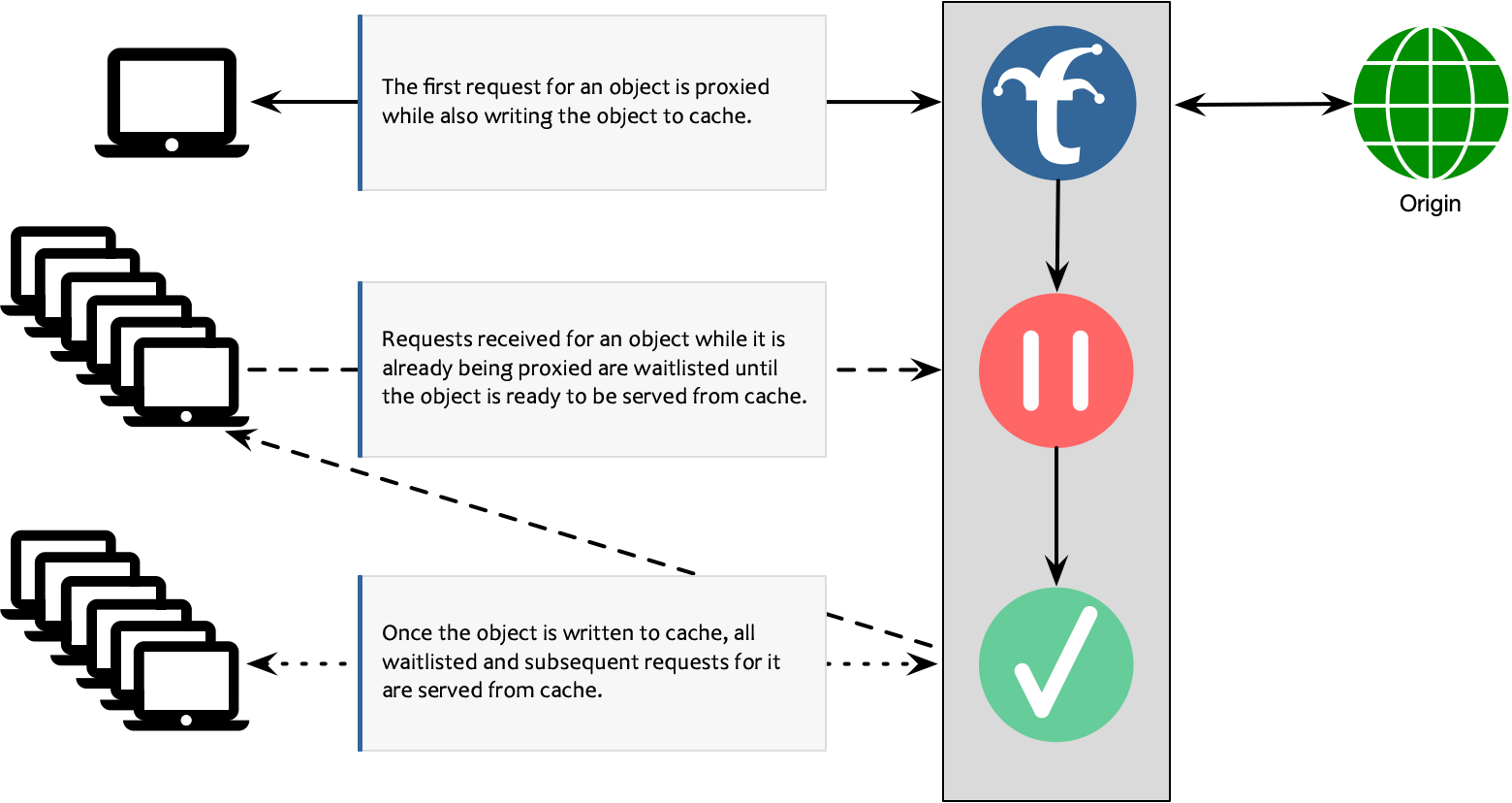
Progressive Collapsed Forwarding
Progressive Collapsed Forwarding (PCF) is an improvement upon the basic version, in that it eliminates the waitlist and serves all simultaneous requests concurrently while the object is still downloading from the server, similar to Apache Traffic Server’s “read-while-write” feature. This may be useful in low-latency applications such as DASH or HLS video delivery, since PCF minimizes Time to First Byte latency for extremely popular objects.
The feature is further detailed in the following diagram:
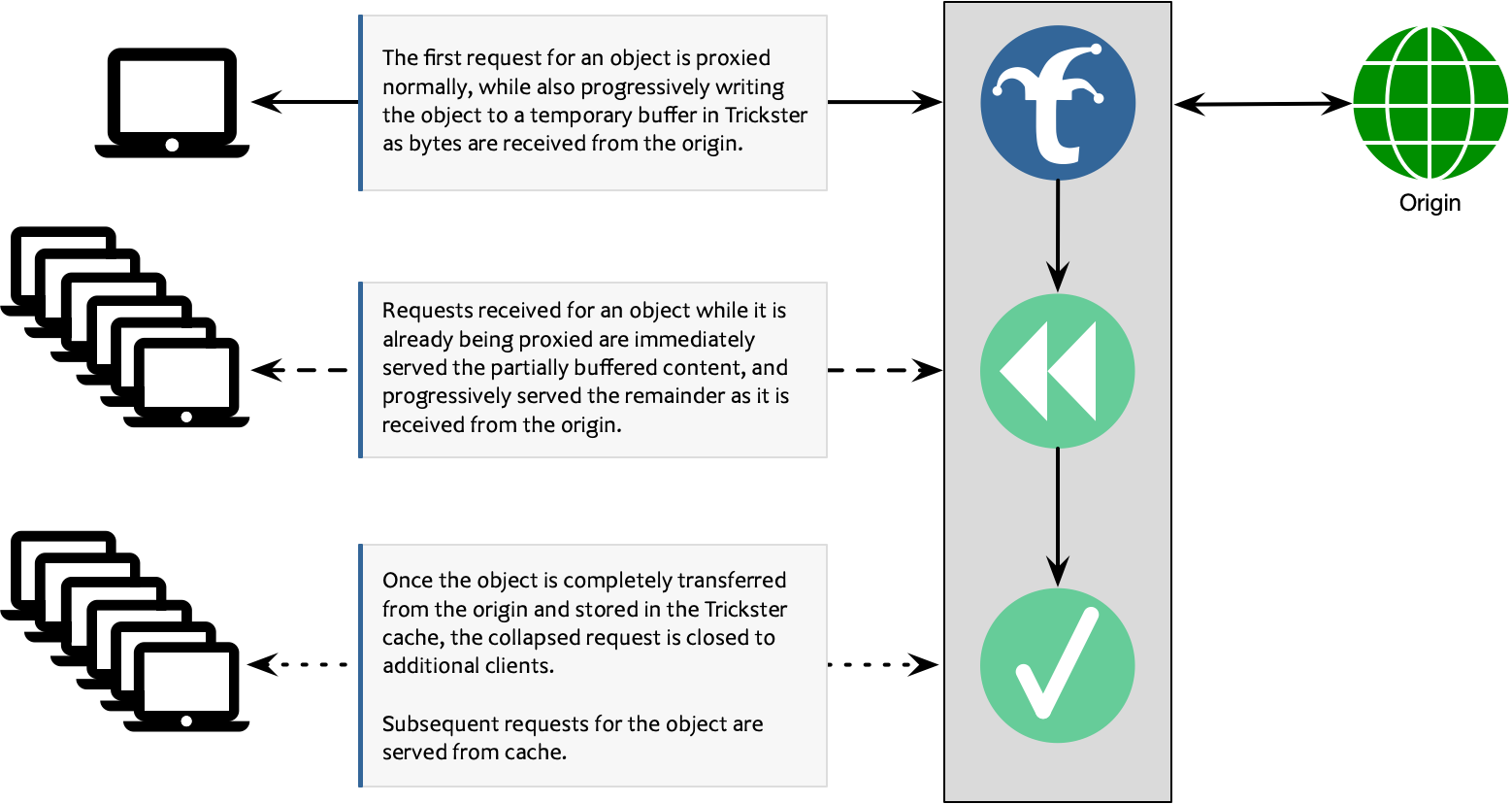
PCF for Proxy-Only Requests
Trickster provides a unique feature that implements PCF in Proxy-Only configurations, to bring the benefits of Collapsed Forwarding to HTTP Paths that are not configured to be routed through the Reverse Proxy Cache. (See Paths documentation for more info on routing).
The feature is further detailed in the following diagram:
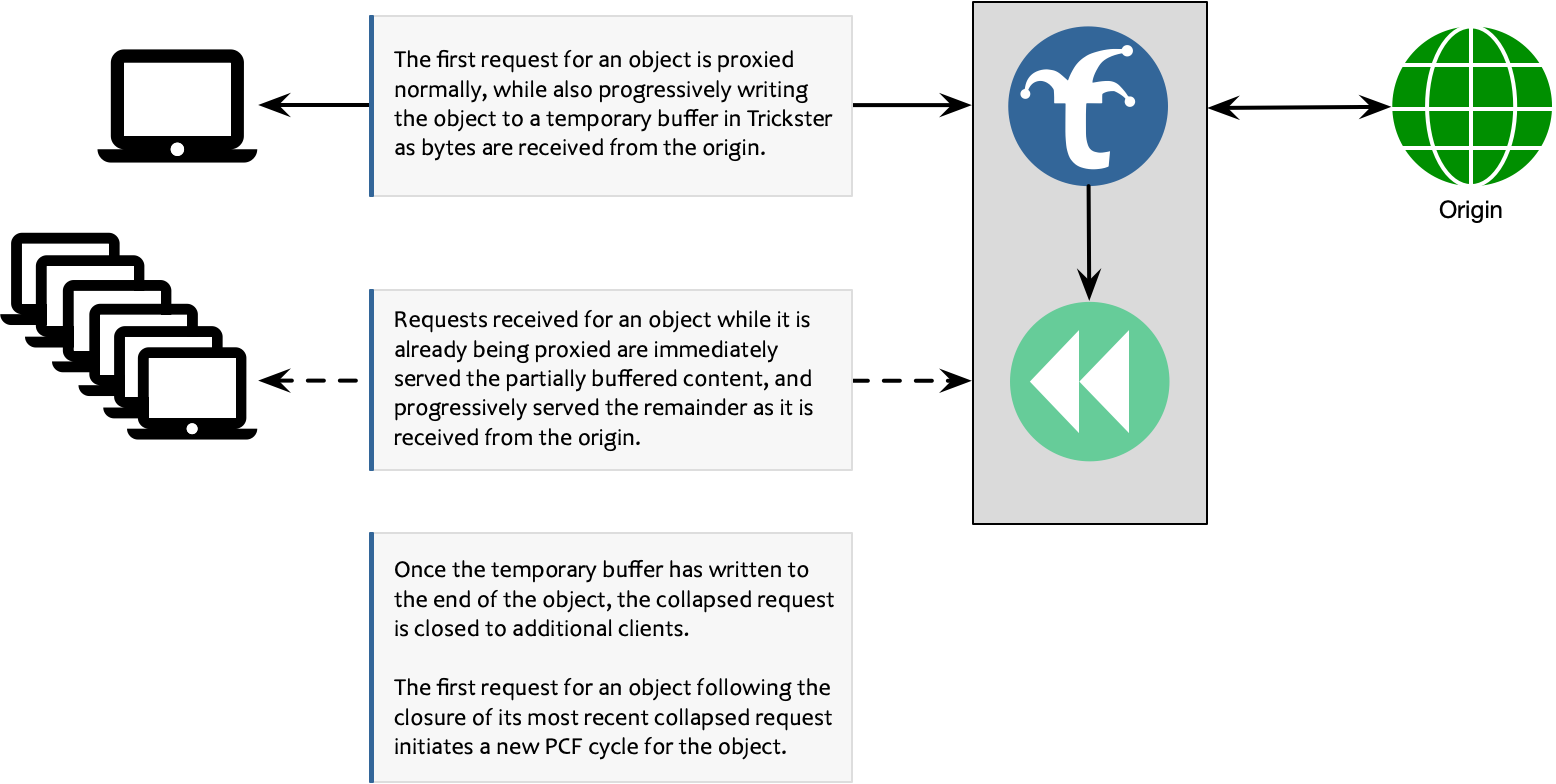
When collapsing is refused
Collapsing delivers the same bytes to every client that joins, which is a stronger claim than caching makes. Trickster therefore applies the shared-cache rules from RFC 9111 before fanning a response out, and refuses when any of the following holds. A refused response is still served normally; each client simply gets its own fetch.
| Condition | Reason |
|---|---|
| Method is not GET or HEAD | Collapsing a non-idempotent request would mean one of them never executed (RFC 9110 9.2.1) |
| Response status is not 200 | Partial and error responses are not safely shareable |
Cache-Control: private or no-store | Explicitly single-user (RFC 9111 5.2.2.5, 5.2.2.7) |
Response carries Set-Cookie | Per-client state; sharing it would disclose it across users |
Request carried Authorization without public, s-maxage or must-revalidate on the response | RFC 9111 3.5 |
Vary: *, or a Vary field not listed in the path’s cache_key_headers | Two joiners could legitimately deserve different bytes |
Content-Type: text/event-stream | An event stream is per-subscriber, not a shared object |
Response is larger than the backend’s max_object_size_bytes | The shared buffer is bounded by that limit |
The default is to refuse: a missed collapse costs one extra origin fetch, while an incorrect one would serve one user’s response to another.
Object sizes
A response with a known Content-Length is buffered exactly. A response of
unknown length – a chunked transfer, which is common for live video manifests
and segments – is buffered as it arrives, growing up to the backend’s
max_object_size_bytes. A collapsed transfer that exceeds that limit is aborted
for every attached client rather than being silently truncated.
If the origin fails or ends a body early, every client attached to that collapse receives a failed response. An incomplete object is never presented as complete and is never written to cache.
How to enable Progressive Collapsed Forwarding
When configuring path configs as described in Paths Documentation add collapsed_forwarding: progressive in any path config using the proxy or proxycache handlers.
Example:
origins:
  test:
    paths:
      - path: /test_path1/
        match_type: prefix
        handler: proxycache
        collapsed_forwarding: progressive
      - path: /test_path2/
        match_type: prefix
        handler: proxy
        collapsed_forwarding: progressive
See the example.full.yaml for more configuration examples.
How to test Progressive Collapsed Forwarding
An easy way to test PCF is to set up your favorite file server to host a large file(Lighttpd, Nginx, Apache WS, etc.), In Trickster turn on PCF for that path config and try make simultaneous requests. If the networking between your machine and Trickster has enough bandwidth you should see both streaming at the equivalent rate as the origin request.
Example:
- Run a Lighttpd instance or docker container on your local machine and make a large file available to be served
- Run Trickster locally
- Make multiple curl requests of the same object
You should see the speed limited on the origin request by your disk IO, and your speed between Trickster limited by Memory/CPU
6 - Time Series Caching
Accelerating time series databases with Trickster’s Delta Proxy Cache.
6.1 - Supported Providers
Trickster currently supports the following Providers:
 Generic HTTP Reverse Proxy Cache
Trickster operates as a fully-featured and highly-customizable reverse proxy cache, designed to accelerate and scale upstream endpoints like API services and other simple http services. Specify 'reverseproxycache' or just 'rpc' as the Provider when configuring Trickster.
Time Series Databases
 Prometheus
Trickster fully supports the Prometheus HTTP API (v1), including Prometheus 3.x features like native histograms and UTF-8 metric names. Specify 'prometheus' as the Provider when configuring Trickster. See the Prometheus Support Document for more information.
 ClickHouse
Trickster supports accelerating ClickHouse time series over both HTTP and the ClickHouse native binary protocol (port 9000), and is tested against the Vertamedia and official Grafana ClickHouse (v4+) datasource plugins. Specify 'clickhouse' as the Provider when configuring Trickster.
See the ClickHouse Support Document for more information.
 InfluxDB
Trickster supports InfluxDB 1.x, 2.x, and 3.x. Specify 'influxdb' as the Provider when configuring Trickster.
See the InfluxDB Support Document for more information.
 Apache Druid
Trickster accelerates fixed-width native JSON timeseries, groupBy, and
topN queries plus eligible TIME_FLOOR SQL queries, with safe Object Proxy
Cache fallback for other read-query shapes. Specify 'druid' as the Provider
when configuring Trickster.
See the Apache Druid Support Document for more information.
 Graphite
Trickster accelerates Graphite’s render API, including graphite-web, go-carbon
and other Graphite-protocol backends. Specify 'graphite' as the Provider when
configuring Trickster.
See the Graphite Support Document for more information.
 MySQL
MySQL
Trickster supports protocol-aware acceleration for supported MySQL
servers and Grafana’s built-in MySQL data source. Specify mysql as the direct
terminal provider and expose it through a listener with protocol: mysql.
See the MySQL Provider Guide for the supported server, client, SQL, authentication, TLS, caching, routing, and operations contract.
6.2 - Per-Query Time Series Instructions
Beginning with Trickster v1.1, certain features like Fast Forward can be toggled a per-query basis, to assist with compatibility in your environment. This allows the drafters of a query to have some say over toggling these features on queries they find to have issues running through Trickster. This is done by adding directives via query comments. For example, in Prometheus, you can end any query with # any comment following a hashtag, so you can place the per-query instructions there.
Supported Per-Query Instructions
Fast Forward Disable
Instruction trickster-fast-forward
Supported for: Prometheus (other time series do not currently implement Fast Forward)
Usage: go_goroutines{job="trickster"} # trickster-fast-forward:off
Notes: This can only be used to disable fast forward. A value of on will have no effect.
Backfill Tolerance
Instruction trickster-backfill-tolerance
Supported for: All time series backends
Usage: SELECT time, count(*) FROM table # trickster-backfill-tolerance:120
Notes: This overrides the backfill tolerance value for this query by the specified value (in seconds). Only integers are accepted.
6.3 - Query Range Limits
Trickster supports enforcing limits on the maximum time range (duration) of incoming queries. This feature protects both the Trickster cache and the downstream origin TSDBs from resource-intensive, oversized queries.
Overview
When a client sends a query spanning a duration larger than the configured limit, Trickster intercepts the request early in the pipeline. It rejects the query, returns an HTTP 400 Bad Request status, and increments a metric counter. This helps prevent large queries (e.g., querying 1 year of data at 15s resolution) from causing out-of-memory (OOM) issues or heavy processing spikes.
Configuration
You can configure the query range limit on any backend by setting the max_query_range option. The value is a duration string (e.g., 1h, 1d, 14d).
Here is a configuration example:
backends:
  prometheus_dev:
    provider: prometheus
    origin_url: http://prometheus-origin:9090
    max_query_range: 14d
Setting max_query_range: 0 or omitting the field disables the range limit enforcement.
Supported and Unsupported Backends
Query range limit enforcement is active on backends that implement the backends.TimeseriesBackend interface, which includes:
- Supported Backends:
- Prometheus
- InfluxDB
- ClickHouse
- Application Load Balancers (ALBs) using Time Series Merge (TSM)
- Unsupported Backends:
- Standard HTTP Reverse Proxy backends (e.g.,
reverseproxycache) that do not parse the query timespan.
- Standard HTTP Reverse Proxy backends (e.g.,
Rejection Behavior
When an incoming query’s duration exceeds the allowed max_query_range:
- HTTP Status: Trickster responds immediately with HTTP
400 Bad Request. - Error Message: The response body contains an error message, e.g.,
query time range exceeds the allowed limit of 336h0m0s. - Short-circuiting: Downstream origin TSDB instances are never contacted, conserving database resources.
Metrics and Logging
Trickster exposes metrics and logs to track rejected queries:
Metrics
- Metric Name:
trickster_proxy_query_range_rejected_total - Labels:
backend(name of the backend rejecting the query) - Type: Counter
- Description: Tracks the total number of queries rejected due to exceeding the
max_query_rangelimit.
Logs
Upon query rejection, Trickster emits a structured warning log including information about the offending query:
[WARN] query rejected due to max_query_range limit (backendName=prometheus_dev, limit=336h0m0s, duration=360h0m0s, clientIP=127.0.0.1, path=/api/v1/query_range, statement=up)
Use with ALBs
Application Load Balancer (ALB) backends configured with the Time Series Merge (TSM) mechanism can enforce query range limits at the ALB entry point. This ensures that Trickster rejects oversized queries before scattering them across downstream pool member backends.
For details on using max_query_range with TSM ALBs, refer to the ALB Documentation.
6.4 - Timeseries Request Sharding
Overview
A shard means “a small part of a whole,” and Trickster supports the sharding of upstream HTTP requests when retrieving timeseries data. When configured for a given time series backend, Trickster will shard eligible requests by inspecting the time ranges needed from origin and subdividing them into smaller ranges that conform to the backend’s sharding configuration. Sharded requests are sent to the origin concurrently, and their responses are reconstituted back into a single dataset by Trickster after they’ve all been returned.
Mechanisms
Trickster support three main mechanisms for sharding:
- Maximum Timestamps Per Shard - Trickster calculates number of expected unique timestamps in the response by dividing the requested time range size by the step cadence, and then subdivides the time ranges so that each sharded request’s time range will return no more timestamps than the configured maximum.

- Maximum Time Range Width Per Shard - Trickster inspects each needed time range, and subdivides them such that each sharded request’s time range duration is no larger than the configured maximum.

- Epoch-Aligned Maximum Time Range Width Per Shard - Trickster inspects each needed time range, and subdivides them such that each sharded request’s time range duration is no larger than the configured maximum, while also ensuring that each shard’s time boundaries are aligned to the Epoch based on the configured shard step size.

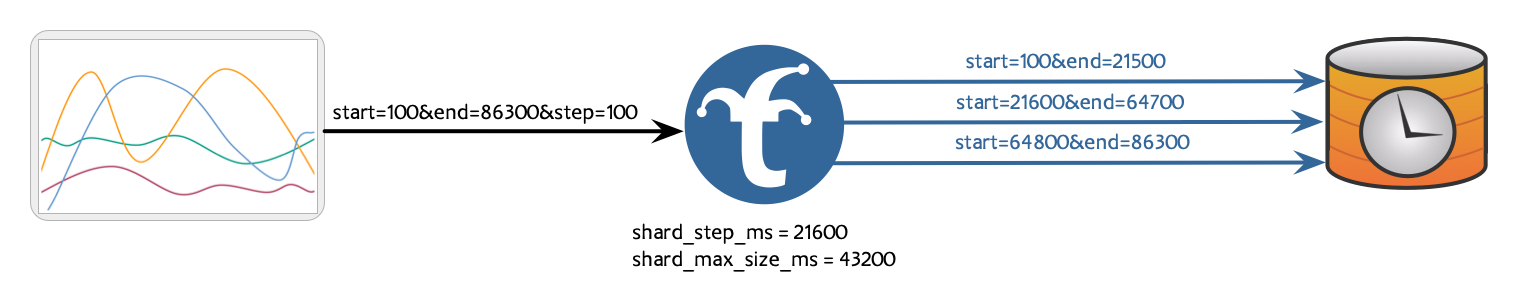
Configuring
Maximum Unique Timestamp Count Per Shard
In the Trickster configuration, use the shard_max_size_points configuration to shard requests by limiting the maximum number of unique timestamps in each sharded response.
backends:
  example:
    provider: prometheus
    origin_url: http://prometheus:9090
    shard_max_size_points: 10999
Maximum Time Range Width Per Shard
In the Trickster configuration, use the shard_max_size_time configuration to shard requests by limiting the maximum width of each sharded request’s time range.
backends:
  example:
    provider: 'prometheus'
    origin_url: http://prometheus:9090
    shard_max_size_time: 2h
Epoch-Aligned Maximum Time Range Width Per Shard
In the Trickster configuration, use the shard_step configuration to shard requests by limiting the maximum width of each sharded request’s time range, while ensuring shards align with the epoch on the configured cadence. This is useful for aligning shard boundaries with an upstream database’s partition boundaries, ensuring that sharded requests have as little partition overlap as possible.
backends:
  example:
    provider: 'prometheus'
    origin_url: http://prometheus:9090
    shard_step: 2h
shard_step can be used in conjunction with shard_max_size_time, so long as shard_max_size_time is perfectly divisible by shard_step. This combination configuration will align shards against the configured shard step, while sizing each shard’s time range to be multiple shard steps wide.
backends:
  example:
    provider: 'prometheus'
    origin_url: http://prometheus:9090
    shard_step: 2h
    shard_max_size_time: 4h
Neither shard_step or shard_max_size_time can be used in conjunction with shard_max_size_points.
6.5 - Providers
Guides for each supported time series provider.
6.5.1 - Prometheus Support
Trickster fully supports accelerating Prometheus, which we consider our First Class backend provider. They work great together, so you should give it a try!
Most configuration options that affect Prometheus reside in the main Backend config, since they generally apply to all TSDB providers alike.
Supported API Endpoints
Trickster supports the full Prometheus HTTP API (v1), including features introduced in Prometheus 3.x.
Cached Endpoints
| Endpoint | Cache Strategy | Scatter/Gather Merge |
|---|---|---|
/api/v1/query_range | Delta Proxy Cache | Yes |
/api/v1/query | Object Proxy Cache | Yes |
/api/v1/series | Object Proxy Cache | Yes |
/api/v1/labels | Object Proxy Cache | Yes |
/api/v1/label/<name>/values | Object Proxy Cache | Yes |
/api/v1/alerts | Proxy + Merge | Yes |
/api/v1/targets | Object Proxy Cache | No |
/api/v1/targets/metadata | Object Proxy Cache | No |
/api/v1/rules | Object Proxy Cache | No |
/api/v1/alertmanagers | Object Proxy Cache | No |
/api/v1/status/* | Object Proxy Cache | No |
/api/v1/query_exemplars | Object Proxy Cache | No |
/api/v1/metadata | Object Proxy Cache | No |
/api/v1/format_query | Object Proxy Cache | No |
/api/v1/parse_query | Object Proxy Cache | No |
/api/v1/scrape_pools | Object Proxy Cache | No |
/api/v1/features | Object Proxy Cache | No |
Proxied Endpoints (not cached)
| Endpoint | Notes |
|---|---|
/api/v1/notifications/live | SSE streaming |
/api/v1/write | Remote write (v1 and v2) |
/api/v1/otlp/v1/metrics | OTLP ingestion |
/api/v1/admin/* | Explicitly unsupported (returns error) |
All other /api/v1/* paths are reverse-proxied to the origin without caching.
Prometheus 3.x Features
- Native histograms are fully supported in query and query_range responses, including mixed series with both float samples and histogram samples.
- UTF-8 metric and label names (e.g.,
{"metric.name"}) are supported in queries and cache keys. - Query stats (
stats=allparameter) are cache-key differentiated, so responses with and without stats are cached separately.
Injecting Labels
Trickster can inject labels on a per-backend basis into Prometheus responses before returning them to the caller.
Here is the basic configuration for adding labels:
backends:
  prom-1a:
    provider: prometheus
    origin_url: http://prometheus-us-east-1a:9090
    prometheus:
      labels:
        datacenter: us-east-1a

  prom-1b:
    provider: prometheus
    origin_url: http://prometheus-us-east-1b:9090
    prometheus:
      labels:
        datacenter: us-east-1b
Interaction with ALB Merge Strategy
When using label injection with an ALB configured for Time Series Merge, injected labels are automatically stripped from responses before merging. This ensures that series from different backends are aggregated correctly, and the injected labels do not appear in the final response to the caller. See the ALB Merge Strategy documentation for details.
Max Query Range Limitation
Trickster supports enforcing a max_query_range limit on Prometheus backends. For details on how to configure and use query range limits, see the Query Range Limits documentation.
6.5.2 - ClickHouse Support
Trickster will accelerate ClickHouse queries that return time series data normally visualized on a dashboard. Acceleration works by using the Time Series Delta Proxy Cache to minimize the number and time range of queries to the upstream ClickHouse server.
Scope of Support
Trickster is tested with the official ClickHouse DataSource Plugin for Grafana v4.21.1 and supports acceleration of queries constructed by this plugin using its built-in time macros like $__fromTime and $__toTime. Delta caching with this an other plugins (e.g., Altinity/Vertamedia) depends on the supported query shapes below. Trickster also supports several other query formats that return “time series like” data.
Trickster also supports the ClickHouse Go SDK (clickhouse-go/v2) over its HTTP and Native protocols, including clickhouse.OpenDB.
Native Binary Protocol Support
Inbound and upstream protocols are configured independently:
- A named listener with
protocol: clickhouseaccepts Native client connections. - A ClickHouse backend with
protocol: nativeuses the Native protocol for its origin. An empty protocol orprotocol: httpuses HTTP.
listeners:
  default:
    protocol: http
    port: 8480
  clickhouse-native:
    protocol: clickhouse
    port: 8487

backends:
  click1:
    provider: clickhouse
    origin_url: http://clickhouse:8123
    listener_names: [default, clickhouse-native]
    cache_name: default
This exposes one HTTP route at /click1/ and one Native listener on port 8487, backed by the same cache and HTTP ClickHouse origin. A Native listener must map to exactly one backend; ALB and user-router multiplexing are not supported.
To use a Native origin instead, set the backend protocol and point origin_url at ClickHouse’s Native port:
backends:
  click1:
    provider: clickhouse
    origin_url: http://clickhouse:9000
    protocol: native
All four HTTP/Native ingress and HTTP/Native origin combinations are supported. Native credentials, database, query settings, parameters, and query IDs are forwarded to the origin. Native identity pools are bounded to 64 credential/database combinations per backend.
TLS
Native listener TLS uses the backend’s server certificate. Set require_tls: true and provide both certificate paths:
listeners:
  clickhouse-native-tls:
    protocol: clickhouse
    port: 9441
    tls_watch_interval: 30s

backends:
  click1-tls:
    provider: clickhouse
    origin_url: http://clickhouse:8123
    listener_names: [clickhouse-native-tls]
    require_tls: true
    tls:
      full_chain_cert_path: /etc/trickster/tls/server.crt
      private_key_path: /etc/trickster/tls/server.key
Certificate changes are hot-swapped. Since require_tls applies to every binding of a backend, use a separate backend entry when plaintext and TLS listeners must coexist.
For a TLS Native origin, use an https origin URL with the Native protocol. The common backend TLS options configure origin verification and optional mutual TLS:
backends:
  click1:
    provider: clickhouse
    origin_url: https://clickhouse:9440
    protocol: native
    tls:
      certificate_authority_paths: [/etc/trickster/tls/origin-ca.crt]
      client_cert_path: /etc/trickster/tls/client.crt
      client_key_path: /etc/trickster/tls/client.key
Native Limitations
The Native listener supports SELECT queries, ping/pong, revision 54460 framing, structured errors, and LZ4 compression. INSERT, external tables, and session-changing USE or SET statements are rejected; select a database and settings per request. ClientCancel is accepted as a no-op and does not asynchronously cancel an active upstream request.
Supported native protocol data types: all integer types (8–256 bit), Float32/64, String, FixedString(N), DateTime, DateTime64, Date, Date32, UUID, IPv4, IPv6, Enum8/16, Bool, Nullable(T), Array(T), Map(K,V), Tuple(T1,T2,…), LowCardinality(T), and Decimal.
Delta-cacheable query results are decoded into Trickster’s dataset model and re-encoded in the client’s requested format. Both the TSV and the FORMAT Native origin readers support every scalar type above, Nullable(T), LowCardinality(T), Array(T), Map(K, V) and Tuple(...) (including named elements and nesting); compound values are carried in ClickHouse’s text-literal form ([1,'a'], {'k':1}, ('a',1)) and parsed back when re-encoding to Native. Nested, Variant, Dynamic and JSON columns are rejected with an explicit error on the delta path rather than decoded incorrectly; such queries should use a non-delta-cacheable shape.
Native wire clients receive Native blocks. HTTP clients using a Native origin may request JSON, Native, CSV, or TSV-family output; compound columns in CSV/TSV and unsupported formats return an error. The modeler recognizes Native origin responses through the X-ClickHouse-Format response header, and HTTP Native framing honors client_protocol_version.
Trickster parses incoming ClickHouse statements into a full abstract syntax tree using the AfterShip ClickHouse SQL parser, then applies its own semantic analysis to determine whether a query is eligible for time series delta caching and, if so, its timestamp column, bucket cadence, time range, grouping tags, and cache identity. The cache key is derived from a canonical form of the query in which the requested time range is replaced with placeholders, so requests for different time ranges of the same logical series share one delta cache entry.
Trickster’s analysis fails closed: a valid query whose shape cannot be proven safe for delta caching is never rewritten approximately. It is instead served through the Object Proxy Cache (OPC) or proxied directly, and the classification reason is exported through the trickster_sql_query_analysis_total metric.
If you find query or response structures that are not yet supported, or providing inconsistent or unexpected results, we’d love for you to report those. We also always welcome any contributions around this functionality.
Delta-Cacheable Queries
To be eligible for the delta cache, a query must be a single SELECT statement containing a recognized time-bucketing expression in its select list, a supported time range in its WHERE or PREWHERE clause, and a GROUP BY clause that includes the time bucket. Each requirement is described below.
Time-Bucketing Expressions
Exactly one select-list expression must match a supported bucket form:
Grafana Plugin Format
SELECT intDiv(toUInt32(time_col), 60) * 60 [* 1000] [AS alias]
This is the approach used by the Grafana plugin. The argument to the ClickHouse intDiv function is the step value in seconds, since the toUInt32 function on a datetime column returns the Unix epoch seconds. An optional output multiplier of 1000, 1000000, or 1000000000 selects millisecond, microsecond, or nanosecond output timestamps.
ClickHouse Time Grouping Functions
SELECT toStartOfInterval(time_col, INTERVAL n unit) [AS alias]
with a positive constant n and a unit of millisecond, second, minute, hour, day, or week; or one of the fixed-period functions:
toStartOfNanosecond
toStartOfMicrosecond
toStartOfMillisecond
toStartOfSecond
toStartOfMinute
toStartOfFiveMinute
toStartOfTenMinutes
toStartOfFifteenMinutes
timeSlot
toStartOfHour
toStartOfDay
toStartOfWeek
toMonday
date_trunc('unit', time_col) and dateTrunc support the same fixed units. toStartOfWeek uses ClickHouse’s Sunday phase while toMonday and weekly date_trunc use Monday. Calendar-length month, quarter, and year buckets are served through the OPC.
The time column may be a plain, qualified (table.col), or quoted identifier, optionally wrapped in toDateTime, toInt32, or toUInt32. Integer constants defined in a scalar WITH clause may be used for the step value. Timezone-parameter variants of these functions (for example toStartOfHour(time_col, 'America/Denver')) are not eligible for delta caching and are served through the OPC. The current SQL parser does not accept INTERVAL MICROSECOND or INTERVAL NANOSECOND; use the corresponding fixed toStartOf... function.
Determining the Requested Time Range
Time range predicates must appear in a top-level AND conjunction of the WHERE or PREWHERE clause. Predicates joined by OR or negated with NOT make the query ineligible for delta caching.
Two predicate targets are supported, with different rules:
- The raw time column (the column inside the bucket function): the lower bound must be inclusive (
>=) and the upper bound exclusive (<). Values that do not fall on bucket boundaries — such as the live ranges produced by Grafana’s$__fromTimeand$__toTimemacros — are rounded inward to the nearest complete bucket (lower bound up, upper bound down), so partial edge buckets are omitted from the response rather than cached as complete aggregates. If no complete bucket remains after rounding, the query is served through the OPC. Other comparators — includingBETWEEN— describe partial buckets whose aggregates cannot be safely cached, so those queries are served through the OPC. - The bucket alias (the output of the bucket expression):
>,>=,<,<=, andBETWEENare all supported, because bucket outputs are discrete; Trickster normalizes each comparator to the first and last included bucket.
Bound values may be expressed as epoch integers, ClickHouse string dates in the form 2006-01-02 15:04:05 (or date-only, or RFC3339), toDateTime(n), toDateTime64(n, precision), or toDate(n) wrappers, WITH-clause constants, or now()/now64() with optional addition or subtraction of seconds. DateTime64 precision is retained. Floating epoch bounds and timezone-qualified conversions such as toDateTime(n, 'America/Denver') are not eligible.
If no upper bound is present, Trickster caches results up to the current time and inserts a safe upper bound into origin requests automatically.
Examples of delta-cacheable time range clauses (for a one-minute bucket cadence):
WHERE t >= '2020-10-15 00:00:00' AND t <= '2020-10-16 12:00:00'  -- bucket alias
WHERE t BETWEEN 1574686320 AND 1574689920                        -- bucket alias
WHERE time_col >= toDateTime(1574686320) AND time_col < toDateTime(1574689920)
WHERE t >= now() - 3600 AND t < now()                            -- bucket alias
Secondary date-range predicates whose values match the primary range — such as the Date-typed partition filters emitted by the Grafana plugin — are recognized and rewritten in step with the primary range.
Grouping and Result Shape
The GROUP BY clause must include the time bucket (by alias or by its full expression), and every non-aggregate column in the select list must also be grouped. Grouped columns become the series tags in the cached time series. Queries using GROUP BY ... WITH CUBE/ROLLUP, grouping on expressions that are not selected, or leaving a selected dimension ungrouped are served through the OPC.
Output Formats
Delta-cacheable queries may specify FORMAT JSON, CSV, CSVWithNames, TabSeparated (TSV), TabSeparatedWithNames, or TabSeparatedWithNamesAndTypes, or omit the FORMAT clause. Trickster requests TSVWithNamesAndTypes from the origin and re-marshals cached data into the client’s requested format.
Non-Time-Series Queries
Queries that are not cacheable as time series — such as LIMIT-based queries, queries with set operations (UNION, EXCEPT, INTERSECT), SELECT 1 health checks, or SDK handshake requests — are transparently proxied to the upstream ClickHouse server. These requests are cached using the Object Proxy Cache (OPC) with per-query cache keys derived from the query and database URL parameters, ensuring that different SQL statements receive distinct cache entries.
Health and Ping Endpoint
Trickster exposes a /ping endpoint that returns a health check response, matching the endpoint provided by ClickHouse itself. This enables compatibility with clients and SDKs that probe /ping during connection initialization.
Normalization and “Fast Forwarding”
Trickster will always normalize the calculated time range to fit the step size, so small variations in the time range will still result in actual queries for the entire time “bucket”. In addition, Trickster will not cache the results for the portion of the query that is still active – i.e., within the current bucket or within the configured backfill tolerance setting (whichever is greater).
Per-query behavior can be adjusted with comment directives such as trickster-backfill-tolerance; see Per-Query Instructions.
Observability
Query classification outcomes are exported through two low-cardinality metrics that never include query text:
trickster_sql_query_analysis_total— labeled by backend, dialect, cache mode (delta,object,none), and a stable reason code such asdelta_cacheable,unsafe_predicate, orunsupported_bucket.trickster_sql_query_rewrite_failures_total— counts failures to render an origin request from a cached query plan.
With debug logging enabled, classification decisions are also logged with the same structured reason codes.
Max Query Range Limitation
Trickster supports enforcing a max_query_range limit on ClickHouse backends. For details on how to configure and use query range limits, see the Query Range Limits documentation.
6.5.3 - InfluxDB Support
Trickster provides support for accelerating InfluxDB queries that return time series data normally visualized on a dashboard. Acceleration works by using the Time Series Delta Proxy Cache to minimize the number and time range of queries to the upstream InfluxDB server.
Scope of Support
Trickster is tested with the built-in InfluxDB DataSource Plugin for Grafana v5.0.0.
Trickster uses InfluxDB-provided packages to parse and normalize queries for caching and acceleration. If you find query or response structures that are not yet supported, or providing inconsistent or unexpected results, we’d love for you to report those so we can further improve our InfluxDB support.
Trickster supports integrations with InfluxDB 1.x, 2.x, and 3.x.
Prometheus Remote Read
For InfluxDB 1.x, Trickster accelerates Prometheus remote-read requests sent to
POST /api/v1/prom/read. Point Prometheus at the same endpoint on Trickster and
retain the InfluxDB query parameters, for example:
remote_read:
  - url: http://trickster:8480/api/v1/prom/read?db=metrics&rp=autogen
The InfluxDB endpoint supports one query per request and the Prometheus
SAMPLES response type. Trickster delta-caches requests with that shape. Other
request shapes continue through the normal proxy path so that InfluxDB remains
responsible for its response and error behavior.
Raw remote-read samples do not advertise a guaranteed interval, so point-count
sharding cannot split their extents without risking gaps. Requests use the
normal proxy path when shard_max_size_points is enabled; time-based sharding
remains supported. Cache retention (oldest and lru) and point-based backfill
tolerance use a positive hints.step_ms; a request without that hint uses the
normal proxy path, including Prometheus instant queries with a zero step hint.
The hint is retained in serialized cache entries and does not change the 1 ms
precision used to locate missing raw samples.
Cacheable remote reads request Snappy directly from InfluxDB to avoid an extra
HTTP compression layer. Reconstructed responses carry Content-Encoding: snappy
on cache misses, partial hits, and full hits.
The db, rp, u, and p query parameters and the Authorization header are
part of the cache identity. They are forwarded unchanged unless a path-level
request rewrite or header configuration overrides them.
InfluxDB 3.x Support
Trickster supports InfluxDB 3.x via both the native v3 API endpoints and the v1/v2 compatibility endpoints.
Supported v3 Endpoints
GET/POST /api/v3/query_sql— SQL queries with delta-proxy cachingGET/POST /api/v3/query_influxql— InfluxQL queries with delta-proxy cachingPOST /api/v3/write_lp— line protocol writes (proxied, not cached)
All other v3 API paths (including the /api/v3/configure/* management endpoints, with any HTTP method) are proxied through untouched.
Query requests on both query endpoints may arrive as URL parameters (GET), an application/json document ({"q": ..., "db": ..., "format": ..., "params": ...}), a form-encoded body, or a raw statement body — all four shapes are parsed and cached equivalently, and the db and params values participate in the cache identity.
InfluxQL over v3
/api/v3/query_influxql requests use the same delta-proxy caching as the v1 /query endpoint (queries with a GROUP BY time(...) interval and a time-bounded WHERE clause), but speak the v3 request/response shapes: the v3 request document above and the v3 tabular response formats, including the iox::measurement column, which Trickster treats as a series tag alongside any GROUP BY tags.
SQL Query Caching
SQL queries using date_bin() or date_trunc() for time binning are parsed for time range extraction and step detection, enabling delta-proxy caching. Trickster extracts time ranges from WHERE clauses and intervals from date_bin(INTERVAL '...', time) or date_trunc('unit', time) in SELECT. Live, unaligned time ranges (the shape dashboard tools emit) are rounded inward to complete buckets. Grouped queries (GROUP BY 1, host) are cached per tag series.
Example query that Trickster will accelerate:
SELECT date_bin(INTERVAL '1 hour', time) AS time, avg(temperature)
FROM weather
WHERE time >= '2024-01-01 00:00:00' AND time < '2024-01-02 00:00:00'
GROUP BY 1
SELECT queries that cannot be delta-cached (no fixed-cadence time bucket, joins, subqueries, window functions, compound selects such as UNION, LIMIT, variable-length buckets like '1 month', or unsafe time predicates) fall back to the object proxy cache, which caches the whole response briefly and passes results through unchanged. Non-SELECT statements and parameterized queries (a params field in the request) are proxied to the origin without delta caching.
Queries without an upper time bound run to the present; for these, Trickster’s backfill tolerance is floored at one bucket so the still-filling final bucket is always refreshed from the origin rather than cached as complete.
Response Formats
Trickster supports the following v3 response formats, controlled by the format query parameter (in the URL or the request document) or, when no format is given, the Accept header (application/json, application/jsonl, text/csv, …):
json(default) — JSON array of objectsjsonl— JSON Lines (one JSON object per line)csv— standard CSV with header row
The parquet and pretty formats are not supported for caching and will be proxied through.
v1/v2 Compatibility
InfluxDB 3.x ships with v1 and v2 compatibility endpoints. Trickster’s existing InfluxQL support works against these endpoints with no additional configuration — just point Trickster at the v3 instance and query via /query.
Flight SQL (gRPC)
InfluxDB 3.x exposes SQL via Apache Arrow Flight SQL on gRPC in addition to HTTP. Grafana’s InfluxDB datasource in SQL mode, the Python/Rust/Java SDKs, and ADBC all default to Flight SQL, so HTTP-only caching misses a significant fraction of real-world query traffic. The protocol-level (backend-agnostic) listener documentation lives in Apache Arrow Flight SQL Listeners; this section covers the InfluxDB specifics.
Trickster can expose a Flight SQL server that proxies to an upstream Flight SQL endpoint and caches the Arrow IPC byte stream. Enable it by defining a listener with the flight-sql protocol and mapping exactly one InfluxDB backend to it (alongside its usual HTTP listener):
listeners:
  influx3-flight:
    protocol: flight-sql   # Apache Arrow Flight SQL over gRPC
    port: 8485
backends:
  influx3:
    provider: influxdb
    origin_url: 'http://influxdb3:8181/'
    listener_names: [default, influx3-flight]
    influxdb:
      flight_upstream_address: 'influxdb3:8181'   # optional, defaults to origin_url host
      flight_max_response_bytes: 134217728        # optional, defaults to 128MiB
      flight_max_buffered_bytes: 536870912         # optional, aggregate in-flight budget; defaults to 512MiB
      flight_allowed_location_hosts:               # optional exact authorities for alternate endpoints
        - 'influxdb3-replica:8181'
The authorization and database headers are forwarded from the client through to the upstream, and every cache entry is keyed by the backend name, the database/bucket-name headers, and a hash of the authorization header — so tenants and databases never share cache entries. Requests that send no authorization header share one anonymous cache scope, mirroring the access the upstream would grant them.
Statement queries are served through a three-tier cache:
- Delta proxy cache — queries the SQL analyzer classifies as delta-cacheable (the same
date_bin()/date_trunc()shapes as the HTTP path) are cached by time extent: repeat and overlapping queries fetch only the missing sub-ranges from the upstream, and responses are rebuilt into Arrow record batches conforming to the response’s original schema. A query’sORDER BYis carried through that rebuild, so a cache hit returns rows in the requested order; ordering terms that do not resolve to a select-list output fall to the next tier. Entries use the backend’stimeseries_ttland honorbackfill_tolerance; still-filling buckets are always refetched. Responses whose Arrow schemas the delta model cannot represent (nested types, non-string dictionaries, …) automatically fall to the next tier. - Object cache — everything else cacheable is stored as the verbatim Arrow IPC byte stream, returned byte-identically, with a lifetime of
influxdb.flight_cache_ttl(default 60s). Metadata RPCs and prepared statements always use this tier. - Proxy — statements referencing nondeterministic functions (
now(),current_timestamp,random(), …) and non-SELECT statements are never cached.
Flight SQL TLS
The Flight listener serves TLS when its mapped backend’s tls block presents a certificate and key (the same mechanism HTTP listeners use); certificate rotation applies on config reload without dropping the listener. Without a certificate the listener serves plaintext gRPC. The upstream dial uses TLS when influxdb.flight_upstream_tls is set, honoring the backend tls block’s insecure_skip_verify.
Unsupported Flight SQL RPCs
Trickster proxies queries, result-set schema requests (GetSchemaStatement/GetSchemaPreparedStatement, which ADBC drivers probe on connect), the metadata RPCs below, and the prepared-statement lifecycle. Other Flight SQL RPCs — writes/updates/ingest (ExecuteUpdate, DoPut ingestion), transactions, savepoints, Substrait plans, query cancellation, endpoint renewal, and session options — return gRPC Unimplemented; clients requiring them should connect to InfluxDB directly. A prepared-statement binding must arrive as a single record batch; a client streaming several batches for one binding receives Unimplemented rather than a binding taken from its first batch alone.
Flight SQL listeners share Trickster’s standard listener lifecycle: connection limits (connections_limit), graceful drain on SIGTERM (active streams are drained until the configured drain timeout, then closed), and config reload (SIGHUP) — a reload with an unchanged backend configuration keeps serving on the existing socket, while a changed configuration drains the old server and rebinds.
Metadata RPCs
ADBC clients (Grafana’s SQL datasource, the Python adbc_driver_flightsql, etc.) probe the following RPCs on connect to populate schema browsers and query editors. Trickster proxies these to the upstream and caches the Arrow IPC response:
GetFlightInfoTables/DoGetTablesGetFlightInfoCatalogs/DoGetCatalogsGetFlightInfoSchemas/DoGetDBSchemasGetFlightInfoTableTypes/DoGetTableTypesGetFlightInfoSqlInfo/DoGetSqlInfoGetFlightInfoXdbcTypeInfo/DoGetXdbcTypeInfoGetFlightInfoPrimaryKeys/DoGetPrimaryKeysGetFlightInfoImportedKeys/DoGetImportedKeysGetFlightInfoExportedKeys/DoGetExportedKeysGetFlightInfoCrossReference/DoGetCrossReference
Flight SQL response size
Flight responses are buffered whole so they can be cached. influxdb.flight_max_response_bytes bounds one upstream response (128MiB by default), while influxdb.flight_max_buffered_bytes bounds response bytes concurrently assembled or streamed (512MiB by default). Exceeding either bound returns gRPC ResourceExhausted; a negative value removes that bound.
A FlightInfo partitioned across several endpoints is consumed in full. Alternate endpoint locations are followed only when their exact host:port authority appears in influxdb.flight_allowed_location_hosts, because the request’s authorization and database metadata are forwarded to that host. A TLS upstream never follows a plaintext alternate location. influxdb.flight_max_location_clients bounds cached alternate connections and defaults to 16.
Prepared Statements
Trickster proxies the full prepared statement lifecycle: CreatePreparedStatement, DoPutPreparedStatementQuery (parameter binding), DoGetPreparedStatement, ClosePreparedStatement. A parameterless prepared statement is equivalent to executing its statement text, so it is served through the same three cache tiers as plain statement queries — delta caching included — and shares their cache entries. Executions with bound parameters are cached whole, keyed by the bound parameter hash so two clients running the same statement with different values don’t alias. Prepared statements abandoned by disconnected clients are closed upstream after 15 minutes of inactivity.
Note: InfluxDB 3 Core 3.10 reports a parameter schema at prepare time but does not resolve bound values during query planning (upstream limitation). Parameterless prepared statements work end-to-end; parameterized ones require a newer Core or Enterprise build.
Flux Language Support
Trickster supports the Flux Query Language for general/basic usage with InfluxDB 1.x and 2.x. Flux is not supported in InfluxDB 3.x.
The delta-proxy cache accepts now() as a range() bound and handles queries with aggregateWindow(every: ...) – the common Grafana shape. Multi-table Flux CSV responses (one table per series in the result set) are also read correctly.
Trickster does not support advanced union-style queries (e.g., with multiple from clauses). In this rare use case, these responses will currently provide invalid data, however, a subsequent beta will proxy unsupported requests.
Trickster currently does not properly handle schema changes within a response CSV body (e.g., multiple CSVs in the same document with their own #annotation and header rows). We will fully support this use case in a future beta.
Max Query Range Limitation
Trickster supports enforcing a max_query_range limit on InfluxDB backends. For details on how to configure and use query range limits, see the Query Range Limits documentation.
6.5.4 - Apache Druid Support
Trickster accelerates eligible Apache Druid native JSON queries with the Time
Series Delta Proxy Cache (DPC). Configure druid as the backend provider and
point origin_url at a Druid Broker or Router.
backends:
  druid1:
    provider: druid
    origin_url: http://druid-router:8888
    cache_name: default
    backfill_tolerance: 60s
    timeseries_retention_factor: 2048
Native query acceleration
POST /druid/v2 uses delta caching when all of these conditions hold:
queryTypeistimeseries,groupBy, ortopN.intervalscontains exactly one ISO-8601 half-open interval.- Both interval boundaries align with the selected granularity and origin.
granularityhas a fixed width:- a simple granularity from
secondthroughday; - a positive
durationgranularity in milliseconds; or - a fixed ISO-8601
periodgranularity in UTC, such asPT15MorP1D.
- a simple granularity from
- The selected context does not request an alternate native response shape.
Trickster removes the interval from the logical cache identity and rewrites
only missing extents into Druid’s [start,end) form. Druid’s end is exclusive,
so the final cached bucket is rendered as extent.End + granularity.
The response model preserves native timeseries, groupBy, and topN JSON
shapes. Grouping dimensions become DataSet tags internally. Hidden typed values
and per-bucket positions preserve non-string dimensions and native row/ranking
order when a response passes through the cache.
Object-cache fallback
A valid read query that is unsafe for delta merging automatically uses the Object Proxy Cache (OPC) with a one-minute fallback TTL when Druid does not provide explicit freshness headers. This includes:
- other native query types such as
scan,search,segmentMetadata,datasourceMetadata, andtimeBoundary; - multiple intervals;
- interval boundaries that do not align with the selected granularity;
all,none,week,month,quarter, andyearsimple granularities;- calendar-width periods or period granularities in a non-UTC time zone;
- groupBy limits or dimension-first result ordering; and
- response-changing contexts such as
bySegment,serializeDateTimeAsLong, timeseriesgrandTotal, or groupByresultAsArray.
The following native context keys are transport controls and are omitted from
the cache identity: queryId, sqlQueryId, priority, timeout, and
queryDeadline. They remain unchanged in the request sent to Druid. Semantic
context keys, including skipEmptyBuckets, remain part of the cache identity.
Druid SQL acceleration
POST /druid/v2/sql uses the same delta cache for a deliberately conservative
subset of Druid SQL. The request must be a JSON object using either the default
or explicit resultFormat: "object", or resultFormat: "array" with
header: true. The statement must be a single-table SELECT that has:
- one
TIME_FLOOR(__time, <fixed UTC period>)bucket expression with an explicit alias; - a
GROUP BYcontaining that bucket and every selected dimension; and - a complete lower/upper time range on
__time(unaligned edges are rounded inward, so partial edge buckets are not cached).
The shared CockroachDB SQL analyzer canonicalizes the statement and renders
each missing extent while preserving the original JSON context on the wire.
Literal MILLIS_TO_TIMESTAMP(...) bounds generated by the Grafana Druid plugin
are supported. Object rows and header-plus-array rows are converted to the
standard Trickster DataSet internally and emitted in their requested shape
after cache merging. Other valid SELECT statements and response formats
remain safe OPC fallbacks; non-read statements, SQL task requests, and malformed
requests are proxied.
Route policy
| Route | Method | Policy |
|---|---|---|
/druid/v2 | POST | DPC when eligible, otherwise OPC or proxy |
/druid/v2/sql | POST | DPC for eligible SQL, otherwise OPC or proxy |
/druid/v2/sql/task | POST | Proxy only |
/druid/v2/datasources... | GET | OPC |
/status/health | GET | Health probe; expects true |
| all other routes | any | Proxy only |
SQL ingestion and management endpoints, ALB time-series merging,
scan/search delta caching, and Fast Forward are not supported. Fast Forward
is disabled for every Druid backend. A 60-second backfill
tolerance is used when the backend does not configure one, so recently ingested
buckets can be refreshed before segments settle.
Observability
trickster_druid_query_analysis_totalcounts classifications by backend, cache mode (delta,object, orproxy), and stable reason code.trickster_druid_query_rewrite_failures_totalcounts failed missing-extent rewrites by backend and fixed failure category.
Neither metric includes query text, datasource names, or request IDs.
6.5.5 - Graphite Provider
Trickster accelerates Graphite’s render API with the Delta Proxy Cache: it caches each metric at the origin’s native resolution and, on subsequent requests, fetches only the time ranges it does not already hold.
Graphite makes that harder than most time series databases, because a render
request does not say what resolution it will be answered at. Whisper chooses an
archive based on how old the query’s from is, and no API exposes a metric’s
archive ladder. Trickster therefore learns each ladder by probing the origin,
caches what it learns, and accelerates only the requests whose resolution it can
predict. Everything else is served correctly through ordinary object caching.
Specify graphite as the provider:
backends:
  graphite1:
    provider: graphite
    origin_url: 'http://graphite.example.com:80'
    cache_name: default
That is the whole minimum configuration. Graphite’s cache sizing differs from every other provider’s, so the provider supplies its own defaults rather than asking operators to discover them; see Sizing for what they are and when to change them.
Compatibility
Tested against graphite-web 1.1.10 with Whisper storage, and written against
its source. It should work with any Graphite-protocol origin that serves
/render and /metrics/expand, including go-carbon’s carbonserver,
graphite-clickhouse and carbonapi, but only graphite-web is verified.
| Client | Status |
|---|---|
| Grafana’s Graphite data source | Verified, GET and POST form bodies |
Direct /render API clients | Verified |
| Graphite Composer / dashboard UI | Proxied, not accelerated (image formats) |
| Response format | Behavior |
|---|---|
json | Accelerated. Also what Trickster requests upstream. |
raw, csv, msgpack | Accelerated; rendered from the cached series |
png, svg, pdf, pickle, dygraph, rickshaw | Proxied and object-cached |
Trickster always requests format=json from the origin regardless of what the
client asked for, and renders the client’s format from the cached series. JSON
is the only render format that carries the tags object, which Grafana relies
on, and it is what makes one cached series able to serve every output format.
Configuration
Every common backend option applies (cache_name, timeseries_ttl,
timeseries_retention_factor, backfill_tolerance, max_object_size_bytes,
timeout, healthcheck, paths, TLS, authenticators); two of them,
max_object_size_bytes and timeseries_retention_factor, take
Graphite-specific defaults, as Sizing explains.
Per-path request_headers and request_params apply to the synthetic
requests resolution makes (probes, wildcard expansion) as well as to proxied
traffic, so an origin behind a static API key or one that needs local=1
works for learning too. What cannot work is per-client upstream identity:
resolution state (learned ladders, wildcard expansion tokens, the registry
generation) is backend-wide, and synthetic requests carry only the backend’s
configured identity. Trickster therefore declines acceleration — the
request is served correctly through the object cache, which keys on the
client’s Authorization and every declared result-affecting input —
whenever a render request carries an Authorization header, a header named
in the render path’s cache_key_headers, or a parameter or form field
named in its cache_key_params/cache_key_form_fields (such as local,
which selects the clustered origin view) that the path’s
request_headers/request_params does not statically override, and
whenever the render path or the backend itself has a request rewriter
(req_rewriter_name) attached, since a rewriter can change the upstream
host, path, headers, or parameters in ways synthetic requests do not see. The fallback is counted as
trickster_graphite_fallbacks_total{reason="client_identity"}.
If every client shares one upstream identity — Grafana with a configured
datasource credential is the common case — supply it in the graphite
block to re-enable acceleration:
backends:
  graphite1:
    provider: graphite
    origin_url: 'http://graphite.example.com:80'
    graphite:
      origin_username: 'metrics'
      origin_password: '<the origin password>'
For origins using a non-Basic scheme, set origin_authorization to the
verbatim header value (e.g., 'Bearer <token>') instead of the
username/password pair.
The credential becomes the Authorization request header of every path —
proxied client traffic, synthetic resolution requests (probes, wildcard
expansion) and the default health check alike — so the origin sees one
static identity, a client-supplied Authorization header is replaced
rather than forwarded, and requests accelerate regardless of what the
client sent. Cached objects are keyed on the configured credential, so
rotating it invalidates previously cached responses and learned resolution
state rather than serving the old tenant’s data. To authenticate
Trickster’s own clients as well, attach an
authenticator via authenticator_name: the
validated client credential is stripped before proxying and the origin
credential is applied in its place.
A path config that sets its own Authorization in request_headers (or
removes it with -Authorization) overrides the origin credential for that
path. Appending one with +Authorization alongside an origin credential is
rejected at startup, since the effective header would be ambiguous. If
per-path identities then diverge across the paths resolution
uses — /render and /metrics/expand selecting different
request_headers/request_params for synthetic GETs, or GET and POST
/render pinned to different credentials — Trickster declines
acceleration rather than mix upstream namespaces, counted as
trickster_graphite_fallbacks_total{reason="resolution_identity"}.
The graphite block adds provider-specific options:
backends:
  graphite1:
    provider: graphite
    origin_url: 'http://graphite.example.com:80'
    graphite:
      time_zone: UTC
      passthrough_max_data_points: false
      find_cache_ttl: 1m
      resolution_registry:
        ttl: 24h
        negative_ttl: 30s
        max_entries: 100000
        persist: true
        probe_concurrency: 2
        probe_budget: 96
      static_retentions:
        - pattern: '^collectd\.'
          retentions: '10s:6h,1m:7d,10m:5y'
| Option | Default | Purpose |
|---|---|---|
time_zone | UTC | Interprets date-anchored from/until values (midnight, today, MM/DD/YY) when the request has no tz parameter. Set it to the origin’s graphite-web TIME_ZONE, or those queries resolve to different instants than the origin uses. |
origin_username, origin_password | unset | Static HTTP Basic credential sent as the Authorization header of every upstream request — proxied, synthetic and health check alike. See Configuration above. |
origin_authorization | unset | Verbatim Authorization header value for non-Basic schemes (e.g., Bearer <token>); mutually exclusive with origin_username/origin_password. |
passthrough_max_data_points | false | Send the client’s maxDataPoints upstream instead of consolidating in Trickster. See maxDataPoints. |
find_cache_ttl | 1m | How long a wildcard target’s expansion to concrete metric paths is reused. Lower it where metrics appear and disappear frequently. |
max_targets_per_request | 128 | Renders carrying more targets than this are served through the object lane, untouched, before any parsing or per-target fan-out. |
max_target_length | 16384 | A render with a longer single target expression (in bytes) is likewise served through the object lane untouched. |
max_expanded_leaves | 4096 | A wildcard whose expansion matches more leaf paths than this is served through the object lane; the refusal is remembered for find_cache_ttl. |
max_expansion_bytes | 2097152 | Bounds one expansion’s aggregate decoded leaf-name bytes the same way. |
resolution_registry.ttl | 24h | How long a learned ladder is trusted. Whisper ladders change only when an operator runs whisper-resize.py, so this is deliberately long. |
resolution_registry.negative_ttl | 30s | Initial backoff after a failed resolution. Doubles per consecutive failure, capped at 10m. |
resolution_registry.max_entries | 100000 | Bounds each registry layer; least-recently-used entries are evicted. |
resolution_registry.persist | true | Write learned ladders through to this backend’s cache so a restart does not relearn them. |
resolution_registry.probe_concurrency | 2 | Simultaneous ladder-learning runs. |
resolution_registry.probe_budget | 96 | Probes one learning run may issue before giving up. |
static_retentions | empty | Seed and override, from your storage-schemas.conf. See Static retentions. |
Health checks
The default health check is GET /metrics/find?query=*, which every
Graphite-protocol implementation serves. /version is not used because
carbonapi and graphite-clickhouse answer it differently.
A configured origin credential rides on the probe even when the
healthcheck block declares custom headers. To override it, set your own
Authorization value there; to send the probe unauthenticated, set
Authorization: ''.
Routed paths
| Path | Handling |
|---|---|
/render (GET, POST) | The render handler: delta cache, or object cache when the request is not accelerable |
/metrics/find, /metrics/expand, /metrics/index.json, /tags, /tags/* | Object-cached, 30s. These also back resolution’s own lookups, so caching them lowers probe cost. |
/functions, /version | Object-cached, 1h |
| everything else | Proxied |
How resolution prediction works
Why it is necessary
Whisper picks an archive from the age of the query’s left edge, not from the width of the window:
diff = now - fromTime
for archive in header['archives']:
    if archive['retention'] >= diff:
        break
step = archive['secondsPerPoint']
So from=-7d&until=-6d and from=-7d&until=now are answered at the same
step, and a query one second either side of a rung boundary is answered at
different steps. The delta cache must know the step before it can compose a
cache key or reason about which ranges it already holds — and the step is a
property of the metric’s on-disk file, which nothing in the request reveals.
Static configuration is not sufficient on its own, because a Whisper file keeps
whatever ladder it was created with. Editing storage-schemas.conf affects only
newly created files, so in any long-lived installation the config and the files
routinely disagree.
Probe and learn
On the first request for a metric Trickster does not know the ladder, so the
request is served through the object cache — correct, just not delta-cached —
and the response itself teaches the step at that age. In the background,
Trickster then discovers the metric’s full ladder with a short series of
synthetic /render probes: a geometric sweep outward in time to find where the
step changes, then a binary search for each rung boundary, and a pair of probes
to establish maxRetention. Each probe asks for a one-second window and pins
the origin’s reference time with now, so it is cheap and exact.
Ladders are shared. They originate from storage-schemas.conf patterns, so a
deployment with thousands of metrics typically has only a handful of distinct
ladders; a new metric is first confirmed against the ladders already known
(about 7 probes) and only discovered from scratch (about 40) if none matches.
In the developer environment, 24 metrics across 4 ladders converge in about 380
probes total, after which probing stops entirely until the TTL expires.
Once a ladder is known, prediction is arithmetic and costs nothing.
Confidence levels
Every resolved target carries a confidence, exported as the confidence label
on trickster_graphite_resolution_lookups_total:
| Confidence | Meaning | Behavior |
|---|---|---|
exact | The step was read from an origin response for this metric at this age | Delta cached |
derived | Computed from known ladders — the LCM across a wildcard’s leaves, or a step-altering function Trickster understands | Delta cached |
configured | From static_retentions only, not yet confirmed by probe | Delta cached, and a confirming probe is scheduled |
unknown | No usable step | Object cached |
A request with several targets reports the weakest confidence among them.
Verification, and what happens when a prediction is wrong
The step is not merely predicted; it is checked. Every response Trickster
models is compared against the predicted step. A mismatch means the cached
ladder was wrong — a whisper-resize.py, a metric moved between schemas — and
Trickster:
- discards the response rather than caching it under the predicted key,
- increments
trickster_graphite_step_mispredictions_totaland logs a warning, - invalidates the registry generation, so every entry learned under the old assumption misses rather than colliding,
- relearns the affected ladders, and
- re-serves the request through the object cache, so the client still gets the correct answer.
One response shape cannot self-verify: JSON carries no explicit step, so a
fetch that returns fewer than two points is consistent with any prediction.
Trickster never trusts one. A delta fetch that would cover a single bucket —
the tip fetch every steady-state refresh performs — is widened one bucket
into the past, which cannot change the archive whisper selects (the pinned
now keeps now - from identical) but makes the response two points, and
therefore self-verifying, at no extra request cost. Any fetched response
that still cannot prove its step — one point, or no series where the
prediction promised data inside retention — is refused outright: nothing is
cached, and the request is served through the object cache instead, while
the background learner re-establishes the ladder.
trickster_graphite_step_mispredictions_total should be flat at zero. A
non-zero value is not a client-visible error, but it does mean something the
registry believed was wrong.
Static retentions
static_retentions mirrors storage-schemas.conf: an ordered list, first
match wins, patterns matched anywhere in the metric path exactly as carbon
applies them.
    graphite:
      static_retentions:
        - pattern: '^collectd\.'
          retentions: '10s:6h,1m:7d,10m:5y'
        - pattern: '\.count$'
          retentions: '1m:2d,5m:30d'
        - pattern: '.*'
          retentions: '1m:1d'
Retention syntax is Whisper’s: precision:retention pairs, where each part is
a number with an optional unit (s, m for minutes, h, d, w, y), and a
bare number in the second position is a point count. 1m:7d is a one-minute
step kept for seven days.
This is a seed and an override, never the sole source of truth. A static
match yields configured confidence and schedules a confirming probe; when the
probe disagrees with the configuration, the probe wins and the ladder is
relearned. That is deliberate: it means a stale static_retentions block
degrades to a few extra probes rather than to incorrect data.
Use it to skip the warmup cost on a known-stable deployment, not as a substitute for learning.
Changing static_retentions invalidates the persisted registry on the next
start, so a corrected block takes effect immediately rather than waiting out
the TTL.
What is accelerated
A target is delta-cached only if every function in it satisfies two independent properties:
- Its step is predictable — the function does not change the resolution in a way Trickster cannot compute.
- It is range-decomposable — each output point is a function of the input
points at that same timestamp, so the values for
[t1,t2]are identical whether that window was fetched alone or as part of a wider one.
The second property is what delta caching actually requires, and it is stricter than it first appears. The v1 allowlist is deliberately small:
Cross-series aggregation — one output point per input timestamp:
sumSeries (sum), averageSeries (avg), minSeries, maxSeries,
diffSeries, multiplySeries, divideSeries, divideSeriesLists,
stddevSeries, rangeOfSeries, countSeries, percentileOfSeries,
aggregate, aggregateWithWildcards, aggregateSeriesLists, group,
groupByNode, groupByNodes, asPercent (pct), weightedAverage,
powSeries, unique, and the *SeriesLists and *WithWildcards variants.
Per-point transforms: scale, scaleToSeconds, offset, add, pow,
exp, absolute, invert, squareRoot, sigmoid, logit, log, round,
transformNull, isNonNull, removeAboveValue, removeBelowValue,
consolidateBy, setXFilesFactor (xFilesFactor).
Naming, name-based filtering and cosmetics: alias, aliasSub,
aliasByNode, aliasByMetric, aliasByTags, upper, lower, substr,
exclude, grep, color, alpha, lineWidth, dashed, drawAsInfinite,
secondYAxis, stacked, areaBetween.
Bare metric paths, wildcards (*, ?, [a-z], {a,b}) and pipe syntax are
all accelerated.
What falls back, and why
Anything not on the list above is served through the object cache. The reason
is recorded on trickster_graphite_fallbacks_total:
reason | Cause |
|---|---|
function_not_allowlisted | A function in the target is not on the allowlist |
unknown_step | The step could not be resolved (metric not yet learned, probe failing, or the window is wholly beyond maxRetention) |
missing_target | No target parameter, or a wildcard that matches nothing |
parse_error | The target expression, from/until, or now did not parse |
non_series_format | An image or pickle format, or graphType=pie |
multi_target_step_mismatch | Targets resolve to different steps and could not be split |
passthrough_max_data_points | passthrough_max_data_points is on and the request carries maxDataPoints |
misprediction | A response contradicted the predicted step |
tz_unavailable | The request names a tz whose validity could not be verified within the timezone cold-load budget (a burst of unique hostile tz values can spend it); the request is served unaccelerated with the original tz forwarded, rather than being reinterpreted in the configured zone |
client_identity | The request carries a result-affecting identity or view selector — an Authorization header, a header named in the render path’s cache_key_headers, or a parameter/form field it names in cache_key_params/cache_key_form_fields (local above all) — that the path’s request_headers/request_params does not statically override, or the render path or backend has a request rewriter — see below |
resolution_identity | The configured path identities are mixed: /render and /metrics/expand select different request_headers/request_params for synthetic GETs, or the request’s path config carries a different identity than the synthetic one (e.g., GET and POST /render pinned to different credentials) |
Notable functions that are not accelerated, and why:
- Time-windowed:
movingAverage,movingSum,movingMin,movingMax,movingMedian,exponentialMovingAverage,derivative,nonNegativeDerivative,perSecond,integral,stdev,holtWinters*,linearRegression. Each output point depends on input points before it, so a cached range cannot be reused at its edges. - Whole-range selecting or ranking:
highest*,lowest*,sortBy*,limit,mostDeviant,*Percentile,currentAbove/Below,averageAbove/Below,maximumAbove/Below,filterSeries. Which series come back depends on the entire requested range. - Bucketing:
summarize,hitcount,smartSummarize. These look decomposable — withalignToFrom=false,summarize’s buckets align to absolute interval boundaries — but the bucket covering either edge of the requested window is summarized from only the points inside that window. Measured on graphite-web 1.1.10, the same absolute one-hour bucket reported134885.899,302921.880and307388.038over three different windows. Caching such a value and reusing it for a different window would return data the origin never produced, so these take the object lane. - Time-shifting:
timeShift,timeStack,timeSlice,delay. - Generators and tag queries:
constantLine,threshold,timeFunction,randomWalk,sinFunction,identity,seriesByTag,groupByTags,events, andtemplate().
The object lane is still a cache: the whole response is cached by request URL with a TTL, keyed on every render parameter. It is always correct because it makes no claim about the response’s internal structure.
Multiple targets
Grafana sends every target of a panel in one /render call. Trickster splits a
multi-target request into one delta-cached fetch per target and merges the
results in target order, so targets on different ladders are still
accelerated. If any single target cannot be accelerated, the whole request is
served unaccelerated, because consolidation at the origin spans all series in
the response and must be applied consistently.
maxDataPoints and consolidation
Grafana sends maxDataPoints on every panel, sized to the panel’s pixel width.
Two panels of different widths showing the same query would otherwise be two
different cache entries.
Trickster strips maxDataPoints from upstream requests, caches at the
origin’s native resolution, and applies consolidation when rendering the
response to each client. One cached series therefore serves every panel width,
every output format, and noNullPoints, jsonp, pretty and tz variations.
The consolidation reproduces graphite-web’s renderViewJson exactly, including
its start “nudge”, its treatment of xFilesFactor, the consolidateBy
function, and the maxDataPoints=1 special case — verified byte-for-byte
against a live origin.
Set passthrough_max_data_points: true if you need the origin’s own
consolidation byte-for-byte instead. Requests carrying maxDataPoints are then
served unaccelerated, which for Grafana means most requests, so this largely
disables acceleration. It exists for operators who must guarantee identical
bytes to a pre-existing consumer.
Sizing
Two of the common backend settings default differently for Graphite, because
Graphite is fetched at its native resolution: maxDataPoints is stripped
upstream (see maxDataPoints), so Trickster
buffers and caches every point Whisper holds for the window, not the few
hundred a dashboard draws. The generic defaults are sized for origins that
consolidate before responding.
| Setting | Generic default | Graphite default |
|---|---|---|
max_object_size_bytes | 512 KB | 64 MB |
timeseries_retention_factor | 1024 points | 524288 points |
The Graphite values come from pkg/backends/graphite/options/defaults.go and are applied only where the configuration is silent, so setting either one in the file always wins.
max_object_size_bytes
The delta cache must buffer an entire response to model it. At native resolution a wide window on a fine archive is large: in the developer environment, a 120-day panel over two series on a 5-minute archive is 34,560 points per series and about 1.6 MB of JSON — three times the generic 512 KB limit.
A response over the limit cannot be delta-cached. Trickster logs
upstream response exceeded MaxObjectSizeBytes and serves the request through
the object lane instead, which streams rather than buffers — so clients still
get their data, but that panel is never accelerated. Raise the limit if you
serve panels wider than the 64 MB default holds:
max_object_size_bytes: 134217728 # 128MB
timeseries_retention_factor
The cache keeps this many points per series, cropping older ones. The generic default of 1024 points is only about 3.5 days at a 5-minute step, so a 90-day dashboard panel would have almost its entire range cropped after each fetch and refetched on the next — a partial hit that re-fetches nearly everything. The Graphite default of 524288 covers 5 years at a 5-minute step, or 60 days at a 10-second one.
Raise it if you serve a wider window at a finer step than that, and lower it to cap what one series may occupy:
timeseries_retention_factor: 1048576
Cache storage
Trickster does not roll up between rungs: a 10-second cached chunk is never
reused to answer a query that resolves to 60 seconds, because the rollup
Trickster computed would not match what Whisper’s lower archive holds (which
depends on the metric’s aggregationMethod and xFilesFactor). A different
step is a different cache key.
The practical implication is that a metric is cached once per rung it is
queried at. A dashboard with a 1-hour, a 24-hour and a 30-day view of the
same metric holds three cached series for it, not one. Size the cache for the
distinct (metric, step) pairs your dashboards produce, not for the number of
distinct metrics.
Metrics, logs, and tracing
Graphite-specific metrics, in addition to the standard
trickster_proxy_requests_total{provider="graphite"} and trickster_cache_*
families:
| Metric | Type | Notes |
|---|---|---|
trickster_graphite_resolution_lookups_total{backend_name,confidence,source} | counter | One per resolved request |
trickster_graphite_probes_total{backend_name,kind,result} | counter | Should spike at start and fall to zero |
trickster_graphite_ladders{backend_name} | gauge | Distinct ladders known; should flatten at a small number |
trickster_graphite_registry_entries{backend_name,layer} | gauge | leaf, ladder, target, negative |
trickster_graphite_step_mispredictions_total{backend_name} | counter | Should be flat at zero |
trickster_graphite_fallbacks_total{backend_name,reason} | counter | Why requests were not accelerated |
No metric path, target expression or query text ever appears in a label; every label value comes from a closed set. See metrics.md.
Logs: a Debug line per resolution decision carrying the target, a bucketed
age, the lane, confidence, source and step (or reason when declined); Warn on
every misprediction and on every negative-cache entry.
Traces: GraphiteExpand (a child of the request span), GraphiteProbe
(kind, result, step) and GraphiteLearnLadder (ladder, probe count).
Operations and troubleshooting
Everything is falling back
Check trickster_graphite_fallbacks_total by reason.
unknown_stepdominating right after a start is normal; it should fall as ladders are learned. If it does not, resolution is failing — look forgraphite ladder learning failed; negative-cachedwarnings.function_not_allowlistedmeans the dashboard uses functions outside the allowlist. That is expected and correct, not a defect.non_series_formatmeans the client is asking for images; those panels cannot be delta-cached.
Probing never quiets down
trickster_graphite_probes_total should approach zero after warmup and
trickster_graphite_ladders should flatten. If probing continues:
- Metric names may be high-cardinality or ephemeral, so new leaves appear
constantly. Raise
resolution_registry.max_entries, or accept the cost. - The registry may be evicting under
max_entriespressure and relearning. Comparetrickster_graphite_registry_entries{layer="leaf"}against the configured maximum. - Learning may be failing and retrying under backoff. Check the warnings.
Step mispredictions are non-zero
Something changed a metric’s on-disk ladder — usually whisper-resize.py, a
schema edit followed by new file creation, or a metric that moved between
schema patterns. Trickster recovers on its own (it relearns and re-serves the
request unaccelerated), so this is not a client-visible error, but the counter
should return to flat once the new ladders are learned. Persistent
mispredictions on one namespace suggest an origin whose resolution is not a
function of now - from at all — a clustered graphite-web fronting stores with
different schemas, for example.
A panel is never accelerated but should be
- Look for
upstream response exceeded MaxObjectSizeBytesin the logs and raisemax_object_size_bytes. - Check whether the panel’s window is wholly beyond the metric’s
maxRetention; those requests have nothing to cache. - A single non-allowlisted target in a multi-target panel makes the whole panel unaccelerated.
Repeated partial hits on wide panels
Raise timeseries_retention_factor. A partial hit that re-fetches nearly the
whole range on every request is the signature of cropping.
Verifying correctness against the origin
Because the object lane and the delta lane must both be byte-identical to the
origin, the simplest check is to configure two data sources in Grafana — one
direct to Graphite, one through Trickster — and compare panels. The developer
environment (docs/developer/environment/) is set up this way, with a
dashboard whose panels deliberately exercise archive boundaries, the retention
edge, schema drift, non-allowlisted functions and mixed-ladder multi-target
requests.
Known gaps
- Fast Forward is not implemented. Graphite’s coarsest-rung behavior and
its
until > nowclamp make the “one extra instant datapoint” approach ill-defined.fast_forward_disableis effectively always on. - No ALB / Time Series Merge support. Merging across replicas requires the replicas’ ladders to agree, an invariant not yet established. Graphite backends can still be members of non-TSM ALB mechanisms.
- Non-decomposable functions are not accelerated. A future release may
evaluate them inside Trickster over cached native-resolution leaves, which
would move
movingAverage,derivative,summarize,highest*and friends into the accelerated path. - No cross-resolution rollup, as described under Cache storage.
- Tag-based queries (
seriesByTag,groupByTags) are not accelerated. They are proxied and object-cached. - Non-ASCII metric names (graphite-web’s
UTF8_METRICS) are not supported by the target parser; such targets fail to parse and take the object lane.
6.5.6 - MySQL Provider
Trickster can accept native MySQL client connections, proxy each authenticated session to a MySQL origin, and cache eligible text-protocol query results. This guide describes the initial supported contract. Behavior not listed here is rejected or proxied without caching; cache eligibility always fails closed.
Compatibility
The supported matrix is:
- Oracle MySQL 8.4 LTS through 9.7 LTS;
- Grafana 11.0 and above using Grafana’s built-in MySQL data source; and
- native clients that use
mysql_native_passwordand the supported commands below.
MariaDB, Percona Server, Aurora MySQL, other MySQL-compatible products, older Grafana releases, and third-party Grafana MySQL data sources are not part of the initial compatibility claim, but should work without problems. File an issue if you discover a compatibility issue.
The developer environment pins MySQL 8.4 and Grafana 13.
Direct backend configuration
The listener accepts the MySQL wire protocol on one TCP port. MySQL negotiates
TLS in-band, so do not configure an HTTP-style tls_port.
listeners:
  mysql-native:
    protocol: mysql
    address: ""
    port: 8486
    connections_limit: 200
    mysql:
      handshake_timeout: 10s
      read_timeout: 30s
      write_timeout: 30s
      idle_timeout: 5m
      max_packet_size_bytes: 16777215
      max_query_size_bytes: 1048576

authenticators:
  mysql-clients:
    provider: basic
    users:
      grafana_reader: ${GRAFANA_MYSQL_PASSWORD}

caches:
  mysql-cache:
    provider: memory
    memory:
      max_size_bytes: 536870912

backends:
  mysql-primary:
    provider: mysql
    listener_names: [mysql-native]
    authenticator_name: mysql-clients
    origin_url: mysql://trickster_ro:REDACTED@mysql.example:3306/analytics
    cache_name: mysql-cache
    timeout: 30s
    max_concurrent_conns: 200
    max_object_size_bytes: 8388608
    mysql:
      max_result_rows: 100000
      max_result_size_bytes: 67108864
    healthcheck:
      interval: 5s
      timeout: 3s
      failure_threshold: 3
      recovery_threshold: 2
Exactly one direct MySQL backend or one supported MySQL User Router ALB maps to
a MySQL listener. The origin URL must use the mysql scheme and include an
origin username. Percent-encode reserved username, password, and database
characters. Configuration stringification and the sanitized management
configuration redact an embedded origin password, but the source configuration
must still be protected as a secret.
The authenticator is the only downstream credential source. Trickster terminates downstream authentication; it does not pass client credentials to the origin or silently fall back to origin credentials. Native-password verification requires the original password, so MySQL authenticator entries must be plaintext values, including environment-expanded values or a protected CSV users file. Htpasswd hashes are rejected for this listener. Do not expose the raw configuration management endpoint outside a trusted administrative network.
TLS
Downstream TLS
Add a server certificate and key to the listener-facing backend:
backends:
  mysql-primary:
    # ...direct backend settings above...
    require_tls: true
    tls:
      full_chain_cert_path: /etc/trickster/tls/server.crt
      private_key_path: /etc/trickster/tls/server.key
Without a server pair, downstream TLS is disabled. With the pair, TLS is
optional unless require_tls: true rejects plaintext clients. TLS 1.2 is the
minimum. Downstream client certificates are not supported in the initial
release.
Upstream TLS
The upstream modes are:
- no upstream TLS fields: plaintext;
insecure_skip_verify: true: encryption without server verification;- one
certificate_authority_pathsentry: CA and hostname verification; and - a complete
client_cert_path/client_key_pathpair: mutual TLS, combined with verified or explicitly unverified server mode.
backends:
  mysql-primary:
    # ...direct backend settings above...
    tls:
      certificate_authority_paths:
        - /etc/trickster/tls/origin-ca.crt
      client_cert_path: /etc/trickster/tls/origin-client.crt
      client_key_path: /etc/trickster/tls/origin-client.key
Certificate/key settings must be complete pairs. More than one upstream CA
path, require_tls without a downstream server pair, or an incomplete pair is
a configuration error. There is no CA-verification-without-hostname mode.
Connections, limits, and lifecycle
Each authenticated downstream connection owns exactly one upstream connection.
There is no pooling or multiplexing, which prevents transaction, database, and
session state from leaking between clients. Size connections_limit and
max_concurrent_conns together and leave capacity for health probes. A useful
starting point is one admitted origin connection per downstream connection,
plus normal operational headroom.
Listener limits protect the downstream boundary:
connections_limitlimits concurrent client connections (0is unlimited);- handshake, command-read, response-write, and idle timeouts bound each phase;
max_packet_size_bytesis fixed at 16 MiB minus one; andmax_query_size_byteslimits SQL text within that packet ceiling.
Backend limits protect the origin and cache:
timeoutbounds connect and query work;max_concurrent_connsbounds upstream admission;mysql.max_result_rowsandmysql.max_result_size_bytesbound results; andmax_object_size_bytesskips caching an otherwise valid oversized object.
Handshake, packet, query, read, write, and idle failures close the client connection. Origin timeout or concurrency rejection closes the affected upstream connection and returns a bounded MySQL error. A row/byte overflow closes both sides because a partial result may already have been emitted.
On shutdown, Trickster stops accepting new sessions and drains existing ones within the configured management drain window. A reload that changes MySQL authentication, listener transport, certificates, origin transport, routing, or relevant limits restarts and drains the listener; an established session is never silently moved to new credentials, TLS policy, or a different origin.
Protocol behavior
Supported commands are:
COM_QUERYcontaining one text-protocol statement;COM_INIT_DB;COM_PING;COM_QUIT; andCOM_RESET_CONNECTION.
Reset discards the upstream connection and tracked session state. The next command opens a fresh origin connection.
The initial release rejects binary prepared statements; SQL PREPARE,
EXECUTE, and DEALLOCATE; server cursors; binary results; compression;
LOCAL INFILE and all LOAD statements; multi-statements; stored-procedure
CALL; HELP, XA, HANDLER, and CACHE INDEX; executable version comments;
unclassified text response shapes; COM_CHANGE_USER; replica registration; and
binlog commands. Connection attributes may be syntactically accepted but are
ignored for authentication, routing, cache identity, and query semantics.
Malformed, oversized, timed-out, or partially streamed commands close the
connection. A fully consumed unsupported command normally leaves it usable.
Successful DML and DDL are proxied and never cached. They do not invalidate existing OPC or DPC entries, so another session may see cached data until TTL expiry or eviction. Use short TTLs or purge affected cache data when immediate read-after-write visibility across sessions is required.
Cache classification
Trickster uses three outcomes:
- Delta Proxy Cache (DPC): a supported deterministic aggregate time-series
SELECTwith one unambiguous time output, literal positive cadence, safe result shape and ordering, and an inclusive-lower/exclusive-upper raw-time predicate; - Object Proxy Cache (OPC): a deterministic single-result
SELECTthat is safe to cache as one object but is not proven reusable by time extent; and - proxy-only: mutations, transactions, unsupported or unsafe session state, non-deterministic or rejected shapes, and any query whose safety cannot be established.
DPC supports the tested zero-phase integer/cast and
FLOOR(UNIX_TIMESTAMP(column) / n) * n bucket forms when n is the same
positive integer literal on both sides. Dynamic, mismatched, non-positive,
overflowing, ambiguous, or non-zero-phase forms fail closed. Qualified and
backtick-quoted identifiers, multiple numeric values, and string dimensions
are supported only in the shapes recorded by the compatibility corpus.
The authenticated downstream username, selected terminal backend, normalized database, supported time-zone literal, and query identity participate in cache keys. Cache entries are never shared across authenticated users merely because their SQL is identical.
Grafana macros and exact SQL shapes
Only patterns represented by the versioned compatibility corpus are published
as supported. The corpus covers $__time, $__timeEpoch, $__timeFilter,
$__timeFrom, $__timeTo, $__timeGroup, $__timeGroupAlias,
$__unixEpochFilter, $__unixEpochFrom, $__unixEpochTo,
$__unixEpochGroup, and $__unixEpochGroupAlias. Its documented minimum
$__interval is one minute.
Grafana’s normal inclusive $__timeFilter expansion is OPC:
SELECT
  CAST(CAST(UNIX_TIMESTAMP(ts)/(300) AS SIGNED)*300 AS SIGNED) AS time,
  COUNT(*) AS samples
FROM telemetry
WHERE ts BETWEEN FROM_UNIXTIME(1785542400)
             AND FROM_UNIXTIME(1785628800)
GROUP BY time
ORDER BY time
Compose $__timeFrom() and $__timeTo() into a half-open predicate for DPC:
SELECT
  CAST(CAST(UNIX_TIMESTAMP(ts)/(60) AS SIGNED)*60 AS SIGNED) AS time,
  AVG(value) AS mean_value
FROM telemetry
WHERE site = 'denver'
  AND ts >= FROM_UNIXTIME(1785542400)
  AND ts < FROM_UNIXTIME(1785628800)
GROUP BY time
ORDER BY time
The epoch-second equivalent is:
SELECT
  CAST(CAST(epoch_seconds/(300) AS SIGNED)*300 AS SIGNED) AS time,
  SUM(requests) AS requests
FROM service_rollups
WHERE region = 'us-west'
  AND epoch_seconds >= 1785542400
  AND epoch_seconds < 1785628800
GROUP BY time
ORDER BY time
Trickster normalizes the lower bound up and the exclusive upper bound down to
the cadence and caches only complete buckets. A range with no complete bucket
normalizes to an empty range. Inclusive upper bounds and Grafana’s strict-lower
$__unixEpochFilter expansion remain OPC because they do not prove the same
complete-bucket semantics. Native DATETIME/TIMESTAMP, epoch-second integer,
and the corpus’s epoch-nanosecond adaptation are supported in their recorded
shapes.
Session state
The only cache-safe tracked state is the selected default database and one
session-scoped literal SET time_zone = '<value>'. USE and COM_INIT_DB
update the database portion of cache identity.
Transactions and savepoints bypass cache while active. Other SET forms,
character set or collation changes, sql_mode, lc_time_names, user
variables, temporary objects, locks, session-local functions, mutations, and
unclassified state changes make that connection cache-unsafe. Reconnect or a
successful COM_RESET_CONNECTION is required to restore the configured
baseline.
Protocol-aware User Router
A native MySQL User Router selects one direct terminal MySQL backend from the verified downstream username:
listeners:
  mysql-routed:
    protocol: mysql
    port: 8486
    connections_limit: 200

authenticators:
  tenant-clients:
    provider: basic
    users:
      tenant_a_reader: ${TENANT_A_CLIENT_PASSWORD}
      tenant_b_reader: ${TENANT_B_CLIENT_PASSWORD}

caches:
  tenant-a-cache:
    provider: memory
  tenant-b-cache:
    provider: filesystem

backends:
  tenant-a-mysql:
    provider: mysql
    authenticator_name: tenant-clients
    origin_url: mysql://tenant_a_ro:REDACTED@mysql-a.example:3306/analytics
    cache_name: tenant-a-cache
    healthcheck:
      interval: 5s
      timeout: 3s

  tenant-b-mysql:
    provider: mysql
    authenticator_name: tenant-clients
    origin_url: mysql://tenant_b_ro:REDACTED@mysql-b.example:3306/analytics
    cache_name: tenant-b-cache
    healthcheck:
      interval: 5s
      timeout: 3s

  mysql-by-tenant:
    provider: alb
    listener_names: [mysql-routed]
    authenticator_name: tenant-clients
    alb:
      mechanism: ur
      user_router:
        default_backend: tenant-a-mysql
        users:
          tenant_a_reader:
            to_backend: tenant-a-mysql
          tenant_b_reader:
            to_backend: tenant-b-mysql
The listener-facing router owns the one downstream authentication exchange, admission, and TLS. Direct terminal MySQL backend entries must reference the same named authenticator to satisfy backend validation, but do not perform a second client exchange. The terminal owns its origin credentials, upstream TLS, cache, health, limits, and query policy. Routing occurs once before opening the upstream connection and remains sticky for the whole downstream session. Transactions, database changes, and session state never trigger rerouting.
Only direct MySQL terminal backends are supported. Nested ALBs, Rules, cycles,
mixed terminal providers, empty routes, and MySQL to_user/to_credential
remapping are configuration errors. A router requires an authenticator. An
unmapped user uses default_backend when configured; without one, Trickster
returns a bounded native MySQL no-route error. HTTP no_route_status_code is
not sent on the native connection. A selected unhealthy or unavailable
terminal fails as a MySQL availability error; the session is not silently
routed elsewhere.
The verified username and selected terminal remain in cache identity. Route metrics use configured router/backend names and bounded outcomes, never the username.
Metrics, logs, and health
Important metrics include:
trickster_sql_query_analysis_total{backend_name,dialect,cache_mode,reason};trickster_sql_query_rewrite_failures_total{backend_name,dialect,reason};trickster_sql_query_cache_total{backend_name,dialect,cache_mode,cache_status};trickster_proxy_request_duration_secondsandtrickster_proxy_points_totalwithprovider="mysql";trickster_mysql_connections_total,trickster_mysql_active_connections,trickster_mysql_errors_total,trickster_mysql_route_selections_total, andtrickster_mysql_command_duration_seconds; and- cache operation, usage, limit, and event metrics labeled by
cache_name.
Example PromQL, replacing names to match the deployment:
sum by (cache_mode, reason) (rate(trickster_sql_query_analysis_total{backend_name="mysql1"}[5m]))
sum by (reason) (rate(trickster_sql_query_rewrite_failures_total{backend_name="mysql1"}[5m]))
sum by (cache_mode, cache_status) (rate(trickster_sql_query_cache_total{backend_name="mysql1"}[5m]))
histogram_quantile(0.95, sum by (le) (rate(trickster_proxy_request_duration_seconds_bucket{backend_name="mysql1",provider="mysql"}[5m])))
sum by (cache_status) (rate(trickster_proxy_points_total{backend_name="mysql1",provider="mysql"}[5m]))
sum by (operation, status) (rate(trickster_cache_operation_objects_total{cache_name="mysql-cache"}[5m]))
trickster_cache_usage_bytes{cache_name="mysql-cache"}
sum by (reason) (rate(trickster_cache_events_total{cache_name="mysql-cache",event="eviction"}[5m]))
Analysis logs contain bounded backend, cache mode, reason, and statement-type fields. Rewrite and protocol failures use bounded categories; SQL text, passwords, and usernames are not metric labels. Keep debug logging temporary in production because classification logs can be high volume.
Native health checks open a bounded connection with the backend’s configured
origin credentials and TLS policy, then issue COM_PING. They use the common
interval, timeout, failure, and recovery thresholds. HTTP health request fields
do not apply. Health output reports sanitized authentication, TLS, timeout,
refused-connection, and server-error categories. See Health Checks
for management endpoint details.
Kubernetes deployment
The base examples expose the optional mysql Service/container port on 8486.
The safe routed example keeps the complete credential-bearing configuration in
deploy/kube/mysql-user-router-secret.yaml
and replaces the base ConfigMap volume with
deploy/kube/mysql-deployment-patch.yaml.
Replace every placeholder and use an encrypted/external secret controller in
production. Do not put an origin DSN, downstream passwords, private keys, or
client keys in deploy/kube/configmap.yaml.
For direct TLS or mTLS, add the server, CA, and client certificate material to
a Kubernetes TLS or opaque Secret, mount it read-only, and reference the mount
paths from the backend tls block. Rotating that Secret requires the
configuration/certificate reload path described above; established sessions
are drained rather than changing transport identity in place.
Operations and troubleshooting
Kubernetes readiness
The native health scheduler does not delay listener startup or make the general
health endpoint return a non-200 status. /trickster/ping proves only that the
process is running, and a TCP readiness probe on port 8486 proves only that the
native listener is accepting connections. The companion manifest uses that TCP
probe. Treat the scheduled MySQL status published in /trickster/health?json
as the origin-readiness signal in an external controller or monitoring rule;
do not assume the endpoint’s HTTP status reflects origin health. Allow at least
interval * failure_threshold or interval * recovery_threshold for a stable
transition. User Router terminals report separately, and a failing selected
terminal returns a native availability error rather than rerouting the session.
Capacity planning
Start from peak concurrent dashboard/client sessions. Reserve approximately
one origin connection per admitted client, then add health and rollout
headroom. Bound result rows/bytes below the pod or process memory budget and
set max_object_size_bytes below both the result-byte limit and a practical
fraction of cache capacity. For an in-memory cache, budget retained objects,
index overhead, concurrent result encoding, and normal process memory. Use
finite query, command, and idle timeouts so abandoned clients cannot retain
connections indefinitely.
Repeated misses or proxy-only outcomes
- Group
trickster_sql_query_analysis_totalbycache_modeandreason. - Confirm the query is deterministic, single-result, and outside a transaction or unsafe session.
- For DPC, inspect the expanded SQL: require a literal cadence and
>=lower,<upper raw-time predicates. - Confirm the requested interval contains at least one complete cadence bucket and that cache TTL, backfill tolerance, and retention are suitable.
- Check username, selected backend, database, and time zone; these intentionally isolate keys.
- Inspect cache operation status and eviction metrics for admission failures or churn.
Authentication and TLS
- Authentication failure: verify the named authenticator, plaintext/CSV credential source, exact username, supported native-password plugin, and filesystem permissions on a mounted users file.
- Downstream TLS failure: verify the server pair,
require_tls, client TLS mode, hostname, and TLS 1.2+ support. Do not usetls_port. - Upstream TLS failure: verify the single CA path, hostname in the origin URL,
complete client pair when using mTLS, file permissions, and whether
insecure_skip_verifywas intentionally selected.
Origin and cache failures
During an origin outage, health transitions and MySQL error metrics should rise; existing safe cache hits may continue, while misses fail. Restore origin health before increasing connection limits. A cache-provider failure should surface in cache operation/event metrics and logs; query handling fails closed to the provider’s normal proxy behavior rather than treating an unknown cache state as a hit.
Certificate rotation and relevant configuration reloads drain affected native listeners. Monitor active connections, authentication/TLS errors, route selection outcomes, health state, rewrite failures, cache status, and p95 latency until the old sessions have drained.
Rollout and rollback
Canary the listener/backend configuration with a limited client population. Compare against the pre-release baseline and roll back for a sustained increase of 5 percentage points in proxy/origin/protocol errors, 10 percentage points in proxy-only classifications, 1 percentage point in rewrite failures, or 20% in p95 proxy latency. Roll back by restoring the previous configuration and binary/image on the release branch, reloading or restarting Trickster, and allowing the old MySQL listener to drain. Do not move an established session between versions. Preserve metrics and sanitized logs for the incident record.
Environment variables and reload behavior
The global TRK_ORIGIN_URL and TRK_ORIGIN_TYPE variables map only to the
default backend and are suitable only for a basic single-backend deployment.
There are no one-to-one TRK_* variables for MySQL listener limits, backend
limits, TLS, health, or User Router options; configure those in YAML.
Authenticator users values support ${VARIABLE} expansion, and supported
users files and secret volume mounts are preferred for production. The
origin_url field does not expand ${VARIABLE} in structured YAML; store a
configuration containing an embedded DSN as a protected secret, not a public
ConfigMap.
Validate before rollout:
trickster -validate-config -config /etc/trickster/trickster.yaml
SIGHUP and the management reload endpoint reload a changed file. Authentication, TLS, transport, routing, and terminal runtime changes restart and drain the affected MySQL listener. Cache policy changes apply to new work; existing cache objects remain subject to their stored TTL and normal eviction.
Known compatibility gaps
The initial release does not claim support for:
- MySQL-compatible server products outside Oracle MySQL 8.4-9.7;
- downstream plugins other than
mysql_native_passwordor downstream mTLS; - prepared/binary protocols, compression, local infile, multi-results, stored procedures, binlog/replication commands, or connection-attribute semantics;
- general SQL parsing beyond the Vitess-supported and compatibility-corpus shapes;
- window functions, grouping sets, rollups, ambiguous time axes or buckets, unsafe boolean predicates, non-deterministic outputs, dynamic/non-zero-phase buckets, or inclusive-range DPC;
- arbitrary session-state caching or cross-session mutation invalidation; and
- nested/mixed MySQL User Router topologies or origin credential remapping.
The executable SQL contract is
pkg/backends/mysql/testdata/compatibility/v1.json. The maintainer-facing frozen release matrix is in
docs/developer/mysql-release-contract.md.
7 - Routing & Load Balancing
Directing requests across multiple backends with the ALB, autodiscovery and Rule engine.
7.1 - Application Load Balancer
Trickster 2.x provides an Application Load Balancer that is easy to configure and provides unique features to aid with Scaling, High Availability and other applications. The ALB supports several balancing Mechanisms:
| Mechanism | Config | Provides | Description |
|---|---|---|---|
| Round Robin | rr | Scaling | a basic, stateless round robin between healthy pool members |
| Time Series Merge | tsm | Federation | uses scatter/gather to collect and merge data from multiple replica tsdb sources |
| First Response | fr | Speed | fans a request out to multiple backends, and returns the first response received |
| First Good Response | fgr | Speed | fans a request out to multiple backends, and returns the first response received with a status code < 400 |
| Newest Last‑Modified | nlm | Freshness | fans a request out to multiple backends, and returns the response with the newest Last-Modified header |
| User Router | ur | Control | Inspects the credentials in the Request and routes it based on the Username |
Integration with Backends
The ALB works by applying a Mechanism to select one or more Backends from a list of Healthy Pool Members, through which to route a request. Pool member names represent Backend Configs (known in Trickster 0.x and 1.x as Origin Configs) that can be pre-existing or newly defined.
All settings and functions configured for a Backend are applicable to traffic routed via an ALB - caching, rewriters, rules, tracing, TLS, etc.
In Trickster configuration files, each ALB itself is a Backend, just like the pool members to which it routes. This makes it possible to configure infinite loops (e.g., where ALB1 has ALB2 in its pool, and ALB2 has ALB1 in its pool). However, at startup Trickster will validate ALB configurations by following all ALBs’ possible paths, and exit with a startup failure if any infinite loops are detected.
In addition to (or instead of) a static pool list, an ALB’s pool membership can be discovered and kept current automatically at runtime — from Kubernetes, the AWS, Google Cloud and Azure APIs, the Docker Engine, the Consul or Nomad service registries, DNS records, an HTTP endpoint, or a watched member-list file. See ALB Autodiscovery.
Mechanisms Deep Dive
Each mechanism has its own use cases and pitfalls. Be sure to read about each one to understand how they might apply to your situation.
Basic Round Robin
A basic Round Robin rotates through a pool of healthy backends used to service client requests. Each time a client request is made to Trickster, the round robiner will identify the next healthy backend in the rotation schedule and route the request to it.
The Trickster ALB is intended to support stateless workloads, and currently does not support Sticky Sessions or other advanced ALB capabilities.
Weighted Round Robin
Trickster supports Weighted Round Robin with a first-class integer weight on pool entries. A pool entry may be a plain backend name (weight 1) or a mapping with an explicit weight:
pool:
  - node01            # weight 1
  - name: node02
    weight: 3         # receives 3 of every 4 requests
Apportionment is exact: over any totalWeight consecutive requests against a stable healthy pool, each member is selected exactly weight times. Weights also carry through from autodiscovery sources that convey them (DNS SRV record weights, member-file weight fields); see ALB Autodiscovery.
The legacy workaround of repeating a member name multiple times in the pool list still functions, but explicit weights replace it and are preferred.
Weights apply to mechanisms that select a single member per request (round robin). Fan-out mechanisms (fr, fgr, nlm, tsm) dispatch to every healthy member regardless of weight.
More About Our Round Robin Mechanism
Trickster’s Round Robin Mechanism works by maintaining an atomic uint64 counter that increments each time a request is received by the ALB. With uniform weights, the ALB performs a modulo operation on the request’s counter value, with the denominator being the count of healthy backends in the pool; the resulting value, ranging from 0 to len(healthy_pool) - 1, indicates the assigned backend based on the counter and current pool size. With mixed weights, the modulo denominator becomes the pool’s total weight, and each member owns a contiguous weight-sized span of that rotation. Selection remains lock- and allocation-free in both forms.
Example Round Robin Configuration
backends:

  # traditional Trickster backend configurations

  node01:
    provider: reverseproxycache # will cache responses to the default memory cache
    path_routing_disabled: true # disables frontend request routing via /node01 path
    origin_url: https://node01.example.com # make requests with TLS
    tls: # this backend might use mutual TLS Auth
      client_cert_path: ./cert.pem
      client_key_path: ./cert.key

  node02:
    provider: reverseproxy      # requests will be proxy-only with no caching
    path_routing_disabled: true # disables frontend request routing via /node02 path
    origin_url: http://node-02.example.com # make unsecured requests
    request_headers: # this backend might use basic auth headers
      Authoriziation: "basic jdoe:${NODE_02_AUTH_TOKEN}"

  # Trickster 2.x ALB backend configuration, using above backends as pool members

  node-alb:
    provider: alb
    alb:
      mechanism: rr # round robin
      pool:
        - node01 # as named above; weight 1
        - node02
        # to weight the pool, use the mapping form on any entry:
        # - name: node02
        #   weight: 2 # node02 would receive 2 of every 3 requests
Here is the visual representation of this configuration:
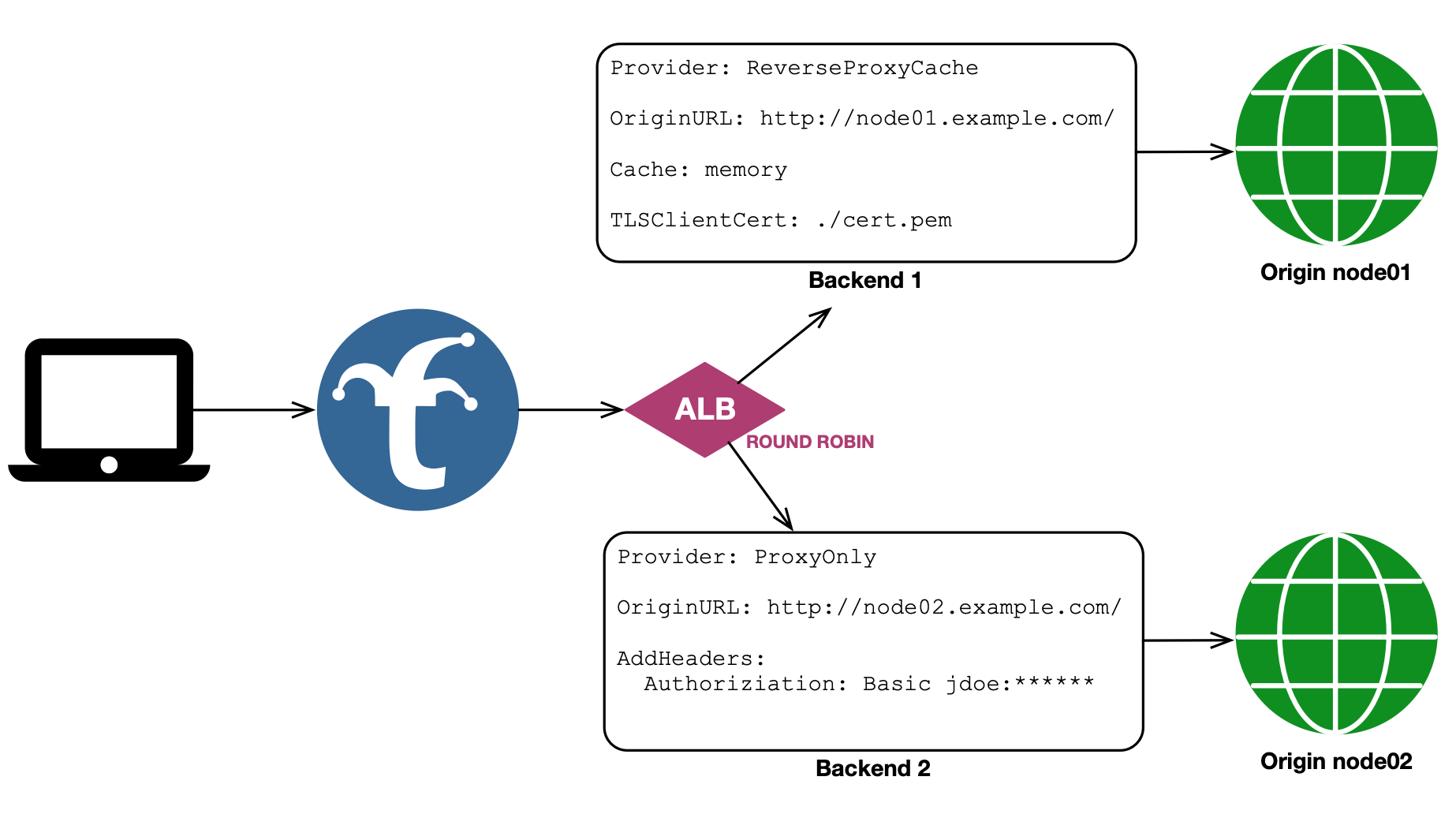
Time Series Merge
The Time Series Merge mechanism supports both High Availability and federation. Each physical backend represents one logical data shard. Set the backend-level replica_group option to the same value on physical backends that are HA replicas of that shard. TSM first coalesces those replicas, using configured pool order to resolve overlapping points and later replicas to fill gaps, and then reduces the distinct logical shards.
When a TSM pool member is itself an ALB (for example, a round-robin ALB over
Prometheus backends), set replica_group on that immediate nested ALB. Trickster
uses the wrapper as the replica-group boundary while delegating TSM planning and
finalization to its terminal Prometheus provider. Other ALBs and non-TSM
providers cannot set an explicit replica group.
When replica_group is omitted, it defaults to the backend name, so existing configurations continue to treat every backend as a distinct shard. Explicitly set it for HA pools that use non-idempotent aggregations such as sum, count, or avg; otherwise replicas will be counted as separate data.
Replica grouping is backend-global, not ALB-specific. A backend cannot be a replica in one ALB and a disjoint shard in another; define a second backend entry if both views are required. Partially overlapping datasets are not representable: one backend belongs to one logical shard for all TSM queries. Injected labels remain useful output and routing metadata, but they do not establish replica provenance.
If replicas disagree at the same logical point, the first configured member wins deterministically and Trickster records a conflict metric and warning log. A failed replica does not make a response partial when another replica covers its group. If an entire logical group is unavailable, the response is marked partial and includes a warning.
For request paths that are not mergeable by the configured time series provider, TSM does not fan the request out. Those requests are dispatched directly to the first live pool target. The same first-live-target fallback is used when a request cannot be prepared for the merge path.
Merge Strategy
Within each configured replica group, TSM deduplicates values when merging series with identical labels — for each timestamp, only one replica value is kept. Across different groups it uses the query’s merge strategy.
For Federation use cases where backends hold different, non-overlapping data, Trickster automatically selects a merge strategy per query by parsing it with the upstream Prometheus PromQL parser and inspecting the outermost aggregation operator. No configuration is required. Because selection uses the parsed expression, redundant parentheses, comments, whitespace, keyword case, and by/without placement do not change the selected strategy. This is particularly important for PromQL aggregation queries like sum() or avg(), which strip labels from results and cause series from different backends to appear identical.
| Outer Operator | Trickster Merge Behavior |
|---|---|
sum | Sum of values per unique label set + timestamp |
count | Sum of values per unique label set + timestamp |
count_values | Sum of values per unique label set + timestamp |
min | Minimum value per unique label set + timestamp |
max | Maximum value per unique label set + timestamp |
group | Deduplicate per unique label set + timestamp |
avg | Dual queries (avg→sum and avg→count); weighted arithmetic mean per unique label set + timestamp |
topk, bottomk | Query the inner expression across backends, merge it, then apply final top/bottom-k selection per timestamp and aggregation group |
stddev, stdvar | Pool shard-local count, mean, and variance states, then finalize the global population variance or standard deviation |
quantile | Query the inner expression, merge all float samples globally, then calculate the exact quantile per timestamp and aggregation group |
limit_ratio | Apply Prometheus-compatible label-hash sampling, globally finalizing a supported inner aggregation when necessary |
limitk | Query the inner expression, merge it globally, then retain the first k samples in stable TSM series order per timestamp and aggregation group |
sum, count, or count_values followed by or vector(0) | Sum of values per unique label set + timestamp |
| (none) | Deduplicate (default) |
For avg queries, Trickster issues two concurrent sub-queries per backend shard — one rewriting the outer avg to sum and another to count — then computes a true weighted arithmetic mean (sum_total / count_total) per series per timestamp. This avoids the skew introduced by a naïve avg-of-averages when backends have different data cardinalities.
When an outer aggregation’s input contains a nested aggregation, binary expression, or function that needs globally complete input, Trickster retains the aggregation’s established merge strategy and adds a warning. This fail-open behavior preserves correct results when the input series are colocated while noting that results can be inaccurate when matching series are split across shards.
For sum, count, or count_values followed by or vector(0), Trickster sends the complete expression to each backend and sums the results, because a backend without matching series contributes only the explicit zero. This requires an aggregation input that each backend can evaluate independently: no nested aggregation, binary expression, or function that needs globally complete input. When the or uses on(...) or ignoring(...) label matching, this applies only to sum or count without by or without grouping; other forms use the warning fallback described below.
For topk and bottomk, Trickster sends the inner expression to each backend, merges those inner results using the inner expression’s merge strategy, then applies the final rank-and-trim step per timestamp and aggregation group. This prevents each backend’s local topk/bottomk result from being weighted equally during the merge. If the inner expression is avg, Trickster still uses the weighted sum/count rewrite before applying the final rank. This also applies when the rank aggregation is wrapped in sort() or sort_desc().
For stddev and stdvar, Trickster requests the shard-local count, mean, and population variance and pools those states before finalizing the requested global value. Native histograms are excluded from this float-only calculation. Supported already-aggregated inner expressions such as count, min, max, and group are merged globally before the outer variance aggregation.
For quantile, Trickster sends the inner expression to every backend, globally merges supported inner aggregations, ignores native-histogram samples, and calculates Prometheus’s exact sort-and-interpolate value independently for each timestamp and group. Exact quantiles require every relevant float sample, so their fanout responses can be substantially larger than shard-local quantiles and remain subject to the configured response-capture limits. A capture-limit failure is returned rather than silently substituting an approximate result.
For limit_ratio, selection uses the same complete-label-set hash threshold as Prometheus. Supported inner aggregations are merged before the ratio is applied; shard-local expressions can be sampled by each backend because the hash decision for a given label set is independent of shard placement.
For limitk, Trickster reproduces the current Prometheus evaluator’s first-visited algorithm over TSM’s stable merged-series order: lexicographic JSON serialization of the complete label set, followed by the series name. Selection is independent for every timestamp and aggregation group, retains complete labels and both float and native-histogram samples, and does not rank candidates by value or label hash.
Prometheus does not define a canonical storage visitation order for limitk. A separate Prometheus deployment whose storage returns the same series in a different order may therefore select different labels. Trickster guarantees the requested cardinality, grouping, and repeatability for the same merged input, and fanout completion order does not affect the result. limitk remains an experimental PromQL operator, so this compatibility contract may change with Prometheus.
For an unsupported inner expression, Trickster retains the established per-shard fallback and injects a warnings entry in the Prometheus response body to alert the caller that results may be inaccurate.
The same deduplicating fallback and warning apply when an aggregation is not the query’s outermost operation (for example, histogram_quantile(0.9, sum by (le) (rate(x_bucket[5m])))), when an aggregation is combined with a binary expression other than the supported or vector(0) form, and when the query cannot be parsed as PromQL, such as a query that uses another dialect’s extensions.
When a non-dedup strategy is in effect and backends have injected labels configured, those labels are automatically stripped before merging. This ensures series from different backends hash identically for aggregation, and the injected labels do not appear in the response.
Native Histograms
Native histogram samples are preserved through the merge rather than being numerically aggregated. When a timestamp has a histogram on one backend and a float sample on another (or histograms on both), the histogram value is kept as-is — numeric aggregators like sum only apply across float samples. This prevents mixed-type series from being corrupted into garbage values when backends return a mix of float and histogram samples at the same timestamp.
Max Query Range Limitation
Trickster ALB supports enforcing a max_query_range duration on ALB backends. For details on how to configure and use query range limits, see the Query Range Limits documentation.
Providers Supporting Time Series Merge
Trickster currently supports Time Series Merging for the following TSDB Providers:
| Provider Name |
|---|
| Prometheus |
We hope to support more TSDB’s in the future and welcome any help!
Example TS Merge Configuration
backends:

  # prom01a and prom01b are redundant and poll the same targets
  prom01a:
    provider: prometheus
    replica_group: prom01
    origin_url: http://prom01a.example.com:9090
    prometheus:
      labels:
        region: us-east-1

  prom01b:
    provider: prometheus
    replica_group: prom01
    origin_url: http://prom01b.example.com:9090
      labels:
        region: us-east-1

  # prom-alb-01 scatter/gathers to prom01a and prom01b and merges responses for the caller.
  # Enforces a max 14-day time range limit on all incoming merge requests.
  prom-alb-01:
    provider: alb
    max_query_range: 14d
    alb:
      mechanism: tsm # time series merge
      pool:
        - prom01a
        - prom01b

  # prom02 and prom03 poll unique targets but produce the same metric names as prom01a/b
  prom02:
    provider: prometheus
    origin_url: http://prom02.example.com:9090
      labels:
        region: us-east-2

  prom03:
    provider: prometheus
    origin_url: http://prom03.example.com:9090
      labels:
        region: us-west-1

  # prom-alb-all scatter/gathers prom01a/b, prom02 and prom03 and merges their responses
  # for the caller. The merge strategy is automatically selected per-query based on the
  # outer PromQL aggregation operator. Injected labels are automatically stripped before
  # merging so that series from different backends are combined correctly. Because prom01a
  # and prom01b are in the same replica_group, their values are de-duplicated before being
  # merged/reduced with prom02 and prom03.
  prom-alb-all:
    provider: alb
    alb:
      mechanism: tsm
      pool:
        - prom01a
        - prom01b
        - prom02
        - prom03
Here is the visual representation of a basic TS Merge configuration:
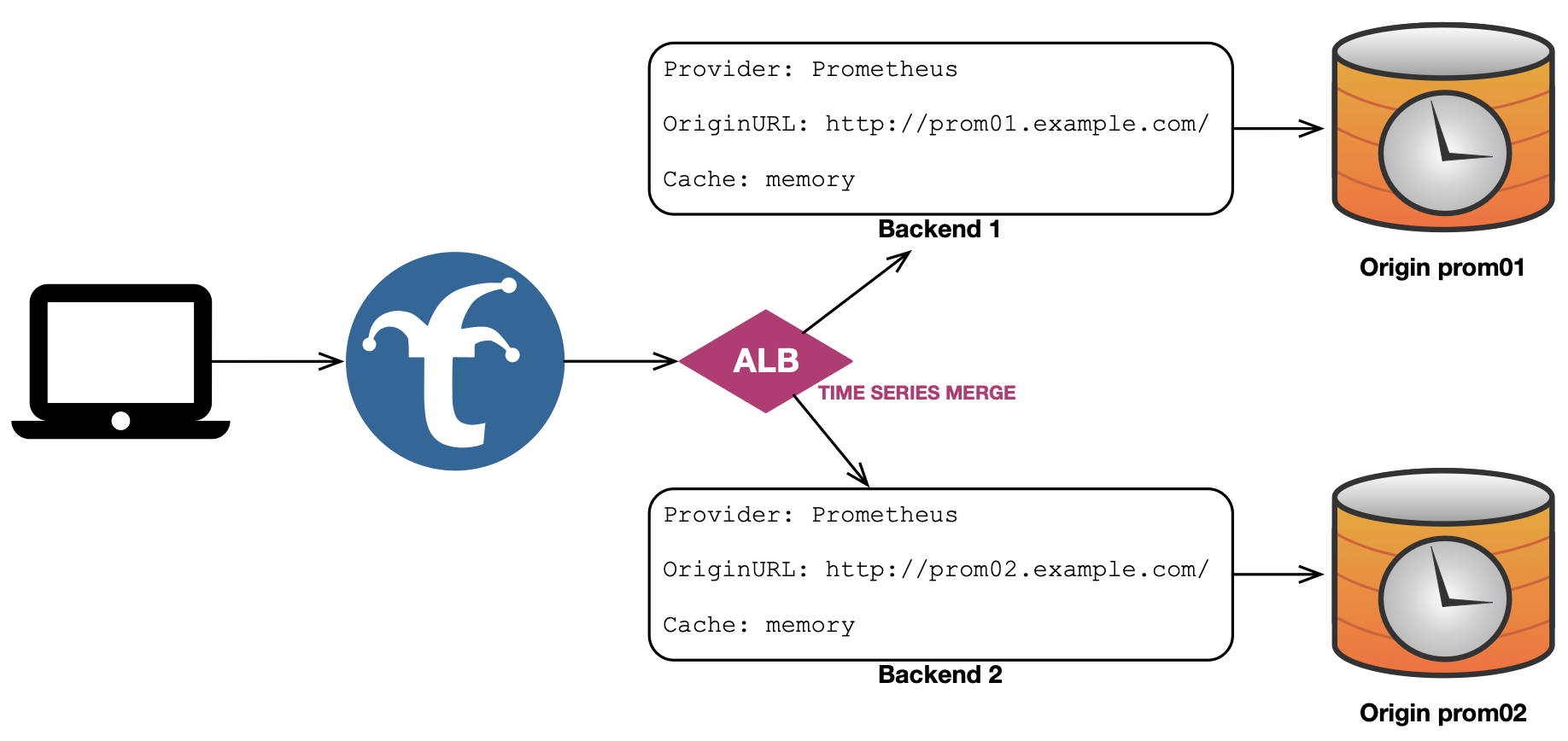
First Response
The First Response mechanism fans a request out to all healthy pool members, and returns the first response received back to the client. All other fanned out responses are cached (if applicable) but otherwise discarded. If one backend in the fanout has already cached the requested object, and the other backends do not, the cached response will return to the caller while the other backends in the fanout will cache their responses as well for subsequent requests through the ALB.
This mechanism works well when using Trickster as an HTTP object cache fronting multiple redundant origins, to ensure the fastest response possible is delivered to downstream clients - even if the HTTP Response Code indicates an error in the request or by the first backend to respond.
First Response Configuration Example
backends:
  node01:
    provider: reverseproxycache
    origin_url: http://node01.example.com

  node02:
    provider: reverseproxycache
    origin_url: http://node-02.example.com

  node-alb-fr:
    provider: alb
    alb:
      mechanism: fr # first response
      pool:
        - node01
        - node02
Here is the visual representation of this configuration:
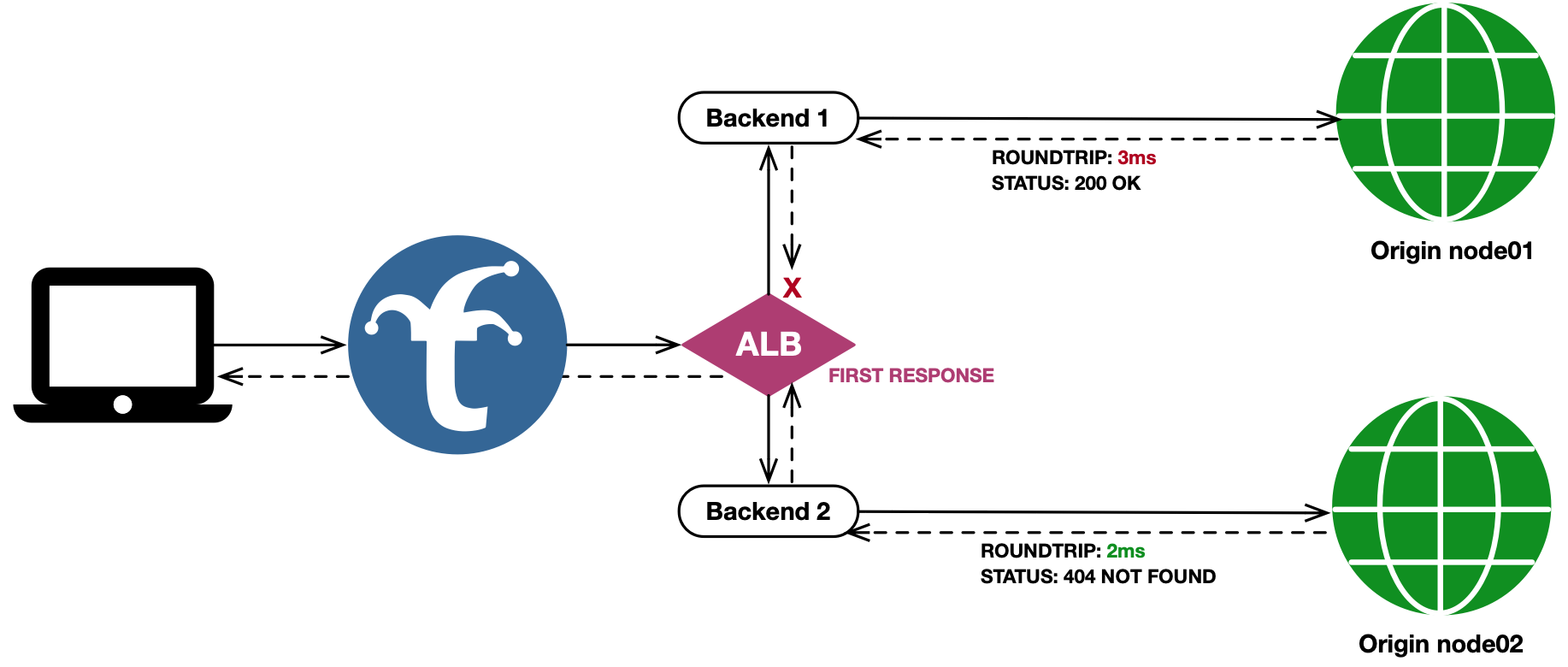
First Good Response
The First Good Response (fgr) mechanism acts just as First Response does, except that it waits to return the first response with an HTTP Status Code < 400. If no fanned out response codes are in the acceptable range once all responses are returned (or the timeout has been reached), then the healthiest response, based on min(all_responses_status_codes), is used.
This mechanism is useful in applications such as live internet television. Consider an operational condition where an object may have been written to Origin 1, but not yet written to redundant Origin 2, while users have already received references to and begin requesting the object in a separate manifest. Trickster, when used as an ALB+Cache in this scenario, will poll both backends for the object and cache the positive responses from Origin 1 for serving subsequent requests locally, while a negative cache configuration will avoid potential 404 storms on Origin 2 until the object can be written by the replication process.
Custom Good Status Codes List
By default, fgr will return the first response with a status code < 400. However, you can optionally provide an explicit list of good status codes using the fgr.status_codes configuration setting, as shown in the example below. When set, Trickster will return the first response to be returned that has a status code found in the configured list.
First Good Response Configuration Example
negative-caches:
  default: # by default, backends use the 'default' negative cache
    "404": 500 # cache 404 responses for 500ms

backends:
  node01:
    provider: reverseproxycache
    origin_url: http://node-01.example.com

  node02:
    provider: reverseproxycache
    origin_url: http://node-02.example.com

  node-alb-fgr:
    provider: alb
    alb:
      mechanism: fgr # first good response
      pool:
        - node01
        - node02
      fgr:
        status_codes: [ 200, 201, 204 ] # only consider these codes when selecting a response
Here is the visual representation of this configuration:
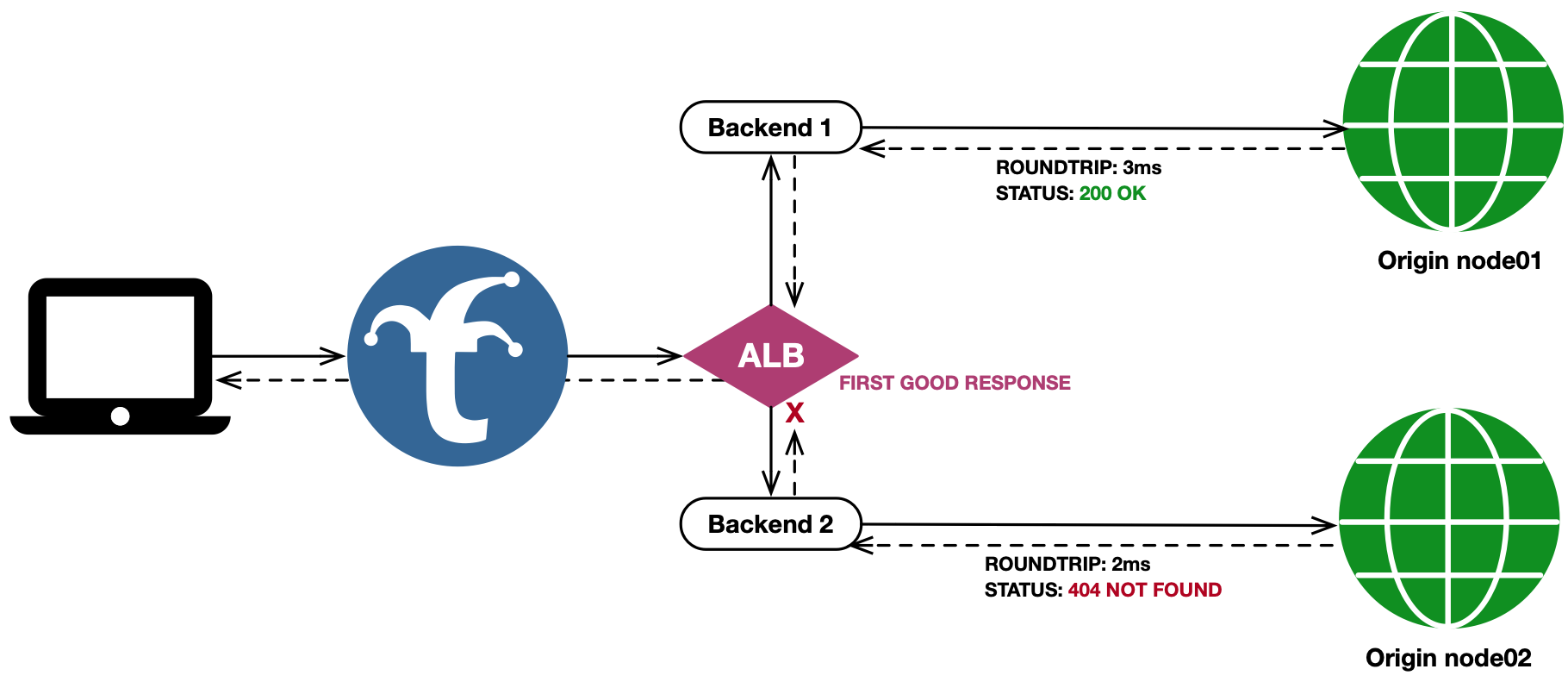
Newest Last-Modified
The Newest Last-Modified mechanism is focused on providing the user with the newest representation of the response, rather than responding as quickly as possible. It will fan the client request out to all backends, and wait for all responses to come back (or the ALB timeout to be reached) before determining which response is returned to the user.
If at least one fanout response has a Last-Modified header, then any response not containing the header is discarded. The remaining responses are sorted based on their Last Modified header value, and the newest value determines which response is chosen.
This mechanism is useful in applications where an object residing at the same path on multiple origins is updated frequently, such as a DASH or HLS manifest for a live video broadcast. When using Trickster as an ALB+Cache in this scenario, it will poll both backends for the object, and ensure the newest version between them is used as the client response.
Note that with NLM, the response to the user is only as fast as the slowest backend to respond.
Newest Last-Modified Configuration Example
backends:
  node01:
    provider: reverseproxycache
    origin_url: http://node01.example.com

  node02:
    provider: reverseproxycache
    origin_url: http://node-02.example.com

  node-alb-nlm:
    provider: alb
    alb:
      mechanism: nlm # newest last modified
      pool:
        - node01
        - node02
Here is the visual representation of this configuration:
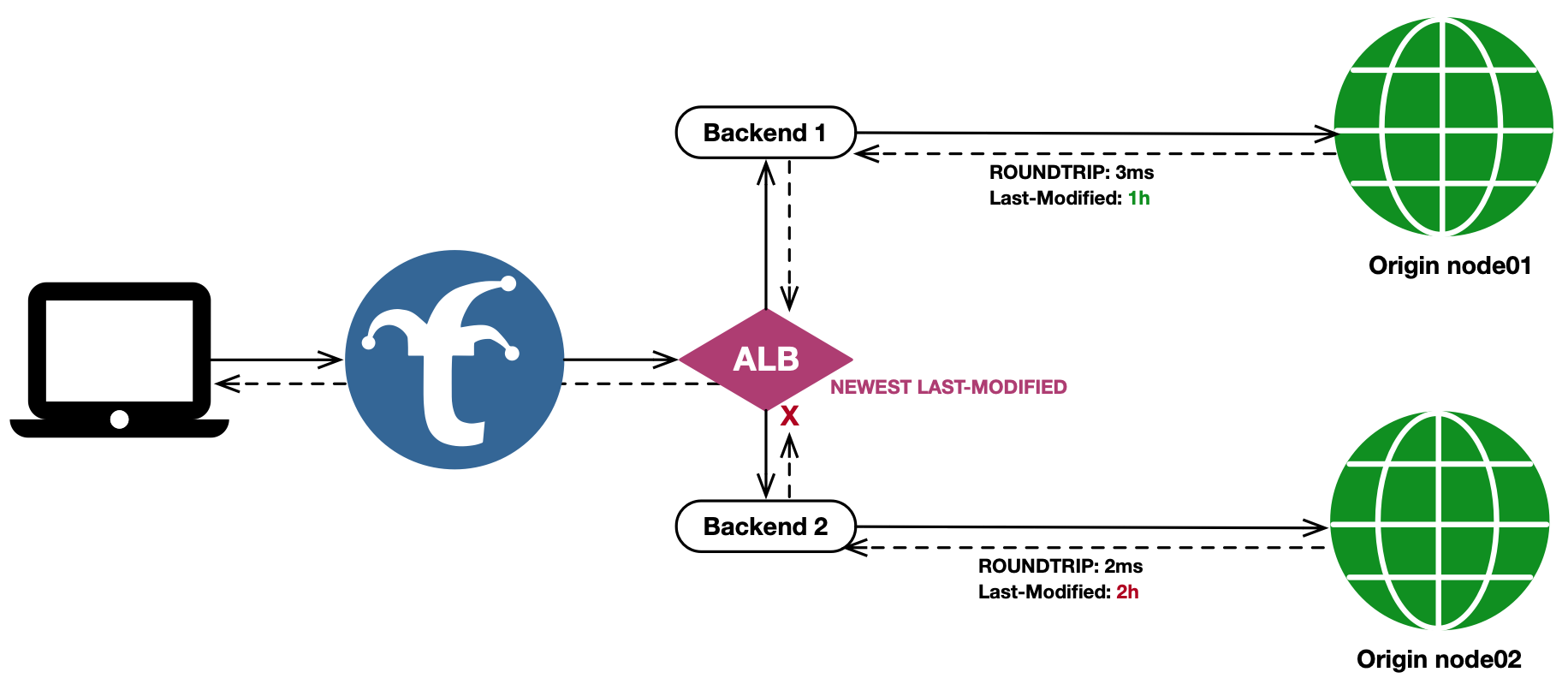
User Router
The User Router mechanism is used to control a Request’s destination Backend based on the username in the request. A default Backend (for no-user and users not in the manifest) can be configured, as well as a Backend per-user.
Native MySQL listeners use a deliberately narrower User Router topology than
HTTP backends: one authenticated listener-facing User Router may select only
direct terminal MySQL backends, selection is sticky for the session, and
to_user/to_credential remapping is rejected. See the
MySQL Provider Guide for the complete
authentication, routing, health, cache-identity, and no-route contract.
When a User Router ALB is configured to use an Authenticator, the ALB can also modify a Request’s credentials before passing it off to the destination Backend. In the graphic below, user casey will be routed to the readersBackend, which proxies to a read-only database server with the dbreader credentials; while user taylor will be routed to the writersBackend, which proxies to a read-write database server with the dbwriter credentials. Here is the example configuration corresponding to the graphic:
Credential replacement is applied only when the user’s configured to_backend target is selected. When a request instead uses default_backend - because the username has no mapping, the mapping does not name a usable runtime target, or the mapped target is unavailable - the request retains its inbound credentials. If a user should receive replacement credentials when routed to the same Backend that also serves as the default, set that Backend explicitly as the user’s to_backend.
backends:
  readersBackend:
    provider: clickhouse
    origin_url: http://read.prod.db.com:8123/

  writersBackend:
    provider: clickhouse
    origin_url: http://write.prod.db.com:8123/

  click-lb-01:
    provider: alb
    authenticator_name: dbUsers
    alb:
      mechanism: ur # User Router Mechanism
      user_router: # User Router-specific configs
        default_backend: readersBackend # optional - users not in the list will route here, origin will 401
        users:
          casey:
            to_user: dbreader # replaces user casey with dbreader in the request's Authorization header
            to_credential: ${DB_READER_PW} # replaces credential in the Authorization header with this env
            to_backend: readersBackend # explicit selection applies casey's credential replacement
          taylor:
            to_user: dbwriter # replaces user taylor with dbwriter in the request's Authorization header
            to_credential: ${DB_WRITER_PW} # replaces credential in the Authorization header with this env
            to_backend: writersBackend # taylor is sent to the writers backend

authenticators:
  dbUsers:
    provider: clickhouse # use the clickhouse authenticator
    users_file: /path/to/user-manifest.csv # this file should include casey and taylor users
    users_file_format: csv # required when users_file is set
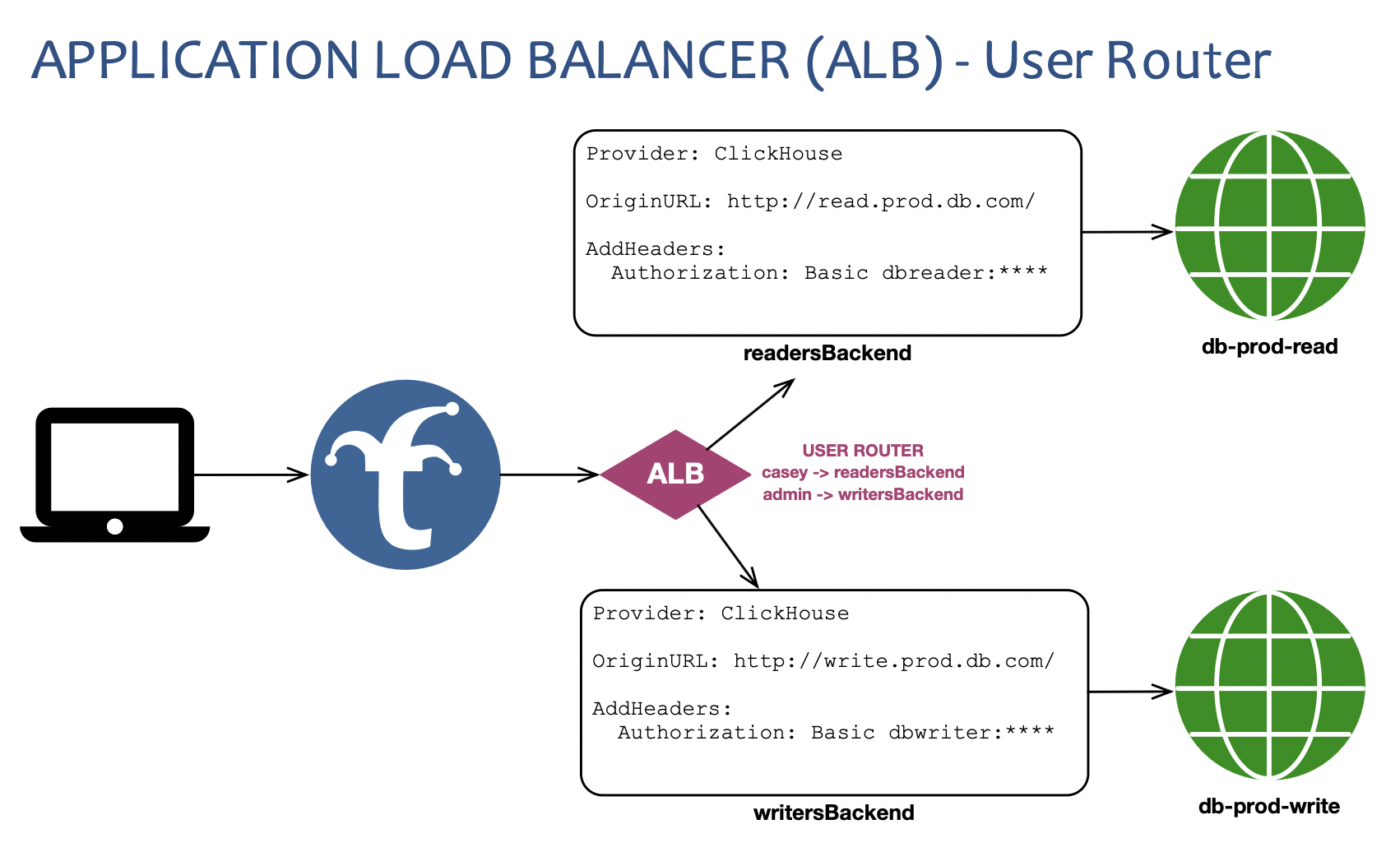
Supported Backend Provider Types
The User Router mechanism supports all Backend provider types for default_backend and to_backend values, including other User Router ALBs.
However, config validation will fail if:
- there are any possible infinite loops between backends configured
- users could ultimately be routed to different non-virtual (ALB/Rule) backend types by the same User Router ALB. The final ultimate route for all users must be of the same type (regardless of how many additional hops through ALBs and Rules the request would take).
- In other words: user1 cannot be ultimately routed to a
clickhousebackend and user2 be ultimately routed to aprometheusbackend by the same User Router ALB.
- In other words: user1 cannot be ultimately routed to a
User Router without an Authenticator
If a User Router ALB does not use an Authenticator, you can still configure user-specific Backend routes. In these cases Trickster will observe (but not authenticate) the username in the request and route based on the observed username. However, Trickster will exit with a validation failure on startup if a User Router ALB that does not utilize an Authenticator is configured to swap credentials. In short: users must be positively authenticated by a Trickster Authenticator for credential swapping to be permitted by the User Router ALB.
When a User Router ALB doesn’t use an Authenticator, Trickster uses the final destination Backend provider type to select a default Authenticator (operating in observe-only mode / no users manifest) for username observation. For clickhouse-destined User Routers, the observe only Authenticator provider is clickhouse. For all other backend provider types, the default the observe only Authenticator provider is basic (Basic Auth).
to_user / to_credential vs Backend Path Header Injection
It is still possible to insert credentials to a Backend proxy request using the request_headers Backend Path config. But any request_headers alterations configured for auth-related headers (e.g., Authorization) are performed by the Backend after being handled by a User Router; so they would overwrite any user-specific to_user and to_credential transformations performed by the User Router ALB.
Default Backend
As shown in the example config above, you can provide a default_backend config to a User Router, and users who are not in the user router list will be routed to this backend.
If you do not supply a default_backend, users who are not in the manifest will receive a default response of 502 Bad Gateway. You can customize the default response code by setting no_route_status_code to a value between 400 and 599 as in this example:
backends:
  prod-01:
    provider: reverseproxy
    origin_url: https://example.com/

  users-lb-01:
    provider: alb
    alb:
      mechanism: ur
      authenticator_name: all-users # not shown for brevity, see above examples
      user_router:
        no_route_status_code: 401 # unauthorized response for users not in allow list
        users: # allowed users
          casey:
            to_backend: prod-01
          taylor:
            to_backend: prod-01
          kris:
            to_backend: prod-01
User Router ALB Backend Pool and Health Checking
The User Router does not rotate through or fan out to a pool of Backends like
the other ALB mechanisms. A healthy mapped target is selected directly. When a
mapped target is unavailable, the request uses the healthy default_backend
without applying the mapped target’s credential replacement. If neither target
is available, the router uses its configured no-route response.
That fallback applies to HTTP requests. A native MySQL session whose username
has an explicit mapping fails with a MySQL availability error when that mapped
terminal is unavailable; it is never redirected to default_backend. Only an
unmapped MySQL username may use the configured default terminal.
You can configure a User Router ALB’s backend destinations to be other ALBs with mechanisms that utilize healthchecked pools.
Bounding Per-Member Response Captures
ALB mechanisms that fan out (TSM, FR, FGR, NLM) buffer each pool member’s response in memory before merging or selecting a winner. Without a cap, one misbehaving upstream returning an oversized body can OOM the proxy – an N-way fanout multiplies that by N.
Trickster applies a default cap of 256 MiB per response. A member whose body exceeds the cap is treated as a partial failure: the merged response carries an X-Trickster-Result: phit marker and the trickster_alb_fanout_failures_total{mechanism, reason="truncated"} metric increments.
Override the cap at the backend or ALB level:
backends:
  default:
    max_capture_bytes: 67108864  # 64 MiB, applies to all backends (Prometheus, ClickHouse, ALB members, etc.)

  prom-alb-tsm:
    provider: alb
    alb:
      mechanism: tsm
      max_capture_bytes: 16777216  # 16 MiB, ALB-specific override
      pool:
        - prom01
        - prom02
The ALB-level value takes precedence over the backend-level value, which in turn takes precedence over the 256 MiB default.
Bounding Aggregate In-Flight Captures
max_capture_bytes caps each member’s response individually; a fanout to N members can still buffer up to N * max_capture_bytes in flight. For deployments with large pools or low memory ceilings, set max_fanout_capture_bytes to cap the aggregate buffer across all in-flight slots in a single fanout call. Slots dispatched after the aggregate budget would go negative are fail-fasted (marked Failed, no capture buffer allocated) before the upstream handler runs; the merge sees them as partial failures and the existing fallback path handles it.
backends:
  prom-alb-tsm:
    provider: alb
    alb:
      mechanism: tsm
      max_capture_bytes: 16777216         # 16 MiB per member
      max_fanout_capture_bytes: 67108864  # 64 MiB total across all in-flight slots
      pool:
        - prom01
        - prom02
        - prom03
        - prom04
max_fanout_capture_bytes defaults to 0 (no aggregate cap). Pick a value matching what your trickster instance can afford to buffer per request, independent of pool size.
Maintaining Healthy Pools With Automated Health Check Integrations
Health Checks are configured per-Backend as described in the Health documentation. Each Backend’s health checker will notify all ALB pools of which it is a member when its health status changes, so long as it has been configured with a health check interval for automated checking. When an ALB is notified that the state of a pool member has changed, the ALB will reconstruct its list of healthy pool members before serving the next request.
Health Check States
A backend will report one of three possible health states to its ALBs: unavailable (-1), unknown (0), or available (1).
Health-Based Backend Selection
Each ALB has a configurable healthy_floor value, which is the threshold for determining which pool members are included in the healthy pool, based on their instantaneous health state. The healthy_floor represents the minimum acceptable health state value for inclusion in the healthy pool. The default healthy_floor value is 0, meaning Backends in a state >= 0 (unknown and available) are included in the healthy pool. Setting healthy_floor: 1 would include only available Backends, while a value of -1 will include all backends in the configured pool, including those marked as unavailable.
Backends that do not have a health check interval configured will remain in a permanent state of unknown. Backends will also be in an unknown state from the time Trickster starts until the first of any configured automated health check is completed. A pool member in a permanent unknown state can never reach available, so a healthy_floor: 1 ALB whose members lack health checks would have an empty pool and return 502 for every request. To avoid that, Trickster resets such an ALB’s effective floor to 0 at startup, emits a warning naming the ALB and the un-probed members, and sets the trickster_alb_pool_floor_reset{backend_name} gauge to 1. Configure a health check interval on those members if you want healthy_floor: 1 to apply.
Setting healthy_floor below 0 admits members the probe has confirmed unavailable, not just members in the transient unknown state. If your goal is to keep traffic flowing during the cold-start window before the first probes complete, lower the pool members’ recovery_threshold so they transition out of unknown faster – don’t lower the floor. When healthy_floor < 0 Trickster emits a startup warning and sets the trickster_alb_pool_admits_failing{backend_name} gauge to 1.
Example ALB Configuration Routing Only To Known Healthy Backends
backends:
  prom01:
    provider: prometheus
    origin_url: http://prom01.example.com:9090
    healthcheck:
      interval: 1000ms # enables automatic health check polling for ALB pool reporting

  prom02:
    provider: prometheus
    origin_url: http://prom02.example.com:9090
    healthcheck:
      interval: 1000ms

  prom-alb-tsm:
    provider: alb
    alb:
      mechanism: tsm   # times series merge healthy pool members
      healthy_floor: 1 # only include Backends reporting as 'available' in the healthy pool
      pool:
        - prom01
        - prom02
All-Backends Health Status Page
Trickster 2.x provides a global health status page available at http://trickster:metrics-port/trickster/health or (the configured health_handler_path).
The global status page will display the health state about all backends configured for automated health checking. Here is an example configuration and a possible corresponding status page output:
backends:
  proxy-01:
    provider: reverseproxy
    origin_url: http://server01.example.com
    # not configured for automated health check polling

  prom-01:
    provider: prometheus
    origin_url: http://prom01.example.com:9090
    healthcheck:
      interval: 1000ms # enables automatic health check polling every 1s

  flux-01:
    provider: inflxudb
    origin_url: http://flux01.example.com:8086
    healthcheck:
      interval: 1000ms # enables automatic health check polling every 1s
$ curl "http://${trickster-fqdn}:8481/trickster/health"

Trickster Backend Health Status            last change: 2020-01-01 00:00:00 UTC
-------------------------------------------------------------------------------

prom-01      prometheus   available

flux-01      influxdb     unavailable since 2020-01-01 00:00:00 UTC

proxy-01     proxy        not configured for automated health checks

-------------------------------------------------------------------------------
You can also provide a 'Accept: application/json' Header or query param ?json
JSON Health Status
As the table footer from the plaintext version of the health status page indicates, you may also request a JSON version of the health status for machine consumption. The JSON version includes additional detail about any Backends marked as unavailable, and is structured as follows:
$ curl "http://${trickster-fqdn}:8481/trickster/health?json" | jq

{
  "title": "Trickster Backend Health Status",
  "updateTime": "2020-01-01 00:00:00 UTC",
  "available": [
    {
      "name": "flux-01",
      "provider": "influxdb"
    }
  ],
  "unavailable": [
    {
      "name": "prom-01",
      "provider": "prometheus",
      "downSince": "2020-01-01 00:00:00 UTC",
      "detail": "error probing target: dial tcp prometheus:9090: connect: connection refused"
    }
  ],
  "unchecked": [
    {
      "name": "proxy-01",
      "provider": "proxy"
    }
  ]
}
7.2 - ALB Autodiscovery
Autodiscovery keeps an ALB pool’s membership current at runtime:
instead of hand-maintaining a pool list, Trickster watches a discovery
source and adds, updates, and drains pool members as the source changes —
with no config reload or listener restart. Discovered members are cloned
from a designated template backend, so they inherit its caching, TLS,
health check, path, and timeout configuration.
Supported Discovery Providers
| provider | discovers | change detection |
|---|---|---|
kubernetes | endpointslices, services or pods via the Kubernetes API | watch (event-driven) |
dns_srv | SRV records | poll |
dns_a | A/AAAA records | poll |
file | a member-list file | filesystem notify + poll |
http_sd | a member-list HTTP endpoint | poll (ETag-aware) |
consul | Consul service instances | blocking query (event-driven) |
nomad | Nomad’s native service registry | blocking query (event-driven) |
aws | EC2 instances or ECS tasks, by aws.service | poll |
gcp | Compute Engine instances, by gcp.service | poll |
azure | Virtual Machines, by azure.service | poll |
docker | Docker Engine containers | poll |
For other services, users are generally served by the file provider (any
external service-discovery tool can emit the member list), by
http_sd (the universal adapter — a few lines of
glue serving a member list, with no Trickster change), or by the DNS
providers (e.g. Consul’s DNS interface, cloud private DNS zones, Docker’s
embedded DNS). Developers can add providers against a simple interface; see
the provider authoring guide.
Configuration Overview
Autodiscovery has three configuration parts:
- a named discoverer in the top-level
discoverysection — the provider and its connection-level settings (Kubernetes client, DNS resolver). Multiple ALBs can share one discoverer, and therefore one client/watch/resolver stack. - a template backend — a normal backend definition marked
is_template: true. Templates are never routed, never eligible foris_default, never static pool members, and don’t require anorigin_url; they exist to be cloned per discovered member. - the ALB’s
alb.discoveryblock — which discoverer to use, a provider-specificquerydescribing what to select, the template to clone, and guardrail options.
discovery:
  in-cluster:
    provider: kubernetes
    kubernetes:
      in_cluster: true

backends:
  prom-template:
    provider: prometheus
    is_template: true
    cache_name: default
    healthcheck:
      interval: 5s

  prom-alb:
    provider: alb
    alb:
      mechanism: tsmerge
      discovery:
        discoverer_name: in-cluster
        template_backend: prom-template
        query:
          kind: endpointslices
          namespace: monitoring
          service: prometheus
          port: web
A discovery-backed ALB may also list static pool members; discovered
members are additive to them. Static pool entries (and discovered members
from sources that convey weights) support integer weights for the
round_robin mechanism:
pool:
  - static-member          # weight 1
  - name: bigger-member
    weight: 3
Discoverer Connection Options
Each entry in the top-level discovery section declares a provider and
that provider’s connection-level block:
| provider | block | options |
|---|---|---|
kubernetes | kubernetes | in_cluster (default true) or kubeconfig path — mutually exclusive; plus qps, burst, user_agent, timeout |
dns_srv, dns_a | dns | resolver (host:port; default: system resolver), interval (poll cadence, default 30s, min 1s; record TTLs act as a floor) |
file | file | poll_interval (stat-poll fallback cadence, default 30s, min 1s) |
http_sd | http + http_sd | connection settings in the shared http block (below); http_sd.format selects the member-list document: trickster (default) or prometheus |
consul | http + consul | connection settings in the shared http block; consul.datacenter, namespace, partition, wait, allow_stale, only_passing, warning_is_ready |
nomad | http + nomad | connection settings in the shared http block; nomad.namespace, region, wait, allow_stale |
aws | aws (+ optional http) | aws.service (required: ec2 or ecs), region, and the credential fields; the endpoint is derived, so http.endpoint is an optional override |
gcp | gcp (+ optional http) | gcp.service (required; gce), gcp.project (from the metadata server when unset) and credentials_file; the endpoint is the Compute API, so http.endpoint is an optional override |
docker | docker (+ optional http) | docker.api_version; the endpoint defaults to the well-known socket, so http.endpoint is an optional override (unix:// or tcp://) |
azure | azure (+ optional http) | azure.service (required; vm), azure.subscription_id (required), credentials and cloud; the endpoint comes from the cloud, so http.endpoint is an optional override |
A block is only valid on its own provider’s entries; anything else fails startup.
The shared http block
Providers that discover members by polling an HTTP endpoint share one
connection block rather than each defining its own, so that configuring a
second such provider does not mean learning a second vocabulary. It is
required by http_sd, and rejected on providers that do not poll HTTP.
| option | meaning |
|---|---|
endpoint | base URL of the service to poll (http/https, host required) |
interval | poll cadence (default 30s, min 1s) |
timeout | bound on a single poll (default 10s, min 100ms) |
tls | outbound client TLS: client_cert_path/client_key_path, certificate_authority_paths, insecure_skip_verify |
headers | headers set on every request; where a registry’s credential is a bespoke header (X-Consul-Token, X-Nomad-Token), it goes here |
username, password | static HTTP Basic credential |
bearer_token | sent as Authorization: Bearer <token> |
bearer_token_file | path re-read before each poll, so a rotated credential is picked up without a restart — prefer this over bearer_token for anything that expires |
follow_redirects | default false; a redirect away from the configured endpoint is surfaced rather than chased |
username/password and the bearer-token fields are mutually exclusive,
as are the two bearer-token forms: a config that sets both fails startup
instead of silently preferring one, which is how an operator ends up
debugging a 401 against a config that looks correct.
Providers whose normal poll includes a server-side wait (blocking queries)
need timeout comfortably above that wait. There is no second,
client-level timeout underneath it that could cut a long poll short.
Template Backends
The template_backend is an ordinary backend definition marked
is_template: true. A discovered member overrides exactly the template’s
name, origin_url (and its derived scheme/host/path-prefix, with
the member’s path prefix falling back to the template’s), and replica
group (see below); the member’s weight applies to its pool entry. Every
other option — cache settings, TLS client configuration, healthcheck,
paths, request rewriters, authenticator, timeouts, concurrency limits,
tracing — is inherited from the template.
Templates are excluded from everything that applies only to live
backends: they are never routed, cannot be is_default, cannot appear in
a static ALB pool, and do not require an origin_url. A template must
use an origin-serving provider (not alb or rule), and a TSM-merged or
replica_group_label-using ALB requires a time-series-merge-capable
template provider.
The alb.discovery Block
| option | description | default |
|---|---|---|
discoverer_name | name of a discoverer in the top-level discovery section (required) | |
template_backend | name of a backend with is_template: true (required) | |
query | provider-specific selection (required; see each provider below) | |
min_members | reject snapshots that would shrink the discovered membership below this count, keeping the last-good pool (guards against source blips returning empty results). 0 disables. | 0 |
debounce_window | coalesce membership changes arriving within this window into one pool update, damping flapping sources. 0 disables. | 0 |
startup_policy | retry starts the ALB with only its static members and keeps retrying the discoverer; fail fails startup when the discoverer is unavailable | retry |
health_mode | probe: discovered members inherit the template’s active health check. provider: the discoverer’s readiness reporting (currently Kubernetes only) drives member health instead of active probes | probe |
Health and Readiness Semantics
In probe mode, each discovered member gets its own health check from the
template’s healthcheck config, and the ALB’s healthy_floor applies
exactly as it does to static members. If the template has no probe
interval and the floor requires passing probes, the floor is reset to 0
with a loud warning (as with static members).
A new member’s first probe runs the moment it is registered, and a member
the provider reports ready is admitted to the pool immediately, ahead
of that first result. This matters for rolling deploys: an orchestrator
retires the old workload on the very readiness signal that announced the
new one, so a pool that held the newcomer in unknown until its own probe
completed would have no admissible member in between, and every request in
that window would fail with a 502 even though a healthy workload was
serving. From its first result on, the probe governs the member exactly as
it does an established one: a member the provider reports not-ready, or
one whose readiness the provider does not convey, waits for its first
passing probe as before.
In provider mode, readiness reported by the discoverer maps onto member
health: ready members enter as passing (1), not-ready and terminating
members as failing (-1), readiness-unknown members as unchecked (0) — so a
healthy_floor of 1 excludes members until the provider reports them
ready.
Members a provider reports as shutting down (terminating Kubernetes endpoints, deletion-stamped pods) are removed from the snapshot entirely, so they drain from the pool before the workload is killed — enabling zero-error rolling deploys. On removal, a member’s in-flight requests complete, its health check stops, its metrics series are deleted, and its idle upstream connections close after the configured drain timeout.
TSM Replica Groups
When the ALB uses the Time Series Merge
mechanism, discovered members participate in replica_group semantics
three ways, in priority order:
Per-member groups from the discovery source (highest priority): the Kubernetes provider can read a configured label from each discovered workload via
query.replica_group_label, andfileprovider entries may carry areplica_groupfield. Members sharing a group value are treated as HA replicas of one logical shard and coalesced; distinct values are distinct shards, merged. This handles sharded-HA topologies (e.g., Thanos-style Prometheus pairs) discovered with a single selector:backends: prom-alb: provider: alb alb: mechanism: tsmerge discovery: discoverer_name: in-cluster template_backend: prom-template query: kind: endpointslices namespace: monitoring service: prometheus port: web replica_group_label: prometheus/shardA
replica_groupset on the template backend: inherited by every member without a source-conveyed group — all such members are HA replicas of one shard (the common HA-pair case).Neither (default): each member is its own replica group, i.e. its own logical shard — a pure federation/merge of every member.
For the pods and service kinds the label is read from the discovered
Pod or Service itself. For endpointslices, endpoints don’t carry pod
labels, so setting replica_group_label joins a Pod watch in the query’s
namespace to resolve each endpoint’s target pod (see the RBAC note below);
an endpoint whose pod isn’t yet observed joins ungrouped and regroups
automatically when the pod appears. A member whose group changes is
rebuilt in place under the same name.
Because replica_group is only meaningful on time-series backends,
configuration validation requires a TSM-capable template_backend
whenever the ALB mechanism is tsmerge or replica_group_label is set.
The DNS providers convey no grouping metadata; use the template-level
group (mode 2) or the file provider for grouped non-Kubernetes pools.
Query Vocabulary
Every ALB’s alb.discovery.query block is drawn from one shared vocabulary.
A field set for a provider that does not accept it fails startup rather
than being silently ignored, so a query aimed at the wrong provider is a
config error rather than an empty pool.
| field | kubernetes | dns_srv | dns_a | file | http_sd | consul | nomad | aws | gcp | azure | docker |
|---|---|---|---|---|---|---|---|---|---|---|---|
kind | ● | ||||||||||
namespace | ● | ||||||||||
service | ● | ● | ● | ● | |||||||
selector | ● | ||||||||||
srv_name | ● | ||||||||||
hostname | ● | ||||||||||
path | ● | ● | |||||||||
filter | ● | ● | ● | ||||||||
filters | ● | ● | |||||||||
tags | ● | ● | ● | ● | ● | ||||||
cluster | ● | ||||||||||
network | ● | ||||||||||
address_type | ● | ● | ● | ● | |||||||
port | ● | ● | ● | ● | ● | ● | |||||
port_label | ● | ● | ● | ● | |||||||
scheme | ● | ● | ● | ● | ● | ● | ● | ● | ● | ● | |
replica_group_label | ● | ● | ● | ● | ● | ● |
Most fields mean the same thing everywhere:
scheme—http(default) orhttpsfor the member’s origin URL.port— a static port applied to every member.port_label— reads the port from the provider’s own metadata namespace: an EC2 or Azure tag, a GCE label (then instance metadata), a Docker container label. It wins overportper member, so a fleet can share one static default with individual machines overriding it.address_type—private(default),public, oripv6. Which address to take where a resource has several.replica_group_label— reads a TSM replica group from the same namespace asport_label.tags— narrows by tag/label presence, and is a conjunction: every listed tag must be present.filter/filters— provider-native selection evaluated server-side.filteris an expression string (Consul, Nomad, GCE);filtersis a name→values map (AWSFilter.N, Docker’s filter document). These are passed through, so an expression the upstream does not understand fails the refresh loudly rather than matching nothing.
Hosts versus endpoints is the distinction that decides whether a port is
required. A cloud inventory API returns hosts — aws service: ec2,
gcp, and azure return addresses with no port, so one of port or
port_label is required. Kubernetes and docker return endpoints
that carry their own ports, so a port is optional there and is resolved
from the object when unambiguous.
The kubernetes Provider
The kubernetes provider watches the cluster via the API server (shared
informers; watch-driven, no polling) and supports three query kinds.
Connection options:
discovery:
  my-cluster:
    provider: kubernetes
    kubernetes:
      in_cluster: true              # use the pod's service account (default)
      # kubeconfig: /path/to/kubeconfig   # or run against a remote cluster
      qps: 20                       # sustained API request rate (default 20)
      burst: 40                     # API request burst allowance (default 40)
      timeout: 10s                  # bounds one-shot API calls (default 10s)
      # user_agent: my-trickster/1  # default: trickster/<version> (<os>/<arch>)
in_cluster and kubeconfig are mutually exclusive; with neither set,
in-cluster is assumed.
qps and burst are the client-side rate limit on API requests. The
defaults are raised over the client-go defaults (5 and 10), which are sized
for a one-shot CLI rather than a process that watches many objects.
timeout bounds a single one-shot API call, such as the connectivity
preflight run under startup_policy: fail. It is deliberately not applied
to the REST client as a whole, whose timeout would also truncate the
long-running watch streams the informers depend on.
Shared Watches
Discoverers that agree on the connection (API server, credentials, identity) and on the query’s server-side filtering (namespace, label selector, field selector) share one set of informers, so several ALBs selecting the same Service cost the API server one watch rather than one each. A watch is released when the last subscription using it stops, so unsubscribing one ALB never disturbs another. Nothing needs to be configured for this; it follows from the discoverer and query values being identical.
Startup Preflight
When any ALB bound to a kubernetes discoverer sets startup_policy: fail,
the discoverer contacts the API server’s /version endpoint before any
watch is established, bounded by timeout. Informers are lazy, so without
this check an unreachable API server is indistinguishable from a Service
with no endpoints yet: the process would start clean and serve an empty
pool. Under the default startup_policy: retry the preflight is skipped and
the discoverer keeps watching for the API server to come back.
Query Kinds
endpointslices (default) discovers the ready endpoint addresses of a
named Service — the pod IPs behind it — and is the right choice for
routing around the Service’s own load balancing:
query:
  kind: endpointslices
  namespace: monitoring
  service: prometheus
  port: web          # port name or number; optional when the service has one port
service discovers the ClusterIP of each Service matching a label
selector (or one named Service), one member per Service:
query:
  kind: service
  namespace: monitoring
  selector:
    app: prometheus
  port: 9090
pods discovers pod IPs directly by label selector, without requiring
a Service (the original ask of issue #609):
query:
  kind: pods
  namespace: monitoring
  selector:
    app: prometheus
  port: web
namespace defaults to the pod’s own namespace when running in-cluster.
Port and Scheme Resolution
port may be a named port, a number, or omitted when the target declares
exactly one port; ambiguity is logged and the object skipped. The member
scheme comes from query.scheme if set; otherwise a declared
appProtocol: https on the selected port, or a trickstercache.org/scheme
annotation on the watched Service/Pod, selects https; the default is
http.
Zero-Error Rolling Deploys
Terminating endpoints are removed from the discovered membership as soon
as the change is observed, so members drain out ahead of pod deletion.
One piece belongs to the workload, though: Kubernetes marks an endpoint
terminating and signals the container at the same moment, so — as with
any EndpointSlice consumer, kube-proxy included — the pod must keep
serving briefly while its removal propagates. Give discovered workloads a
short preStop delay (a few seconds comfortably covers Trickster’s
sub-second pickup):
lifecycle:
  preStop:
    sleep:         # native sleep action (Kubernetes >= 1.30); images with
      seconds: 5   # a shell can use exec with command: ["sleep", "5"]
Without it, an instantly-exiting container can produce a brief window of connection errors during rollouts — regardless of what is consuming the EndpointSlices.
RBAC
The provider needs only list and watch on the resources your query kinds use — it never reads Secrets or ConfigMaps and never writes:
query kind | apiGroup | resource | verbs |
|---|---|---|---|
endpointslices | discovery.k8s.io | endpointslices | list, watch |
service | "" (core) | services | list, watch |
pods | "" (core) | pods | list, watch |
Queries are namespace-scoped, so a namespaced Role/RoleBinding per
watched namespace is sufficient and preferred:
apiVersion: rbac.authorization.k8s.io/v1
kind: Role
metadata:
  name: trickster-autodiscovery
  namespace: monitoring
rules:
  - apiGroups: ["discovery.k8s.io"]
    resources: ["endpointslices"]
    verbs: ["list", "watch"]
---
apiVersion: rbac.authorization.k8s.io/v1
kind: RoleBinding
metadata:
  name: trickster-autodiscovery
  namespace: monitoring
subjects:
  - kind: ServiceAccount
    name: trickster
    namespace: trickster
roleRef:
  kind: Role
  name: trickster-autodiscovery
  apiGroup: rbac.authorization.k8s.io
Add services and/or pods rules only for the kinds you configure. Note
that using replica_group_label with the endpointslices kind joins a
Pod watch, so it additionally requires pods list/watch in the query’s
namespace. RBAC cannot scope below the resource level, so the grant covers
all objects of that resource in the bound namespace. Out-of-cluster
(kubeconfig-based) discoverers need the same permissions for their user or
service account.
The dns_srv Provider
The dns_srv provider polls SRV records. SRV target and port map to the
member address; SRV weight maps to the member’s load-balancing weight; and
only the highest-priority tier (the lowest priority value present in the
answer) becomes members — lower tiers are treated as standby capacity
managed on the DNS side.
discovery:
  corp-dns:
    provider: dns_srv
    dns:
      resolver: 10.0.0.53:53   # optional; default: the system resolver
      interval: 30s            # poll cadence (default 30s)

backends:
  my-alb:
    provider: alb
    alb:
      mechanism: rr
      discovery:
        discoverer_name: corp-dns
        template_backend: my-template
        query:
          srv_name: _prometheus._tcp.example.com
          # scheme: https      # optional; default http
Record TTLs act as a floor on the poll cadence: an answer is never
re-resolved before its shortest TTL expires, so interval is the most
frequent the provider will query. Resolution failures keep the last-good
membership; an authoritative empty answer empties it.
The dns_a Provider
The dns_a provider resolves a hostname’s A and AAAA records, with a
fixed port and scheme from the query. This covers round-robin DNS,
headless-service-style DNS outside Kubernetes, Docker’s embedded DNS, and
Consul’s DNS interface without a bespoke provider:
query:
  hostname: prometheus.service.consul
  port: 9090           # required
  # scheme: https      # optional; default http
The dns connection options, poll cadence, TTL floor, and failure
semantics are the same as dns_srv.
The file Provider
Note: like Prometheus’s file_sd, the file provider is the universal
integration point — anything that can write a file (cron, sidecar,
consul-template, your deploy tooling) can drive an ALB pool.
The provider watches a local YAML or JSON member-list file and applies it atomically on change:
discovery:
  external-sd:
    provider: file
    # file:
    #   poll_interval: 30s   # stat-poll fallback cadence (default 30s)

backends:
  my-alb:
    provider: alb
    alb:
      mechanism: rr
      discovery:
        discoverer_name: external-sd
        template_backend: my-template
        query:
          path: /etc/trickster/members.yaml
The file is a list of members:
- name: prom-1            # optional; defaults to the address
  address: 10.0.0.1:9090  # required host:port
- name: prom-2
  scheme: https           # optional; default http
  address: 10.0.0.2:9090
  path_prefix: /base      # optional
  weight: 3               # optional; default 1
  replica_group: shard-0  # optional; TSM replica group (see above)
Writers should replace the file atomically (write to a temp file in the same directory, then rename). A file that fails to read or parse keeps the last-good membership; an empty file is a valid, empty membership.
Change Detection
The provider uses two mechanisms together (via Trickster’s shared filesystem watcher), so updates are never missed:
- Filesystem notification (on the file’s parent directory, debounced): near-instant pickup of writes, atomic renames, and symlink swaps on local filesystems; a directory watch dropped by deletion or recreation is automatically re-armed.
- A content-comparing poll of the file (
file.poll_interval, default30s, minimum1s): the guaranteed fallback wherever notification is unreliable or unavailable.
Guidance for Kubernetes-mounted member files:
- ConfigMap / Secret volume mounts: kubelet applies updates with an atomic symlink swap inside the mount directory, which generates inotify events — notification works, and updates are picked up promptly. Note that kubelet itself syncs ConfigMap content periodically (typically up to a minute), which usually dominates end-to-end latency.
subPathmounts of a ConfigMap/Secret: Kubernetes never updates these after pod start — no mechanism (notification or polling) can see a change. Mount the directory, not asubPath.- Network- or FUSE-backed volumes (NFS PVs, some CSI drivers):
inotify generally does not observe writes made by other clients, so the
stat poll is the effective update mechanism — set
file.poll_intervalto the freshness your deployment needs. emptyDir/hostPathwritten by a sidecar in the same pod: notification works.
The poll compares file content (not timestamps), so any change is
detected within one poll_interval regardless of filesystem timestamp
granularity.
The http_sd Provider
http_sd fetches a member list from an HTTP endpoint. It is the universal
adapter: any service-discovery system Trickster has no in-tree provider for
can feed it through a few lines of glue that serve a member list, with no
Trickster change and no restart.
discovery:
  fleet:
    provider: http_sd
    http:
      endpoint: https://sd.example.com
      interval: 15s
      bearer_token_file: /var/run/secrets/sd-token
    http_sd:
      format: trickster

backends:
  prom-template:
    provider: prometheus
    is_template: true
  prom-alb:
    provider: alb
    alb:
      mechanism: tsm
      discovery:
        discoverer_name: fleet
        template_backend: prom-template
        query:
          path: /pools/prometheus
The query’s path is optional and is appended to the endpoint, so one
server can serve a different member list per ALB while they share the
discoverer’s connection settings. The query’s scheme supplies the scheme
for prometheus-format targets, which are bare host:port; native-format
entries carry their own and override it.
Formats. trickster is the same document the file provider reads and
is the default:
- name: prom-1
  scheme: https
  address: 10.0.0.1:9090
  path_prefix: /base
  weight: 2
  replica_group: shard-0
prometheus is the document Prometheus’s own file_sd and http_sd
consume, so an existing endpoint can be pointed at Trickster unchanged:
[{"targets": ["10.0.0.1:9090"], "labels": {"env": "prod"}}]
A group’s __scheme__ label overrides the query scheme, letting one
endpoint serve mixed-scheme members. Note that the Prometheus format cannot
express weight or replica_group — deployments that need weighted
pools or TSM replica groups want the native format.
The format is named explicitly rather than sniffed. The two documents are structurally distinguishable, but guessing means a typo in one format can parse as a valid, wrong membership in the other, and the cost of guessing wrong is a silently drained pool.
Efficiency. Requests carry X-Prometheus-Refresh-Interval-Seconds, as
Prometheus’s does, so servers that generate member lists on demand can pace
their own work. ETag is honored: an unchanged membership costs one
conditional request and a 304, with no re-parse and no snapshot. The
validator is only stored after a document parses, so a rejected document
can never be confirmed as current by a later 304.
Failure. A transport error, an unexpected status, an oversized body
(the limit is 16 MiB), or a document that will not parse all keep the
last-good membership and are logged once per failure streak and counted on
trickster_discovery_refresh_errors_total. An endpoint that
authoritatively returns no members ([]) is a valid membership and is
applied, so a scaled-to-zero pool can be reported as such.
The consul Provider
consul reads service instances from Consul’s health endpoint. It is
event-driven rather than polled: each request is a Consul blocking
query, so the server parks it until the service changes or wait elapses.
A membership change is observed within a round trip instead of within a
poll interval, and a stable service costs one parked connection rather
than a request per interval.
discovery:
  consul-dc1:
    provider: consul
    http:
      endpoint: http://127.0.0.1:8500
      # a rotated ACL token; Consul accepts the Authorization Bearer scheme
      # as an equivalent to its own X-Consul-Token header
      bearer_token_file: /var/run/secrets/consul-token
    consul:
      datacenter: dc1
      wait: 5m          # how long a blocking query parks; 1s–10m
      allow_stale: true # answer from any server, not only the leader

backends:
  prom-template:
    provider: prometheus
    is_template: true
  prom-alb:
    provider: alb
    alb:
      mechanism: tsm
      health_mode: provider   # Consul's own checks decide readiness
      discovery:
        discoverer_name: consul-dc1
        template_backend: prom-template
        query:
          service: prometheus
          tags: [production]
          # filter: 'Service.Meta.version == "2"'
          # replica_group_label: shard   # read from the service's Meta
Readiness. Consul reports per-instance check status, so this is the
first provider outside kubernetes that can honestly answer “is this member
ready”, which makes health_mode: provider meaningful for VM and container
fleets. An instance’s readiness is its worst check: all passing is
ready, critical and maintenance are not ready, and warning is ready by
default (matching how Consul treats warning for DNS) — set
warning_is_ready: false to drain warning instances instead. A status a
future Consul release introduces is treated as not-ready rather than
ignored.
Failing instances are reported as NotReady rather than omitted, so that an
ALB using the default health_mode: probe can decide for itself and a
wholly-unhealthy service does not look like an empty one. Set
only_passing: true to have Consul filter them out server-side instead.
Weights. Consul’s own Weights.Passing / Weights.Warning map onto
member weights, including the passing/warning distinction — an operator who
has already told Consul the relative capacity of each instance does not have
to tell Trickster again.
Addresses. A service that registers its own address overrides its node’s, which is how sidecars and containers with their own routable address are represented. An instance with no usable address or port fails the whole refresh rather than being silently dropped, so a pool never quietly shrinks because of a catalog change nobody noticed.
Labels. Members carry service, service_id, node, datacenter,
status, and tags (comma-bracketed, as ,a,b,). Service metadata is
carried as meta_<key> so that an operator-defined key cannot shadow a
Trickster-assigned label.
Timeouts. http.timeout must outlast consul.wait, because a blocking
query legitimately takes that long. Its default is derived from the wait
rather than shared with the other HTTP providers (Consul adds up to
wait/16 of its own jitter, which the margin covers), and a config that
sets it too low is rejected at startup rather than producing a stream of
timeouts. http.interval is not the poll cadence here — with blocking
queries there is no cadence — it is the retry delay after a failure.
The nomad Provider
nomad reads service instances from Nomad’s native service registry
(Nomad 1.3+). Like consul it is event-driven, using the same HashiCorp
blocking-query protocol, so a membership change is observed within a round
trip rather than within a poll interval.
discovery:
  nomad-eu:
    provider: nomad
    http:
      endpoint: http://127.0.0.1:4646
      # a rotated ACL token; Nomad accepts the Authorization Bearer scheme
      # as an equivalent to its own X-Nomad-Token header
      bearer_token_file: /var/run/secrets/nomad-token
    nomad:
      namespace: default
      region: eu-1
      wait: 5m
      allow_stale: true

backends:
  prom-alb:
    provider: alb
    alb:
      discovery:
        discoverer_name: nomad-eu
        template_backend: prom-template
        query:
          service: prometheus
          tags: [production]
          # filter: 'JobID == "monitoring"'
Native registry, not Consul. This reads the registry a job selects with
provider = "nomad" in its service block. Jobs that register into Consul
instead are discovered with the consul provider, and that is the more
capable choice where it applies: Nomad’s service endpoint carries no
per-instance check state, so members are reported ReadyUnknown and
health_mode: provider falls back to Trickster’s own probes. A deployment
that wants discovery-conveyed readiness should register its services into
Consul.
Tags filter client-side. Unlike Consul’s catalog endpoint, Nomad’s
service endpoint has no tag parameter, so query.tags is applied by
Trickster after the response arrives. It is a conjunction — every listed tag
must be present. query.filter is passed through to Nomad and evaluated
server-side.
Labels. Members carry service, service_id, job_id, alloc_id,
node_id, namespace, datacenter, and tags (comma-bracketed). The
allocation and job identifiers are what an operator needs to trace a member
back to the workload that registered it.
Timeouts work exactly as for consul: http.timeout must outlast
nomad.wait, its default is derived from the wait, and http.interval is
the retry delay after a failure rather than a poll cadence.
The aws Provider
aws discovers members from an AWS API, selected by aws.service: ec2
for instances, ecs for tasks. It is required — with more than one AWS
API supported, defaulting would be an arbitrary guess at which one you
meant, so a config that omits it fails at startup. Further AWS sources
arrive as new service values rather than new providers, inheriting this
provider’s credentials, signing, pagination and options.
discovery:
  fleet:
    provider: aws
    aws:
      service: ec2      # required: ec2 or ecs
      region: us-east-1
      # credentials omitted: use the standard chain (IRSA, instance
      # profile, environment, shared config). See docs/aws.md.
    http:
      interval: 60s   # instance inventories change slowly; poll gently

backends:
  prom-alb:
    provider: alb
    alb:
      discovery:
        discoverer_name: fleet
        template_backend: prom-template
        query:
          filters:
            tag:service: [prometheus]
            instance-state-name: [running]
          port_label: trickster-port   # read the port from an EC2 tag
          address_type: private        # private (default), public, or ipv6
          # port: 9090                 # or a static port for every member
          # replica_group_label: shard
Credentials, region resolution and IAM are documented once in
AWS Integration. The IAM principal needs
ec2:DescribeInstances.
Hosts, not endpoints. An instance inventory returns hosts with several addresses and no port, so two query fields exist that the registry providers do not need:
address_type—private(default),public, oripv6— selects which of the instance’s addresses becomes the member address.port_label— names an EC2 tag whose value is the member’s port.portsupplies a static one. At least one is required, and they compose: where both are set, the tag wins per instance andportis the fallback, which is what makesport_labelsafe to adopt incrementally across a fleet.
Selection. filters is passed to EC2 as Filter.N, evaluated
server-side — use tag:<key> to filter on a tag value, and any other
DescribeInstances filter
name. tags additionally requires the presence of tag keys, applied after
the response arrives.
Instance state. running is Ready and pending is NotReady.
Instances that are shutting-down, stopping, stopped or terminated
are omitted entirely rather than reported unready, so they drain from
pools before they stop answering — the same rule the kubernetes provider
applies to terminating endpoints. A state a future EC2 release introduces is
treated as not-ready rather than assumed healthy.
Instances that cannot become members are excluded, not fatal. An
instance with no port_label tag and no static port, or with no address
of the requested type, is skipped and logged (once, until the set of
excluded instances changes) rather than failing the refresh. This differs
deliberately from the consul and nomad providers, where a malformed
entry fails the whole refresh: a service registry contains only instances of
the service, so a bad entry means the API is broken, while an EC2 inventory
routinely contains hosts that simply are not tagged yet. Failing there would
drain a working pool because of one unrelated instance.
Labels. Members carry instance_id, instance_type, instance_state,
image_id, availability_zone, vpc_id, subnet_id, architecture,
private_ip, public_ip, private_dns and public_dns. Instance tags are
carried as tag_<Key>, prefixed so an operator-defined tag cannot shadow a
Trickster-assigned label. The Name tag becomes the member name, falling
back to the instance id.
Endpoint. Derived from the region and service
(https://ec2.<region>.amazonaws.com). Set http.endpoint to override it
for a VPC endpoint, a FIPS endpoint, or a test double; a region is required
when it is not overridden, because the endpoint is built from it.
service: ecs
Discovers ECS tasks, including Fargate, which service: ec2
structurally cannot see — a Fargate task has no EC2 instance behind it.
discovery:
  tasks:
    provider: aws
    aws:
      service: ecs
      region: us-east-1
    http:
      interval: 30s

backends:
  prom-alb:
    provider: alb
    alb:
      discovery:
        discoverer_name: tasks
        template_backend: prom-template
        query:
          cluster: prod           # ECS cluster; the account default when unset
          service: prometheus     # ECS service name; optional
          port_label: trickster-port
          # port: 9090            # or a static port for every task
The IAM principal needs ecs:ListTasks and ecs:DescribeTasks.
awsvpc only. Each task in awsvpc mode has its own elastic network
interface, so DescribeTasks alone yields a routable address. That is the
only mode Fargate offers and the default for new EC2-launch-type services.
Under bridge or host networking the address belongs to the container
instance rather than the task, and resolving it would take two further API
calls, a second signing service and broader IAM — so such tasks are
excluded with a reason saying so rather than silently missing. If you
need bridge or host mode, say so and it can be added.
Tags must be propagated. port_label reads an ECS task tag, and ECS
does not copy service tags onto tasks unless the service is created with
--propagate-tags SERVICE. Trickster asks DescribeTasks for tags
explicitly (include: [TAGS]); if port_label finds nothing, check the
propagation setting first.
Task state. RUNNING is Ready; PROVISIONING, PENDING and
ACTIVATING are NotReady; DEACTIVATING, STOPPING, DEPROVISIONING
and STOPPED are omitted entirely, so tasks drain from pools before they
stop answering. Container health is only reported when the task definition
declares a health check — UNHEALTHY is NotReady, and UNKNOWN or absent
is treated as ready, because the alternative would make every
un-instrumented task permanently unusable.
Selection is by cluster and service; filters and address_type are
rejected for ecs, since ECS selects by cluster rather than by instance
attribute and an awsvpc task has exactly one address. tags still filters on
tag presence after the response arrives.
Labels. Members carry task_arn, task_id, cluster,
task_definition, group, launch_type, availability_zone,
task_status and health_status, plus task tags as tag_<Key>. The Name
tag becomes the member name, falling back to the task id.
Churn. A task that disappears between ListTasks and DescribeTasks is
ordinary churn; it is reported as an exclusion rather than silently
shrinking the pool.
The gcp Provider
gcp reads a Google Cloud API named by gcp.service. The provider is
named for the cloud rather than for Compute Engine, matching aws — Google
Cloud APIs outside Compute Engine belong here too, and would sit oddly under
a provider called gce.
service is required even though gce is the only value today. A
default added now could never be removed, and every service added later
would then be reached by opting out of a value the operator never chose.
A value names the product an operator would recognize, not the API that
serves it — the same convention as aws.service. That matters here: Cloud
Load Balancing is served by the Compute API alongside instances, so naming
these for the API would collide where naming them for the product does not.
service: gce
Discovers Google Compute Engine instances through the Compute API’s
instances.aggregatedList, which covers every zone in the project in
one paged call — so no zone list has to be configured or kept current.
discovery:
  fleet:
    provider: gcp
    gcp:
      service: gce               # required
      project: my-project        # from the metadata server when unset
      # credentials_file: /etc/trickster/sa.json   # ADC when unset
    http:
      interval: 60s              # instance inventories change slowly

backends:
  prom-alb:
    provider: alb
    alb:
      discovery:
        discoverer_name: fleet
        template_backend: prom-template
        query:
          filter: 'labels.role = "prometheus" AND status = "RUNNING"'
          tags: [http-server]     # network tags, matched on presence
          port_label: port        # instance label, or metadata key
          address_type: private   # private (default), public, or ipv6
          # port: 9090            # or a static port for every member
          # replica_group_label: shard
Credentials. Leaving credentials_file empty selects Application
Default Credentials: GOOGLE_APPLICATION_CREDENTIALS, gcloud user
credentials, Workload Identity on GKE, or the instance metadata server
on GCE. Prefer those over a key file wherever the platform offers one.
Credentials resolve lazily and only successes are cached, so Trickster
starts even when the metadata server is briefly unreachable and a momentary
failure does not permanently disable discovery.
credentials_file must be a service account key. The credential type is
required rather than taken from the file: an external_account or
impersonated_service_account configuration can name an arbitrary token URL
or local executable, so accepting whichever type a file happens to declare
would hand credential resolution somewhere unintended. For user credentials,
use ADC instead of this field.
The IAM principal needs compute.instances.list on the project — the
roles/compute.viewer role includes it. The OAuth scope requested is
compute.readonly; Trickster never mutates a project.
Project. Taken from gcp.project, then from the credentials, then from
the metadata server when Trickster runs on GCE. It is deliberately not
required in config, because reading it from the metadata server is the
idiomatic deployment.
Hosts, not endpoints, exactly as for aws service: ec2:
address_type chooses the address and port/port_label supplies the
port, with the label winning per instance and the static port as fallback.
port_label reads an instance label first, then instance metadata —
both are key/value namespaces on a GCE instance, and a deployment already
carrying the value in metadata does not have to move it.
Instance status. RUNNING is Ready; PROVISIONING, STAGING and
REPAIRING are NotReady; STOPPING, SUSPENDING, SUSPENDED and
TERMINATED are omitted entirely, so instances drain from pools before
they stop answering. A status a future Compute Engine release introduces is
treated as not-ready rather than assumed healthy.
Selection. filter is a GCE filter expression, evaluated server-side.
tags matches GCE network tags, which are names without values, so it
filters on presence. Requests set returnPartialSuccess, so one unreachable
zone contributes no instances rather than failing the whole refresh.
Labels. Members carry instance_id, instance_name, status, zone,
machine_type, network, subnetwork, private_ip, public_ip, and
tags (comma-bracketed). Instance labels are carried as label_<key>,
prefixed so a user-defined label cannot shadow a Trickster-assigned one.
Resource URLs are shortened to their last segment, since a member label full
of https://www.googleapis.com/compute/v1/... is unreadable.
The azure Provider
azure reads an Azure Resource Manager API named by azure.service.
service is required even though vm is the only value today, for the
same reason as aws.service and gcp.service: a default added now could
never be removed.
service: vm
Discovers Virtual Machines, joining them to their network interfaces to resolve addresses.
discovery:
  fleet:
    provider: azure
    azure:
      service: vm                # required
      subscription_id: 00000000-0000-0000-0000-000000000000  # required
      # resource_group: prod-rg  # narrows every list; recommended
      # credentials omitted: use the managed identity of the VM or AKS pod
      # tenant_id: ...           # with a service principal:
      # client_id: ...
      # client_secret: ...
      # federated_token_file: /var/run/secrets/azure/tokens/azure-identity-token
      # cloud: public            # public (default), usgovernment, china
      # power_state: false       # one extra list call; see Readiness
    http:
      interval: 60s              # vm inventories change slowly

backends:
  prom-alb:
    provider: alb
    alb:
      discovery:
        discoverer_name: fleet
        template_backend: prom-template
        query:
          tags: [prometheus]     # vm tag names, matched on presence
          port_label: port       # a vm tag holding the port
          # port: 9090           # or a static port for every member
          # address_type: private # private (default), public, or ipv6
          # replica_group_label: shard
Credentials. Leaving the credential fields empty selects the managed
identity of the Azure VM or AKS pod Trickster runs on, via the instance
metadata service; set client_id alone to select a user-assigned
identity. On AKS with workload identity, set federated_token_file to
the projected token path — the platform writes and rotates that file, so
Trickster holds no secret, and the file is re-read on every token
acquisition. A client_secret service principal is the fallback where
neither is available; it is redacted from config dumps and the management
API.
There is deliberately no credential chaining. A configured credential that fails is an error, not a reason to quietly fall back to the instance metadata service and authenticate as a different principal.
Permissions. The principal needs only Reader on the subscription, or
on the resource group named by resource_group. The specific actions are
Microsoft.Compute/virtualMachines/read and
Microsoft.Network/networkInterfaces/read, plus
Microsoft.Network/publicIPAddresses/read when address_type: public.
power_state: true additionally requires read at subscription scope,
even with resource_group set — see Readiness.
If discovery finds nothing, check resource provider registration first.
A subscription where Microsoft.Compute is not registered answers the VM
list with HTTP 200 and an empty result, not an error, so the pool is
silently empty. New subscriptions start unregistered. Trickster detects this
case and logs it, but the fix is outside Trickster:
az provider register -n Microsoft.Compute && az provider register -n Microsoft.Network
Clouds. cloud selects both the ARM endpoint and the Entra ID login
endpoint together, since keeping two URLs consistent by hand is exactly the
kind of thing that silently half-works. http.endpoint overrides the ARM
endpoint alone, for a private ARM proxy or a test server.
API versions. ARM requires an explicit api-version on every request,
so both are pinned rather than omitted: compute_api_version (default
2024-07-01) for the VM list and network_api_version (default
2024-05-01) for interfaces and public addresses. Pinning means the
response shape cannot change under Trickster when Microsoft ships a new
version. Override either to move forward deliberately.
The join. An Azure VM carries no address. Addresses live on network
interfaces, which the VM references by resource id, and a public address is
a further reference from the interface to a publicIPAddresses resource. A
refresh is therefore two list calls — three with address_type: public —
joined in memory. Resource ids are matched case-insensitively, because
Azure treats them that way and the casing genuinely differs between APIs; a
VM’s interface reference commonly spells the resource group differently from
the interface list. A VM whose references resolve to nothing is excluded
with a message saying so specifically, since that is the symptom a broken
join produces.
resource_group is worth setting on a large subscription: it narrows every
list rather than enumerating thousands of machines to find a handful.
Hosts, not endpoints, exactly as for aws service: ec2 and gcp
service: gce: address_type chooses the address and port/port_label
supplies the port, with the tag winning per VM and the static port as
fallback. VM tags are matched case-insensitively, as Azure treats them,
so a machine tagged Role is found by a query for role.
Readiness. Off by default, ReadyUnknown for every member. The VM list
carries provisioning state, not power state, and a provisioned VM may be
stopped — reporting Ready on that basis would assert something Azure never
said. Setting power_state: true requests the instance view, which makes
running VMs Ready and removes stopped ones from membership entirely so
they drain from pools. The cost is one extra list call per refresh, not one
call per VM: the whole-subscription list accepts statusOnly=true and
returns every machine’s instance view at once. Trickster’s own active health
checks are the alternative, and cover the case either way.
statusOnly is a parameter of the subscription-wide list only. The
resource-group-scoped list accepts it, returns 200, and silently ignores
it, so Trickster always issues this one call at subscription scope — which
is why power_state: true needs subscription-scope read even when
resource_group is set. If the status list ever comes back with no instance
view for any machine, the refresh fails and keeps the last-good
membership rather than reading every VM as stopped and emptying the pool.
Labels. Members carry vm_name, vm_id, location, vm_size,
resource_group, private_ip, public_ip, and power_state when
requested. VM tags are carried as tag_<key>, prefixed so a user-defined
tag cannot shadow a Trickster-assigned label.
The docker Provider
docker discovers containers through the Docker Engine API’s
GET /containers/json, polled on http.interval.
discovery:
  containers:
    provider: docker
    docker: {}                 # api_version: v1.41 by default
    http:
      # endpoint: unix:///var/run/docker.sock   # the default
      # endpoint: tcp://dockerhost:2376         # remote daemon; add a tls block
      interval: 30s

backends:
  prom-alb:
    provider: alb
    alb:
      discovery:
        discoverer_name: containers
        template_backend: prom-template
        query:
          filters:
            label: [com.example.discover=yes]
          # network: backend      # required only when a container is on several
          # port: 9090            # or port_label, when the container exposes several
          # address_type: private # private (default), public, or ipv6
          # replica_group_label: com.example.shard
Endpoint. Taken from http.endpoint, defaulting to
unix:///var/run/docker.sock. Both the unix:// and tcp:// forms
DOCKER_HOST uses are accepted, so one can be pasted into the other. A
tcp:// endpoint takes its client TLS from the shared http.tls block —
that is how a remote daemon’s mutual TLS is configured — and becomes
https on the wire when one is present. TLS on a unix:// endpoint is
rejected rather than ignored.
Access. Trickster needs read access to the Docker socket, which on most
hosts means membership of the docker group. That access is equivalent to
root on the host, so prefer a read-only socket proxy in production over
mounting the socket directly. Trickster only ever issues GET /containers/json.
API version. Pinned to v1.41 (Docker 20.10 and later) rather than
left off. An unversioned request binds to whatever the daemon’s newest
version happens to be, so the response shape would change under Trickster
when the host upgrades Docker. Override with docker.api_version to use a
newer one.
Endpoints, not hosts. Unlike the cloud providers, the Engine API
reports ports, so port is not required. A container exposing exactly
one TCP port resolves automatically; one exposing several is excluded with
a reason naming the candidates, rather than having a guess made for it. UDP
ports are never candidates, which is what makes the single-port case common
in practice — a container exposing one TCP port beside two UDP ports is
unambiguous. port_label reads the port from a container label and wins
over a static port per container.
Addresses. address_type: private (the default) uses the container’s IP
on its network, with the container-internal port. public uses the host
binding instead — the address and port are taken from the same binding, so
a container publishing one port on 127.0.0.1 and another on 0.0.0.0 does
not produce a mismatched pair. A wildcard binding (0.0.0.0 or ::) is not
dialable, so it resolves to 127.0.0.1. ipv6 uses the container’s global
IPv6 address.
Networks. A container on exactly one network needs no network. One on
several must name which, rather than having a map iteration pick — that
would differ between polls and churn the pool. A container attached to no
network is excluded.
Readiness. State: running is required; every other state leaves
membership entirely, so containers drain from pools as they stop. Health
comes from the container’s HEALTHCHECK: healthy is Ready, unhealthy
and starting are NotReady, and a container with no healthcheck
declared is ReadyUnknown, not Ready — the daemon knows the process
started, not that it is serving, and Trickster’s own health checks cover
that. Note that GET /containers/json reports health only inside its
human-readable Status string; the per-container inspect that carries a
structured Health object would cost one request per container per poll.
Selection. filters is passed to the Engine API as its own filter
document and evaluated server-side, so the daemon does the narrowing:
label, name, status, health, network, ancestor and the rest. A
filter name the daemon does not recognize is a 400 and fails the refresh
loudly, rather than being ignored into a silently empty pool. When the query
sets no status filter, status: [running] is added, so a host with a long
history of exited containers is not listed in full every poll.
Labels. Members carry container_id (short form), container_name,
image, state, network and private_ip. Container labels are carried
as label_<key>, prefixed so a user-defined label cannot shadow a
Trickster-assigned one — Compose’s own labels arrive as
label_com.docker.compose.service and the like.
Upstream Permissions
Every provider is read-only; Trickster never mutates a discovery source. The least privilege each needs:
| provider | required access |
|---|---|
kubernetes | list + watch on the resources your query kinds touch — see RBAC |
consul | an ACL token with service:read (and node:read) for the queried services |
nomad | an ACL token with read-job on the namespace |
aws (ec2) | ec2:DescribeInstances |
aws (ecs) | ecs:ListTasks, ecs:DescribeTasks (add ec2:DescribeInstances for EC2-launch-type tasks) |
gcp | compute.instances.list — roles/compute.viewer includes it |
azure | Reader on the subscription or resource group; power_state: true needs it at subscription scope |
docker | read access to the Engine socket (the docker group, or a read-only socket proxy) |
http_sd | whatever the endpoint itself requires; see connection options |
Credentials are never required in config where the platform can supply
them: aws uses the standard credential chain (IRSA, instance profile,
environment), gcp uses Application Default Credentials (Workload Identity
on GKE, the instance service account on GCE), and azure uses the managed
identity of the VM or AKS pod. Prefer those over stored secrets wherever
they are available — see each provider’s section. Secrets that are
configured (aws.secret_key, azure.client_secret) redact themselves from
config dumps and the management API.
Observing Discovered Members
Discovered members appear on the health status page
alongside static pool members, under their generated backend names
(<alb-name>-<member-name>), tagged with their provider, owning ALB, and
discoverer (e.g., prometheus (prom-alb via in-cluster)).
Membership additions and removals are logged at info with the member name
and origin (credentials embedded in origin URLs are masked), and the full
membership is logged at debug on every change; all autodiscovery log
events carry scope=discovery for easy filtering. Per-ALB member-count,
member-change, snapshot-result, and refresh-staleness metrics — and
per-discoverer refresh-error counters — are documented in
metrics.md. When the ALB has a tracing_name configured,
each membership reconcile cycle is traced as an alb.discovery.reconcile
span via the standard tracing subsystem; the request hot
path is never traced by discovery.
7.3 - Rule Backend
The Rule Backend is not really a true Backend; it only routes inbound requests to other configured Backends, based on how they match against the Rule’s cases.
A Rule is a single inspection operation performed against a single component of an inbound request, which determines the Next Backend to send the request to. The Next Backend can also be a rule Backend, so as to route requests through multiple Rules before arriving at a true Backend destination.
A rule can optionally rewrite multiple portions of the request before, during and after rule matching, by using request rewriters, which allows for powerful and limitless combinations of request rewriting and routing.
Rule Parts
A rule has several required parts, as follows:
Required Rule Parts
input_source- The part of the Request the Rule inspectsinput_type- The source data typeoperation- The operation taken on the input sourcenext_route- The Backend Name indicating the default next route for the Rule if no matching cases. Not required ifredirect_urlis provided.redirect_url- The fully-qualified URL to issue as a 302 redirect to the client in the default case. Not required ifnext_routeis provided.
Optional Rule Parts
input_key- case-sensitive lookup key; required when the source isheaderor URLparaminput_encoding- the encoding of the input, which is decoded prior to performing the operationinput_index- when > -1, the source is split into parts and the input is extracted from parts[input_index]input-delimiter- when input_index > -1, this delimiter is used to split the source into parts, and defaults to a standard space (’ ‘)ingress_req_rewriter name- provides the name of a Request Rewriter to operate on the Request before rule execution.egress_req_rewriter name- provides the name of a Request Rewriter to operate on the Request after rule execution.nomatch_req_rewriter name- provides the name of a Request Rewriter to operate on the Request after rule execution if the request did not match any cases.max_rule_executions- limits the number of rules a Request is passed through, and aborts with a 400 status code when exceeded. Default is 16. The first rule a request reaches sets its budget from this value; each later rule it passes through may lower the budget but not raise it.
input_source permitted values
| source name | example extracted value |
|---|---|
| url | https://example.com:8480/path1/path2?param1=value |
| url_no_params | https://example.com:8480/path1/path2 |
| scheme | https |
| host | example.com:8480 |
| hostname | example.com |
| port | 8480 (inferred from scheme when no port is provided) |
| path | /path1/path2 |
| params | ?param1=value |
| param | (must be used with input_key as described below) |
| header | (must be used with input_key as described below) |
| has_param | true or false: whether the query parameter named by input_key is present, even if empty |
| has_header | true or false: whether the header named by input_key is present, even if empty |
input_type permitted values and operations
| type name | permitted operations |
|---|---|
| string (default) | prefix, suffix, contains, eq, md5, sha1, modulo, rmatch |
| num | eq, le, ge, gt, lt, modulo |
| bool | eq |
Rule Cases
Rule cases define the possible values are able to alter the Request and change the next route.
Case Parts
Required Case Parts
matches- A string list of values applicable to this case.next_route- The Backend Name indicating the next route for the Rule when a request matches this Case. Not required ifredirect_urlis provided.redirect_url- The fully-qualified URL to issue as a 302 redirect to the client when the Request matches this Case. Not required ifnext_routeis provided.
Optional Case Parts
req_rewriter name- provides the name of a Request Rewriter to operate on the Request when this case is matched.
Example Rule - Route Request by Basic Auth Username
In this example config, requests routed through the /example path will be compared against the rules and routed to either the Reader cluster or the Writer cluster. Curling http://trickster-host/example/path would route to the reader or writer cluster based on a provided Authorization header.
rules:
  example-user-router:
    # default route is reader cluster
    next_route: example-reader-cluster

    input_source: header
    input_key: Authorization
    input_type: string
    input_encoding: base64 # Authorization: Basic <base64string>
    input_index: 1         # Field 1 is the <base64string>
    input_delimiter: ' '   # Authorization Header field is space-delimited
    operation: prefix      # Basic Auth credentials are formatted as user:pass,
                           # so we can check if it is prefixed with $user:
    cases:
      - matches: # writers
          - 'johndoe:'
          - 'janedoe:'
        next_route: example-writer-cluster

backends:
  example:
    provider: rule
    rule_name: example-user-router

  example-reader-cluster:
    provider: rpc
    origin_url: 'http://reader-cluster.example.com'

  example-writer-cluster:
    provider: rpc
    origin_url: 'http://writer-cluster.example.com'
    path_routing_disabled: true  # restrict routing to this backend via rule only, so
                                 # users cannot directly access via /example-writer-cluster/
Example Rule - Route Request by Path Regex
In this example config, requests routed through the /example path will be compared against the rules and routed to either the Reader cluster or the Writer cluster. Curling http://trickster-host/example/reader and http://trickster-host/example/writer would route to the reader or writer cluster by matching the path.
rules:
  example-user-router:
    # default route is reader cluster
    next_route: example-reader-cluster

    input_source: path
    input_type: string
    operation: rmatch      # perform regex match against the path to see if it matches 'writer
    operation_arg: '^.*\/writer.*$'
    cases:
      - matches:
          - 'true' # rmatch returns true when the input matches the regex; update next_route
        next_route: example-writer-cluster

backends:
  example:
    provider: rule
    rule_name: example-user-router

  example-reader-cluster:
    provider: rpc
    origin_url: 'http://reader-cluster.example.com'

  example-writer-cluster:
    provider: rpc
    origin_url: 'http://writer-cluster.example.com'
    path_routing_disabled: true  # restrict routing to this backend via rule only, so
                                 # users cannot directly access via /example-writer-cluster/
Example Rule - Rewrite a Hostname From a Regex Capture
An rmatch rule makes its numeric and named capture groups available to the matched case and egress request rewriters. This example routes a request containing a three-character tenant label and prefixes the destination hostname with that tenant.
request_rewriters:
  tenant-host:
    instructions:
      - [ 'hostname', 'set', '${tenant}.writer.example.com' ]

rules:
  tenant-router:
    next_route: example-reader-cluster
    input_source: path
    input_type: string
    operation: rmatch
    operation_arg: '\{mylabel="(?P<tenant>[a-z0-9]{3})"\}'
    cases:
      - matches: [ 'true' ]
        req_rewriter_name: tenant-host
        next_route: example-writer-cluster

backends:
  example:
    provider: rule
    rule_name: tenant-router

  example-reader-cluster:
    provider: rpc
    origin_url: 'http://reader-cluster.example.com'

  example-writer-cluster:
    provider: rpc
    origin_url: 'http://writer-cluster.example.com'
    path_routing_disabled: true
For input_source: path, matching uses Go’s decoded URL.Path. For example, %7Bmylabel%3D%22abc%22%7D is matched as {mylabel="abc"} and ${tenant} expands to abc. ${0} represents the complete regex match, while ${1} represents the first capture group. See Request Rewriters for token lifetime and safety details.
8 - Request Handling
Customizing how Trickster processes HTTP requests and responses.
8.1 - Customizing HTTP Path Behavior
Trickster supports, via configuration, customizing the upstream request and downstream response behavior on a per-Path, per-Backend basis, by providing a paths configuration section for each backend configuration. Here are the basic capabilities for customizing Path behavior:
- Modify client request headers prior to contacting the origin while proxying
- Modify origin response headers prior to processing the response object in Trickster and delivering to the client
- Modify the response code and body
- Limit the scope of a path by HTTP Method
- Select the HTTP Handler for the path (
proxy,proxycacheor a published provider-specific handler) - Select which HTTP Headers, URL Parameters and other client request characteristics will be used to derive the Cache Key under which Trickster stores the object.
- Disable Metrics Reporting for the path
- Hide the
X-Trickster-Resultresponse header from the client
Path Matching Scope
Paths are matchable as exact, prefix, segment or regex
The default match is exact, meaning the client’s requested URL Path must be an exact match to the configured path in order to match and be handled by a given Path Config. For example a request to /foo/bar will not match an exact Path Config for /foo.
A prefix match will match any client-requested path to the Path Config with the longest prefix match. A prefix match Path Config to /foo will match /foo/bar as well as /foobar and /food. A basic string match is used to evaluate the incoming URL path, so it is recommended to consider finishing paths with a trailing /, like /foo/ in Path Configurations, if needed to avoid any unintentional matches.
A segment match is a prefix match that only matches on a path segment boundary: a segment Path Config for /foo matches /foo, /foo/ and /foo/bar, but not /foobar. A segment path ending in /, like /foo/, matches /foo/bar but not /foo. Segment and prefix paths share one tier and are evaluated longest path first, so the two kinds can be mixed freely. This is the matching the Kubernetes Ingress Prefix and Gateway API PathPrefix types define.
A segment and a prefix path may name the same path; both are kept, and they are tried in the order described under Header and Query Parameter Conditions below, since neither is more specific than the other in the router’s eyes. A plain prefix listed first therefore answers everything the segment would, leaving it unreached, so list the segment first when you want it to serve the paths on a boundary.
Header and Query Parameter Conditions
A Path Config may also be conditioned on the request’s headers and query parameters with match_headers and match_query_params. Each is a list of conditions with a name, a value and an optional regex flag. A condition is satisfied when the named header or parameter is present and its first value equals value, or, with regex: true, matches value as an RE2 regular expression. The expression is not anchored, so anchor it (^...$) to require a whole-value match. A header or parameter that is absent never satisfies a condition, even one an empty value would satisfy; a header that is present and empty does. Header names are matched case-insensitively; parameter names are case-sensitive, as query parameters are.
These are match conditions and are distinct from request_headers and request_params, which modify the request after it has matched.
paths:
  - path: /api/
    match_type: prefix
    match_headers:
      - name: X-Tenant
        value: gold
    handler: proxycache
    ...
  - path: /api/
    match_type: prefix
    match_query_params:
      - name: version
        value: '^v[0-9]+$'
        regex: true
    handler: proxy
    ...
  - path: /api/
    match_type: prefix
    handler: proxy
    ...
Conditioned paths on the same path and methods are tried in ascending match_order, then in the order they appear in the configuration, and the first one whose conditions the request satisfies handles it. A path with no conditions always matches, so it must rank last among the paths sharing its path and method: list it after them, or give it a higher match_order. match_order is what orders candidates that come from different backends, since backends are a map with no declaration order; equal orders across backends are tried in backend name order. A request satisfying none of the conditioned paths continues to the less specific tiers as if the path did not exist: a shorter prefix, a regex path, a less specific host, and finally a 404. A request for a path whose methods do not include the request method is answered 405 as always; conditions do not change that.
Compiled once at load, conditions cost nothing for paths that declare none: a router with no conditioned paths matches exactly as it did before they existed. The query string is parsed at most once per request, and only when a reachable conditioned path names a query parameter.
Regex Paths
A path can also be a regular expression, evaluated against the client’s requested URL Path. A path is treated as a regex when either:
- the path value starts with
^/(or the escaped form^\/) — this is auto-detected and applies regardless of any configuredmatch_type; or - the Path Config explicitly sets
match_type: regex, in which case the path need not start with^/; Trickster will prepend a^anchor if absent, so match semantics are consistent.
Regex paths use Go’s RE2 syntax (linear-time matching; no backtracking). Patterns are always anchored at the start with ^. A $ end anchor is honored when present but never required — an unanchored end behaves like a prefix-style match, so ^/api/[0-9]+ matches /api/42 and /api/42/details alike, while ^/api/[0-9]+$ matches only /api/42.
Evaluation order: regex paths are evaluated only after both exact and prefix matching have missed. Within the regex tier, patterns are evaluated longest-pattern-string first; equal-length patterns are evaluated in the order they appear in the configuration; the first pattern that matches wins.
Provider Default Paths
Each backend provider defines its own default paths, which are merged with the paths you configure: a configured path replaces a default with the same path and methods, and any remaining defaults are kept. This is why a backend that configures only /api still answers every other path through its provider’s catch-all / route.
Set path_defaults_disabled: true on a backend to register only its configured paths. The backend then answers exactly the paths it lists and returns 404 for everything else. This is how the Kubernetes controller keeps a generated backend to the paths its route declares, and it is also useful for narrowly scoping a backend by hand. A backend with defaults disabled and no configured paths serves nothing.
Host Resolution
A backend’s paths are matched either for the hostnames it lists in hosts, or, when it sets any_host_routing: true, for every hostname reaching its listeners. The two are mutually exclusive and configuring both fails validation. A backend that sets neither is reachable only through its /backend_name/ path, an ALB, or a rule.
When a backend lists hosts, its paths are matched only for requests whose Host header (port excluded, compared case-insensitively) matches an entry. An entry may be an exact hostname, a single-label wildcard such as *.example.com, which matches api.example.com but not example.com or a.b.example.com, or an any-depth wildcard such as **.example.com, which matches api.example.com and a.b.example.com but still not example.com. A wildcard must be the leading label and nothing else in the entry may contain a *; a backend may not list both spellings for one domain.
The router resolves each request by host tier and stops at the first match: the exact hostname; then, at each label boundary of the hostname working outward, a *. wildcard covering the hostname (its first boundary only) before a **. wildcard at the same boundary; then the global routes, which are those of backends using any_host_routing or is_default. So for a.b.example.com the order is a.b.example.com, *.b.example.com, **.b.example.com, **.example.com, **.com, then global. Within each tier the path tiers run in the order above: exact, then longest prefix, then regex. So an exact host beats a wildcard host, a wildcard beats a global route, and a host-specific regex path beats a global exact path. Any-depth wildcards cost one map lookup per label boundary, and only when a backend registers one.
Hiding the Result Header
Every response carries X-Trickster-Result, which says how the request was handled (trickster-result.md). Set hide_result_header: true on a path to withhold it from the client, for a path facing the public where the cache behavior is nobody’s business but the operator’s. Metrics and the access log still record the result: the value is kept for the access log’s %{cache-status}x and %{engine}x fields, so hiding it from clients does not blind the operator. The decision is the serving path’s: when an ALB or rule path that hides the header dispatches to a backend whose path does not, the header is served, and only a response the dispatching path answered itself is withheld. The Kubernetes controller sets it from a TricksterCachePolicy with resultHeader: Hide.
paths:
  - path: /
    match_type: prefix
    handler: proxycache
    hide_result_header: true
Dispatch-Only Paths
A path with dispatch_only: true is registered on the backend’s own router only, never on a listener. It is reachable when another backend hands the request over — an ALB selecting this backend from its pool, or a rule whose next_route names it — and is invisible to clients otherwise, even when the backend lists hosts or sets any_host_routing. Use it to keep the entry point for a path on one backend while the backend that finally serves it stays reachable only through that entry point. The Kubernetes controller relies on it: a route that another route’s header match fronts keeps its path dispatch-only, so the rule that tests the header is the only thing registered on the listener.
Catch-all warning: a classic catch-all path — match_type: prefix on /, or an effective catch-all like /api in front of regexes that all begin ^/api — always prefix-matches first and prevents the regex tier from ever being evaluated for those requests. When using regex paths, define the catch-all as a regex too (e.g. ^/.*), which sorts shortest and therefore evaluates last. Trickster logs a startup warning when a backend defines regex paths alongside a / prefix catch-all.
backends:
  default:
    provider: rpc
    origin_url: 'http://example.com'
    paths:
      # auto-detected as a regex path (starts with ^/)
      - path: '^/api/[0-9]+/results'
        methods: [ GET ]
        handler: proxycache
      # explicit opt-in; Trickster anchors this to ^/reports/(annual|monthly)/
      - path: '/reports/(annual|monthly)/'
        match_type: regex
        methods: [ GET ]
        handler: proxy
      # regex catch-all: evaluates last, does not shadow the regexes above
      - path: '^/.*'
        methods: [ '*' ]
        handler: proxy
Timeouts and Retries
A backend’s timeout bounds how long the origin may take to begin a
response and how long its body may stall. A path may bound more: timeout
is a deadline on the whole upstream exchange for requests on the path,
retries included, and attempt_timeout a deadline on each attempt; both
cancel the upstream request when reached, and attempt_timeout may not
exceed timeout. A retry block repeats a failed idempotent request
(GET, HEAD, OPTIONS, TRACE, PUT, DELETE, with a body only when
it can be replayed) up to attempts more times: always after a connection
failure, and after a response whose status is in codes. backoff waits
between attempts; a request the client abandoned is never retried. Retries
are drawn from a budget per path, budget_percent of the requests the path
saw in the last ten seconds with three always allowed, so an origin that
is down is not swamped by retries of everything that reaches it. Retried
requests are counted in trickster_proxy_upstream_retries_total. A budget_percent of 100 removes the budget, so every eligible request is retried; a request whose timeout or attempt_timeout runs out with no attempt answered is answered 504, while an origin that cannot be reached at all is answered 502.
backends:
  default:
    provider: rpc
    origin_url: 'http://example.com'
    paths:
      - path: /api/
        match_type: prefix
        methods: [ GET, POST ]
        handler: proxycache
        timeout: 5s
        attempt_timeout: 2s
        retry:
          attempts: 2
          codes: [ 502, 503 ]
          backoff: 100ms
          budget_percent: 20
Mirroring Requests
A path’s mirrors list sends a copy of each request it serves to other
backends and discards the copies’ responses; the client’s response comes
from the path’s own handler alone. A copy is served through the mirror
backend’s router, so it follows that backend’s paths and handlers, on its
own goroutine after the original has been handed to the path’s handler; a
bodied request is buffered so every reader gets it. Each mirror’s percent
selects the share of requests copied (all of them when unset) and its
max_in_flight bounds the copies in progress at once (64 when unset); a
copy the bound refuses is dropped. A copy is never mirrored again, however
the mirror backend’s paths are configured. Copies are counted in
trickster_proxy_mirror_requests_total as sent or dropped. Every mirror
backend must exist and may not be a template.
backends:
  default:
    provider: rpc
    origin_url: 'http://example.com'
    paths:
      - path: /api/
        match_type: prefix
        methods: [ '*' ]
        handler: proxy
        mirrors:
          - backend_name: shadow
            percent: 10
  shadow:
    provider: rp
    origin_url: 'http://shadow.example.com'
Forwarding Trailers
Proxy and caching handlers relay origin trailers automatically: the client’s
TE: trailers reaches the origin, and trailers follow the response body.
A response served from cache has no trailers, so gRPC paths should use the
proxy handler, which the Kubernetes controller selects for every GRPCRoute.
Method Matching Scope
The methods section of a Path Config takes a string array of HTTP Methods that are routed through this Path Config. You can provide [ '*' ] to route all methods for this path.
Suggested Use Cases
- Redirect a path by configuring Trickster to respond with a
302response code and aLocationheader - Issue a blanket
401 Unauthorizedcode and custom response body to all requests for a given path. - Adjust Cache Control headers in either direction
- Affix an Authorization header to requests proxied out by Trickster.
- Control which paths are cached by Trickster, and which ones are simply proxied.
Request Rewriters
You can configure paths send inbound requests through a request rewriter that can modify any aspect of the inbound request (method, url, headers, etc.), before being processed by the path route. This means, when the path route inspects the request, it will have already been modified by the rewriter. Provide a rewriter with the req_rewriter_name config. It must map to a named/configured request rewriter (see request rewriters for more info). Note, you can also send requests through a rewriter at the backend level. If both are configured, backend-level rewriters are executed before path rewriters are.
request_rewriters:
  # this example request rewriter adds an additional header to the request
  # you can include as many instructions in rewriter as required
  example:
    instructions:
      - [ header, set, Example-Header-Name, Example Value ]

backends:
  default:
    provider: rpc
    origin_url: 'http://example.com'
    paths:
      - path: /
        req_rewriter_name: example
Header and Query Parameter Behavior
In addition to running the request through a named rewriter, it is currently possible to make similar changes to the request with legacy path features that are described in this section. Note that these are likely to be deprecated in a future Trickster release, in favor of the more versatile named rewriters described above, which accomplish the same thing. Currently, if both a named rewriter and legacy path-based rewriting configs are defined for a given path, the named rewriter will be executed first.
Basics
You can specify request query parameters, as well as request and response headers, to be Set, Appended or Removed.
Setting
To Set a header or parameter means to insert if non-existent, or fully replace if pre-existing. To set a header, provide the header name and value you wish to set in the Path Config request_params, request_headers or response_headers sections, in the format of 'Header-or-Parameter-Name' = 'Value'.
The Host request header is special: it is what the upstream connection sends as its Host, so a request_headers entry naming it, under any spelling of the name, replaces the Host the origin sees rather than adding a header line. +Host behaves as a set, since Host carries one value, and -Host clears the override so the origin’s own host is sent.
As an example, if the client request provides a Cache-Control: no-store header, a Path Config with a header ‘set’ directive for 'Cache-Control' = 'no-transform' will replace the no-store entirely with a no-transform; client requests that have no Cache-Control header that are routed through this Path will have the Trickster-configured header injected outright. The same logic applies to query parameters.
Environment Variable Substitution
The request_headers, request_params and response_headers sections support environment variable substitution. This means you can use environment variables in your header or query parameter values. Example:
backends:
  default:
    # ...
    paths:
      - path: /
        # ...
        request_params:
          'token': '${REQUEST_PARAM_TOKEN}'
        request_headers:
          'X-Auth-Token': '${REQUEST_HEADER_TOKEN}'
        response_headers:
          'X-Auth-Token': '${RESPONSE_HEADER_TOKEN}'
Appending
Appending a means inserting the header or parameter if it doesn’t exist, or appending the configured value(s) into a pre-existing header with the given name. To indicate an append behavior (as opposed to set), prefix the header or parameter name with a ‘+’ in the Path Config.
Example: if the client request provides a token=SomeHash parameter and the Path Config includes the parameter '+token' = 'ProxyHash', the effective parameter when forwarding the request to the origin will be token=SomeHash&token=ProxyHash.
Removing
Removing a header or parameter means to strip it from the HTTP Request or Response when present. To do so, prefix the header/parameter name with ‘-’, for example, -Cache-control: none. When removing headers, a value is required to be provided in order to conform to YAML specification; this value, however, is ineffectual. Note that there is currently no ability to remove a specific header value from a specific header - only the entire removal header. Consider setting the header value outright as described above, to strip any unwanted values.
Response Header Timing
Response Header injections occur as the object is received from the origin and before Trickster handles the object, meaning any caching response headers injected by Trickster will also be used by Trickster immediately to handle caching policies internally. This allows users to override cache controls from upstream systems if necessary to alter the actual caching behavior inside of Trickster. For example, InfluxDB sends down a Cache-Control: No-Cache header, which is fine for the user’s browser, but Trickster needs to ignore this header in order to accelerate InfluxDB; so the default Path Configs for InfluxDB actually removes this header.
Cache Key Components
By default, Trickster will use the HTTP Method, URL Path and any Authorization header to derive its Cache Key. On a backend with preserve_host, the client’s Host is part of the key as well, since the origin sees it and may answer by it; a path whose request_headers fixes Host (a Host or +Host entry with a value, or -Host) sends one value, so its objects are keyed without it, while an empty Host entry changes nothing and keys as if absent. In a Path Config, you may specify any additional HTTP headers and URL Parameters to be used for cache key derivation, as well as information in the Request Body.
Using Request Body Fields in Cache Key Hashing
Trickster supports the parsing of the HTTP Request body for the purpose of deriving the Cache Key for a cacheable object. Note that body parsing requires reading the entire request body into memory and parsing it before operating on the object. This will result in slightly higher resource utilization and latency, depending upon the size of the client request body.
Body parsing is supported when the request’s HTTP method is POST, PUT or PATCH, and the request Content-Type is either application/x-www-form-urlencoded, multipart/form-data, or application/json.
In a Path Config, provide the cache_key_form_fields setting with a list of form field names to include when hashing the cache key.
Trickster supports parsing of the Request body as a JSON document, including documents that are multiple levels deep, using a basic pathing convention of forward slashes, to indicate the path to a field that should be included in the cache key. Take the following JSON document:
{
    "requestType": "query",
    "query": {
        "table": "movies",
        "fields": "eidr,title",
        "filter": "year=1979"
    }
}
To include the requestType, table, fields, and filter fields from this document when hashing the cache key, you can provide the following setting in a Path Configuration:
cache_key_form_fields = [ 'requestType', 'query/table', 'query/fields', 'query/filter' ]
Example Reverse Proxy Cache Config with Path Customizations
backends:
  default:
    provider: rpc
    paths:
      # root path '/'
      - path: / # each path must be unique for the backend
        methods: [ '*' ] # All HTTP methods applicable to this config
        match_type: prefix # matches any path under '/'
        handler: proxy # proxy only, no caching (this is the default)
        # modify the query params en route to the origin; this adds authToken=${ROOT_REQUEST_AUTH_TOKEN}
        # (sourced from the environment variable ROOT_REQUEST_AUTH_TOKEN)
        request_params:
          authToken: ${ROOT_REQUEST_AUTH_TOKEN}
        # When a user requests a path matching this route, Trickster will
        # inject these headers into the request before contacting the Origin
        request_headers:
          Cache-Control: No-Transform
        # inject these headers into the response from the Origin
        # before replying to the client
        response_headers:
          Expires: '-1'
        # a path-level CORS policy overrides the backend policy; see docs/cors.md
        cors:
          mode: preserve
      - path: /images/
        methods:
          - GET
          - HEAD
        handler: proxycache # Trickster will cache the images directory
        match_type: prefix
        response_headers:
          Cache-Control: max-age=2592000 # cache for 30 days
      # but only cache this rotating image for 30 seconds
      - path: /images/rotating.jpg
        methods:
          - GET
        handler: proxycache
        match_type: exact
        response_headers:
          Cache-Control: max-age=30
          '-Expires': ''
      # redirect this sunsetted feature to a discontinued message
      - path: /blog
        methods:
          - '*'
        handler: localresponse
        match_type: prefix
        response_code: 302
        response_headers:
          Location: /discontinued
      # redirect plaintext requests to the same URL over TLS: the redirect
      # handler builds the Location from the request as the path's rewriter
      # leaves it, so only the parts the rewriter set change
      - path: /account
        methods:
          - '*'
        handler: redirect
        match_type: prefix
        response_code: 301
        req_rewriter_name: to-https
      # cache this API endpoint, keying on the query parameter
      - path: /api/
        methods:
          - GET
          - HEAD
        handler: proxycache
        match_type: prefix
        cache_key_params:
          - query
      # same API endpoint, different HTTP methods to route against, which are denied
      - path: /api/
        methods:
          - POST
          - PUT
          - PATCH
          - DELETE
          - OPTIONS
          - CONNECT
        handler: localresponse
        match_type: prefix
        response_code: 401
        response_body: this is a read-only api endpoint
      # cache the query endpoint, permitting GET, HEAD, POST
      - path: /api/query/
        methods:
          - GET
          - HEAD
          - POST
        handler: proxycache
        match_type: prefix
        cache_key_params:
          - query # for GET/HEAD
        cache_key_form_fields:
          - query # for POST
Redirecting Requests
The redirect handler answers a path with a redirection instead of an upstream request. Its Location is the request’s own URL as the path’s request rewriter and request_headers left it: a rewriter instruction that sets the scheme, hostname, port or path decides that part of the Location, a Host entry in request_headers decides the hostname when the rewriter did not, and whatever neither set is taken from the incoming request. The path’s other request_headers are applied too, though nothing upstream receives them. An explicit scheme with no explicit port drops the request’s port, since the redirect target is that scheme’s well-known port, and a port that is the well-known one for the scheme is omitted. The path’s response_code selects the redirection status (302 unless it names another 3xx), and its response_headers are applied, except that the composed Location always wins: a response_headers entry naming Location is overwritten by it. The redirect handler is registered by the rp and rpc providers. Like localresponse, it answers from configuration alone, so a request carrying Connection: Upgrade receives the redirection rather than being tunneled to the origin as it would be on a proxying path.
request_rewriters:
  to-https:
    instructions:
      - [ scheme, set, https ]

backends:
  default:
    provider: rp
    origin_url: 'http://example.com'
    paths:
      - path: /account
        match_type: prefix
        handler: redirect
        response_code: 301
        req_rewriter_name: to-https
A request for http://shop.example.com:8080/account/settings?tab=1 is answered with 301 and Location: https://shop.example.com/account/settings?tab=1. A fixed Location that ignores the request is better expressed with the localresponse handler, as in the example above.
Modifying Behavior of Time Series Backend
Each of the Time Series Providers supported in Trickster comes with its own custom handlers and pre-defined Path Configs that are registered with the HTTP Router when Trickster starts up.
For example, when Trickster is configured to accelerate Prometheus, pre-defined Path Configs are registered to control how requests to /api/v1/query work differently from requests to /api/v1/query_range. For example, the /ap1/v1/query Path Config uses the query and time URL query parameters when creating the cache key, and is routed through the Object Proxy Cache; while the /api/v1/query_range Path Config uses the query, start, end and step parameters, and is routed through the Time Series Delta Proxy Cache.
In the Trickster config file, you can add your own Path Configs to your time series backend, as well override individual settings for any of the pre-defined Path Configs, and those custom settings will be applied at startup.
To know what configs you’d like to add or modify, take a look at the Trickster source code and examine the pre-definitions for the selected Backend Provider. Each supported Provider’s handlers and default Path Configs can be viewed under /pkg/backends/<provider>/routes.go. These files are in a standard format that are quite human-readable, even for a non-coder, so don’t be too intimidated. If you can understand Path Configs as YAML, you can understand them as Go code.
Examples of customizing Path Configs for Providers with Pre-Definitions:
backends:
  default:
    provider: prometheus
    paths:
      # route /api/v1/label* (including /labels/*)
      # through Proxy instead of ProxyCache as pre-defined
      - path: /api/v1/label
        methods:
          - GET
        match_type: prefix
        handler: proxy
      # route fictional new /api/v1/coffee to ProxyCache
      - path: /api/v1/coffee
        methods:
          - GET
        match_type: prefix
        handler: proxycache
        cache_key_params:
          - beans
      # block /api/v1/admin/ from being reachable via Trickster
      - path: /api/v1/admin/
        methods:
          - GET
          - POST
          - PUT
          - HEAD
          - DELETE
          - OPTIONS
        match_type: prefix
        handler: localresponse
        response_code: 401
        response_body: No soup for you!
        no_metrics: true
8.2 - Request Rewriters
A Request Rewriter is a named series of instructions that modifies any part of the incoming HTTP request. Request Rewriters are used in various parts of the Trickster configuration to make scoped changes. For example, a rewriter can modify the path, headers, parameters, etc. of a URL using mechanisms like search/replace, set and append.
In a configuration, request rewriters are represented as map of instructions, which themselves are represented as a list of string lists, in the following format:
request_rewriters:
  example_rewriter:
    instructions:
      - [ 'header', 'set', 'Cache-Control', 'max-age=60' ], # instruction 0
      - [ 'path', 'replace', '/cgi-bin/', '/' ],            # instruction 1
      - [ 'chain', 'exec', 'remove_accept_encoding' ]       # instruction 2

  remove_accept_encoding:
    instructions:
      - [ 'header', 'delete', 'Accept-Encoding' ] # instruction 0
In this case, any other configuration entity that supports mapping to a rewriter by name can do so with by referencing example_rewriter or remove_accept_encoding. Note that example_rewriter executes remove_accept_encoding using the chain instruction.
Where Rewriters Can Be Used
Rewriters are exposed as optional configurations for the following configuration constructs:
In a backend config, provide a req_rewriter_name to rewrite the Request using the named Request Rewriter, before it is handled by the Path route.
In a path config, provide a req_rewriter_name to rewrite the Request using the named Request Rewriter, before it is handled by the Path route.
In a rule config, provide ingress_req_rewriter_name, egress_req_rewriter_name and/or nomatch_req_rewriter_name configurations to rewrite the Request using the named Request Rewriter. The meaning of Ingress and Egress, in this case, are scoped to a Request’s traversal through the Rule in which these configuration values exist, and is unrelated to the wire traversal of the request. For ingress and egress, the rewriter is executed before or after, respectively, it is handled by the Rule (including any modifications made by a matching rule case). The No-Match Request Rewriter is only executed when the request does not match to any defined case.
In a Rule’s case configurations, provide req_rewriter_name. If there is a Rule Case match when executing the Rule against the incoming Request, the configured rewriter will execute on the Request before returning control back to the Rule to execute any configured egress request rewriter and hand the Request off to the next route.
In a Request Rewriter instruction using the chain instruction type. Provide the Rewriter Name as the third argument in the instruction as follows: [ 'chain', 'exec', '$rewriter_name']. See more information below.
Regex Capture Tokens
An rmatch rule, or a backend path with match_type: regex, can expose its regular expression matches to request rewriters. Numeric tokens use ${0} for the complete match and ${1}, ${2}, etc. for capture groups. A named capture such as (?P<tenant>[a-z0-9]{3}) is also available as ${tenant}.
For a regex path, captures are taken from the request path as the client sent it and are available to that path’s req_rewriter_name rewriter and to the backend-level rewriter. Only paths whose rewriters actually use tokens pay the capture cost; every other route is matched without allocation. This is how an Ingress trickstercache.org/rewrite-target: /${2} is expressed:
request_rewriters:
  strip-app:
    instructions:
      - [ 'path', 'set', '/${2}' ]
backends:
  app:
    provider: rp
    origin_url: 'http://app:8080'
    paths:
      - path: '^/app(/|$)(.*)'
        req_rewriter_name: strip-app
Captures are available only to the matched case rewriter and the current rule’s egress rewriter. The ingress rewriter runs before matching and cannot use captures from its own rule, and captures are cleared before the request enters the next route. If the regular expression does not match, no capture tokens are available to the no-match or egress rewriter. Undefined tokens are left unchanged, while an optional capture group that did not participate in a successful match expands to an empty string.
Token expansion is supported in setter and appender values for headers and parameters, and in configured values for path, method, host, hostname, port and scheme instructions. Header and parameter replace/delete instructions also expand their key, search and replacement fields. Chained rewriters receive the same captures. For example:
request_rewriters:
  tenant-host:
    instructions:
      - [ 'hostname', 'set', '${tenant}.writer.example.com' ]
      - [ 'header', 'set', 'X-Tenant', '${1}' ]
Captured values are inserted without additional validation or escaping. Use restrictive regular expressions for values written to a hostname, path, header or query parameter. In particular, a client-controlled authority token can route a request, including configured upstream credentials, to an unintended host if the expression is too broad.
When Trickster constructs the final upstream URL, only host components explicitly changed by a request rewriter override the configured backend origin_url. A hostname rewrite preserves the origin_url port, while host replaces both hostname and port. The inbound request’s host never overrides origin_url by itself.
Instruction Construction Guide
header
header rewriters modify a header with a specific name and support the following operations.
header set
header set will set a specific header to a specific value.
['header', 'set', 'Header-Name', 'header value']
header replace
header replace performs a search/replace function on the Header value of the provided Name
['header', 'replace', 'Header-Name', 'search value', 'replacement value']
header delete
header delete removes, if present, the Header of the provided Name
['header', 'delete', 'Header-Name']
header append
header append appends an additional value to Header in the format of value1[, value2=subvalue, ...]
['header', 'append', 'Header-Name', 'additional header value']
path
path rewriters modify the full or partial path and support the following operations.
path set
['path', 'set', '/new/path'] sets the entire request path to /new/path
['path', 'set', 'awesome', 0 ] sets the first part of the path (zero-indexed, split on /) to ‘awesome’. For example, /new/path => /awesome/path
path replace
['path', 'replace', 'search', 'replacement'] search replaces against the entire path scalar
['path', 'replace', 'search', 'replacement', 1] search replaces against the second part of the path; For example /my/example-search/path => /my/example-replacement/path
path prefix-replace
['path', 'prefix-replace', '/old', '/new'] replaces a leading path prefix and keeps the remainder. The prefix must match on a segment boundary, so /old matches /old and /old/items but not /older. For example /old/items?x=1 => /new/items?x=1, and /old => /new. A replacement of / strips the prefix: /old/items => /items. Paths that do not start with the prefix are left unchanged. This is the equivalent of the Gateway API URLRewrite ReplacePrefixMatch filter.
param
param rewriters modify the URL Query Parameter of the specified name, and support the following operations
param set
param set sets the URL Query Parameter of the provided name to the provided value
['param', 'set', 'paramName', 'new param value']
param replace
param replace performs a search/replace function on the URL Query Parameter value of the provided name
['param', 'replace', 'paramName', 'search value', 'replacement value']
param delete
param delete removes, if present, the URL Query Parameter of the provided name
['param', 'delete', 'paramName']
param append
param append appends the provided name and value to the URL Query Parameters regardless of whether a parameter name already exists with the same or different value.
['param', 'append', 'paramName', 'additional param value']
params
params rewriters update the entire URL parameter collection as a URL-encoded scalar string.
params set
params set will replace the Request’s entire URL Query Parameter encoded string with the provided value. The provided value is assumed to already be URL-encoded.
['params', 'set', 'param1=value1¶m2=value2']
To clear the URL parameters, use ['params', 'set', '']
params replace
params replace performs a search/replace operation on the url-encoded query string. The search and replacement values are assumed to already be URL-encoded.
['params', 'replace', 'search value', 'replacement value']
method
method rewriters update the HTTP request’s method
method set
method set sets the Request’s HTTP Method to the provided value. This value is not currently validated against known HTTP Method. The instruction should be configured to include a known and properly-formatted (all caps) HTTP Method.
['method', 'set', 'GET']
host
host rewriters update the HTTP Request’s host - defined as the hostname:port, as expressed in the Request’s Host header.
host set
host set sets the Request’s Host header to the provided value.
['host', 'set', 'my.new.hostname:9999']
['host', 'set', 'my.new.hostname'] Trickster will assume a standard source port 80/443 depending upon the URL scheme
host replace
host replace performs a search/replace operation on the Request’s Host Header.
['host', 'replace', ':8480', '']
['host', 'replace', ':443', ':8443']
['host', 'replace', 'example.com', 'trickstercache.org']
hostname
hostname rewriters update the HTTP Request’s hostname, without respect to the port.
hostname set
hostname set sets the Request’s hostname, without changing the port.
['hostname', 'set', 'my.new.hostname']
hostname replace
hostname replace performs a search/replace on the Request’s hostname, without respect to the port.
['hostname', 'replace', 'example.com', 'trickstercache.org']
port
port rewriters update the HTTP Request’s port, without respect to the hostname.
port set
port set sets the Request’s port.
['port', 'set', '8480']
port replace
port replace performs a search/replace on the port, as if it was a string. The search and replacement values must be integers and are not validated.
['port', 'replace', '8480', '']
port delete
port delete removes the port from the Request. This will cause the port to be assumed based on the URL scheme.
['port', 'delete']
scheme
scheme rewriters update the HTTP Request’s scheme (http or https).
scheme set
scheme set sets the scheme of the HTTP Request URL. This must be http or https in lowercase, and is not validated.
['scheme', 'set', 'https']
chain
chain rewriters do not directly rewrite the request, but execute other rewriters’ instructions before proceeding with the current rewriter’s remaining instructions (if any). You can create a rewriter with some reusable functionality and include that in other rewriters with a chain exec. Or you can define a rewriter that is just a list of other chained rewriters. Note that there is currently no validation of the configuration to prevent infinite cyclic chained rewriter calls. There is, however, a hard limit of 32 chained rules before a request will stop rewriting and proceed with being served by the backend.
chain exec executes the supplied rewriter name. Trickster will error at startup if the rewriter name is invalid. An example is provided in the sample yaml config at the top of this article.
['chain', 'exec', 'example_rewriter']
8.3 - Request Body Handling Customizations
Request Body Size Limiter
By default, the max allowed Request Body size is 10 MB. If the client request
body in a POST, PUT or PATCH are over 10 MB, the request will receive a
response of 413 Request Payload is too large
You can change (or bypass) this limit in the ’listeners’ Config Section per-listener:
listeners:
  default:
    max_request_body_size_bytes: 5120 # request bodies must be <= 5kb or returns 413
listeners:
  default:
    max_request_body_size_bytes: 5120 # request bodies > 5kb truncated to 5kb
    truncate_request_body_too_large: true # truncate request bodies that are too large
8.4 - Cross-Origin Resource Sharing
Trickster can control Cross-Origin Resource Sharing (CORS) response headers for each backend. A path can override its backend’s policy by providing its own cors block.
For compatibility, a backend or path without a cors block uses Trickster’s legacy behavior: Access-Control-Allow-Origin is set to *, while other CORS headers from the origin are left unchanged.
Modes
| Mode | Behavior |
|---|---|
preserve | Return the origin’s Access-Control-* response headers unchanged. |
merge | Preserve origin CORS headers, then apply the configured headers as overrides. |
replace | Remove all origin Access-Control-* response headers, then apply the configured headers. |
disable | Remove all origin Access-Control-* response headers. This mode cannot include a headers block. |
When preserve or merge is configured, Trickster includes the request’s Origin header in the cache key. This prevents an origin-specific CORS response from being served to a request from another origin.
Backend Configuration
The following example replaces the origin’s CORS headers with a fixed policy:
backends:
  default:
    provider: reverseproxycache
    origin_url: http://api.example.com
    cors:
      mode: replace
      headers:
        Access-Control-Allow-Origin: https://dashboard.example.com
        Access-Control-Allow-Credentials: "true"
        Access-Control-Expose-Headers: X-Trickster-Result
To preserve the origin’s CORS headers while replacing selected values, use merge:
cors:
  mode: merge
  headers:
    Access-Control-Allow-Origin: https://trickster.example.com
To return all origin CORS headers unchanged, use preserve without a headers map:
cors:
  mode: preserve
To disable CORS headers, use disable without a headers block:
cors:
  mode: disable
Only Access-Control-* response headers can be configured in a cors.headers map. As with path response_headers, prefix a header name with - to remove that header in merge mode or + to append another value.
Path Overrides
A path-level policy replaces the backend policy for requests matching that path:
backends:
  default:
    provider: reverseproxycache
    origin_url: http://api.example.com
    cors:
      mode: preserve
    paths:
      - path: /private/
        match_type: prefix
        cors:
          mode: disable
For an ALB, user router, or rule backend that dispatches to another backend internally, the policy on the client-facing backend and path takes precedence. Internal routing therefore cannot change the CORS policy associated with the public Trickster route.
8.5 - Simulated Latency
Trickster supports simulating latency on a per-backend basis, and can simulate both consistent and random durations of latency. Simulated latency is introduced in the frontend part of the proxy, and thus works with any backend provider.
In rule, alb and other backend providers, where a request may transit multiple backend routes, only the Simulated Latency configs associated with the request entrypoint (first route) will be processed, and not any subsequent routes the request is sent through.
Consistent Latency Duration
In the Backend configuration, add a latency_min value > 0, and the configured amount of latency will be introduced for each incoming request.
Random Latency
To simulate random latency, set latency_max to a value > latency_min, which may be 0 for random latency. Trickster will introduce a random amount of latency between (inclusive) the provided min and max values.
Response Header
When simulated latency is applied to a request, an x-simulated-latency header will be included in the corresponding response indicating the duration of the latency applied in milliseconds. The format of the latency header is as follows:
GET /api/v1/query?query=up HTTP/1.1
Accept: */*
...

HTTP/1.1 200 OK
X-Simulated-Latency: 300ms
X-Trickster-Result: engine=DeltaProxyCache; status=hit; ffstatus=hit
Date: Mon, 06 Sep 2021 04:07:20 GMT
...
Example Config
backends:
  default:
    origin_url: https://www.example.com
    provider: reverseproxy
    #
    # introduce random latency between 50 and 150 milliseconds on each request
    latency_min: 50ms
    latency_max: 150ms

  backend2:
    origin_url: https://www.trickstercache.org
    provider: reverseproxy
    #
    # introduce latency of 300 milliseconds on each request
    latency_min: 300ms
9 - Kubernetes
Running Trickster on Kubernetes, and using it as a Gateway API and Ingress controller with cluster-native caching policy.
9.1 - Deploying on Kubernetes
deploy/kube carries two raw-YAML deployments. configmap.yaml,
deployment.yaml and service.yaml run Trickster as a caching proxy with
the exhaustive example configuration; the gateway-*.yaml manifests run it
as the Kubernetes Gateway API and Ingress controller described in
kubernetes-gateway.md and
kubernetes-ingress.md. The Helm chart at
https://github.com/trickstercache/helm-charts is built from these
manifests, so what they do is what the chart does with its values applied.
What is in deploy/kube
| File | What it is |
|---|---|
gateway-namespace.yaml | the trickster namespace every controller manifest names |
gateway-rbac.yaml | ServiceAccount, ClusterRole and binding, and the leader election Role, per kubernetes-rbac.md |
gateway-classes.yaml | the trickster GatewayClass and IngressClass |
gateway-configmap.yaml | the controller’s configuration: Ingress listeners, probe listener, the kubernetes section |
gateway-deployment.yaml | two replicas, readiness and liveness probes, drain settings, a restricted security context |
gateway-service.yaml | the LoadBalancer whose address is published into status, and a ClusterIP for metrics |
gateway-pdb.yaml | keeps one replica through voluntary disruptions |
gateway-hpa.yaml | optional CPU autoscaling |
crds/trickstercachepolicies.yaml | the TricksterCachePolicy resource (kubernetes-cache-policy.md) |
configmap.yaml, deployment.yaml, service.yaml | the plain caching proxy |
graphite-*.yaml, mysql-*.yaml | demonstrations layered on the plain proxy |
Installing the controller
The Gateway API is an add-on, installed from its own release. Install the
version the controller is built against (sigs.k8s.io/gateway-api in
go.mod); the standard channel carries the v1 kinds, and the
experimental channel additionally carries HTTPRoute retries and the
TCPRoute, TLSRoute and UDPRoute kinds. The TricksterCachePolicy definition
ships in deploy/kube/crds. Both go in before the controller starts, since
it probes for them once at startup:
make -C deploy/kube install-gateway-crds                                    # standard channel
make -C deploy/kube install-gateway-crds GATEWAY_API_CHANNEL=experimental
A cluster that will never serve the Gateway API skips the first apply and
the GatewayClass in gateway-classes.yaml; the controller then serves
Ingress objects alone. Then the controller itself, in this order:
make -C deploy/kube bootstrap-trickster-gateway
which applies the namespace, RBAC, classes, ConfigMap, Deployment, Service and PodDisruptionBudget and waits for the rollout. A pod is ready only once its controller has translated the cluster’s routing objects and the data plane serves them, so the rollout completing means the controller is serving. Verify what it claimed:
kubectl get gatewayclass trickster            # ACCEPTED True
kubectl get ingressclass trickster
kubectl -n trickster get service trickster-gateway   # the published address
kubectl get gateway,httproute,ingress -A      # PROGRAMMED, the address, and Accepted parents
A Gateway of the class opens the ports it declares; an Ingress naming the class is served on the listeners the ConfigMap configures:
apiVersion: gateway.networking.k8s.io/v1
kind: Gateway
metadata:
  name: edge
  namespace: shop
spec:
  gatewayClassName: trickster
  listeners:
    - name: http
      port: 80
      protocol: HTTP
Configuration
gateway-configmap.yaml is the primary configuration file, mounted at
/etc/trickster/trickster.yaml. It carries what the cluster’s routing
objects cannot: the listeners claimed Ingresses are served on, the listener
the probes use, logging, the kubernetes section, and the operator tier
(kubernetes.defaults) no route may change. Everything the controller
generates from Gateways, routes and Ingresses is merged after it, through
the same validation, and may only add objects: it can never change main,
logging, mgmt or a listener the file defines. Every option is described
in configmap.yaml, which is the example configuration wrapped in a
ConfigMap.
Fragments in conf.d
A second ConfigMap, trickster-gateway-conf-d, is mounted at
/etc/trickster/conf.d and is optional. Each of its keys becomes a file
there, and every .yaml, .yml or .conf file in the directory is merged
into the primary file in name order, as described under
Multiple Configuration Files. It is
where the operator tier is provisioned without touching the primary file:
the caches, negative caches, tracers, request rewriters and authenticators
that kubernetes.defaults, a GatewayClass’s parameters, a
TricksterCachePolicy or an Ingress annotation may then select by name.
apiVersion: v1
kind: ConfigMap
metadata:
  name: trickster-gateway-conf-d
  namespace: trickster
data:
  caches.yaml: |
    caches:
      objects:
        provider: memory
        index:
          max_size_bytes: 536870912
  authenticators.yaml: |
    authenticators:
      gateway-auth:
        provider: basic
        users:
          api: ${API_PASSWORD_HASH}
A chart renders its values into exactly these fragments; a hand-run deployment edits them in place.
How a change reaches the pod
Two patterns, which may be combined:
In-place reload. The manifests set mgmt.auto_reload_interval, so the
running process polls its files and reloads when one changes, through the
same validation and graceful path a SIGHUP uses. The kubelet refreshes a
mounted ConfigMap within about a minute of an edit (its sync period), by an
atomic symlink swap the poll sees and filesystem notifications do not, which
is why polling is the mechanism. A reload that fails validation leaves the
previous configuration serving, logged as a failed reload; caches and
listeners whose settings did not change are kept, and a listener whose
settings did change is restarted with a drain. The volumes are whole-volume
mounts and never subPath mounts: a subPath mount is a copy the kubelet
does not refresh, so the poll would see nothing.
Rollout on a checksum. A chart that wants every configuration change to
pass through a rollout, with the Deployment’s history as its rollback, puts
a hash of the rendered ConfigMap in a pod template annotation
(checksum/config in gateway-deployment.yaml); a changed hash rolls the
pods. Readiness holds each new pod out of the Service until its controller
has programmed the routes, and the old pod drains only after it has been
removed, so the rollout is invisible to clients. This is the pattern for a
change the in-place reload cannot make, and for a Secret consumed through
the environment.
Secrets
Credentials never go in a ConfigMap. The configuration expands ${VARIABLE}
in its credential-bearing fields, listed under
Configuring Secrets:
authenticator users, a Redis password, a user router’s to_credential, and
header values in path, CORS, health check and discovery blocks. Mount a
Secret into the environment
(envFrom.secretRef in gateway-deployment.yaml) and reference its keys.
A container’s environment is fixed at start, so a rotated Secret reaches
the pod through a rollout, not a reload. TLS certificates for HTTPS Gateway
listeners and Ingress TLS sections are read from the kubernetes.io/tls
Secrets the objects reference and pushed into the listeners at runtime,
rotated without a reload; no certificate is mounted.
Ports and addresses
A Gateway listener binds the port it declares, in the pod, and
gateway-service.yaml forwards by port number, so a Gateway declaring 80 is
reached at the load balancer’s port 80. The pod runs as an unprivileged user
and binds 80 and 443 through the net.ipv4.ip_unprivileged_port_start
sysctl the Deployment sets, which every current Kubernetes release treats as
safe. The alternative, adding NET_BIND_SERVICE to the container, does not
reach a non-root process: the capability is dropped at execve unless the
binary carries file capabilities, which the image does not set. A Gateway
declaring some other port needs a matching Service entry.
A port is bound once, so a port belongs either to a Gateway or to a listener
configured in the ConfigMap. The manifests give 80 and 443 to Gateways and
serve Ingresses on 8080 and 8443, which the Service also forwards. To serve
Ingresses on 80 and 443 instead, move the web and websecure listeners to
those ports in the ConfigMap and have Gateways declare others; the Service
forwards by number and needs no change.
The addresses published into Gateway and Ingress status are those of the
Service named by kubernetes.published_service, a LoadBalancer here. On a
cluster with no load balancer implementation, give the Service externalIPs
or make it a NodePort, or install one such as MetalLB; the status address
follows whatever the Service is assigned.
Every Gateway of the class is served by every replica at the one published
address, and two Gateways declaring one port merge on it as described under
Listeners. A deployment that needs
Gateways at distinct addresses runs one controller Deployment per
GatewayClass: a copy of the manifests with its own namespace or names, its
own Service, and a distinct gateway_class_controller_name (and
ingress_class) that only that class names.
Scaling and availability
The Deployment starts two replicas spread across nodes, with a
PodDisruptionBudget keeping one through drains. Every replica watches the
cluster, translates and serves every route; one, elected over the Lease
kubernetes.leader_election names, writes status and Events, so adding
replicas adds data-plane capacity and nothing else, which is what the
optional HorizontalPodAutoscaler scales on. The resource requests are
starting points.
A rolling update surges one pod in before one goes (maxSurge: 1,
maxUnavailable: 0), and terminationGracePeriodSeconds covers the
preStop sleep (which lets the endpoint removal propagate before SIGTERM)
plus mgmt.shutdown_drain_timeout, with margin; see
Graceful shutdown.
RBAC
gateway-rbac.yaml grants exactly the verbs
kubernetes-rbac.md lists, cluster-wide, because the
shipped configuration watches every namespace. A controller narrowed with
kubernetes.watch_namespaces binds the namespaced kinds through a Role in
each watched namespace and keeps only gatewayclasses, ingressclasses and
namespaces cluster-wide; read_only: true drops every write. The
endpoint routing mode adds endpointslices, left commented in the file.
The image
trickstercache/trickster (also ghcr.io/trickstercache/trickster) is a
statically linked binary built with CGO_ENABLED=0 on a distroless static
base: no shell, no package manager, no libc. It runs as nobody (65534) and
the manifests pin that with runAsNonRoot and a read-only root filesystem.
The image carries the CA bundle, the license notices of every linked
dependency under /licenses, and the example configuration at
/etc/trickster/trickster.yaml, which the mounted ConfigMap replaces.
Images are signed; the README shows the cosign verify invocation. The
Kubernetes client and Gateway API libraries the controller is built on are a
fixed part of the binary whether or not the kubernetes section is
configured, and a Trickster without that section holds no watches and opens
no API connection.
The plain caching proxy
configmap.yaml is examples/conf/example.full.yaml wrapped in a
ConfigMap, generated by make kube-configmap and checked in CI, so the two
never drift; edit the example, not the ConfigMap. deployment.yaml mounts it
and service.yaml exposes the proxy and metrics ports.
graphite-deployment-patch.yaml and mysql-deployment-patch.yaml layer an
in-cluster Graphite and a credential-bearing MySQL configuration on top of
it; each file describes how it is applied.
9.2 - Kubernetes Gateway API
Trickster serves the gateway.networking.k8s.io/v1 objects it claims —
GatewayClass, Gateway, HTTPRoute and ReferenceGrant — translating them into
its own configuration and reloading onto it. Enable the controller with the
top-level kubernetes section (configuring.md) and grant
it the permissions in kubernetes-rbac.md. Ingress v1
is served alongside; see kubernetes-ingress.md.
Caching behavior — a cache, TTLs, a time series provider, the cache key — is
attached to Gateways, routes and Services with the TricksterCachePolicy
resource; see kubernetes-cache-policy.md.
The Gateway API is optional at runtime. Its CRDs are an add-on that most clusters do not have, so the controller probes for the group at startup and, where it is absent, watches none of its kinds and serves Ingress alone.
What is claimed
A GatewayClass belongs to this controller when its spec.controllerName
equals kubernetes.gateway_class_controller_name. A Gateway belongs to it
when its spec.gatewayClassName names a claimed class, and a route of any
served kind (HTTPRoute, GRPCRoute, TCPRoute, TLSRoute, UDPRoute) attaches
through a parentRef naming a claimed Gateway. Anything else is ignored
entirely: not translated, not counted, and never statused. A parentRef
naming a Gateway this controller does not claim is another controller’s
business and draws no complaint.
GatewayClass parameters
A GatewayClass may carry a parametersRef to a ConfigMap. Its data keys
are the kubernetes.defaults fields, spelled the same way, and override
those defaults for every route served through a Gateway of the class:
apiVersion: gateway.networking.k8s.io/v1
kind: GatewayClass
metadata:
  name: trickster-cached
spec:
  controllerName: trickstercache.org/gateway-controller
  parametersRef:
    group: ""
    kind: ConfigMap
    name: cached-gateway-params
    namespace: trickster
---
apiVersion: v1
kind: ConfigMap
metadata:
  name: cached-gateway-params
  namespace: trickster
data:
  cache_name: objects
  negative_cache_name: api-errors
  timeout: 45s
  authenticator_name: gateway-auth
| Key | Value |
|---|---|
routing_mode | service or endpoint |
cache_name, negative_cache_name | a configured cache or negative cache |
tracing_name, req_rewriter_name, authenticator_name | a configured tracer, request rewriter or authenticator |
timeout | a duration with a unit, such as 30s |
health_mode | probe or provider, for generated discovery-backed ALBs |
Unlike an Ingress annotation, a GatewayClass may set the operator-tier names,
because a GatewayClass is cluster-scoped infrastructure and whoever can write
its ConfigMap decides the defaults for the class. A TricksterCachePolicy on
a Gateway, an HTTPRoute, one of its rules, or a backend’s Service is written
over the class’s parameters, most specific last; see
kubernetes-cache-policy.md.
Because those parameters carry operator controls, a class whose parameters
cannot be honored is not served: none of its Gateways open a port and
none of the routes attached to them are emitted, until the parameters are
fixed. That covers a parametersRef that cannot be read (wrong kind, no
namespace, ConfigMap absent or outside the watched namespaces) and any key
that is unknown, does not parse, or names something the configuration does
not define. Every affected Gateway is reported with the reason. A ConfigMap
with no keys is a class with no overrides, and is served.
Listeners
Each Gateway listener becomes a Trickster listener bound to the declared
port. HTTP opens a plaintext port; HTTPS opens a TLS port with
tls_runtime_certs, whose certificates arrive from the referenced Secrets at
runtime; TCP, TLS and UDP open a stream listener
of the matching protocol, which relays what it receives without reading it.
Listeners on one port — within a Gateway or across Gateways — merge onto one
Trickster listener, because a port can be bound once; a UDP listener binds
in its own port space, so it may share a port number with a TCP, TLS,
HTTP or HTTPS listener. Two listeners on one port must serve one
protocol; where they do not, the listener of the older Gateway (then the
earlier listener) keeps the port and the other is reported and not served.
Listeners of different Gateways on one port may share a hostname, or have
none: each admits its own routes and the port serves the union, with
overlapping routes resolved by the ordinary precedence (the older route
wins). On HTTPS the merged listeners’ certificates share one store, which
answers for a name with the first certificate carrying it, so two listeners
on one port, of one Gateway or two, may not bring different certificates
carrying one name (a wildcard being a name of its own); the older Gateway’s
listener, then the earlier one, keeps the name and the other is reported
with HostnameConflict and not served until a rotation ends the overlap. A
Secret rotated to unusable material withdraws nothing, so on a port whose
store holds a certificate under it that certificate keeps its names until a
usable rotation replaces it, while on a port holding nothing under it the
Secret claims nothing.
Two Gateways naming one hostname on one port must also name the same
certificate. Hostless HTTPS listeners merge whatever their certificates,
each selected by the names it carries, so long as those names are disjoint.
A Gateway may not repeat a hostname on a port within itself, which the API
refuses before it reaches the controller.
hostname may be precise or a single leading wildcard label
(*.example.com). It restricts the routes the listener admits, as described
below. A TCP or UDP listener cannot carry one, since nothing in the
stream names a host; a listener that declares one is refused with
UnsupportedValue. A TLS listener’s hostname is matched against the server
name a client offers.
On an HTTPS listener tls.mode must be Terminate (the default). Every
certificateRefs entry must name a kubernetes.io/tls Secret, in the
Gateway’s namespace or in one whose ReferenceGrant permits it. A listener
that cannot terminate TLS at all — no tls block, no certificateRefs, or
Passthrough — is not served. A reference that merely does not resolve yet
is reported and the listener still opens, so that creating the Secret later
heals it without any further change. Certificates never travel in
configuration: they are supplied to the running listener and re-supplied when
the Secret changes, so a rotation costs no reload. See
tls.md for how a listener holds them and for
the certificate inventory that lists them.
On a TLS listener tls.mode must be Passthrough: the listener relays the
client’s handshake to the backend the server name selects and terminates
nothing, so it holds no certificate and certificateRefs are ignored. The
mode defaults to Terminate, which is refused with UnsupportedValue
rather than assumed; a TLS listener that would terminate and forward plain
TCP is not served in this release.
allowedRoutes.namespaces.from is honored: Same (the default), All, and
Selector against the labels of the route’s Namespace. allowedRoutes.kinds
may list the kinds the listener’s protocol carries: HTTPRoute and
GRPCRoute on HTTP and HTTPS, TCPRoute on TCP, TLSRoute on TLS
and UDPRoute on UDP. Any other kind is reported as unsupported on the
listener, and a listener admitting no supported kind admits no route.
Deviation: allowedRoutes decides which routes attach to a listener; it
does not fence requests. Listeners on one port share one router, which
resolves a request by hostname across every route served on the port, so a
request for shop.example.com whose path no route on the
shop.example.com listener claims may be answered by a route attached to a
*.example.com listener on the same port — including a route from a
namespace the precise listener would not have admitted. The Gateway API’s
GatewayHTTPListenerIsolation feature, under which the most specific
listener alone answers its hostname, is not supported.
A listener no route has attached to is bound all the same: a generated
backend of its own answers 404 for whatever arrives, so the port is open
and an HTTPS listener already holds its certificates before its first
route, and the listener is Programmed as soon as it is declared.
Not supported in this release, reported and ignored: spec.addresses
(addresses come from kubernetes.published_service), spec.tls, and
spec.allowedListeners (ListenerSets). A Gateway naming
spec.infrastructure.parametersRef is refused with InvalidParameters and
not served, since nothing reads Gateway parameters and serving it without
them would misrepresent what was asked.
Binding a port below 1024 inside a container requires running as root,
granting NET_BIND_SERVICE, or the net.ipv4.ip_unprivileged_port_start
sysctl the deployment in deploy/kube sets
(kubernetes-deploy.md); a
Gateway declaring port 80 behind a Service that maps it from a high
container port is not yet expressible, so declare the port the pod may bind.
Route attachment and hostnames
A parentRef selects a claimed Gateway, optionally narrowed by
sectionName or port. The route attaches to each selected listener whose
allowedRoutes admit it and whose hostname intersects the route’s:
- a listener with no hostname admits whatever the route names, or every hostname when the route names none;
- a route naming no hostname takes the listener’s;
- otherwise each route hostname is kept when it equals the listener’s or
falls within its wildcard (
*.example.comadmitsshop.example.comanddeep.shop.example.com), and a wildcard route hostname is narrowed to a precise listener it covers.
When both sides name hostnames and none agree, the route is not accepted on that listener, and a parentRef none of whose listeners accept the route is reported with the reason.
The route is then served once per port and hostname it was accepted on. Listeners that merged onto one port serve it for the union of the hostnames they admitted.
A wildcard hostname spans any number of labels, as the Gateway API defines:
a route served on *.example.com answers shop.example.com and
deep.shop.example.com, but not example.com. See
paths.md for the order hosts are tried in.
Matches and precedence
| HTTPRoute | Trickster |
|---|---|
path.type: Exact | an exact path match |
path.type: PathPrefix | a whole-segment prefix match |
path.type: RegularExpression | a regular expression match, anchored at the start |
no path | PathPrefix / |
method, headers, queryParams | conditions on the matched path |
backendRefs with weight | a weighted round-robin pool over the references |
A Kubernetes PathPrefix matches whole path elements: /foo matches /foo
and /foo/bar but never /foobar, and a trailing slash means nothing.
Requests are resolved by host first — the exact hostname, then wildcards covering it from the nearest label boundary outward, then hostless routes — then by path, exact before longest prefix before regular expression, then by method, and finally by the match’s header and query parameter conditions, most specific first. The Gateway API’s own precedence decides among matches that meet on one path and method: a match naming a method first, then more header matches, then more query parameter matches, then the older route.
- A header or query value is compared whole, and a
RegularExpressionone must match the whole value. The field must be present to match at all: a pattern the empty string satisfies, such as.*, matches a field that is present and empty but not one that is absent. A match naming one header or query parameter twice uses the first condition, whatever the case. - A method that no match claims on a path some match did claim reaches the
covering match on the same host where one exists, so a
POSTto a path that only namesGETstill reaches the prefix behind it, and answers 404 otherwise. That fill does not cross into a less specific host tier. - Two matches testing the same path, method and predicates are a duplicate:
the older route keeps it (ties on creation time break on namespace then
name) and the other is reported. An
Exactmatch outranks aPathPrefixon the same path and a match naming a method outranks one that does not, whatever their ages, which is the order the Gateway API defines.
Backend references
Each backendRefs entry must be a Service (the default kind) with a port
that exists on it. A reference into another namespace needs a ReferenceGrant
in that namespace permitting HTTPRoute from the route’s namespace to
Service, optionally by name. weight defaults to 1; a weight of 0 sends no
traffic and drops the reference.
The request reaches the Service with the Host header the client sent, and
cached objects are keyed by
it, so two hosts one backend serves never share an object; a URLRewrite
hostname replaces it, and then keys nothing. A Service port whose
appProtocol is kubernetes.io/h2c is spoken to in cleartext HTTP/2 by
prior knowledge. A headless Service (clusterIP: None) resolves to its
pods: under service routing it is dialed on the port’s numeric
targetPort, and one naming its targetPort by name, which only its pods
resolve, is refused there with UnsupportedValue; under endpoint routing
the pods are discovered through the EndpointSlices, which name the port, so
both shapes are served. The routing mode that decides is the one the route’s
policies leave in force (class parameters, route, rule, then the Service’s
own policy).
A reference that cannot be resolved — unsupported kind, no permitting grant,
Service or port absent — keeps its slot and its weight, and its share of the
traffic answers with a fixed 500, which is what the Gateway API requires.
A rule with no usable reference answers 500 outright. Because Services are
watched, creating the Service later heals the route. Several references
become a weighted round-robin pool, apportioned exactly by integer weight.
BackendTLSPolicy
A BackendTLSPolicy whose targetRefs name a Service, optionally one named
port of it through sectionName, makes every connection to that Service
TLS, verified as the policy says:
apiVersion: gateway.networking.k8s.io/v1
kind: BackendTLSPolicy
metadata:
  name: web-tls
  namespace: shop
spec:
  targetRefs:
    - group: ""
      kind: Service
      name: web-svc
      sectionName: https
  validation:
    caCertificateRefs:
      - group: ""
        kind: ConfigMap
        name: web-ca
    hostname: web.shop.internal
validation.hostname is sent as the SNI and is the name the certificate is
verified against. caCertificateRefs name ConfigMaps, or kubernetes.io/tls
Secrets, in the policy’s namespace whose ca.crt key holds a PEM bundle;
wellKnownCACertificates: System trusts the system store instead. The two
are alternatives, as the API defines them: a bundle from caCertificateRefs
is the whole of the trust for that backend, so a certificate from a public
authority is refused, and only a policy selecting System trusts the system
roots. The bundle travels in configuration, so a rotated bundle costs a
reload; a CA certificate is public material. A port-specific policy
outranks one for the whole Service, and of two policies selecting one target
the older wins and the other is reported.
A policy that cannot be honored — a reference that does not resolve or holds
no certificate, a wildcard hostname, subjectAltNames, an unknown well-known
set — makes every backendRef it governs invalid: the reference answers
500 as an unresolvable one does, because connecting without the
verification the policy asked for would be worse. options are
implementation-specific and are reported and ignored. Only Service
targets are supported.
Filters
Filters on a rule apply to every request it matches; filters on a
backendRef apply after them, to the requests that reference receives.
RequestHeaderModifier, ResponseHeaderModifier, URLRewrite,
RequestRedirect and RequestMirror are supported.
Within one header modifier a header may be named once, across set, add
and remove and whatever its case; a filter naming Authorization under
set and authorization under remove has no defined order and makes the
route not served. Header names are case-insensitive throughout. Across
filters, modifications fold into one operation per header in the order they
apply, the rule’s filters before a backendRef’s: a set followed by an add
of the same header sets the joined value; an add after a remove is a
set; a remove after a set removes.
replacePrefixMatch replaces the declared prefix on a segment boundary, so
with a PathPrefix of /api and a replacement of /v2, /api becomes
/v2, /api/ becomes /v2/ and /api/orders becomes /v2/orders; an
empty replacement is /. It requires the rule to have exactly one match,
of type PathPrefix, and on a backendRef it also requires the rule to have
exactly one backendRef: behind a weighted dispatch the member no longer
knows which prefix was matched. A rule and one of its backendRefs may not
both rewrite the path.
RequestRedirect answers with the status it names (301, 303, 307 or
308, or 302 by default) and a Location composed from the request as the filter leaves
it: scheme, hostname, port and path replace their parts of the
request URL and the rest is kept. An explicit scheme with no port sends
the client to the scheme’s well-known port; neither scheme nor port
sends it back to the Gateway listener’s port, whatever port the request’s
Host header carried; and a port that is the well-known one for the scheme
is omitted. A redirecting rule forwards nothing, not even a request carrying
Connection: Upgrade, which is answered with the redirection like any
other. It is still a backend the operator’s controls apply to: an
authenticator from kubernetes.defaults or the GatewayClass’s parameters
guards it exactly as it guards a forwarding rule, and a
ResponseHeaderModifier on the same rule applies to the redirection.
backendRefs written on a redirecting rule are ignored and reported, and it
may not also carry a URLRewrite. Filters apply in the order declared, and a
redirect ends the request: a RequestHeaderModifier ahead of it modifies the
request the redirect answers, so a Host it sets is the Location’s
hostname when the redirect names none, while one after it has no request
left to modify and is reported and ignored. The redirect filter alone
defines the Location: a ResponseHeaderModifier on the same rule that sets, adds or
removes Location, in any case, makes the route not served rather than
being applied in one order or the other and silently losing to the
redirect. Express the target through the redirect’s own scheme,
hostname, port and path.
RequestMirror copies the share of requests it names — percent, or
fraction rounded to a whole percent — to the Service its backendRef
resolves to, discarding their responses; see
Mirroring Requests for what the data plane
does with a copy. The reference resolves exactly as a forwarding
backendRef does, ReferenceGrants and BackendTLSPolicy included. One that
does not resolve is the one filter failure the API defines as partial: the
mirror is dropped, the route’s ResolvedRefs is False, and the rest of
the route is served. A mirror on a rule fires once per request, ahead of a
weighted dispatch; one on a backendRef fires for the requests that
reference receives, and a rule served by one backendRef carrying both
fires both. A filter copying nothing (percent: 0) makes the route
not served.
A filter this build cannot honor — ExtensionRef, CORS, ExternalAuth,
a repeated filter type, a malformed hostname, header, scheme, port or
status — makes the route not served until it is fixed, because ignoring
a filter would serve the route wrongly rather than partially.
Timeouts and retry
A rule’s timeouts and retry apply to every request it serves, behind a
weighted dispatch included; see
Timeouts and Retries for their exact
semantics. timeouts.request bounds the whole upstream exchange, retries
included, and timeouts.backendRequest each attempt; a zero duration
bounds nothing, and backendRequest may not exceed request. A request
that runs out of either with no attempt answered is answered 504. retry
repeats an idempotent request after a connection failure and after a
response whose status is in codes, attempts times (once when unset, at
most ten), waiting backoff between attempts. The Gateway API defines no
retry budget, so every eligible request is retried. A value the data plane
cannot express makes the route not served, and sessionPersistence is
reported and ignored.
GRPCRoute
A GRPCRoute attaches, ranks and resolves exactly as an HTTPRoute does, and
lowers onto what gRPC is on the wire: every call is a POST to
/{service}/{method}. A method match with service and method is an
exact path; service alone is the path prefix beneath the service; method
alone matches the method under any service; and a RegularExpression type
matches each segment as a pattern, an absent one matching any segment. A
headers match is a header match. RequestHeaderModifier,
ResponseHeaderModifier and RequestMirror are the HTTPRoute’s filters;
ExtensionRef is not honored. The generated backends select the proxy
handler, which relays trailers, and speak cleartext HTTP/2 by prior
knowledge to a plaintext Service, or HTTP/2 over TLS to one a
BackendTLSPolicy governs, since gRPC needs HTTP/2 end to end. A
TricksterCachePolicy on a Gateway or a Service still governs a GRPCRoute’s
backends for the operator-tier controls, but a GRPCRoute caches nothing and
a policy cannot target one.
An HTTP or HTTPS listener admits both kinds by default and
allowedRoutes.kinds may restrict it to one; supportedKinds says which.
An HTTPRoute and a GRPCRoute attached to one listener with intersecting
hostnames cannot both be served: the older is, and the newer is refused
with Accepted: False and reason RouteConflict, which is the resolution
the Gateway API defines. The controller watches GRPCRoutes only in a cluster
whose Gateway API serves the kind; see
kubernetes-rbac.md.
TCPRoute, TLSRoute and UDPRoute
The stream route kinds attach as an HTTPRoute does, through a parentRef
naming a claimed Gateway, narrowed by sectionName or port and subject to
the listener’s allowedRoutes; a TCPRoute attaches only to TCP listeners,
a TLSRoute only to TLS listeners and a UDPRoute only to UDP listeners,
and one naming a listener of another protocol is refused with
NotAllowedByListeners. Each is served with exactly one rule, since nothing
in a stream selects among rules; a route declaring more is refused with
UnsupportedValue. The rule’s backendRefs resolve as an HTTPRoute’s do
(a Service port, ReferenceGrants for another namespace), with their weights,
and an unresolvable reference keeps its share of the connections and refuses
them, as the Gateway API requires; a BackendTLSPolicy does not apply, since
the stream is relayed unread.
A TCP or UDP listener carries one route: the oldest route naming it is
served and every later one is refused with RouteConflict. A TLSRoute’s
hostnames are the server names it serves, intersected with the listener’s
hostname as an HTTPRoute’s are; a route naming none serves every server name
the listener admits. Listeners on one port bind one socket, so each server
name on a port belongs to one route, the oldest, however many listeners on
that port admitted it: a route admitted by a wildcard listener and a precise
one on the same port is served once there, a newer route that names only
names already served on the port is refused with RouteConflict, and one
that names some is served for the rest and told which it lost. A route
admitted by several Gateways on one port takes the first Gateway’s policy.
A connection is relayed to the route whose hostname matches the server name
it offers, a precise name before a wildcard, and a connection whose server
name no route serves, or that offers no ClientHello at all, is closed.
A backendRef’s port is resolved by the route’s transport: a TCPRoute or TLSRoute selects the Service port of that number carrying TCP and a UDPRoute the one carrying UDP, so a Service exposing one port number over both, with different names and targets, is reached at the right target in either mode; a Service exposing the number over the other transport alone is an unresolved reference, keeping its weight and refusing its share.
Every connection, and every UDP client’s session, is committed to one
backendRef by weighted round robin, and in the endpoint routing mode to one
of that Service’s ready endpoints in turn; a member that cannot be dialed
refuses the connection rather than passing it to a sibling, an unresolved
reference refuses its share without a lookup, and it is the Service’s
readiness that takes an endpoint out of rotation. The
health_mode parameter does not apply to stream members, which are always
judged by readiness, since no probe speaks the protocol they carry. A stream
route caches nothing, and a TricksterCachePolicy cannot target one;
kubernetes.defaults and a GatewayClass’s parameters reach it only for
routing_mode.
The controller watches the three kinds only in a cluster whose experimental
Gateway API channel serves them (gateway.networking.k8s.io/v1alpha2); see
kubernetes-rbac.md. Their status is written as an
HTTPRoute’s is.
Endpoint routing mode
With routing_mode: endpoint, from kubernetes.defaults or a GatewayClass’s
parameters, a backendRef is served by an ALB whose pool is the Service’s
ready endpoints, discovered from its EndpointSlices, rather than a backend
addressing the Service’s cluster IP. Each pool carries everything the
backendRef would have carried — cache, timeout, TLS, filters. Endpoint churn
reaches the pools without a configuration reload, and a rolling restart
drains terminating endpoints before their pods stop. The controller’s
service account needs endpointslices list and watch for it; see
kubernetes-rbac.md.
health_mode decides how a discovered member is judged healthy:
provider (the default) trusts the EndpointSlice’s readiness, which is
what the pod’s own readiness probe already established; probe runs an
active health check, configured by kubernetes.defaults.healthcheck or,
when that is unset, a probe of the origin’s root every 5 seconds. See alb-autodiscovery.md
for the semantics of both.
Status
Every claimed object is told what became of it, by one replica at a time (see Leader election):
- GatewayClass:
AcceptedisTruefor a claimed class, orFalsewith reasonInvalidParameterswhen itsparametersRefcannot be honored, in which case none of its Gateways is served. - Gateway:
AcceptedisTruewhen every listener is valid,Truewith reasonListenersNotValidwhen only some are, andFalsewhen none is.ProgrammedfollowsAccepted, and is lowered toFalsewith reasonPendingwhen the data plane rejected the generated configuration, orAddressNotAssignedwhenkubernetes.published_serviceis configured but that Service has no address yet.status.addressescarries the published Service’s load balancer addresses, or failing those its external IPs. - Gateway listeners: one entry per declared listener, with
Accepted,Programmed,ResolvedRefsandConflicted,supportedKinds(the kinds the listener’s protocol carries, those of themallowedRoutes.kindsadmits, or nothing when it admits no kind this controller serves) andattachedRoutes, which counts only routes that are served. A refused listener keeps its entry and says why (UnsupportedProtocol,UnsupportedValue,ProtocolConflict,HostnameConflict,InvalidCertificateRef). A certificateRef that does not resolve lowersResolvedRefs(InvalidCertificateRef,RefNotPermitted) without refusing the listener, and an unsupported route kind lowers it withInvalidRouteKinds. - HTTPRoute (and every other route kind): one
parentsentry, under this controller’s name, per parentRef naming a claimed Gateway.AcceptedisTruewhen at least one listener accepted the route, orFalsewithNoMatchingParent,NotAllowedByListeners,NoMatchingListenerHostname,RouteConflictfor a stream route whose listener or server names an older route already serves, orUnsupportedValuefor an unroutable hostname, a filter that cannot be honored, or a stream route with more than one rule, each of which unserves the whole route.ResolvedRefsisFalsewithBackendNotFound,InvalidKind,RefNotPermittedorUnsupportedProtocol(a BackendTLSPolicy that cannot be honored) when any backendRef did not resolve; the route stays attached and the unresolved reference answers with an error. Entries other controllers wrote are left untouched, and a parentRef naming a Gateway this controller does not claim gets no entry.
Every condition’s observedGeneration is the generation that was
translated, and a verdict is written only onto that generation of that
object, so an object edited after translation, or recreated under the same
name, is never labeled with a verdict about its predecessor.
A Gateway whose class stops being accepted keeps its Gateway and listener
entries — the listeners Accepted on their own terms, Programmed: False
because the Gateway is not served — and every HTTPRoute naming it is refused
with NoMatchingParent and the class’s reason, so a class rejection reaches
the routes rather than leaving them with the acceptance they had. An HTTPS
listener is Programmed only while the data plane holds a usable certificate
for it: one whose only material cannot be parsed is Programmed: False with
reason Invalid, while a rotation to unusable material leaves the certificate
already serving in place, so the listener stays Programmed with
ResolvedRefs: False saying why the new material was not taken.
Conditions of other types and other controllers’ entries are kept, and an
object whose status already says what the pass concluded is not written at
all, so a resync that changes nothing makes no API call. A write the API
server refuses is logged, counted in
trickster_kgw_status_write_failures_total, and retried on the next pass.
Status writing never delays the routes and certificates a pass carries.
Status is not withdrawn from an object once it stops being claimed; the new
owner overwrites it.
Events
Everything a pass could not do with an object is a Warning Event on that
object, visible in kubectl describe: Rejected for a translation problem,
InvalidAnnotation for a rejected annotation, InvalidCertificate for a TLS
Secret that is missing or unusable, CertificateRejected for one a
listener’s certificate store refused, InvalidParameters for a
GatewayClass’s parameters, and Invalid, Conflicted or TargetNotFound
for a TricksterCachePolicy. A claimed GatewayClass gets a Normal Accepted
Event. An Event is published when the problem first appears, and again when
the replica publishing it takes over leadership, not on every resync;
client-go’s aggregation folds repeats and rate-limits per object.
Leader election
Every replica watches, translates and programs its own data plane. Status and
Events are written by one replica, elected over a Lease
(kubernetes.leader_election), so two replicas never fight over one
object’s status. Every write is bound to the leadership term it began under,
so a replica that loses the Lease stops writing at once and cannot overwrite
what its successor wrote. A replica that loses the election keeps serving.
leader_election.enabled: false makes every replica a writer, for a
single-replica deployment that wants no Lease; read_only: true makes none
of them one, and needs no write permission at all. The Lease lives in
leader_election.namespace, the pod’s own namespace by default, and
lease_duration must be at least one second because the Lease API stores it
in whole seconds.
The leader is visible as trickster_kgw_leader; the controller’s other
metrics are in metrics.md. When kubernetes.defaults.tracing_name
names a tracer, every reconcile pass is traced on it: kgw.reconcile, with
kgw.translate, kgw.compile, kgw.apply and kgw.certificates beneath
it, and each status write as a kgw.status trace of its own, since it runs
on its own worker.
Pod readiness
The readiness endpoint (/trickster/ready; see
Graceful shutdown) reports
503 not programmed from before the listeners open until the controller’s
first translation is serving, and 200 ready from then on. A translation the
data plane rejects programs nothing, so the pod stays not ready until a later
reconcile succeeds. A pod is therefore not added to its Service’s endpoints
until the routes it exists to serve are in place, which is what makes a
rolling update of the controller Deployment invisible to clients. A
controller that cannot start, because the API server is unreachable or the
service account lacks a permission, keeps the pod not ready, so the rollout
waits rather than replacing a working pod with one that serves nothing. A
reload that changes the kubernetes section restarts the controller without
touching readiness, since the routes already programmed keep serving; a
reload that enables the section after it was off holds readiness again until
the new controller publishes.
Tuning for generic web ingress
The defaults suit a caching proxy in front of an API. A Gateway serving
arbitrary web traffic through Trickster should consider these settings on
the listeners it generates and in kubernetes.defaults:
| Setting | Where | Suggested | Why |
|---|---|---|---|
max_request_body_size_bytes | listener | 10 MiB (the default), higher for upload paths | A request body above it is refused with 413 before it reaches an origin; truncate_request_body_too_large is for logging, not proxying |
read_header_timeout | listener | 10s | Bounds a client that sends headers slowly; has no effect on the body or the response |
connections_limit | listener | 0 (unlimited), or the pod’s file descriptor budget | A limit blocks accepts rather than refusing them |
proxy_protocol, trusted_proxies | listener | the load balancer’s addresses | The real client address in logs and max_query_range decisions; see Trusted Proxies |
timeout | kubernetes.defaults | 60s (the default) | Bounds how long an origin may take to start a response and how long its body may stall; a route’s timeouts bound more |
max_object_size_bytes | backend | 512 KiB (the default), higher for large cached objects | A response above it is served but never cached; streaming responses are unaffected |
access_log | kubernetes.defaults | the json preset to stdout | One line per request with the route, upstream and request identifiers; see access-logs.md |
A response the origin streams is relayed as it arrives on every handler; the caching handlers buffer only what they store. Range requests are served through the cache as described in range_request.md.
Conformance
The controller is tested against the upstream
Gateway API conformance suite
for the GATEWAY-HTTP profile on every change, against the experimental CRD
channel. make kind-conformance (or kind-conformance-docker on macOS) runs
it against a local kind cluster, and CI publishes the report as a workflow
artifact.
The core result is partial rather than a core conformance claim: every core
test passes but HTTPRouteMultipleGateways, which is skipped. It expects two
Gateways declaring one port to answer at distinct addresses, which one
process serving every Gateway of a class at one address cannot do; the
Gateways merge on the port as described under Listeners. A deployment that
needs Gateways at distinct addresses runs one controller Deployment per
GatewayClass (kubernetes-deploy.md).
The report lists the extended features claimed. They cover query parameter, method and port matching, request and response header modification on rules and backendRefs, path, host, scheme and port rewrites and redirects, request mirroring, request and backend timeouts, retries, named route rules, and WebSocket and h2c backend protocols.
Not supported
| Feature | Status |
|---|---|
GatewayHTTPListenerIsolation | Not supported; see the deviation under Listeners |
spec.addresses, GatewayStaticAddresses | Addresses come only from kubernetes.published_service |
spec.infrastructure.parametersRef | The Gateway is refused with InvalidParameters |
ListenerSets (spec.allowedListeners) | Reported and ignored |
| Frontend and backend client certificates | Not supported |
CORS and ExternalAuth filters | Refused; the route is not served |
Multiple RequestMirror filters on one rule | A rule carries one mirror |
BackendTLSPolicy status, subjectAltNames | The policy is honored; its status is not written back and subjectAltNames is refused |
A TLS listener in Terminate mode | Not served; Passthrough only |
sessionPersistence | Reported and ignored |
| Rate limiting | Rate-limit at the load balancer in front, or at the origin |
Session affinity has no Gateway API equivalent here: a weighted rule
apportions each request independently, so an origin that needs affinity
should carry its own session state, or be served by a single backendRef in
routing_mode: service so the Service’s own session affinity applies.
Generated configuration
Every listener, backend, ALB and request rewriter the controller generates
carries the reserved kgw-- prefix and a name derived from the Kubernetes
object’s identity, so the names you see in logs, metrics and the management
API are stable across restarts. A route served on two listeners is served by
one set of objects per port and hostname, each with its own cache keys, so an
object cached through one port is not served through the other.
Generated configuration is merged onto the file configuration and then loaded, validated and applied by the same code that loads a configuration file, so it is exempt from no check. A translation the daemon rejects leaves the last good configuration serving and is not carried into later reloads.
9.3 - Kubernetes Ingress v1
Trickster serves Kubernetes networking.k8s.io/v1 Ingress objects it claims,
translating them into its own configuration and reloading onto it. Enable the
controller with the top-level kubernetes section
(configuring.md) and grant it the permissions in
kubernetes-rbac.md.
What is claimed
An Ingress belongs to this controller when:
- its
spec.ingressClassNamenames an IngressClass whosespec.controllermatcheskubernetes.gateway_class_controller_name; or - it names no class, and one of this controller’s IngressClasses is annotated
ingressclass.kubernetes.io/is-default-class: "true"; or - it carries the deprecated
kubernetes.io/ingress.classannotation naming the configuredkubernetes.ingress_class.
Setting kubernetes.ingress_class narrows ownership to that one class even
when others name this controller, which is how two Trickster instances divide
a cluster. Anything not claimed is ignored entirely: not translated, not
counted, and never statused.
Listeners
An Ingress cannot describe the port it is served on, so it names the
listeners instead — exactly as a backend names the listeners it is served
on. They are ordinary listeners, configured in the listeners section, so
their ports, bind addresses, body limits, timeouts and TLS settings are
tuned the same way every other Trickster listener’s are:
listeners:
  web:
    port: 8080
    max_request_body_size_bytes: 10485760
  websecure:
    tls_port: 8443
    # the certificates arrive at runtime from the Secrets the claimed
    # Ingresses reference, so the port is kept open with none behind it
    tls_runtime_certs: true
kubernetes:
  ingress:
    listener_names:
      - web
      - websecure
Every claimed route is served on all of them. Naming none serves claimed Ingresses on the default frontend, which is where a backend that names no listener is served. A listener that does not exist fails validation, the same way an undefined listener named by a backend does.
A single listener may serve both ports, so listeners: {web: {port: 8080, tls_port: 8443, tls_runtime_certs: true}} named on its own is equally
valid. Binding 80 and 443 inside a container requires running as root,
granting NET_BIND_SERVICE, or the net.ipv4.ip_unprivileged_port_start
sysctl the deployment in deploy/kube sets
(kubernetes-deploy.md); an
install behind a load balancer that terminates TLS simply configures no TLS
port.
Rules and paths
| Ingress | Trickster |
|---|---|
rules[].host | the backend’s hosts; a single leading *. wildcard is honored |
| a rule with no host | any_host_routing |
pathType: Exact | match_type: exact |
pathType: Prefix | match_type: segment |
pathType: ImplementationSpecific | as Prefix, or regex with trickstercache.org/use-regex |
backend.service | a generated backend at http://<service>.<namespace>.svc:<port> |
spec.defaultBackend | a hostless catch-all ordered after every other route |
A Kubernetes Prefix matches whole path elements: /foo matches /foo and
/foo/bar but never /foobar, and a trailing slash means nothing, so
/foo/ and /foo are the same rule. That is the router’s segment match
type, so a Prefix path is one generated path; see
paths.md.
The request reaches the Service with the Host header the client sent, so an
application that reads it sees the Ingress host rather than its own Service
name; cached objects are keyed by it, so a rule with no host serving several
never hands one host’s object to another.
The referenced Service and port must exist in the cluster. A backend that
cannot be resolved still answers, with a fixed 500, rather than silently
vanishing from the routing table; the reason is logged. Because Services are
watched, creating the Service later heals the route without any further
action. backend.resource references are not supported.
Conflicts
Two Ingresses may claim the same host. The router resolves overlapping paths on its own — exact before prefix before regex, longest first within each tier — so the only genuine conflict is a duplicate of host and path once both have been lowered. That is broken in favor of the older object; ties on creation time are broken by namespace and name, so every replica reaches the same answer. A declaration is reported only when it loses everything it asked for, and keeps whatever else it claimed.
An Exact rule outranks a Prefix rule for the same path, whichever object
declared it and whichever is older, which is the precedence Kubernetes
defines. The prefix keeps everything below that path, so the two coexist and
neither is reported as a conflict.
spec.defaultBackend answers whatever no rule matched, so it is emitted as a
catch-all ordered after every other route, including a hostless regular
expression rule. Because it is the controller’s own invention rather than
something the operator wrote, any declared rule that lowers onto the same
route takes it — a hostless / rule with use-regex, for instance — and the
unreachable default backend is reported. Two Ingresses declaring a default
backend do conflict, and the older one wins.
Regular expression paths are anchored before anything else looks at them, so
/api/(.*) and ^/api/(.*) are one route rather than two that would race to
register the same pattern.
TLS
Each spec.tls[].secretName must name a kubernetes.io/tls Secret in the
Ingress’s own namespace. The certificate never travels in configuration: it
is supplied to the TLS listener at runtime and re-supplied whenever the
Secret’s contents change, so rotating a Secret costs no reload at all. See
tls.md.
Certificates reach whichever of the named listeners actually serves TLS; that is a property of the listener’s own configuration, so a plaintext one is simply skipped. A listener’s certificates live only as long as the listener does, so a configuration change that removes one takes its certificates with it; they are installed again when it comes back, without the Secret having to change.
Because only kubernetes.io/tls Secrets are watched, a Secret of any other
type reads as absent, and is reported that way.
Annotations
Annotations outside the trickstercache.org/ namespace are another controller’s
business and are ignored. One inside it that is unknown, or whose value does
not parse, is rejected: the annotation is not applied, the rest of the
object still translates, and the rejection is logged. Failing the whole
object would let one typo delete a live route; applying it silently would
leave an operator believing a setting is in force when it is not.
| Annotation | Value | Effect |
|---|---|---|
trickstercache.org/handler | proxy, proxycache | selects the path handler; proxycache makes the generated backend cache-capable |
trickstercache.org/cache-name | a configured cache name | which cache a caching route uses |
trickstercache.org/max-ttl | a duration, e.g. 10m | caps how long a cached object is served before revalidation |
trickstercache.org/negative-cache-name | a configured negative cache name | how long error responses are cached |
trickstercache.org/timeout | a duration | the upstream request timeout |
trickstercache.org/collapsed-forwarding | basic, progressive | collapses concurrent requests for one object |
trickstercache.org/request-headers | Name: value per line | header updates on the way upstream |
trickstercache.org/response-headers | Name: value per line | header updates on the way back |
trickstercache.org/cors-mode | preserve, merge, replace, disable | how origin CORS headers are combined with the configured ones |
trickstercache.org/cors-headers | Name: value per line | the CORS headers merge and replace apply |
trickstercache.org/use-regex | true, false | compiles this object’s ImplementationSpecific paths as anchored regular expressions |
trickstercache.org/rewrite-target | a path | rewrites the matched path on the way upstream |
trickstercache.org/health-mode | probe, provider | how discovered members are judged healthy in the endpoint routing mode |
Durations require a unit: 600 is rejected, 600s is not.
In a header list, a name prefixed with - deletes the header and one
prefixed with + appends to it rather than replacing:
metadata:
  annotations:
    trickstercache.org/request-headers: |
      X-Forwarded-Host: shop.example.com
      -X-Internal-Token:
    trickstercache.org/response-headers: |
      +Vary: Accept-Encoding
cache-name and negative-cache-name select among things the operator has
already configured; a name the configuration does not define is rejected
like any other bad value, because emitting it would fail validation for the
whole generated configuration and stop every other route in the cluster from
reconciling. The route keeps serving, on the defaults.
That is the line the annotation set is drawn on: an annotation may select
among what the operator provisioned, but never grant a capability or remove
a control. What an annotation may not carry — a time series provider, the
cache key components, hiding the X-Trickster-Result header — belongs on a
TricksterCachePolicy targeting the Ingress or its Service, a resource with
RBAC of its own; a policy on the Ingress is written over its annotations. See
kubernetes-cache-policy.md. Anything on the
far side of that line is an operator setting under kubernetes.defaults,
where it applies to every generated backend and no Ingress author can change
it:
kubernetes.defaults | Effect |
|---|---|
cache_name, negative_cache_name | the defaults a route may override by annotation |
tracing_name | the configured tracer generated backends report to |
req_rewriter_name | a configured rewriter every generated backend runs, ahead of any route’s own |
authenticator_name | the configured authenticator every generated backend is behind |
authenticator_name in particular has no annotation and will not get one: an
annotation that can name an authenticator is one that can also omit it, and
whoever can create an Ingress in their own namespace would then be able to
take their route out from behind authentication. A name in defaults that
the configuration does not define fails startup, rather than the first
reconcile, because it is the operator’s own mistake to see immediately.
max-ttl, cache-name and negative-cache-name describe caching, so they take
effect only on a route that caches — one whose effective handler is
proxycache, either from trickstercache.org/handler or from a configured
kubernetes.defaults.cache_name. On a non-caching route they are emitted
nowhere, because a non-caching backend would ignore them.
Rewriting
trickstercache.org/rewrite-target replaces the part of the path the rule matched:
- an
Exactor regular expression match knows the whole path it matched, so the path is set outright; - a
Prefixmatch knows only its leading segments, so only those are replaced and the rest of the path is carried through.
With trickstercache.org/use-regex: "true", capture groups in the path are
available to the target as ${1}, ${2}, and so on (${0} is the whole
match, and named groups are available under their names). The pattern is
anchored at the start for you, since the API server requires every Ingress
path to begin with /:
metadata:
  annotations:
    trickstercache.org/use-regex: "true"
    trickstercache.org/rewrite-target: /v2/${1}
spec:
  rules:
    - host: shop.example.com
      http:
        paths:
          - path: /api/(.*)
            pathType: ImplementationSpecific
            backend:
              service:
                name: web-svc
                port:
                  number: 8080
A request for /api/orders reaches the Service as /v2/orders.
Endpoint routing mode
With kubernetes.defaults.routing_mode: endpoint, a rule’s backend is an ALB
whose pool is the Service’s ready endpoints, discovered from its
EndpointSlices, rather than a backend addressing the Service’s cluster IP:
the controller generates a discovery entry over its own connection, a
template backend carrying the rule’s settings, and a discovery-backed ALB
whose query selects the Service’s port. Endpoint churn then reaches the pool
without a configuration reload, and a rolling restart of the Deployment
behind the Service drains terminating endpoints before their pods stop.
The controller’s service account needs endpointslices list and watch for
it; see kubernetes-rbac.md.
kubernetes.defaults.health_mode decides how a discovered member is judged
healthy, and trickstercache.org/health-mode overrides it per Ingress:
provider (the default) trusts the EndpointSlice’s readiness, which the
pod’s own readiness probe established; probe runs an active health check
from the generated template, configured by kubernetes.defaults.healthcheck
or, when that is unset, a probe of the origin’s root every 5 seconds. See
alb-autodiscovery.md for the semantics of both.
Status and Events
When kubernetes.published_service names the Service in front of Trickster,
its load balancer addresses (or, failing those, its external IPs) are written
into every claimed Ingress’s status.loadBalancer by the replica holding the
leader election Lease; see
kubernetes-gateway.md. Without it
nothing is written there. Whatever could not be done with an Ingress — a
rejected annotation, a missing TLS Secret, a path that could not be lowered,
a host and path lost to an older Ingress — is a Warning Event on the
Ingress, visible in kubectl describe ingress.
Beyond what an Ingress expresses
Ingress is served indefinitely. Settings an Ingress cannot express — a weighted canary, a redirect, TLS to a backend, TLS passthrough, per-rule timeouts and retries — are Gateway API features; see kubernetes-gateway.md. Both kinds are served at once, so a host may be moved to an HTTPRoute without disturbing the rest.
A TricksterCachePolicy may target an Ingress, one of its rules’ Services,
or an HTTPRoute, so caching behavior can be moved off annotations
independently. These are the equivalents:
trickstercache.org/ annotation | TricksterCachePolicy field |
|---|---|
handler | handler |
cache-name | cacheName |
negative-cache-name | negativeCacheName |
max-ttl | maxTTL |
timeout | timeout, or an HTTPRoute rule’s timeouts |
collapsed-forwarding | collapsedForwarding |
request-headers | requestHeaders, a map, or a RequestHeaderModifier filter |
response-headers | responseHeaders, a map, or a ResponseHeaderModifier filter |
cors-mode, cors-headers | cors.mode, cors.headers |
health-mode | healthMode |
use-regex | an HTTPRoute path match of type RegularExpression |
rewrite-target | a URLRewrite filter, whose ReplacePrefixMatch replaces the matched prefix and ReplaceFullPath the whole path |
A header list becomes a map with the same - and + prefixes. A
rewrite-target using regular expression captures has no Gateway API
equivalent: URLRewrite cannot reference captures, so a RegularExpression
match paired with ReplaceFullPath rewrites to a fixed path only. A policy
on an Ingress is written over its annotations; see
kubernetes-cache-policy.md.
Generated configuration
Every backend, ALB and request rewriter the controller generates carries the
reserved kgw-- prefix and a name derived from the Kubernetes object’s
identity, so the names you see in logs, metrics and the management API are
stable across restarts. Listeners are not generated for Ingress: the ones an
Ingress is served on are the operator’s.
Generated configuration is merged onto the file configuration and then loaded, validated and applied by the same code that loads a configuration file, so it is exempt from no check. A translation the daemon rejects leaves the last good configuration serving and is not carried into later reloads.
9.4 - Kubernetes Cache Policy
TricksterCachePolicy is the custom resource that attaches Trickster’s caching behavior to
the objects the Kubernetes controller serves. It carries everything the
trickstercache.org/* Ingress annotations carry
(kubernetes-ingress.md), and three things they
never will: a time series provider, the cache key components, and whether the
X-Trickster-Result header reaches the client. A custom resource has RBAC of its own, so
whoever may create one is decided by the cluster rather than by whoever may edit a route.
Installing the resource
The definition lives at deploy/kube/crds/trickstercachepolicies.yaml. Install it before the controller starts:
kubectl apply -f deploy/kube/crds/trickstercachepolicies.yaml
kubectl wait --for=condition=Established crd/trickstercachepolicies.trickstercache.org
The controller probes for the resource once at startup, as it does for the Gateway API,
and where the cluster does not serve it, serves every route without one. Installing the
definition later takes effect at the next restart or kubernetes configuration change.
The controller’s service account needs list and watch on trickstercachepolicies and
update on trickstercachepolicies/status; see
kubernetes-rbac.md.
Targets and precedence
A policy governs the objects its targetRefs name, in the policy’s own namespace:
kind | group | governs | sectionName |
|---|---|---|---|
Gateway | gateway.networking.k8s.io | every route attached to the Gateway | not supported |
HTTPRoute | gateway.networking.k8s.io | every rule of the route | one rule, by the rule’s name |
Service | "" | every backendRef and Ingress backend naming the Service | one named port |
Ingress | networking.k8s.io | every rule of the Ingress | not supported |
group may be omitted; when given it must be the kind’s own.
Several policies may govern one rule. They are applied least specific first, each field an inner one sets written over the outer one’s, and a field none of them sets takes the configured default:
- the GatewayClass’s
parametersRef(kubernetes-gateway.md), or an Ingress’s annotations; - a policy on the Gateway;
- a policy on the HTTPRoute or Ingress;
- a policy on the route’s rule, by
sectionName; - a policy on the backend’s Service, then one on the Service’s port.
Header updates fold in that order, one operation per header whatever its spelling: an
inherited Authorization set and a more specific -Authorization leave the header removed,
and a more specific +Vary appends to an inherited Vary. A map may name a header once,
across spellings and operators, because a map is applied in no particular order.
cacheKeyParams and cacheKeyHeaders replace as a whole: a policy that omits a list
inherits it, and one that sets it empty (cacheKeyHeaders: []) clears what was inherited.
A Service policy applies to one backendRef of a rule and not its siblings, so two members of
a weighted rule may be served differently, resultHeader included.
Of two policies naming one target, the older one governs it (ties on creation time break on
namespace then name) and the newer one is reported Conflicted on that target. A policy any
field of which cannot be honored — an unknown value, a duration without a unit, a
cacheName the configuration does not define — governs nothing at all and is reported
Invalid, since a route governed by half a policy would look configured and be something
else.
apiVersion: trickstercache.org/v1alpha1
kind: TricksterCachePolicy
metadata:
  name: metrics
  namespace: monitoring
spec:
  targetRefs:
    - kind: Service
      name: prometheus
      sectionName: http
  provider: prometheus
  cacheName: timeseries
  timeout: 60s
  resultHeader: Hide
Fields
| Field | Value | Effect |
|---|---|---|
handler | proxy, proxycache | the path handler; proxycache makes the backend cache-capable |
provider | prometheus, influxdb, clickhouse, graphite | serves the target through a time series provider; see below |
cacheName | a configured cache | which cache a caching route uses |
negativeCacheName | a configured negative cache | how long error responses are cached |
maxTTL | a duration, e.g. 10m | caps how long a cached object is served before revalidation |
timeout | a duration | the upstream request timeout |
collapsedForwarding | basic, progressive | collapses concurrent requests for one object |
cacheKeyParams | query parameter names | hashed into the cache key of every caching path |
cacheKeyHeaders | header names | hashed into the cache key of every caching path |
requestHeaders | a map of header updates | header updates on the way upstream |
responseHeaders | a map of header updates | header updates on the way back |
cors.mode | preserve, merge, replace, disable | how origin CORS headers combine with the configured ones |
cors.headers | a map of headers | the CORS headers merge and replace apply |
healthMode | probe, provider | how discovered members are judged healthy in the endpoint routing mode |
resultHeader | Expose, Hide | whether X-Trickster-Result reaches the client; see below |
In a header map a name prefixed with - deletes the header and one prefixed with +
appends to it rather than replacing, exactly as in the annotations and in Trickster’s own
request_headers. Durations require a unit. cacheName and negativeCacheName select
among what the operator configured; the operator-tier names — a tracer, a request
rewriter, an authenticator — have no field here either, for the reason given in the
Ingress document: a policy that could name an authenticator could also omit one.
maxTTL, cacheName, negativeCacheName, cacheKeyParams and cacheKeyHeaders take
effect only on a route that caches: one whose effective handler is proxycache, from
handler, a configured cacheName, or a provider.
Provider-aware acceleration
provider makes the generated backend that provider — prometheus, influxdb,
clickhouse or graphite — instead of a reverse proxy cache, so a request for
/api/v1/query_range behind a prometheus policy reaches the Delta Proxy Cache and is
served by time range rather than as an opaque object, exactly as it would from a
hand-configured provider: prometheus backend. See the provider documents
(prometheus.md, influxdb.md,
clickhouse.md, graphite.md) for what each accelerates.
A provider never widens a route. Its accelerated paths are reachable only beneath the
route’s own PathPrefix match, and carry that match’s headers, query parameters and
methods: a request that does not satisfy the match, that names a method the match did not
allow, or that asks for a provider path outside the prefix is served exactly as it would
be without the provider — by the next route the router would have chosen, or not at all. A
provider path that another route on the same host owns, by declaring it exactly or by a
longer prefix, is left to that route.
Each accelerated path keeps the provider’s own cache key components (query, start,
end, step for a range query), which are what make acceleration possible, and takes the
policy’s cacheKeyParams and cacheKeyHeaders beside them, its header updates over the
provider’s own, its CORS policy, its collapsed forwarding and its result header
disposition. Behind a weighted or endpoint-mode dispatch, each member is accelerated under
its own effective policy.
Three things follow:
- The route must expose the provider’s API at its native paths. The router selects the
handler by the request path before any rewrite, so a
PathPrefixof/or/apiputs the provider’s paths in reach, while a route that serves Prometheus under/promand rewrites the prefix away never lets a request reach/api/v1/query_rangeon the provider. Serve a provider at its own paths, on a hostname of its own where it has to share a listener. - Only a
PathPrefixmatch accelerates. AnExactmatch names one path, and aRegularExpressionmatch cannot be intersected with the provider’s paths ahead of time; requests under either are served by the provider backend’s plain object cache. - A route may not declare a path the provider predefines. An
Exactmatch for/api/v1/query_rangewould take the path from the provider’s handler. The controller refuses that: the provider is withheld from that rule alone, the rest of the policy still applies, and both the route and the policy are told by Event. The root path is not a conflict, since every provider predefines it as a plain proxy catch-all.
The generated backend carries only what the policy and the configured defaults describe:
an origin, a cache, timeouts, headers. Provider settings with no policy field — a
Prometheus instant_round, an InfluxDB flux block, a Graphite render section — take
their defaults. MySQL is served over its own wire protocol rather than HTTP and cannot be
selected.
Cache key components
A cached object is stored under a key derived from the backend, the path and, for a
caching path, whatever cacheKeyParams and cacheKeyHeaders name; see
paths.md. The policy’s components reach every caching
path the route serves, the provider’s predefined paths included, where they join the
provider’s own. Name a header whose value partitions the cache — a tenant, an
authorization scope — and every value gets an object of its own.
Exposing the result header
Every Trickster response carries X-Trickster-Result, which says how the request was
handled (trickster-result.md). It is a debugging aid, and on a
gateway in front of the public it discloses which paths are cached and how. resultHeader: Hide withholds it from the client on every path the policy governs. Metrics and the
access log still record the result: the value is kept for the access log’s
%{cache-status}x and %{engine}x fields, so an operator sees what the client does not;
hand-written configuration does the same with the hide_result_header path option
(paths.md). The disposition is
the serving path’s: behind a weighted rule that hides the header, a member whose Service
policy says Expose exposes it, and a response the dispatch answered itself, with no
member selected, follows the rule’s.
Shared caches
The controller’s generated backends use whatever kubernetes.defaults.cache_name, a
GatewayClass’s parameters, or a policy names, and the default in-memory cache when nothing
does. Memory is right for one replica and for objects that are cheap to fetch again; it is
per replica, so two replicas behind one Service each fetch and store their own copy, and a
restart starts cold.
For several replicas, or for time series that are expensive to backfill, configure a Redis cache (caches.md) and name it:
caches:
  shared:
    provider: redis
    redis:
      endpoint: redis.trickster.svc:6379
kubernetes:
  defaults:
    routing_mode: service
    cache_name: shared
Every replica then reads and writes one store, a request served by any replica warms the
cache for all of them, and a rolling restart keeps what was cached. A policy may still
select a different configured cache for the routes it governs, so a shared store for time
series and memory for everything else is one cacheName on one policy.
Cache keys are stable across restarts and replicas. They are derived from the Kubernetes object’s identity rather than the rule’s position, so inserting a rule does not invalidate what its neighbors cached. Renaming a route or moving it between namespaces changes the key; editing its rules does not.
Status and Events
The controller writes one status.ancestors entry per targetRefs entry, under its own
controllerName, with an Accepted condition:
reason | meaning |
|---|---|
Accepted | the policy governs the target |
Conflicted | an older policy governs the target; the message names it |
TargetNotFound | the target is not in a watched namespace |
Invalid | the target’s kind, group or sectionName is not supported, the target is named twice, or the policy as a whole cannot be honored; the message says which |
Status is written by the replica holding the leader election Lease, as every other status
is (kubernetes-gateway.md), and by none under
read_only. Entries other controllers wrote are kept. The same verdicts, and a provider
withheld from a rule, are Warning Events on the policy, visible in kubectl describe trickstercachepolicy; the withheld provider is an Event on the route as well.
A policy’s target is judged to exist when the object is in a watched namespace, whether or
not this controller claims it: a policy on an HTTPRoute attached to another controller’s
Gateway is Accepted and has no effect.
9.5 - Kubernetes Controller RBAC
Every permission the Kubernetes Gateway/Ingress controller uses, and why. This is the source the Helm chart’s Role and ClusterRole are generated from; a verb that does not appear here is one the controller does not use.
The controller is entirely absent unless the top-level kubernetes
configuration section is present, so a Trickster deployment that is not a
gateway needs none of this.
Watched resources
The controller reads these to build its routing model. It never writes them
themselves; the get verbs on the four statused kinds exist only to re-read
an object whose status write was refused as a conflict, and a read-only
instance does not need them.
| API group | Resource | Verbs | Scope | Why |
|---|---|---|---|---|
gateway.networking.k8s.io | gatewayclasses | get, list, watch | Cluster | Deciding which classes name this controller; get re-reads one whose status write conflicted |
gateway.networking.k8s.io | gateways | get, list, watch | Namespaced | Listeners, hostnames, TLS references; get as above |
gateway.networking.k8s.io | httproutes | get, list, watch | Namespaced | Route matches and backend references; get as above |
gateway.networking.k8s.io | grpcroutes | get, list, watch | Namespaced | gRPC method matches and backend references; only in a cluster whose Gateway API serves the kind, and get as above |
gateway.networking.k8s.io | tcproutes, tlsroutes, udproutes | get, list, watch | Namespaced | Stream route backend references and, for TLSRoute, server names; only in a cluster whose experimental Gateway API channel (v1alpha2) serves the kind, and get as above |
gateway.networking.k8s.io | referencegrants | list, watch | Namespaced | Permitting cross-namespace Service and Secret references |
gateway.networking.k8s.io | backendtlspolicies | list, watch | Namespaced | TLS to backends; only in a cluster whose Gateway API serves the kind |
networking.k8s.io | ingressclasses | list, watch | Cluster | Deciding which classes name this controller, and which is the cluster default |
networking.k8s.io | ingresses | get, list, watch | Namespaced | Hosts, paths, backends, TLS references; get as above |
| (core) | services | list, watch | Namespaced | Resolving backend references to an address and port; also in published_service’s namespace, for its addresses |
| (core) | secrets | list, watch | Namespaced | TLS certificates for HTTPS listeners |
| (core) | configmaps | list, watch | Namespaced | A GatewayClass’s parametersRef and a BackendTLSPolicy’s CA bundle; only in a cluster serving the Gateway API |
| (core) | namespaces | list, watch | Cluster | When namespace_selector is configured, or the cluster serves the Gateway API |
discovery.k8s.io | endpointslices | list, watch | Namespaced | Only with routing_mode: endpoint: the generated discoverer reads the endpoints of every referenced Service over the controller’s connection |
trickstercache.org | trickstercachepolicies | get, list, watch | Namespaced | Caching policy on Gateways, routes and Services; only in a cluster that serves the resource, and get as above |
The gateway.networking.k8s.io grants are needed only in a cluster that
serves the Gateway API; its CRDs are an add-on. The controller probes for the
group at startup and, where it is absent, watches none of its kinds and serves
Ingress objects alone. Granting the verbs for resources the cluster does not
define is harmless, so one Role covers both cases; a cluster that will never
install the CRDs can leave them out.
secrets access is narrowed server-side to type=kubernetes.io/tls, so the
controller never holds an application’s credentials in memory. The grant
itself cannot express that narrowing, which is the strongest reason to scope
the controller to named namespaces where that is possible.
namespaces is requested when namespace_selector is configured, and in any
cluster that serves the Gateway API, because a Gateway listener may admit
routes by the labels of their namespace (allowedRoutes.namespaces.from: Selector) and only the Namespace object carries those labels. An Ingress-only
controller using watch_namespaces avoids both the cluster-wide namespace
read and the cluster-scoped Role binding for it.
configmaps is requested only in a cluster that serves the Gateway API, for
the ConfigMap a GatewayClass’s parametersRef may name and the CA bundle a
BackendTLSPolicy’s caCertificateRefs may name. It is watched in the same
namespaces as Services, so a reference into a namespace outside
watch_namespaces is reported as not found.
backendtlspolicies graduated to the Gateway API’s v1 later than the core
kinds, so a cluster may serve the group without it. The controller reads the
served resources at startup and builds the informer only where the kind is
served; a policy on a cluster without it is simply never seen.
trickstercachepolicies is this project’s own custom resource
(kubernetes-cache-policy.md), installed from
deploy/kube/crds. The controller probes for it at startup exactly as it
probes for the Gateway API and watches it only where the cluster serves it,
so the grant is harmless on a cluster without the definition.
EndpointSlices are not watched by the controller itself: endpoint churn is
the autodiscovery provider’s job and reaches the data plane through pool
mutation rather than a configuration reload. In the endpoint routing mode
the controller generates a discoverer over its own connection, so the
service account then also needs the endpointslices grant above in every
namespace whose Services routes reference, exactly as a hand-configured
discoverer would; see the RBAC section of
alb-autodiscovery.md. In the service routing
mode it is not needed.
Cluster writes
Status and Events are the only writes the controller makes; everything above
is read. Setting read_only: true gives up all of them, and the grant below
along with them, for an instance whose service account cannot or should not
write to the cluster. It still watches, translates and serves traffic —
read-only describes the relationship with the cluster, not the data plane.
| API group | Resource | Verbs | Scope | Why |
|---|---|---|---|---|
gateway.networking.k8s.io | gatewayclasses/status | update | Cluster | Accepted condition on claimed classes |
gateway.networking.k8s.io | gateways/status | update | Namespaced | Accepted and Programmed conditions, listener conditions, and published addresses |
gateway.networking.k8s.io | httproutes/status | update | Namespaced | Per-parent Accepted and ResolvedRefs conditions |
gateway.networking.k8s.io | grpcroutes/status | update | Namespaced | The same, for GRPCRoutes |
gateway.networking.k8s.io | tcproutes/status, tlsroutes/status, udproutes/status | update | Namespaced | The same, for the stream route kinds where the cluster serves them |
networking.k8s.io | ingresses/status | update | Namespaced | status.loadBalancer addresses |
trickstercache.org | trickstercachepolicies/status | update | Namespaced | Per-target Accepted conditions |
| (core) | events | create, patch | Namespaced | Translation errors, rejected annotations, certificate failures, class acceptance; patch is how client-go counts a repeated Event |
Leader election
Required only when leader_election.enabled is true (the default) and the
instance is not read-only: the election decides which replica writes status
and Events, so an instance that writes neither contends for nothing. Every
replica programs its own data plane regardless, so a replica that loses an
election still serves traffic.
| API group | Resource | Verbs | Scope | Why |
|---|---|---|---|---|
coordination.k8s.io | leases | get, create, update | Namespaced | The election itself, in leader_election.namespace |
Address publishing
Required only when published_service is configured: the controller watches
that one Service (list, watch on services, narrowed by a field selector
to its name) in the Service’s own namespace, which need not be one of the
watched namespaces, and publishes its assigned addresses into Gateway and
Ingress status.
10 - Observability
Metrics, logs, distributed tracing, and debugging Trickster’s behavior.
10.1 - Trickster Metrics
Trickster exposes a Prometheus /metrics endpoint with a customizable listener port number (default is 8481). For more information on customizing the metrics configuration, see configuring.md.
The following metrics are available for polling with any Trickster configuration:
trickster_build_info(Gauge) - This gauge is always 1 when Trickster is running- labels:
goversion- the version of go under which the running Trickster binary was builtrevision- the commit ID on which the running Trickster binary was builtversion- semantic version of the running Trickster binary
- labels:
trickster_config_last_reload_successful(Gauge) - The value is 1 when true (the last config reload was successful) or 0 when falsetrickster_config_last_reload_success_time_seconds(Gauge) - Epoch timestamp of the last successful configuration reloadtrickster_frontend_requests_total(Counter) - Count of front end requests handled by Trickster- labels:
backend_name- the name of the configured backend handling the proxy requestprovider- the type of the configured backend handling the proxy requestmethod- the HTTP Method of the proxied requesthttp_status- The HTTP response code provided by the backendpath- the Path portion of the requested URL
- labels:
trickster_frontend_requests_duration_seconds(Histogram) - Histogram of front end request durations handled by Trickster- labels:
backend_name- the name of the configured backend handling the proxy requestprovider- the type of the configured backend handling the proxy requestmethod- the HTTP Method of the proxied requesthttp_status- The HTTP response code provided by the backendpath- the Path portion of the requested URL
- labels:
trickster_frontend_written_byte_total(Counter) - Count of bytes written in front end requests handled by Trickster- labels:
backend_name- the name of the configured backend handling the proxy requestprovider- the type of the configured backend handling the proxy requestmethod- the HTTP Method of the proxied requesthttp_status- The HTTP response code provided by the backendpath- the Path portion of the requested URL
- labels:
trickster_proxy_requests_total(Counter) - The total number of requests Trickster has handled.- labels:
backend_name- the name of the configured backend handling the proxy requestprovider- the type of the configured backend handling the proxy requestmethod- the HTTP Method of the proxied requestcache_status- status codes are described herehttp_status- The HTTP response code provided by the backendpath- the Path portion of the requested URL
- labels:
trickster_proxy_upstream_retries_total(Counter) - The number of upstream requests retried under a path’sretrypolicy.- labels:
backend_name- the name of the configured backend handling the proxy requestpath- the configured path whose policy retried the request
- labels:
trickster_proxy_mirror_requests_total(Counter) - The number of requests copied to a path’smirrorbackend.- labels:
backend_name- the name of the configured backend handling the proxy requestmirror_backend- the backend receiving the copiesresult-sent, ordroppedwhen the mirror’s in-flight bound was reached
- labels:
trickster_accesslog_dropped_lines_total(Counter) - The number of access and error log lines dropped because the log could not accept them.- labels:
backend_name- the name of the configured backend whose logger dropped the linelog-accessorerror
- labels:
trickster_proxy_points_total(Counter) - The total number of data points Trickster has handled.- labels:
backend_name- the name of the configured backend handling the proxy requestprovider- the type of the configured backend handling the proxy requestcache_status- status codes are described herepath- the Path portion of the requested URL
- labels:
trickster_proxy_request_duration_seconds(Histogram) - Time required to proxy a given Prometheus query.- labels:
backend_name- the name of the configured backend handling the proxy requestprovider- the type of the configured backend handling the proxy requestmethod- the HTTP Method of the proxied requestcache_status- status codes are described herehttp_status- The HTTP response code provided by the backendpath- the Path portion of the requested URL
- labels:
trickster_proxy_max_connections(Gauge) - Trickster max number of allowed concurrent connectionstrickster_proxy_active_connections(Gauge) - Trickster number of concurrent connectionstrickster_proxy_requested_connections_total(Counter) - Trickster total number of connections requested by clients.trickster_proxy_accepted_connections_total(Counter) - Trickster total number of accepted client connections.trickster_proxy_closed_connections_total(Counter) - Trickster total number of administratively closed client connections.trickster_proxy_failed_connections_total(Counter) - Trickster total number of failed client connections.trickster_proxy_stream_connections_total(Counter) - The number of connections and UDP sessions accepted bytcp,tlsandudplisteners.- labels:
listener_name- the name of the configured listenerprotocol-tcp,tlsorudpresult-proxied, or why the connection was closed instead:not_tls(atlslistener received no ClientHello),no_route(no backend routes the server name),no_upstream(the backend’s pool has no dialable member, or the member chosen refuses its share),dial_failed, orrefused(audplistener at its session limit, or a connection arriving as the listener closes)
- labels:
trickster_proxy_stream_active_connections(Gauge) - The number of connections and UDP sessions stream listeners are relaying.- labels:
listener_name- the name of the configured listenerprotocol-tcp,tlsorudp
- labels:
trickster_proxy_stream_dropped_datagrams_total(Counter) - The number of datagramsudplisteners dropped rather than relayed.- labels:
listener_name- the name of the configured listenerreason-queue_full(the client’s flow, or every flow together, already held its allowance of datagrams waiting to be written) orwrite_timeout(the write to the backend blocked for the whole write bound)
- labels:
trickster_proxy_stream_bytes_total(Counter) - The bytes relayed by stream listeners.- labels:
listener_name- the name of the configured listenerprotocol-tcp,tlsorudpdirection-infrom the client to the backend,outfrom the backend to the client
- labels:
trickster_proxy_query_range_rejected_total(Counter) - Trickster total number of queries rejected due to exceeding themax_query_rangelimit.- labels:
backend- the name of the configured backend rejecting the query
- labels:
trickster_graphite_resolution_lookups_total(Counter) - Count of Graphite step-resolution lookups. Labels never include a metric path or target expression.- labels:
backend_name- the name of the configured Graphite backendconfidence- how the step was established:exact(read from an origin response for this leaf set and age),derived(computed from known leaf ladders),configured(fromstatic_retentions, not yet probe-confirmed), orunknown(no usable step; the request is served unaccelerated)source- where it came from:registry,response,probe,static,function, ornone
- labels:
trickster_graphite_probes_total(Counter) - Count of synthetic requests issued to learn a metric’s archive ladder. Expect a spike at startup that collapses toward zero as ladders are learned.- labels:
backend_name- the name of the configured Graphite backendkind-narrow(a one-second window that also discovers the retention edge),wide(what a real query at that age receives), orfind(a/metrics/expandlookup)result-step(a stepped series came back),empty(no series: beyond retention, or no such metric), orerror
- labels:
trickster_graphite_ladders(Gauge) - Number of distinct archive ladders known to the resolution registry. Ladders come fromstorage-schemas.confpatterns, so this should flatten at a small number.- labels:
backend_name- the name of the configured Graphite backend
- labels:
trickster_graphite_registry_entries(Gauge) - Number of entries in each layer of the resolution registry.- labels:
backend_name- the name of the configured Graphite backendlayer-leaf(metric path to ladder),ladder(the ladders themselves),target(cached wildcard expansions), ornegative(paths in resolution backoff)
- labels:
trickster_graphite_step_mispredictions_total(Counter) - Count of origin responses whose step differed from the predicted step. This should always be zero. A non-zero value means a cached ladder was wrong; Trickster discards the prediction, relearns and re-serves the request unaccelerated, so clients still receive correct data.- labels:
backend_name- the name of the configured Graphite backend
- labels:
trickster_graphite_fallbacks_total(Counter) - Count of render requests served without delta caching. Labels never include a target expression.- labels:
backend_name- the name of the configured Graphite backendreason-parse_error,non_series_format,function_not_allowlisted,unknown_step,missing_target,multi_target_step_mismatch,passthrough_max_data_points,misprediction,client_identity,tz_unavailable, orresolution_identity
- labels:
trickster_sql_query_analysis_total(Counter) - Count of SQL query cache-eligibility classifications. Labels never include query text.- labels:
backend_name- the name of the configured backend analyzing the querydialect- the SQL dialect of the analyzing backend (e.g.,clickhouse)cache_mode- the strongest cache mode supported by the query (delta,object, ornone)reason- the stable classification reason code (e.g.,delta_cacheable,unsafe_predicate,unsupported_bucket)
- labels:
trickster_sql_query_rewrite_failures_total(Counter) - Count of SQL cache-miss extent rewrite failures. Labels never include query text.- labels:
backend_name- the name of the configured backend rendering the querydialect- the SQL dialect of the rendering backendreason- the fixed internal failure category
- labels:
trickster_druid_query_analysis_total(Counter) - Count of native Druid query cache-eligibility classifications. Labels never include query text or datasource names.- labels:
backend_name- the configured Druid backendcache_mode-delta,object, orproxyreason- the stable classification reason code
- labels:
trickster_druid_query_rewrite_failures_total(Counter) - Count of Druid cache-miss extent rewrite failures.- labels:
backend_name- the configured Druid backendreason- the fixed internal failure category
- labels:
trickster_cache_operation_objects_total(Counter) - The total number of objects upon which the Trickster cache has operated.- labels:
cache_name- the name of the configured cache performing the operationprovider- the type of the configured cache performing the operationoperation- the name of the operation being performed (read, write, etc.)status- the result of the operation being performed
- labels:
trickster_cache_operation_duration_seconds(Histogram) - The time, in seconds, required to perform an operation on the Trickster cache. Deletions include both requested removals and index reaper evictions.- labels:
cache_name- the name of the configured cache performing the operationprovider- the type of the configured cache performing the operationoperation- the name of the operation being performed (get,set,setDirect,del)status- the result of the operation being performed (e.g.,hit,kmissfor a full key miss,none)
- labels:
trickster_cache_operation_bytes_total(Counter) - The total number of bytes upon which the Trickster cache has operated. Deletions (del) record bytes only for cache providers that use an index, since other providers don’t track object sizes.- labels:
cache_name- the name of the configured cache performing the operationprovider- the type of the configured cache performing the operationoperation- the name of the operation being performed (read, write, etc.)status- the result of the operation being performed
- labels:
trickster_alb_pool_admits_failing(Gauge) - 1 when an ALB pool’shealthy_flooradmits members in theunavailablestate, 0 otherwise. See alb.md for the recommended floor.- labels:
backend_name- the name of the configured ALB backend
- labels:
trickster_alb_pool_floor_reset(Gauge) - 1 when an ALB pool’shealthy_floorwas reset to 0 at startup because pool members have no health check and could never reach the configured floor, 0 otherwise. See alb.md.- labels:
backend_name- the name of the configured ALB backend
- labels:
The following metrics are available when ALB Autodiscovery is configured:
trickster_alb_discovery_members(Gauge) - Current number of discovered ALB pool members- labels:
alb_name- the name of the discovery-backed ALB backenddiscoverer- the name of the discoverer serving the ALB
- labels:
trickster_alb_discovery_member_changes_total(Counter) - Count of discovered pool member additions and removals- labels:
alb_name- the name of the discovery-backed ALB backenddiscoverer- the name of the discoverer serving the ALBevent-addorremove
- labels:
trickster_alb_discovery_snapshots_total(Counter) - Count of membership snapshots processed, by result- labels:
alb_name- the name of the discovery-backed ALB backenddiscoverer- the name of the discoverer serving the ALBresult-applied(membership updated),unchanged(no-op),rejected(guardrail-refused, e.g.min_members), orpartial(applied with member instantiation failures)
- labels:
trickster_alb_discovery_last_refresh_success_time_seconds(Gauge) - Epoch timestamp of the last successfully processed snapshot, for staleness alerting- labels:
alb_name- the name of the discovery-backed ALB backenddiscoverer- the name of the discoverer serving the ALB
- labels:
trickster_discovery_refresh_errors_total(Counter) - Count of provider-side refresh/watch errors (DNS resolution failures, Kubernetes list/sync failures, member-file read/parse failures)- labels:
discoverer- the name of the discoverer experiencing the errorprovider- the discoverer’s provider type
- labels:
trickster_tls_certificate_expiration_time_seconds(Gauge) - NotAfter time of a serving TLS certificate, as unix seconds. See tls.md.- labels:
listener- the name of the listener serving the certificateentry- the certificate’s source identity
- labels:
trickster_tls_certificate_last_load_time_seconds(Gauge) - Epoch timestamp a serving TLS certificate was last loaded from its source- labels:
listener- the name of the listener serving the certificateentry- the certificate’s source identity
- labels:
trickster_tls_certificate_swaps_total(Counter) - Count of TLS certificates hot-swapped into a live listener by rotation detection- labels:
listener- the name of the listener serving the certificateentry- the certificate’s source identity
- labels:
trickster_tls_certificate_validation_failures_total(Counter) - Count of detected TLS certificate source changes that failed pair validation (e.g. a mid-rotation partial write) and were not swapped in- labels:
entry- the certificate’s source identity
- labels:
trickster_tls_watcher_errors_total(Counter) - Count of errors reading watched TLS certificate source files- labels:
entry- the certificate’s source identity
- labels:
trickster_tls_certificate_store_size(Gauge) - Number of certificates in a listener’s TLS certificate store- labels:
listener- the name of the listener
- labels:
The following metrics are available only for Caches Types whose object lifecycle Trickster manages internally (Memory, Filesystem and bbolt):
trickster_cache_events_total(Counter) - The total number of events that change the Trickster cache, such as retention policy evictions.- labels:
cache_name- the name of the configured cache experiencing the event$provider- the type of the configured cache experiencing the eventevent- the name of the event being performedreason- the reason the event occurred
- labels:
trickster_cache_usage_objects(Gauge) - The current count of objects in the Trickster cache.- labels:
cache_name- the name of the configured cache$provider- the type of the configured cache$
- labels:
trickster_cache_usage_bytes(Gauge) - The current count of bytes in the Trickster cache.- labels:
cache_name- the name of the configured cache$provider- the type of the configured cache$
- labels:
trickster_cache_max_usage_objects(Gauge) - The maximum allowed size of the Trickster cache in objects.- labels:
cache_name- the name of the configured cache$provider- the type of the configured cache
- labels:
trickster_cache_max_usage_bytes(Gauge) - The maximum allowed size of the Trickster cache in bytes.- labels:
cache_name- the name of the configured cache$provider- the type of the configured cache
- labels:
The following metrics are available when the Kubernetes Gateway/Ingress controller is enabled (the top-level kubernetes section; see kubernetes-gateway.md):
trickster_kgw_reconciles_total(Counter) - Count of controller reconcile passes, by result- labels:
result-applied(the data plane was reloaded),unchanged(the generated configuration was already running), orerror(the pass failed to compile or apply)
- labels:
trickster_kgw_reconcile_duration_seconds(Histogram) - Duration of a whole reconcile pass, from reading the caches to writing statustrickster_kgw_reconcile_errors_total(Counter) - Count of reconcile passes that failed in a stage- labels:
stage-compile,apply,certificates(a certificate a listener’s store refused) orstatus(a status write the API server refused)
- labels:
trickster_kgw_watch_events_total(Counter) - Count of Kubernetes watch events received by the controller- labels:
kind- the object kind (Gateway,HTTPRoute,Ingress,Secret,Service, …)event-add,updateordelete
- labels:
trickster_kgw_translate_duration_seconds(Histogram) - Duration of translating the watched objects into the routing modeltrickster_kgw_apply_duration_seconds(Histogram) - Duration of applying generated configuration to the data plane, observed only on passes that reload ittrickster_kgw_generated_objects(Gauge) - Size of the routing model the last pass produced- labels:
kind-listeners,routes,backends,certificatesorpolicies
- labels:
trickster_kgw_status_write_failures_total(Counter) - Count of status writes the API server refused, after conflict retries- labels:
kind- the kind of the object whose status could not be written
- labels:
trickster_kgw_leader(Gauge) - 1 when this replica holds the leader election Lease and so writes status and Events, 0 otherwisetrickster_kgw_last_successful_sync_time_seconds(Gauge) - Epoch timestamp of the last reconcile pass whose generated configuration is running, for staleness alertingtrickster_kgw_route_info(Gauge) - A constant 1 per generated backend, joining it to the Kubernetes object it serves- labels:
kind-HTTPRouteorIngressroute- the object’s namenamespace- the object’s namespacebackend_name- the generated backend’s name, as thebackend_namelabel of the request metrics carries it
For example, request rates per Kubernetes route:
sum by (kind, namespace, route) ( rate(trickster_proxy_requests_total[5m]) * on (backend_name) group_left (kind, namespace, route) trickster_kgw_route_info )- labels:
In addition to these custom metrics, Trickster also exposes the standard Prometheus metrics that are part of the client_golang metrics instrumentation package, including memory and cpu utilization, etc.
10.2 - Distributed Tracing via OpenTelemetry
Trickster instruments Distributed Tracing with OpenTelemetry. We import the OpenTelemetry golang packages to instrument support for tracing.
As OpenTelemetry evolves to support additional exporter formats, we will work to extend Trickster to support those as quickly as possible. We also make a best effort to update our otel package imports to the latest releases, whenever we publish a new Trickster release. You can check the go.mod file to see which release of opentelemetry-go we are is using. In this view, to see which version of otel a specific Trickster release imports, use the branch selector dropdown to switch to the tag corresponding to that version of Trickster.
Supported Tracing Backends
- Jaeger (via OTLP)
- Console/Stdout (printed locally by the Trickster process)
Trickster’s OTLP exporter supports OTLP over HTTP and gRPC. HTTP is the default
for existing OTLP configs. For Jaeger over OTLP/HTTP, configure Trickster with
the collector’s HTTP endpoint, for example http://jaeger:4318/v1/traces. For
Jaeger over OTLP/gRPC, set protocol: grpc and use the collector’s gRPC
endpoint, for example http://jaeger:4317 from another Compose service or
http://127.0.0.1:4317 from the host when using the developer Compose
environment.
Configuration
Trickster allows the operator to configure multiple tracing configurations, which can be associated into each Backend configuration by name.
The example config has exhaustive examples of configuring Trickster for distributed tracing.
For OTLP tracing, protocol selects the exporter transport. Supported values
are http and grpc; when omitted, Trickster uses http for backward
compatibility with existing configs.
Context Propagation
When tracing is enabled for a Backend, Trickster uses the W3C Trace Context and Baggage propagators. It extracts incoming traceparent, tracestate, and baggage headers from client requests and injects the active outbound origin request span into the proxied request. This lets downstream Origins continue the same distributed trace instead of starting an unrelated trace.
Sampling
Trickster uses parent-based sampling for traced requests. The configured sample_rate controls root traces that Trickster starts when there is no sampled upstream trace context. When an incoming request already has a remote parent trace, Trickster follows the parent’s sampling decision so sampled upstream traces continue across the proxy boundary and unsampled upstream traces remain unsampled.
Span List
Trickster can insert several spans to the traces that it captures, depending upon the type and cacheability of the inbound client request, as described in the table below.
| Span Name | Observes when Trickster is: |
|---|---|
| request | initially handling the client request by a Backend |
| QueryCache | querying the cache for an object |
| WriteCache | writing an object to the cache |
| DeltaProxyCacheRequest | handling a Time Series-based client request |
| FetchFastForward | making a Fast Forward request for time series data |
| FetchTimeSeries | retrieving time series data from an Origin |
| FetchRange | retrieving one sharded time range from an Origin |
| Fetch | retrieving one object or range from an Origin |
| FetchRevalidation | revalidating a stale cache object against its Origin |
| ProxyRequest | communicating with an Origin server to fulfill a client request |
| PrepareFetchReader | preparing a client response from a cached or Origin response |
| CacheRevalidation | revalidating a stale cache object against its Origin |
| FetchObject | retrieving a non-time-series object from an Origin |
Tags / Attributes
Trickster supports adding custom tags to every span via the configuration. Depending upon your preferred tracing backend, these may be referred to as attributes. See the example config for examples of adding custom attributes.
Trickster also supports omitting any tags that Trickster inserts by default. The list of default tags are below. For example on the “request” span, an http.url tag is attached with the current full URL. In deployments where that tag may introduce too much cardinality in your backend trace storage system, you may wish to omit that tag and rely on the more concise path tag. Each tracer config can be provided a string list of tags to omit from traces.
Attributes added to request and core proxy/cache/fetch spans
backend.namebackend.providercache.namecache.providerrouter.path- request path trimmed to the route match path for the request (e.g.,/api/v1/query), good for aggregating when there are large variations in the full URL pathrouter.handler
These resource attributes are attached when the corresponding backend, cache, or route configuration is available to the request flow.
Attributes added to top level (request) span
http.url- the full HTTP request URL
Attributes added to cache/proxy spans
cache.status- the lookup or proxy cache status where available. See the cache status reference for a description of the attribute values.
Attributes added to proxy/fetch spans
http.status_code- the HTTP status returned by the Origin or generated proxy response, when available.
Attributes added to the FetchRevalidation span
isRange- is true if the client request includes an HTTPRangeheader
Attributes added to the FetchObject span
isPCF- is true if the origin is configured for Progressive Collapsed Forwarding
10.3 - Access and Error Logs
Trickster can write HTTP access logs and error logs, per backend or for the
whole process, with customizable formats, rotation and retention. Both logs
are off by default; each is enabled by configuring its filename, which may be
a file path or the stdout or stderr stream.
Basic Configuration
backends:
  example1:
    provider: rp
    origin_url: http://example.com/
    access_log:
      filename: /var/log/trickster/example1.access.log
      error_filename: /var/log/trickster/example1.error.log
- The access log receives one line per request handled by the backend and is
written only when
filenameis set. - The error log receives one line per request whose response status is at or
above
error_threshold(default400) and is written only whenerror_filenameis set. An error-logged request also appears in the access log when both are configured. - Two backends may share a filename; they will safely share the underlying file and its rotation.
- When
instance_idis set in the main config, it is inserted into log filenames just as with the application log (e.g.,example1.access.1.log).
Default Access Log
A top-level access_log section applies to every backend that does not define its own access_log, and also captures requests that no backend route handled: router 404s and the built-in ping, readiness, health and management endpoints. Those unmatched lines report - for the backend and provider. Requests on the metrics listener are never access-logged.
access_log:
  filename: stdout
  format: json
backends:
  api:
    provider: rp
    origin_url: http://api:8080/
  quiet:
    provider: rp
    origin_url: http://quiet:8080/
    access_log: {}
A backend’s own access_log replaces the default entirely rather than merging with it, so the empty block on quiet disables access logging for that backend. Lines for a backend carry its name and provider whichever configuration produced them, and a request is logged exactly once even when both the backend and the default write to the same target.
Logging to Standard Output
filename and error_filename accept the special values stdout and stderr in place of a path, for container platforms that collect logs from the process streams. A stream is never rotated or pruned, ignores rotation, retention, compress and instance_id, and may be shared by any number of backends and the default access log regardless of their other settings. Lines are still buffered for up to one second before being written.
access_log:
  filename: stdout
  error_filename: stderr
Log Format
The format option accepts either a named preset or a custom format string
using Apache-style % tokens, so the well-known conventions from Apache
HTTP Server, Apache Traffic Server, Lighttpd, and similar servers apply
directly.
Presets
| Name | Description |
|---|---|
common | NCSA Common Log Format: %h %l %u %t "%r" %>s %b |
combined | Apache/Nginx Combined format: common + Referer and User-Agent. This is the default. |
extended | combined + duration (ms), cache status and backend name |
json | One JSON object per line with a fixed field set (see below) |
Custom Formats
    access_log:
      filename: /var/log/trickster/example1.access.log
      format: '%h %u %t "%r" %>s %b %{ms}T %{cache-status}x'
Supported tokens:
| Token | Description |
|---|---|
%h, %a | client IP address, resolved through the listener’s trusted_proxies when configured |
%{c}a | IP address of the connection peer, which is the proxy when one is trusted |
%l | remote logname (always -) |
%u | authenticated username (from HTTP Basic Auth), else - |
%t | request start time in CLF format: [26/Aug/2026:10:30:00 +0000] |
%{sec}t, %{msec}t, %{usec}t | request start time as a Unix epoch value |
%{LAYOUT}t | request start time in a custom Go time layout |
%r | first line of the request: GET /path?query HTTP/1.1 |
%m | request method |
%U | request URL path |
%q | query string, prefixed with ?, or empty when none |
%H | request protocol (e.g., HTTP/1.1) |
%s, %>s | response status code |
%b | response body bytes, or - when zero (CLF style) |
%B | response body bytes, numeric |
%D | request duration in microseconds |
%T | request duration in whole seconds |
%{us}T, %{ms}T, %{s}T | request duration in the given unit |
%{Name}i | request header value |
%{Name}o | response header value |
%{Name}c | request cookie value |
%v | requested virtual host |
%p | listener port that served the request |
%A | listener IP address that served the request |
%% | a literal % |
Trickster-specific values use the %{key}x extension namespace:
| Token | Description |
|---|---|
%{backend}x | backend name |
%{provider}x | backend provider type |
%{cache-status}x | cache result (hit, phit, kmiss, …); see Cache Status |
%{engine}x | proxy engine that handled the request (e.g., DeltaProxyCache) |
%{path-config}x | the matched path config path |
%{upstream-addr}x | host:port of the origin the request was proxied to, or - when none was contacted |
%{upstream-status}x | status code the origin answered with |
%{upstream-duration}x | duration of the origin exchange in milliseconds |
%{trace-id}x, %{span-id}x | the request’s trace and span identifiers when tracing is enabled |
%{request-id}x | the request’s X-Request-ID; see below |
%{key}e | a static value declared under extra; see below |
Missing values render as -. Values derived from the request (like headers
and usernames) are backslash-escaped so they cannot corrupt the log line
structure. Unknown tokens fail validation at startup.
The json preset emits these fields per line: time, client_ip,
remote_ip, user, method, path, query, proto, status, bytes,
duration_ms, host, referer, user_agent, backend, provider,
path_config, cache_status, engine, upstream_addr, upstream_status,
upstream_duration_ms, trace_id, span_id, request_id, and an extra
object holding the declared extra values when there are any.
Client Address
%h and %a are the client’s address as Trickster resolved it. Without
trusted_proxies on the listener that is the address of the connection
peer. With it, a connection from a trusted proxy is attributed to the
nearest address in Forwarded or X-Forwarded-For that is not itself a
trusted proxy, or to X-Real-IP when neither is present, so a log line
names the client behind a load balancer rather than the balancer. %{c}a
is always the connection peer. See Trusted Proxies
for the listener settings.
Request ID
A format that logs %{request-id}x gives every request an identifier: the
X-Request-ID header the client sent, or a random 128-bit hexadecimal
value assigned on arrival. The identifier is set on the request, so the
origin receives it in X-Request-ID, and echoed on the response, so a
client can quote it. A format that does not log it assigns none.
Extra Values
extra declares static values for a backend’s log lines, rendered by
%{key}e and emitted as the json preset’s extra object:
backends:
  example:
    access_log:
      filename: /var/log/trickster/example.access.log
      format: '%h %t "%r" %>s %b %{team}e'
      extra:
        team: payments
A key may not contain %, { or }. A token naming an undeclared key
renders -. The Kubernetes controller declares route_kind,
route_namespace and route_name on every backend it generates, so a line
names the Ingress, HTTPRoute or GRPCRoute it served.
Dropped Lines
A log line the writer cannot accept, because its bounded buffer is full or
the file cannot be opened, is dropped rather than blocking the request, and
counted in the trickster_accesslog_dropped_lines_total metric by backend
and log (access or error).
Rotation and Retention
Access and error logs are rotated and pruned automatically, using
nginx/logrotate-style numbered archives (example1.access.log.1.gz is the
most recent archive, .2.gz the next, and so on).
    access_log:
      filename: /var/log/trickster/example1.access.log
      rotation:
        size: 256MB   # rotate when the live file would exceed this size (default 256MB)
        interval: 1d  # also rotate when the live file is older than this (default off)
      retention:
        count: 3      # keep at most 3 archives (default 80)
        age: 7d       # also prune archives older than this (default 7d)
      compress: true  # gzip archives (default true)
sizeandintervalmay be combined; the log rotates when either threshold is reached. Setting both to0disables rotation.- Sizes accept
KB,MB,GBandTBsuffixes (binary multiples), or a plain byte count. retention.count: 0disables count-based pruning and keeps all archives.- Writes are buffered for up to one second or 64 KiB. A process or machine crash can lose the buffered tail; an orderly shutdown flushes it.
- Interval rotation keeps its epoch in a
<filename>.rotationsidecar so a restart does not reset the interval clock.
Archives created by older Trickster releases use timestamped lumberjack names and are not included in numbered-archive retention. They form a bounded legacy set and may be removed manually after upgrading.
When upgrading from the original logging implementation, note these filename and retention changes:
retention.count: 0now keeps all archives; configure a positive count to bound archive retention.- With
main.instance_idenabled, filenames without a.logsuffix now also include the instance ID (trickster.outbecomestrickster.2.out). Update log shippers that still follow the unsuffixed filename.
The same rotation, retention and compress options are also available
in the main logging: config section to control rotation of the Trickster
application log, with the same defaults.
Error Log Settings
Each error_* option inherits its value from the corresponding access log
option when unset:
    access_log:
      filename: /var/log/trickster/example1.access.log
      format: combined
      error_filename: /var/log/trickster/example1.error.log
      error_format: ''      # default: inherits format
      error_threshold: 400  # log responses with status >= this (default 400)
      error_rotation:       # default: inherits rotation
        size: 64MB
      error_retention:      # default: inherits retention
        count: 7
      error_compress: true  # default: inherits compress
10.4 - X-Trickster-Result Header
Trickster adds the X-Trickster-Result response header to describe how it handled a request. The header is intended for debugging cache behavior, proxy fallbacks, and partial origin fetches. A path may withhold it from the client with hide_result_header: true (paths.md); the access log and metrics still record the result.
Example:
X-Trickster-Result: engine=DeltaProxyCache; status=phit; fetched=[1612804980000-1612808580000]; ffstatus=hit
The header value is a semicolon-separated list of fields. Optional fields are included only when Trickster has a value for them.
| Field | Description |
|---|---|
engine | The proxy engine that handled the response, such as HTTPProxy, ObjectProxyCache, or DeltaProxyCache. |
status | The cache or proxy result. See Cache Status. |
fetched | Time ranges fetched from the origin to satisfy the response. Ranges are formatted as start-end; multiple ranges are separated by semicolons inside the brackets. |
ffstatus | Fast Forward cache result for time series requests. Possible values are hit, miss, off, or err. |
failed | Time ranges that Trickster attempted to fetch but could not fetch successfully. This usually appears with proxy-error or partial fanout failures. |
Result Statuses
status uses the same values reported in metrics, logs, and tracing. Common examples are:
| Status | Meaning |
|---|---|
hit | The response was served fully from cache. |
phit | Part of the response was served from cache and part was fetched from the origin. |
kmiss | Trickster had no object for the cache key and fetched the response from the origin. |
rmiss | Trickster had an object for the cache key, but not for the requested range. |
rhit | Trickster revalidated a stale cached object against the origin and served it as a hit. |
nchit | The response was served from the Negative Cache. |
purge | The cache key was purged as directed by a request or response header. |
proxy-hit | The request joined an in-flight origin fetch for the same cache key. |
proxy-only | The request was proxied to the origin without writing or reading a cache object. |
proxy-error | An upstream request needed for the response returned an error. |
error | Trickster encountered a cache lookup or cache handling error. |
Proxy-Only Results
status=proxy-only means the response came from the origin through Trickster’s proxy path, without a cache read or cache write for that request. It does not necessarily mean the origin response was wrong.
Common reasons include:
| Cause | Example |
|---|---|
| Backend or path is configured to bypass caching | provider: reverseproxy or proxy_only: true. |
| Client request prevents caching | A request such as Cache-Control: no-cache can force Trickster to proxy and remove the existing object for that cache key. |
| Origin response is not cacheable | For example, response cache headers do not provide cacheability, or the response includes headers that Trickster treats as not cacheable. |
| Time series request cannot be parsed for delta caching | Trickster may fall back to object proxy cache for compatible requests, or proxy the request directly when it cannot safely cache the query shape. |
| Time series range is outside the retained cache window | Old data may be proxied without caching while newer ranges remain cacheable. |
When investigating proxy-only, check the backend provider, any proxy_only setting, request and response Cache-Control headers, and whether the request shape is supported by the configured backend provider.
Fetched And Failed Ranges
fetched and failed describe the ranges Trickster fetched or failed to fetch while serving the response.
Example:
X-Trickster-Result: engine=DeltaProxyCache; status=phit; fetched=[1612804980000-1612808580000;1612812180000-1612815780000]
For time series responses, range values are Unix timestamps in milliseconds. A phit result with fetched ranges usually means Trickster had some of the requested data cached and fetched the missing ranges from the origin.
failed ranges indicate the origin request for those ranges failed. Depending on the proxy engine and fanout behavior, Trickster may return an error response or a partial response with failure metadata.
Fast Forward Status
ffstatus appears on time series responses when the Delta Proxy Cache checks Fast Forward data:
| Fast Forward Status | Meaning |
|---|---|
hit | Fast Forward data was served from cache. |
miss | Fast Forward data was fetched from the origin. |
off | Fast Forward was not attempted for this request. |
err | Fast Forward was attempted but failed or returned unusable data. |
Fast Forward is only relevant for supported time series backends and only when the request is eligible for the latest datapoint optimization.
11 - Release Notes
What’s new and changed in each Trickster release.
11.1 - Trickster 2.1
Trickster 2.1 adds tons of new features to put acceleration in even more places: Kubernetes routing, more supported backend providers, and modern protocols. 👌
The next release of Trickster will be v2.2, which has been added to the Roadmap.
A Brand New Trick: Mecone v1.0
Alongside Trickster v2.1, we’ve launched a new companion project, Mecone (pronounced like McConey) - a Reverse Proxy conformance tester that is extensible via YAML configs. We use Mecone to measure Trickster’s conformance to the HTTP protocol specifications, and also compare its conformance against other industry solutions via published quarterly reports. Check out the Mecone repo to see how Trickster stacks up today in our maiden State of the Industry report.
Trickster v2.1 Features
Request Routing
Kubernetes Gateway API and Ingress Controller - Trickster now runs as a Kubernetes controller, serving
gateway.networking.k8s.ioGatewayClass, Gateway, HTTPRoute, GRPCRoute, TCPRoute, TLSRoute, UDPRoute, ReferenceGrant and BackendTLSPolicy objects, andnetworking.k8s.io/v1Ingress objects, translating them into its own configuration and reloading onto it in-process. Routes may be served through the Service’s cluster IP or load balanced across discovered endpoints, TLS certificates arrive from Kubernetes Secrets without a reload, and status, conditions and Events are written back to every claimed object. Enable it with the new top-levelkubernetessection. See kubernetes-gateway.md, kubernetes-ingress.md, kubernetes-rbac.md and kubernetes-deploy.md.- TricksterCachePolicy Custom Resource - A custom resource that attaches caching behavior — a cache, TTLs, cache key components, CORS, header updates and time series acceleration — to Gateways, HTTPRoutes, Ingresses and Services, so a Prometheus or ClickHouse Service behind a route is accelerated rather than merely proxied. See kubernetes-cache-policy.md.
Auto-discovery - The ALB can now manage pool members through common auto-discovery mechanisms such as Kubernetes APIs, DNS A and SRV records, etc.
Regex Path Matching - You can now define path routes with regexes to match incoming requests, and expose their capture groups to request rewriters.
Wildcard Host Routing - A backend’s
hostsmay name a single-label wildcard (*.example.com) or an any-depth wildcard (**.example.com), resolved by specificity ahead of global routes. See Path Configuration Documentation.
Supported Backend Providers
We now support accelerating InfluxDB 3.x, including over Flight SQL (gRPC). Support for InfluxDB 1.x and 2.x remains and is unchanged.
We’ve expanded ClickHouse delta proxy cache support to include the native (TCP/binary) protocol. You can configure a ClickHouse Backend that accepts HTTP and proxies to an origin via Native, or conversely a Backend that accepts Native and proxies via HTTP. A single Backend configuration can also listen on both Native and HTTP.
We now support accelerating Graphite.
We now support accelerating Apache Druid.
We now support accelerating MySQL with Time Series-like queries (e.g., Grafana dashboards).
HTTP Protocol Conformance
HTTP/2 and HTTP/3 - Between the client and Trickster, cleartext listeners now accept prior-knowledge cleartext HTTP/2 (h2c) alongside HTTP/1.1, as gRPC and other h2c clients require; no configuration is required. Between Trickster and the origin, HTTP/2 is negotiated automatically via ALPN with
https://origins that offer it, also with no configuration. Forhttp://origins that serve only h2c, set the newh2c_prior_knowledgebackend option; it is opt-in because there is no HTTP/1.1 fallback for such an origin. Listeners can also now serve their routes over HTTP/3 (QUIC) alongside HTTP/1.1 and HTTP/2. Enable the newhttp3block on any TLS-enabled listener; responses on the TLS endpoint advertise the HTTP/3 endpoint viaAlt-Svcso clients upgrade on their own. See http3.md.Protocol Upgrades - WebSocket and other
Connection: Upgraderequests are now tunneled end-to-end rather than rejected, including through paths that are otherwise cached.Streaming - Responses with an unknown length and Server-Sent Events streams are now flushed to the client as bytes arrive rather than buffered, and HTTP trailers are passed through.
Stream Listeners - Listeners can now relay TCP connections, TLS connections by server name without terminating them, and UDP datagrams to a backend or a load balancer pool, without reading what passes. Set
protocol: tcp,tlsorudpon a listener; see configuring.md. The Kubernetes controller serves TCPRoute, TLSRoute and UDPRoute through them.
Configuration, Observability & Security
Logging - We’ve added support for customizable access logging and error logging per backend in NCSA format, a top-level
access_logthat captures every request no backend handled, and logging to stdout or stderr for containerized deployments. See access-logs.md.Config Files - We now support loading multiple config files in the same subdirectory below the main config. We’ve also added automatic config reloading when the file contents change - including automatic detection and reloading when a TLS certificate is swapped out. See the Configuring Documentation for more info.
TLS Certificate Rotation and Runtime Certificates - Serving certificates renewed in place on disk by tools such as certbot or cert-manager are detected and hot-swapped into the live listener, with no reload and without dropping established connections;
tls_watch_intervaltunes the backstop poll. The newtls_runtime_certslistener option keeps a TLS port open with no certificate files behind it, so certificates can be supplied to the running process instead — which is how the Kubernetes controller serves Gateway and Ingress TLS from Secrets. The mgmt listener exposes a read-only certificate inventory at/trickster/certificates, and certificate expiry, load, swap and validation metrics are available with example alerting rules. See tls.md.Graceful Shutdown and Readiness - A new readiness endpoint (
/trickster/ready) reports whether the process is serving, andmgmt.shutdown_delayandmgmt.shutdown_drain_timeouthold listeners open and then drain in-flight requests on SIGTERM, so a rolling deployment is invisible to clients./trickster/pingremains a liveness check. See configuring.md.Real Client Addresses - Listeners now accept the PROXY protocol, and the new
trusted_proxieslistener option resolves the real client address fromForwarded,X-Forwarded-FororX-Real-IPonly when the connection comes from a trusted address. The resolved address is what the access log records and whatmax_query_rangerejections are logged against. See Trusted Proxies.
Developer Environment
All of the new supported backend time series providers are included in the Developer Environment Docker Compose.
We’ve refactored the Developer Environment Data Seeder job to use 100% locally generated data. No more big S3 file downloads. This also speeds up the GitHub CI/CD integration tests that depend on the dev env. Seed data is generated once as a TSV, and all seedable databases (MySQL, Druid, ClickHouse) mount the same file to load the same data to enable cross-provider testing and verification.
11.2 - Trickster 2.0
An All-New Bag of Tricks
Trickster 2.0 is a near-complete rewrite of the project with performance, durability and extensibility in mind. We’ve made major architectural improvements, added new features and improved performance. Here’s a comprehensive overview of it all:
Features
- Application Load Balancer (ALB): We have a brand new Application Load Balancer available as a backend provider type, with unique and powerful options, including:
- Fanout and merge data from multiple time series backends into a single response
- currently supports Prometheus backends
- Fanout and return the first response received from any backend pool member
- Fanout and return the response with the newest ‘Last-Modified’ header from all backend pool members
- Routing a request to a given backend based on Basic Auth username
- General Round Robin
- Fanout and merge data from multiple time series backends into a single response
- Enhanced Health Checking: Health checking now supports automated health check polling for any backend, and provides a global health status endpoint. Automated health checks for an ALB pool member backend determines whether the ALB will route requests to it or not.
- Cache Object Chunking: We now support Cache Object Chunking. This optional configuration allows a Time Series dataset to be chunked into multiple cache entries based on a configurable chunk size
- Also supported by standard Reverse Proxy Cache for cache-chunking objects by a Byte Range size
- Only the chunked cache entries needed to span the request range are inspected, rather than the entire time series
- Significantly improves Redis and Filesystem performance of large timeseries records
- Time Series Backend Request Sharding: We now support Time Series Backend Request Sharding. This optional feature allows a client request destined for a Time Series Backend to be cloned into multiple concurrent requests with different time ranges constituting the full uncached range
- Backend shard responses + already-cached data are merged into a single downstream response
- Cache Chunking and TS Backend Request Sharding work together seamlessly and can be used in any combination (on/on, on/off, off/on, off/off, including different cache chunk and request shard sizes).
- Authenticator: We’ve added a new Authenticator feature so you can guard backends with Basic Auth or ClickHouse Auth
- Enhanced Rules Engine: The Rules Engine now supports
rmatchoperations to permit regular expression-based routing against any part of the HTTP request - Request Rewriters: You can now chain a collection of request rewriters for more robust request transformation possibilities
- Cache Purging: We now support purging specific cache items by Key (on the public ports) or Path (on the mgmt port). Read more in the cache documentation
- Simulated Latency: You can use Trickster for Simulated Latency in lab environments
- We’ve added support for InfluxDB 2.0 and Flux Query Language, plus InfluxDB 3.x via the native v3 HTTP API (SQL and InfluxQL) and an optional Apache Arrow Flight SQL (gRPC) proxy. See the InfluxDB support doc for details.
Configuration & Security
- YAML Configuration: Trickster 2.0 uses YAML for configuration instead of TOML
- Environment Variable Substitution: Environment Variable substitution is now possible in configuration files where sensitive information is expected
- Supported via the following fields:
caches[*].redis.password,backends[*].healthcheck.headers,backends[*].paths[*].request_headers,backends[*].paths[*].request_params,backends[*].paths[*].response_headers,authenticators[*].users
- Usage:
password: ${MY_SECRET_VAR}
- Supported via the following fields:
- Request Body Size Limit: A configurable Request Body Size limit has been added for
POST,PUTandPATCHrequests, with a default of 10MB. Requests with a body size exceeding the limit will receive a413 Content Too Largeresponse. See Request Body Handling Customizations for more info - Zipkin Deprecation: Trickster uses packages provided by the OpenTelemetry project for Distributed Tracing capabilities. These external packages recently deprecated support for exporting spans via Zipkin, therefore Zipkin support has been removed for Trickster 2.0. Trickster retains support for OTLP.
Under the Hood & Performance
- Common Time Series Format: We now use a common time series format internally for caching all supported TSDB’s, rather than implementing delta + merge algorithms per-provider.
- New HTTP Request Router: We’ve switched to an all-new, made-for-proxies HTTP Request Router, which is up to 10X faster than the previous one
- SQL Parser: We’ve switched from Regular Expression matches for SQL-based Time Series Backends to an extensible lexer/parser solution, providing better performance and accuracy
- ClickHouse backend providers now use the new SQL Parser
- Race Condition Fixes: We’ve eliminated nearly 100 race conditions and random panics
- Expanded Compression Support: Compression support now includes options for Brotli and Zstd
Developer & Environment Improvements
- Package Reorganization: We’ve re-organized many packages in the codebase to be more easily importable by other projects. A future maintenance release will add documentation to the examples folder for using Trickster packages in your own projects, including caching, acceleration and load balancing
- For Trickster contributors, we have a new Docker Compose for developer environments.
- CI/CD Enhancements: We have added new CI tools, including better linters and race condition checkers to enforce and ensure ongoing project quality
- Docker Automation: We’ve updated our Docker automation:
- The trickster-docker-images repo is now retired and image publishing is handled in the trickster repo
- All merges to main will now push an image to Docker Hub at
trickstercache/trickster:mainas well as totrickstercache/trickster:<COMMIT_ID>- We no longer push images to the legacy
tricksterioandtricksterproxyorgs on DockerHub. Everything is now and onlytrickstercache🎉!
- We no longer push images to the legacy
- Images are also now pushed to the GitHub Container Repository as
ghcr.io/trickstercache/trickster
- Helm Charts: The Helm Charts repository is now updated for Trickster 2.0
- Vendor Directory: We no longer include the
vendordirectory in the project repository andvendoris now in.gitignore.vendorwill continue to be included in Release source tarballs
Documentation & Examples
- Example Configurations: Example configurations are relocated to the examples directory
- Docker Compose Demo: The Trickster docker-compose demo has been relocated to the examples directory and updated to use the latest version tags. This is the easiest way to try out Trickster 2.0!
Still to Come
A future Trickster 2.0.x will include the following additional features that didn’t quite make it to the finish line:
- incorporate ALB examples into the docker-compose demo
Installing
You can build the 2.0 binary from the main branch, download binaries from the Releases page, or use the trickstercache/trickster Docker image tag in containerized environments