This is the multi-page printable view of this section. Click here to print.
Backends
1 - Using Multiple Backends with a single Trickster instance
Trickster supports proxying to multiple backends in a single Trickster instance, by examining the inbound request and using a multiplexer to direct the proxied request to the correct upstream origin, in the same way that web servers support virtual hosting.
There are 2 ways to route to multiple backends.
- HTTP Pathing
- DNS Aliasing
Basic Usage
To utilize multiple backends, you must craft a Trickster configuration file to be read when Trickster starts up - operating with environment variables or command line arguments only supports accelerating a single backend. The example.full.yaml provides good documentation and commented sections demonstrating multiple backends. The config file should be placed in /etc/trickster/trickster.yaml unless you specify a different path when starting Trickster with the -config command line argument.
Each backend that your Trickster instance supports must be explicitly enumerated in the configuration file. Trickster does not support open proxying.
Example backend configuration:
backends:
  my-backend-01: # routed via http://trickster:8480/my-backend-01/
    provider: prometheus
    origin_url: http://my-origin-01.example.com

  my-backend-02: # routed via http://trickster:8480/my-backend-02/
    hosts: [ my-fqdn-02.example.com ] # or http://my-fqdn-02.example.com:8480/
    provider: prometheus
    origin_url: http://my-origin-02.example.com

  my-backend-03:
    path_routing_disabled: true # only routable via Host header, an ALB, or a Rule
    hosts: [ my-fqdn-03.example.com ] # or http://my-fqdn-03.example.com:8480/
    provider: prometheus
    origin_url: http://my-origin-02.example.com
Default Backend
Whether proxying to one or more upstreams, Trickster has the concept of a “default” backend, which means it does not require a specific DNS hostname in the request, or a specific URL path, in order to proxy the request to a known backend. When a default backend is configured, if the inbound request does not match any mapped backends by path or FQDN, the request will automatically be routed through the default backend. You are probably familiar with this behavior from when you first tried out Trickster with the using command line arguments.
Here’s an example: if you have Trickster configured with a backend named foo that proxies to http://foo/ and is configured as the default backend, then requesting http://trickster/image.jpg will initiate a proxy request to http://foo/image.jpg, without requiring the path be prefixed with /foo. But requesting to http://trickster/foo/image.jpg would also work.
The default backend can be configured by setting is_default: true for the backend you have elected to make the default. Having a default backend is optional. In a single-backend configuration, Trickster will automatically set the sole backend as is_default: true unless you explicitly set is_default: false in the configuration file. If you have multiple backends, and don’t wish to have a default backend, you can just omit the value for all backends. If you set is_default: true for more than one backend, Trickster will exit with a fatal error on startup.
Path-based Routing Configurations
In this mode, Trickster will use a single FQDN but still map to multiple upstream backends by path. This is the simplest setup and requires the least amount of work. The client will indicate which backend is desired in URL Path for the request.
Example Path-based Configuration with Multiple Backends:
backends:
  # backend1 backend
  backend1:
    origin_url: 'http://prometheus.example.com:9090'
    provider: prometheus
    cache_name: default
    is_default: true
  # "foo" backend
  foo:
    origin_url: 'http://influxdb-foo.example.com:9090'
    provider: influxdb
    cache_name: default
  # "bar" backend
  bar:
    origin_url: 'http://prometheus-bar.example.com:9090'
    provider: prometheus
    cache_name: default
Using HTTP Path as the Backend Routing Indicator
The client prefixes the Trickster request path with the Backend Name.
This is the recommended method for integrating with applications like Grafana.
Example Client Request URLs:
To Request from Origin
foo: http://trickster.example.com:8480/foo/query?query=xxxTo Request from Origin
bar: http://trickster.example.com:8480/bar/query?query=xxxTo Request from Origin
backend1as default: http://trickster.example.com:8480/query?query=xxxTo Request from Origin
backend1(Method 2, with Origin Name): http://trickster.example.com:8480/backend1/query?query=xxxConfiguring Grafana to request from backend
foovia Trickster:
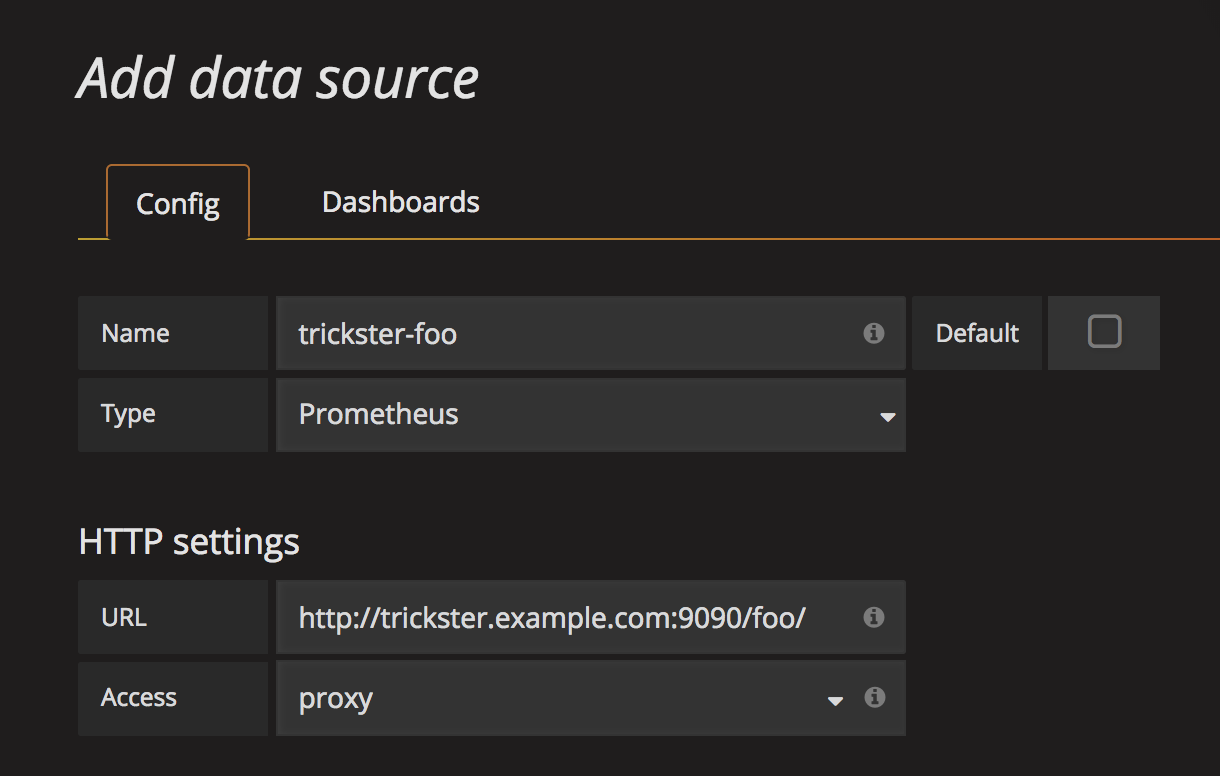
DNS Alias Configuration
In this mode, multiple DNS records point to a single Trickster instance. The FQDN used by the client to reach Trickster is mapped to specific backend configurations using the hosts list. In this mode, the URL Path is not considered during Backend Selection.
Host matching is case-insensitive and ignores the port. An entry may also be a single-label wildcard such as *.example.com, which matches foo.example.com but not example.com or a.b.example.com, or an any-depth wildcard such as **.example.com, which matches foo.example.com and a.b.example.com but not example.com; an exact entry on another backend always wins over a wildcard, and a *. entry wins over a **. entry for the same domain. A * anywhere else in an entry is rejected at load time. See Host Resolution for the full precedence order.
Example DNS-based Backend Configuration:
backends:
  # backend1 backend
  backend1:
    hosts: # users can route to this backend via these FQDNs, or via `/backend1`
      - 1.example.com
      - 2.example.com
    origin_url: 'http://prometheus.example.com:9090'
    provider: prometheus
    cache_name: default
    is_default: true
  # "foo" backend
  foo:
    hosts: # users can route to this backend via these FQDNs, or via `/foo`
      - trickster-foo.example.com
    origin_url: 'http://prometheus-foo.example.com:9090'
    provider: prometheus
    cache_name: default
  # "bar" backend
  bar:
    hosts: # users can route to this backend via these FQDNs, or via `/bar`
      - trickster-bar.example.com
    origin_url: 'http://prometheus-bar.example.com:9090'
    provider: prometheus
    cache_name: default
Example Client Request URLs:
To Request from Origin
foo: http://trickster-foo.example.com:8480/query?query=xxxTo Request from Origin
bar: http://trickster-bar.example.com:8480/query?query=xxxTo Request from Origin
backend1as default: http://trickster.example.com:8480/query?query=xxxTo Request from Origin
backend1(Method 2, via FQDN): http://backend1.example.com:8480/query?query=xxx
Note: It is currently possible to specify the same FQDN in multiple backend configurations. You should not do this (obviously). A future enhancement will cause Trickster to exit fatally upon detection at startup.
Disabling Path-based Routing for a Backend
You may wish for a backend to be inaccessible via the /backend_name/ path, and only by Hostname or as the target of a rule or ALB. You can disable path routing by setting path_routing_disabled: true for the backend, as in this example, which requires the Request’s Host header match 1.example.com or 2.example.com in order to be routed to the backend:
backends:
  backend1:
    hosts:
      - 1.example.com
      - 2.example.com
    origin_url: 'http://prometheus.example.com:9090'
    provider: prometheus
    cache_name: default
    is_default: false
    path_routing_disabled: true # this will disable routing through /backend1
2 - Health Checks
Trickster Service Health - Ping Endpoint
Trickster provides a /trickster/ping endpoint that returns a response of 200 OK and the word pong if Trickster is up and running. The /trickster/ping endpoint does not check any proxy configurations or upstream origins. The path to the Ping endpoint is configurable, see the configuration documentation for more information.
Upstream Connection Health - Backend Health Endpoints
Trickster offers health endpoints for monitoring the health of the Trickster service with respect to its upstream connection to origin servers.
General Endpoint
The main health check path is /trickster/health, which by default will return a text/plain summary of the backend health. You can request YAML or JSON format using the appropriate Accept header, or by providing a ?json or ?yaml query param.
Backend-Specific Endpoints
Each HTTP backend’s health check path is /trickster/health/BACKEND_NAME. For example, if your backend is named foo, you can perform a health check of the upstream server at http://<trickster_address:port>/trickster/health/foo. Native-protocol backends publish their scheduled status through the general endpoint without registering a synthetic HTTP origin route.
The backend health path prefix /trickster/health/ is customizable. See the example.full.yaml for more info about setting the health_handler_path configuration, or refer to this example:
mgmt:
  # this overrides the default '/trickster/health' to '/-/trickster/health'
  health_handler_path: /-/trickster/health
The behavior of a health request will vary based on the Backend provider, as each has their own health check protocol. For example, with Prometheus, Trickster makes a request to /query?query=up and (hopefully) receives a 200 OK, while for InfluxDB the request is to /ping which returns a 204 No Content.
Supported TSDB Providers are pre-configured in Trickster to perform a suitable health check operation, however these can be overridden in the configuration file.
For non-TSDB Backends, the default behavior is to make a GET request to http://origin_url:port/ and expect a 2xx response. However, all aspects of the Health Check request and expected response are configurable per-Backend.
Native MySQL Health Checks
The MySQL backend uses the same interval scheduler, timeout, transition
thresholds, status registry, metrics, reload carryover, and shutdown lifecycle
as HTTP health checks. Each probe opens a fresh connection with the backend’s
configured origin credentials and TLS policy, completes authentication,
executes COM_PING, and closes the connection.
backends:
  mysql1:
    provider: mysql
    origin_url: mysql://health-user:password@mysql.example:3306/analytics
    healthcheck:
      interval: 5s
      timeout: 3s
      failure_threshold: 3
      recovery_threshold: 3
Only interval, timeout, failure_threshold, and recovery_threshold apply
to native probes. HTTP verbs, paths, headers, bodies, and expected HTTP response
options are configuration errors for MySQL. Diagnostics exposed in health
status and logs are limited to sanitized authentication, TLS, timeout,
refused-connection, connection, and server-error categories.
Basic Health Check Configuration Example
backends:
  server1:
    provider: reverseproxycache
    origin_url: http://server1
    healthcheck: # all values below are optional
      verb: HEAD
      path: /health
Health Check With Exhaustive Request/Response Options
backends:
server1:
provider: reverseproxy
origin_url: http://server1
healthcheck: # all values below are optional
#
## customizing the health check request
#
verb: HEAD
scheme: https
host: alternate-hostname.example.com
path: /health
query: param1=value1¶m2=value2
headers:
User-Agent: health-check-agent
# if using a POST or PUT method, you can provide a string body
# body: "my health check body"
#
## customizing the expected response
#
# hc fails if a response takes longer than 1s
timeout: 1000ms
# hc fails if the response code is not in the list
expected_codes: [ 200, 204, 206, 301, 302, 304 ]
#
# hc fails if these response headers are not present and have the expected value
expected_headers:
X-Health-Check-Status: success
# hc fails if the stringified response body does not match the expected value
expected_body: "pass"
See more examples in example.full.yaml.
Health Check Integrations with Application Load Balancers
By default, a Backend will only initiate a health check on-demand, upon receiving a request to its health endpoint.
To facilitate integrations with the Trickster Application Load Balancer provider, additional options provide for 1) timed interval health checks and 2) thresholding for consecutive successful or unsuccessful health checks that determine the backend’s overall health status.
Example Health Check Configuration for use in ALB
backends:
  server1:
    provider: reverseproxy
    origin_url: http://server1
    healthcheck:
      path: /health
      timeout: 1000ms      # timeout should be <= interval
      # for ALB integration:
      interval: 1000ms     # auto-poll health every 1s
      failure_threshold: 3  # backend is unhealthy after 3 consecutive failures
      recovery_threshold: 3 # backend is healthy after 3 consecutive successes
The Prometheus default probe is /api/v1/query?query=up. Some multi-tenant Prometheus gateways reject an unbounded up with 400 bad_data: "too many series found", which keeps the member out of any ALB pool it belongs to. Override healthcheck.query with a bounded expression the backend accepts (for example query=vector(1)) when probing such backends.
Other Ways to Monitor Health
In addition to the out-of-the-box health checks to determine up-or-down status, you may want to setup alarms and thresholds based on the metrics instrumented by Trickster. See metrics.md for collecting performance metrics about Trickster.
3 - Authenticator
Trickster 2.x provides an Authenticator capability that allows you to protect Backends with an Authentication layer.
Authenticator resources are defined globally by name, and then mapped into any Backend and/or Path configuration as needed. Authenticator users can be loaded from htpasswd or csv files, or directly in the Trickster config file. You can provide credentials in plaintext, bcrypt, apache md5-script, as well as legacy formats rsa-256 and rsa-512.
Authenticators work with all Backend provider types. Requests are handled by their respective Authenticators before all other Handlers (e.g., Caches, Rules, Request Rewrites, ALB Routes, etc.).
Native MySQL listeners terminate mysql_native_password authentication and
have stricter credential-source requirements than HTTP authenticators. See the
MySQL Provider Guide.
If a request is routed via a Trickster ALB or Rule Backend through to multiple other Backends - each having different Authenticator configurations - the authentication behavior is currently undefined. In an upcoming Beta release, we will define this use case to either use the Authenticator config (if set) of the very first Backend that handled the request; or to use the first defined Authenticator regardless of how deep into the Backend chain it is.
By default, when an Authenticator handles and successfully authenticates a request, the request’s Auth credentials (e.g., Authorization Header for Basic Auth) are stripped before the request is cloned for any necessary proxying. Setting proxy_preserve: true will preserve these headers instead of stripping them.
Path Protection
When you map an Authenticator to a Backend, all Paths defined for that Backend are protected by the Authenticator. However, you can override the Authenticator on a per-Path basis by including the authenticator_name in a Path config. To bypass a Backend-wide Authenticator in a Path config, use authenticator_name: none. This allows for a few possibilities:
A Backend config with a default / Backend-wide Authenticator that has:
- specific Paths that do not require Authentication
- specific Paths mapped to different Authenticators than the default
A Backend config with no Authenticator defined (so all Paths by default are unprotected) that has:
- specific Paths mapped to different Authenticators than the default
See the example Backend configs below for more details.
Authenticator Providers
Trickster’s Authenticator feature currently supports Basic Auth and ClickHouse-compatible authentication. It was designed with extensibility in mind should there be value in adding additional Authentication providers.
Basic Auth Provider
Basic Auth is supported by using provider: basic in the Authenticator config.
By setting the showLoginForm: true config (see example_auth_1 in the blob below), Trickster will return a WWW-Authenticate: Basic realm="custom-realm-name" header on any request that requires but fails authentication, causing the login form to pop up. When showLoginForm is not present or non-true, Trickster responds with a 401 Unauthorized but does not ask the Basic Auth login form to show.
The realm attribute value defaults to the Authenticator name (e.g., example_auth_1) but can be overridden with the realm config as in the example.
If the user data changes (e.g. updated users_file contents or updated embedded users list), you must send a SIGHUP or other means to reload the Trickster config before the new user pool is processed.
ClickHouse Auth Provider
ClickHouse Auth is supported by using provider: clickhouse in the Authenticator config.
ClickHouse authentication is the same as Basic Auth, except you can also provide user and password URL params.
Example Authenticator Configs
# NOTE: Required options unrelated to Authenticators have been omitted from this
# example. It does not represent a fully-functioning Trickster Config.
# See the 'examples' directory for working copy/paste config examples.

backends:
  backend01:
    provider: reverseproxy # authenticators work with all backend providers
    authenticator_name: example_auth_1 # protects backend01 with example_auth_1 authenticator
    origin_url: https://example.com
    paths:
      - path: / # all requests are protected by example_auth_1
        match_type: prefix
        handler: proxy

  backend02:
    provider: reverseproxy # no backend-wide authenticator
    origin_url: https://example.com
    paths:
      - path: / # requests will be allowed without auth except the 2 Paths below
        match_type: prefix
        handler: proxy
      - path: /private/
        authenticator_name: example_auth_2 # example_auth_2 protects this path only
        handler: proxy
      - path: /admin/
        authenticator_name: example_auth_3 # example_auth_3 protects this path only
        handler: proxy

  backend03:
    provider: reverseproxycache
    authenticator_name: example_auth_1 # protects backend03 with example_auth_1 authenticator
    origin_url: https://example.com
    paths:
      - path: / # requests will be challenged by example_auth_1 except the 2 Paths below
        match_type: prefix
        handler: proxy
      - path: /public/
        authenticator_name: none # requests to /public will be allowed without auth
        handler: proxy
      - path: /app/admin/
        authenticator_name: example_auth_2 # example_auth_2 protects this path, not auth_1
        handler: proxy

authenticators:
  # example_auth_1 loads users from a CSV and embeds a supplemental plaintext manifest
  # It also shows the login form to client browsers when login has failed
  example_auth_1:
    provider: basic # http basic auth (required)
    proxy_preserve: true # don't strip auth headers when proxying this request upstream
    users_file: /path/to/user-manifest.csv # optional users source file
    users_file_format: csv # required when users_file is set
    users: # optional embedded users manifest (username: credential)
      user1: red123
    config: # optional provider-specific configs
      showLoginForm: true # with basic auth, causes the browser to show the login form
      realm: custom-realm-name # realm would be example_auth_1 if not overridden here

  # example_auth_2 loads users from an htpasswd file (assumed bcrypted credentials)
  example_auth_2:
    provider: basic
    users_file: /path/to/user-manifest.htpasswd # optional users source file
    users_file_format: htpasswd # required when users_file is set

  # example_auth_3 loads users from the embedded users manifest, credentials already bcrypted
  example_auth_3:
    provider: basic
    users:
      user1: $2y$asf;j2ihj0h8vabjkwdqbv29hq

  # example_auth_4 loads users from the embedded manifest, credentials injected from env,
  # and supports ClickHouse query params (user/password) in addition to Basic Auth
  example_auth_4:
    provider: clickhouse
    users:
      user1: ${USER1_PASSWORD_ENV} # ${ENV_NAME} substitution is supported
4 - AWS Integration
Trickster uses AWS credentials and SigV4 request signing in two places, and both are configured the same way:
- Signing outbound requests to an origin — the
sigv4block on a backend, below. - Autodiscovery of AWS resources — the
awsdiscovery provider, which reads an AWS API to keep an ALB pool current.
Credentials
Leaving the credential fields empty selects the standard AWS credential chain, in the order the AWS SDK resolves it:
- Environment variables (
AWS_ACCESS_KEY_ID,AWS_SECRET_ACCESS_KEY,AWS_SESSION_TOKEN) - The shared credentials and config files (
~/.aws/credentials,~/.aws/config), honoringprofile - Web-identity tokens — this is how EKS IAM Roles for Service Accounts (IRSA) and EKS Pod Identity work
- AWS SSO
- The EC2 instance metadata service (IMDSv2)
Prefer the chain over static keys wherever the platform provides one: on EKS use IRSA or Pod Identity, on EC2 use an instance profile. Static keys are supported for environments that have nothing else.
Credentials are resolved lazily, on the first signed request, and only a successful resolution is cached. Trickster therefore starts even when the instance metadata service is briefly unreachable, and a momentary metadata failure does not permanently disable signing.
Region
region may be set explicitly. When it is not, it is resolved from
AWS_REGION / AWS_DEFAULT_REGION, the shared config file, or instance
metadata. If none of those yields one, requests fail with an error naming
every source that was tried.
The sigv4 Backend Block
sigv4 signs Trickster’s outbound requests to a backend’s origin.
backends:
  amp:
    provider: prometheus
    origin_url: https://aps-workspaces.us-east-1.amazonaws.com/workspaces/ws-abc123
    sigv4:
      region: us-east-1
      # credentials omitted: use the chain (IRSA, instance profile, ...)
      # access_key: AKIA...
      # secret_key: ...        # redacted in config dumps and the health page
      # profile: production
      # role_arn: arn:aws:iam::123456789012:role/TricksterRead
      # service: aps           # default; see below
| option | meaning |
|---|---|
region | region to sign for; resolved from the environment when unset |
access_key, secret_key | a static credential pair — both or neither |
profile | a profile in the shared config file |
role_arn | a role to assume with whatever the chain resolves first |
service | the AWS service to sign for; defaults to aps |
The service default is aps — Amazon Managed Service for Prometheus.
That is deliberate: earlier releases could sign for nothing else, so every
existing config keeps working unchanged. Set service to sign for a
different AWS service (es for OpenSearch, and so on).
access_key and secret_key must be provided together. A config supplying
only one fails at startup rather than silently falling through to the
chain and authenticating as a different principal.
secret_key is redacted wherever configuration is emitted — the config
dump, the management API, logs, and error messages.
Amazon Managed Service for Prometheus
The common case. Point a prometheus backend at the workspace’s query URL
and add a sigv4 block; Trickster caches and accelerates AMP queries as it
does any other Prometheus origin.
backends:
  amp:
    provider: prometheus
    origin_url: https://aps-workspaces.us-east-1.amazonaws.com/workspaces/ws-abc123
    sigv4:
      region: us-east-1
The IAM principal needs aps:QueryMetrics, aps:GetSeries,
aps:GetLabels, and aps:GetMetricMetadata on the workspace.
Notes
- SigV4 signs a hash of the request body, so Trickster buffers a request
body in order to sign it. This applies only to backends with a
sigv4block. - SigV4 is not supported for the ClickHouse native protocol, which is not HTTP; configuring both fails at startup.
IAM for Autodiscovery
The aws discovery provider needs read-only permission for whichever
aws.service it is configured with.
aws.service | required IAM actions |
|---|---|
ec2 | ec2:DescribeInstances |
ecs | ecs:ListTasks, ecs:DescribeTasks |
A minimal policy for service: ec2:
{
  "Version": "2012-10-17",
  "Statement": [{
    "Effect": "Allow",
    "Action": "ec2:DescribeInstances",
    "Resource": "*"
  }]
}
ec2:DescribeInstances does not support resource-level permissions, so the
resource must be *; narrow the scope with a condition key if your
environment requires it. ecs:ListTasks and ecs:DescribeTasks can be
scoped to a cluster with the ecs:cluster condition key. Trickster only
ever reads.