This is the multi-page printable view of this section. Click here to print.
Getting Started
1 - Quick Start
This composition creates service containers for Prometheus, Grafana, Jaeger, Zipkin, Redis, Trickster and Mockster that together demonstrate several basic end-to-end configurations for running Trickster in your environment with different cache and tracing provider options.
Prerequisites
You should already have the following installed:
Starting the demo
Clone the Trickster Github project.
In the
tricksterdirectory, change your working directory to./examples/docker-composewith the following command:cd examples/docker-composeTo run the demo from the demo directory, enter the following command:
docker-compose up -dYou can interact with each of the services on their exposed ports (as defined in Compose file), or by running
docker logs $container_name,docker attach $container_name, etc.
Exploring Trickster
Grafana
Once the composition is running, we recommend exploring with Grafana, at http://127.0.0.1:3000/. Grafana is pre-configured with datasources and a sample dashboard that are ready-to-use for the demo.
Jaeger UI
Jaeger UI is available at http://127.0.0.1:16686, which provides visualization of traces shipped by Trickster and Grafana. The more you use trickster-based data sources in Grafana, the more traces you will see in Jaeger. This composition runs the Jaeger All-in-One container. Trickster ships some traces to the Agent and others directly to the Collector, so as to demonstrate both capabilities. The Trickster config determines which upstream origin ships which traces where.
For a variety of configurations and other bootstrap data, review the various files in the docker-compose-data folder. This might be useful for configuring and using Trickster (or any of these other fantastic projects) in your own deployments. Try adding, removing, or changing some of the trickster configurations in ./docker-compose-data/trickster-config/trickster.yaml and then docker exec docker-compose_trickster_1 kill -1 1 into the Trickster container to apply the changes, or restart the environment altogether with docker-compose restart. Just be sure to make a backup of the original config first, so you don’t have to download it again later.
Example Datasources
The sim-* datasources generate on-the-fly simulation data for any possible time range, so you can immediately use them after starting up the environment. Note, however, that the simulated data is not representative of reality in any way.
The non-sim Prometheus container that backs the prom-* datasources polls the newly-running environment to generate metrics that will then populate the dashboard. Since the Prometheus container only collects and stores metrics while the environment is running, you’ll need to wait a minute or two for those datasources to show any data on the dashoard in real-time.
Getting Real Dashboard Data
Using datasources backed by the real Prometheus and Trickster (the prom-trickster-* datasources), rather than the simulator, to explore the dashboard is more desirable for the demo. It better conveys the shape and nature of the Trickster-specific metrics that might be unfamiliar. However, since there is no historical data in the demo composition, that creates an upfront barrier.
Keeping the dashboard open and auto-refreshing against any trickster-labeled datasource will help to generate real metrics in Trickster, such as request rates, cache hit rates, etc. Prometheus will collect and store those metrics, and the Grafana dashboard will query and render those metrics. So by keeping the demo dashboard open and refreshing, you are helping to generate the very metrics that the dashboard presents, making the demo much more visually useful while being very meta.
In addition to generating metrics, using the trickster-labeled datasources generates traces that are viewable in Jaeger UI, as described above.
Stopping the Demo and Cleaning Up
To stop and remove the demo, run docker-compose down in the ./examples/docker-compose directory.
2 - Where to Place Trickster
Depending upon the size of your existing or planned deployment, there are several placement configurations available. These designs are suggestions based on common usage, and you may find alternative or hybrid placement configurations that make the most sense for your situation, based on the activity of your Dashboard and TSDB instance(s).
Single “Everything”

Single “Everything” is the most common placement model. In this configuration, you have one optional dashboard endpoint, one Trickster endpoint and one HTTP or TSDB endpoint. Behind each endpoint, you may have a single instance or a cluster. Each component is only aware of the other component’s endpoint exposure and not the underlying configuration. This configuration represents a one-for-one-for-one deployment of your Dashboard, Origin, and Trickster endpoints.
Multiple Backends

In a Multiple Backend placement, you have one dashboard endpoint, one Trickster endpoint, and multiple TSDB and/or HTTP endpoints. Trickster is aware of each upstream endpoint and treats each as a unique backend to which it proxies and caches data independently from the others. Trickster routes a request to a specific backend based on Host Header or URL Path in the client request.
This setup may benefit situations where you have one or more static file server origins serving HTML, CSS and JavaScript assets and/or one or more API endpoints, all supporting a common platform.
For Time Series Dashboard acceleration, this is a good configuration to use when you have a single dashboard that displays data about multiple redundant clusters (each with its own TSDB), or when you have a single dashboard representing information about many different kinds of systems. For example, if you operate a “Dashboard as a Service” solution under which many teams use your Dashboard system by designing their own dashboard screens and bringing their own databases, a single Trickster endpoint can be used to accelerate dashboards for all of your customers.
You will need to configure each Trickster-to-TSDB mapping separately in your dashboard application as a separately named TSDB data source. Refer to the multi-origin documentation for configuring multi-origin support in Trickster and Grafana.
In this configuration, be aware that the default ‘memory’ cache may be underpowered depending on the number of customers, as well as the size and number of queries that need to be cached by each customer. Refer to the caches document to select and configure the caching layers as needed to meet your specific situation.
Multi-Trickster
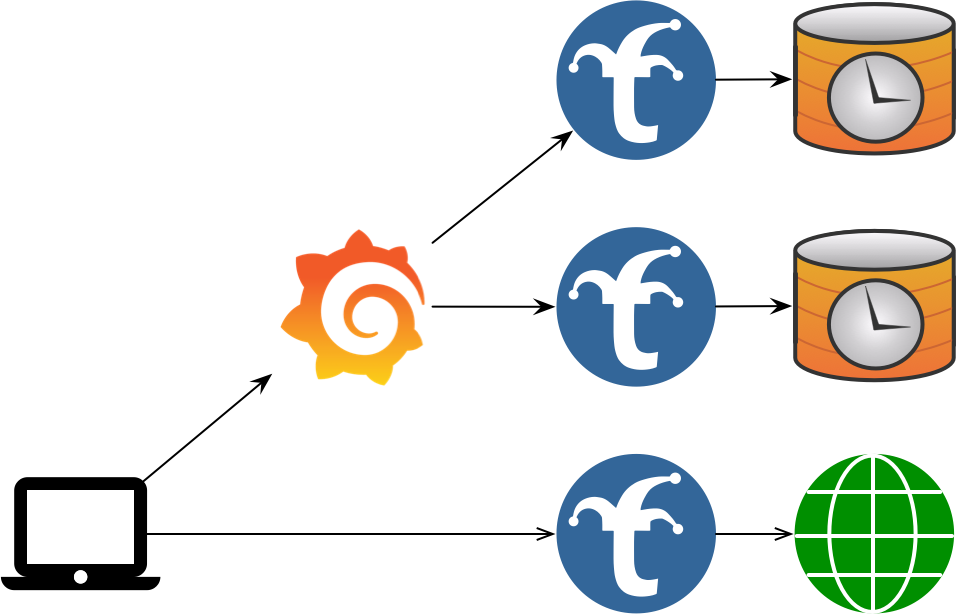
In a Multi-Trickster configuration, you have one dashboard endpoint, multiple Trickster endpoints, and multiple TSDB or HTTP endpoints, with each Trickster Endpoint having a one-to-one mapping to a TSDB/HTTP Endpoint as a pair. This is a good design if Multiple Backends is not performant enough for the amount of activity associated with your solution (e.g., you need more Tricksters). If the Dashboard system owner is different from the TSDB system owner, either party could own and operate the Trickster instance.
3 - Configuring Trickster
There are 3 ways to configure Trickster, listed here in the order of evaluation.
- Configuration File
- Environment Variables
- Command Line Arguments
Note that while the Configuration file provides a very robust number of knobs you can adjust, the ENV and CLI Args options support only basic use cases.
Internal Defaults
Internal Defaults are set for all configuration values, and are overridden by the configuration methods described below. All Internal Defaults are described in examples/conf/example.full.yaml comments.
Configuration Files
Trickster accepts a -config /path/to/trickster.yaml command line argument to specify a custom configuration file. The path can also name a directory containing configuration files. If a provided path cannot be accessed by Trickster, it will exit with a fatal error.
When a -config parameter is not provided, Trickster will check for the presence of a config file at /etc/trickster/trickster.yaml and load it if present, or proceed with the Internal Defaults if not present.
Refer to examples/conf/example.full.yaml for full documentation on format of a configuration file.
Multiple Configuration Files
When -config names a file, Trickster loads that file first and then loads supported files from a sibling conf.d directory, if the directory exists. The primary file can select a different include directory:
main:
  config_include_directory: config-parts
A relative config_include_directory is resolved from the directory containing the primary file. An explicitly configured include directory must exist. Only the primary file can set this option; included files cannot redirect configuration discovery.
When -config names a directory, Trickster loads supported files directly from that directory. The directory must contain at least one supported file, and files in this mode cannot set main.config_include_directory.
In both modes, Trickster:
- Loads only direct regular files whose names do not start with
., with.conf,.yaml, or.ymlextensions matched case-insensitively. - Loads directory entries in ascending lexical filename order. The primary file, when present, always comes first.
- Recursively merges mappings. A later scalar or sequence replaces the earlier value, while a later mapping adds to or overrides individual keys in the earlier mapping.
- Requires each file participating in a multi-source configuration to have a mapping root, one YAML document, and no duplicate keys.
For example, a fragment containing only backends.prometheus.origin_url can change that field without removing the other fields under the prometheus backend. Use null, rather than an empty mapping, when a later file must clear an earlier mapping value.
Reserved Names
Some object-name prefixes are reserved in every named section (backends, caches, listeners, discovery, rules, request_rewriters, negative_caches, tracing, and authenticators) for configuration that Trickster generates internally at runtime. A file or fragment that defines a name with a reserved prefix fails to load. The reserved prefixes are:
| Prefix | Producer |
|---|---|
kgw-- | Kubernetes Gateway/Ingress controller |
Generated configuration is merged after all files and fragments, with the same deep-merge behavior. It may only add objects under the named sections above, so it can never change main, frontend, logging, metrics, or mgmt settings or replace a file-defined object. A change to the generated configuration makes the running configuration stale for reload purposes in the same way as a change to a file, and every reload (SIGHUP, the reload handler, and auto_reload_interval) carries the current generated configuration forward.
Configuring Secrets or Sensitive Information
Trickster supports Environment variable substitution in its configuration file where sensitive information is expected.
- Supported via the following fields:
caches[*].redis.password,backends[*].healthcheck.headers,backends[*].cors.headers,backends[*].paths[*].cors.headers,backends[*].paths[*].request_headers,backends[*].paths[*].request_params,backends[*].paths[*].response_headers,backends[*].alb.user_router.users[*].to_credential,authenticators[*].users,discovery[*].headers
Usage ${ENV_VAR_NAME}, example:
caches:
  default:
    redis:
      password: "${MY_REDIS_PW}"
Environment Variables
Trickster will then check for and evaluate the following Environment Variables:
TRK_ORIGIN_URL=http://prometheus.example.com:9090- The default origin URL for proxying all http requestsTRK_ORIGIN_TYPE=prometheus- The type of supported backend serverTRK_LOG_LEVEL=INFO- Level of Logging that Trickster will outputTRK_PROXY_PORT=8480-Listener port for the HTTP Proxy EndpointTRK_METRICS_PORT=8481- Listener port for the Metrics and pprof debugging HTTP Endpoint
Command Line Arguments
Finally, Trickster will check for and evaluate the following Command Line Arguments:
-log-level INFO- Level of Logging that Trickster will output-config /path/to/trickster.yaml- See Configuration Files section above-origin-url http://prometheus.example.com:9090- The default origin URL for proxying all http requests-provider prometheus- The type of supported backend server-proxy-port 8480- Listener port for the HTTP Proxy Endpoint-metrics-port 8481- Listener port for the Metrics and pprof debugging HTTP Endpoint
Inbound Listeners
The top-level listeners map configures inbound listeners. Trickster always auto-defines three entries using the existing defaults: default, metrics, and mgmt.
Native MySQL listeners have additional protocol, authentication, TLS, and
session-lifecycle requirements. See the MySQL Provider Guide before
configuring protocol: mysql.
ClickHouse Native listeners use protocol: clickhouse; see the
ClickHouse Support Guide for ingress, origin, and TLS options.
listeners:
  default:
    address: ""
    port: 8480
    tls_address: ""
    tls_port: 8483
    connections_limit: 0
    read_header_timeout: 10s
  private_api:
    protocol: http
    address: 127.0.0.1
    port: 9080

backends:
  default:
    listener_names: [default, private_api]
    provider: prometheus
    origin_url: http://prometheus:9090
  private:
    listener_names: [private_api]
    provider: reverseproxy
    origin_url: http://private-origin
listener_names binds a backend to one or more compatible listeners. An ordinary unbound backend uses default; internal routing targets remain unexposed. A backend cannot select the reserved mgmt or metrics listeners, and validation fails for undefined or provider-incompatible listeners.
Each native listener maps to exactly one backend. Multiple HTTP listeners can share a backend, and ClickHouse can bind the same backend to HTTP and ClickHouse Native listeners.
A user-defined listener with no mapped backend is not started and produces a warning. A configured TLS port is enabled only when at least one backend mapped to that listener provides a valid frontend certificate and key in its tls section; otherwise Trickster disables that TLS port and logs a warning.
Trusted Proxies
A listener behind a load balancer or another proxy sees that proxy’s address
as the connection peer. trusted_proxies lists the addresses and CIDRs of
the proxies in front of a listener; for a connection from one of them,
Trickster resolves the client’s address from the forwarding headers it
sent, taking the nearest Forwarded (for=) or X-Forwarded-For address
that is not itself a trusted proxy, or X-Real-IP when neither header is
present. A connection from any other peer is attributed to the peer itself,
whatever headers it carries, so a client cannot claim an address by sending
its own X-Forwarded-For. The resolved address is what the
access log records as %h and %a, and
what max_query_range rejections are logged against.
proxy_protocol: true accepts a PROXY protocol v1 or v2 header ahead of each
connection, which is how many load balancers pass the client’s address
through a TCP proxy. The header is honored from every peer when
trusted_proxies is empty, and only from a trusted proxy otherwise; a
connection from any other peer is read as plain traffic. The header
precedes the TLS handshake, so it works on a listener’s TLS port too, and
the address it carries is the connection peer for everything that follows,
including trusted_proxies matching. A connection that sends no header
within 10 seconds is closed. Enabling or disabling the PROXY protocol, or
changing trusted_proxies while it is enabled, restarts the listener on
reload; changing trusted_proxies alone is applied without a restart.
listeners:
  default:
    port: 8480
    proxy_protocol: true
    trusted_proxies: [10.0.0.0/8, 192.168.1.5]
Stream Listeners
A listener whose protocol is tcp, tls or udp relays what it receives
without reading it. A tcp listener relays each accepted connection’s bytes
to its one mapped backend, and a udp listener relays each client’s
datagrams to its one mapped backend over a session of its own, so replies
find their way back. A tls listener relays TLS connections unterminated:
it reads the server name the client offers in its ClientHello, selects the
mapped backend whose hosts name it (a precise host first, then the longest
wildcard, *.example.com spanning one label and **.example.com any
number), or the one mapped backend with no hosts as the catch-all, and
then relays the whole connection, ClientHello included, so the backend
terminates TLS itself. A connection whose server name nothing routes, or
whose first bytes are not a ClientHello, is closed. A tls listener never
holds a certificate, so tls_port and tls_runtime_certs do not apply to
it; every stream listener uses port and address alone.
A stream listener’s backend is a reverseproxy (rp) backend, whose
origin_url supplies the host and port to dial and nothing more (the scheme
may be tcp:// or udp://), or an alb backend using the rr mechanism,
whose pool members are such backends. Each connection or session is
committed to one pool member chosen by weighted round robin, as an HTTP
request is; a member that cannot be dialed refuses its share rather than
passing it to a sibling, so it is health checks or discovery readiness that
take a dead member out of rotation. A member whose origin host is under the
reserved .invalid domain, which can never resolve, refuses its share
without a lookup, which is how a share that must be refused is expressed. A
discovery-backed ALB works too, and a scheme of tcp or udp on its
query keeps the discovered members’ origins honest. No cache, path, handler
or HTTP setting applies to a stream backend.
listeners:
  postgres:
    protocol: tcp
    port: 5432
    stream:
      connect_timeout: 5s
      idle_timeout: 30m
  sni:
    protocol: tls
    port: 8443
  dns:
    protocol: udp
    port: 53

backends:
  primary:
    provider: rp
    origin_url: tcp://db-primary:5432
    listener_names: [postgres]
  shop:
    provider: rp
    origin_url: tcp://shop-tls:8443
    hosts: [shop.example.com]
    listener_names: [sni]
  other:
    provider: rp
    origin_url: tcp://catch-all-tls:8443
    listener_names: [sni]
  resolver:
    provider: rp
    origin_url: udp://10.0.0.53:53
    listener_names: [dns]
The stream block tunes the relay: connect_timeout (default 10s) bounds
the name lookup and dial of the backend and, on a tls listener, the wait
for the client’s ClientHello; idle_timeout closes a connection over which
no byte has moved in either direction for that long (default none), and ends
a UDP session that has carried no datagram for that long (default 60s,
since a datagram flow has no close of its own). The idle timeout is the
connection’s: a client receiving a stream while sending nothing, or sending
one to a backend that answers only at the end, is not idle, while a write
blocked for the whole period is a stalled receiver and ends the connection.
Either side may half-close: a backend that finishes sending while the client
still has data to send is relayed as TCP allows, PROXY protocol and
connection limit included.
connections_limit bounds the connections a tcp or tls listener relays
at once, an accept beyond it waiting for one to end as on an HTTP listener,
and bounds the sessions a udp listener holds at once, a datagram from a
new client beyond it being dropped and counted as refused; a udp
listener with no limit holds at most 1024 sessions, since every open session
keeps an upstream socket, two workers and a reply buffer. The socket’s
receive loop never waits on the network: each session’s datagrams are queued
for a writer of its own, which relays them in order, so a backend that stops
accepting writes stalls that client alone. A session may hold sixteen
datagrams for its writer, and every session together eight megabytes, the
datagram each writer is in the middle of writing included; a datagram
beyond either is dropped and counted, as is one whose write blocked
for a full second, in trickster_proxy_stream_dropped_datagrams_total. A
session is opened on its worker too, so a slow or failing name lookup for
one client delays no other client’s datagrams and no shutdown; the datagrams
the client sent meanwhile are kept, up to four per session and a megabyte
across every session still opening, and relayed once the backend is reached,
ahead of anything sent later. At most 128 sessions open and 32 resolve or
dial at once, a resolved backend name being reused for thirty seconds, and a
datagram from a new client beyond those is dropped. A client
whose backend cannot be reached is remembered for five seconds, dropping
what it sends, rather than looked up again per datagram; such a client holds
no session slot and nothing it sends prolongs the memory, so a sender of
unreachable flows cannot refuse real ones. proxy_protocol and
trusted_proxies apply to tcp and tls listeners as to HTTP ones.
Changing a stream listener’s backends or stream block on reload swaps the
routing in place; connections already relayed keep the backend they reached.
A stream listener is drained on shutdown like any other: it stops accepting
connections, or datagrams from new clients, keeps relaying the established
connections and sessions until they end or the drain timeout passes, then
closes both sides of every relay and ends every pending dial.
A tcp, tls, http or https endpoint binds a TCP port and a udp
endpoint, like an HTTP/3 endpoint, a UDP port, so a tcp and a udp
listener may share a port number; validation refuses two endpoints of one
transport on one address and port.
The top-level frontend section and listener address/port fields under metrics and mgmt remain supported during the compatibility period. Trickster logs deprecation warnings when those legacy listener settings are used. When the same built-in listener is present in listeners, its new configuration takes precedence.
Configuration Validation
Trickster can validate configuration files by running trickster -validate-config -config /path/to/config. Trickster will load the file or directory and exit with the validation result, without running the configuration.
Reloading the Configuration
Trickster can gracefully reload its configuration sources from disk without impacting the uptime and responsiveness of the application.
Trickster supports manual reloads by requesting an HTTP endpoint or sending a SIGHUP (e.g., kill -1 $TRICKSTER_PID) to the Trickster process. It can also poll the effective configuration sources automatically. In all cases, at least one effective configuration source must have changed since the configuration was loaded.
Automatic Config Reload
Trickster can poll its effective configuration sources and reload after a change. This is disabled by default. Set mgmt.auto_reload_interval to a positive duration to enable it:
mgmt:
  auto_reload_interval: 10s
Polling uses the same validation and graceful reload path as SIGHUP and the management endpoint. The interval itself is reloadable, so a successful configuration update can change or disable automatic reloads. Polling is suitable for Kubernetes ConfigMap projected volumes, whose atomic symlink updates are not reliably represented as writes to the mounted file by filesystem notification APIs.
Config Reload via SIGHUP
Once you have made the desired modifications to your config file, send a SIGHUP to the Trickster process by running kill -1 $TRICKSTER_PID. The Trickster log will indicate whether the reload attempt was successful or not.
Config Reload via HTTP Endpoint
Trickster provides an HTTP Endpoint for viewing the running Configuration, as well as requesting a configuration reload.
The reload endpoint is configured by default to listen on address 127.0.0.1 and port 8484, at /trickster/config/reload. These values can be customized, as demonstrated in the example.full.yaml The examples in this section will assume the defaults. Set the port to -1 to disable the reload HTTP interface altogether.
To reload the config, simply make a GET request to the reload endpoint. If an underlying configuration source has changed, or a supported file has been added to or removed from a configured directory, the configuration will be reloaded and the caller will receive a success response. If the configuration sources have not changed, the caller will receive an unsuccessful response, and reloading will be disabled for the duration of the Reload Rate Limiter. By default, this is 3 seconds, but can be customized as demonstrated in the example config file.
If a listener address or port changes, Trickster drains the old listener before starting its replacement. Listeners whose network settings do not change retain their open sockets and receive the refreshed router in place. Removed or newly unused listeners are drained and stopped, while newly mapped listeners are started. The drain period is configurable and defaults to 30 seconds. The Drain Timeout also applies to old log files when a new log filename is provided.
Graceful Shutdown and Readiness
On SIGTERM or SIGINT, Trickster shuts down in three steps:
- The readiness endpoint (default
/trickster/ready, configurable viamgmt.ready_handler_path) immediately begins returning503 draining. It is served on every proxy listener and on the management listener, and otherwise returns200 readyonly while every listener is serving. When thekubernetessection is configured it also returns503 not programmedfrom before the listeners open until the controller’s first translation is serving (a translation the data plane rejects programs nothing), so a new pod is not routed to before the routes it exists to serve are in place. - Listeners keep accepting connections for
mgmt.shutdown_delay(default0s) so load balancers that poll readiness can stop routing new traffic here first. - Listeners stop accepting and in-flight requests are given up to
mgmt.shutdown_drain_timeout(default: the value ofreload_drain_timeout, 30 seconds) to complete, after which any remaining connections are closed.
A second SIGTERM or SIGINT during the delay or drain closes all connections immediately.
/trickster/ping is a liveness check only; it returns 200 whenever the process can serve HTTP, including during a drain. In Kubernetes, use /trickster/ping for the liveness probe and /trickster/ready for the readiness probe. Pod deletion removes the pod from Service endpoints concurrently with sending SIGTERM, so either set shutdown_delay or add a preStop sleep of a few seconds to let endpoint updates propagate before the listeners close, and set terminationGracePeriodSeconds to at least the preStop sleep plus shutdown_delay plus shutdown_drain_timeout, with a few seconds of margin. deploy/kube/deployment.yaml shows this configuration.
View the Running Configuration
Trickster also provides a http://127.0.0.1:8484/trickster/config endpoint, which returns the yaml output of the currently-running Trickster configuration. The YAML-formatted configuration will include all defaults populated, overlaid with any configuration file settings, command-line arguments and or applicable environment variables. By default, this interface is available only on the management listener. Set mgmt.config_handler_listener to metrics, both, or off to change where it is exposed. This path is configurable as demonstrated in the example config file.
Trickster also provides a sanitized view of the running configuration at http://127.0.0.1:8484/trickster/config/sanitized. If the config_handler_path is customized, append /sanitized to the configured path. The sanitized output deep-copies the running configuration, renames cache, backend, listener, and tracing resources by provider and sequence number (for example, prom-1, prom-2, alb-1, memory-1, listener-1, otlp-1), renames authenticators as auth1, auth2, etc., updates references to those resources in backend, path, ALB, rule, cache, tracing, listener, and authenticator mappings, replaces backend origin_url, Redis endpoint and endpoints, tracing endpoint, and Host-related request rewriter values with example.com, redacts per-path request and response header values, and replaces embedded authenticator users with user1: redacted, user2: redacted, etc. This endpoint is intended for sharing running configuration details in support requests without exposing private infrastructure names, origin endpoints, or user credentials.
Kubernetes Gateway and Ingress Controller
Trickster can act as a Kubernetes Gateway API and Ingress controller, programming its own data plane from the cluster’s routing objects. The controller does not exist unless the top-level kubernetes section is present; a Trickster that is not a gateway holds no watches, elects no leader, and generates no configuration. A complete deployment (RBAC, classes, ConfigMap, Deployment, Service) is in deploy/kube and described in kubernetes-deploy.md.
kubernetes:
  enabled: true                 # default true when the section is present
  connection:
    in_cluster: true
  gateway_class_controller_name: trickstercache.org/gateway-controller
  ingress_class: trickster
  watch_namespaces: []          # empty watches every namespace
  resync_interval: 10m
  debounce_window: 1s
  read_only: false              # true makes no writes to the cluster at all
  leader_election:
    enabled: true
    name: trickster-gateway-controller
  ingress:
    listener_names: [web, websecure]   # empty serves them on the default frontend
  published_service:
    namespace: trickster
    name: trickster-gateway
  defaults:
    routing_mode: service       # required: service or endpoint
    cache_name: default
    negative_cache_name: api-errors
    tracing_name: otlp          # operator-only; no annotation for these
    req_rewriter_name: strip-internal-headers
    authenticator_name: gateway-auth
    health_mode: provider
    healthcheck:                # the active probe used when health_mode is probe
      path: /healthz
      interval: 5s
defaults.routing_mode is required and has no default. In service mode a generated backend sends traffic to the Service’s cluster IP and kube-proxy load balances it. In endpoint mode Trickster discovers the Service’s endpoints and load balances across them itself, which is what makes zero-error rolling deploys and per-endpoint health possible. The two have different failure modes, so Trickster refuses to guess: a configuration that omits the mode fails validation rather than silently picking one. In endpoint mode, defaults.health_mode decides whether discovered endpoints are trusted on their EndpointSlice readiness (provider, the default) or actively probed (probe), and defaults.healthcheck is the probe used in the latter case; unset, it probes the origin’s root every 5 seconds.
gateway_class_controller_name is the name this instance claims GatewayClasses with, and is also matched against an IngressClass’s spec.controller. Objects belonging to any other controller are ignored entirely and never receive status, because writing status onto another controller’s object is worse than ignoring it. An Ingress with no spec.ingressClassName is claimed only when one of this controller’s IngressClasses is annotated ingressclass.kubernetes.io/is-default-class: "true".
watch_namespaces and namespace_selector both narrow which namespaces the controller reads, and are mutually exclusive. watch_namespaces narrows the watches themselves, so a namespace-scoped RBAC grant is sufficient. namespace_selector watches all namespaces and filters by the namespace’s labels, which additionally requires cluster-wide read access to namespaces.
ingress.listener_names are the listeners claimed Ingresses are served on, named exactly as a backend names the listeners it is served on. A Gateway declares its own ports, but an Ingress has no way to, so its listeners are configured in the listeners section like any other and named here; naming none serves them on the default frontend, which is where a backend that names no listener is served. See kubernetes-ingress.md for how Ingress objects are translated and for the trickstercache.org/* annotations, and kubernetes-gateway.md for how Gateway API objects are translated, including how a GatewayClass’s parametersRef overrides defaults for its Gateways.
defaults names objects defined elsewhere in the configuration — a cache, a negative cache, a tracer, a request rewriter, an authenticator — and a name that is not defined fails startup, the same way a backend’s would. A route may override cache_name and negative_cache_name by annotation; the rest are operator settings only, because selecting a tracer is infrastructure and selecting an authenticator is a capability. See kubernetes-ingress.md. Caching behavior beyond what an annotation may carry — a time series provider, the cache key, the result header — is attached with the TricksterCachePolicy resource; see kubernetes-cache-policy.md.
read_only, leader_election and published_service govern what the controller writes back to the cluster. Every replica programs its own data plane; status on the claimed objects, and Events describing what could not be done with them, are written by one replica, elected over a Lease named by leader_election, or by every replica when leader_election.enabled is false. read_only: true writes nothing and needs no write permission. published_service names the Service whose addresses are published into Gateway and Ingress status; it is watched in its own namespace, which need not be a watched one. defaults.tracing_name also selects the tracer the controller’s own reconcile spans report to. See kubernetes-gateway.md for what is written and metrics.md for the controller’s metrics.
Generated objects are named with the reserved kgw-- prefix. Configuration files may not define an object with that prefix and the controller may not generate one without it, so generated and hand-written configuration can never collide in either direction. See kubernetes-rbac.md for the permissions the controller needs.