This is the multi-page printable view of this section. Click here to print.
Object Caching
1 - Byte Range Request Support
Trickster’s HTTP Reverse Proxy Cache offers best-in-class acceleration and caching of Byte Range Requests.
Much like its Time Series Delta Proxy Cache, Trickster’s Reverse Proxy Cache will determine what ranges are cached, and only request from the origin any uncached ranges needed to service the client request, reconstituting the ranges within the cache object. This ensures minimal response time for all Range requests.
In addition to supporting requests with a single Range (Range: bytes=0-5) Trickster also supports Multipart Range Requests (Range: bytes=0-5, 10-20).
Fronting Origins That Do Not Support Multipart Range Requests
In the event that an upstream origin supports serving a single Range, but does not support serving Multipart Range Requests, which is quite common, Trickster can transparently enable that support on behalf of the origin. To do so, Trickster offers a unique feature called Upstream Range Dearticulation, that will separate any ranges needed from the origin into individual, parallel HTTP requests, which are reconstituted by Trickster. This behavior can be enabled for any origin that only supports serving a single Range, by setting the origin configuration value dearticulate_upstream_ranges = true, as in this example:
backends:
  default:
    provider: reverseproxycache
    origin_url: 'http://example.com/'
    dearticulate_upstream_ranges: true
If you know that your clients will be making Range requests (even if they are not Multipart), check to ensure the configured origin supports Multipart Range requests. Use curl to request any static object from the origin, for which you know the size, and include a Multipart Range request; like curl -v -H 'Range: bytes=0-1, 3-4' 'http://example.com/object.js'. If the origin returns 200 OK and the entire object body, instead of 206 Partial Content and a multipart body, enable Upstream Range Dearticulation to ensure optimal performance.
This is important because a partial hit could result in multiple ranges being needed from the origin - even for a single-Range client request, depending upon what ranges are already in cache. If Upstream Range Dearticulation is disabled in this case, full objects could be unnecessarily returned from the Origin to Trickster, instead of small delta ranges, irrespective of the object’s overall size. This may or may not impact your use case.
Rule of thumb: If the origin does not support Multipart requests, enable Upstream Range Dearticulation in Trickster to compensate. Conversely, if the origin does support Multipart requests, do not enable Upstream Range Dearticulation.
Disabling Multipart Ranges to Clients
One of the great benefits of using Upstream Range Dearticulation is that it transparently enables Multipart Range support for clients, when fronting any origin that already supports serving just a single Range.
There may, however, be cases where you do not want to enable Multipart Range support for clients (since its paired Origin does not), but need Upstream Range Dearticulation to optimize Partial Hit fulfillments. For those cases, Trickster offers a setting to disable Multipart Range support for clients, while Upstream Range Dearticulation is enabled. Set multipart_ranges_disabled = true, as in the below example, and Trickster will strip Multipart Range Request headers, which will result in a 200 OK response with the full body. Client single Range requests are unaffected by this setting. This should only be set if you have a specific use case where clients should not be able to make multipart Range requests.
backends:
  default:
    provider: reverseproxycache
    origin_url: 'http://example.com/'
    dearticulate_upstream_ranges: true
    multipart_ranges_disabled: true
Partial Hit with Object Revalidation
As explained above, whenever the client makes a Range request, and only part of the Range is in the Trickster cache, Trickster will fetch the uncached Ranges from the Origin, then reconstitute and cache all of the accumulated Ranges, while also replying to the client with its requested Ranges.
In the event that a cache object returns 1) a partial hit, 2) that is no longer fresh, 3) but can be revalidated, based on a) the Origin’s provided caching directives or b) overridden by the Trickster operator’s explicit path-based Header configs; Trickster will revalidate the client’s requested-but-cached range from the origin with the appropriate revalidation headers.
In a Partial Hit with Revalidation, the revalidation request is made as a separate, parallel request to the origin alongside the uncached range request(s). If the revalidation succeeds, the cached range is merged with the newly-fetched range as if it had never expired. If the revalidation fails, the Origin will return the range needed by the client that was previously cached, or potentially the entire object - either of which are used to complete the ranges needed by the client and update the cache and caching policy for the object.
Range Miss with Object Revalidation
Trickster recognizes when an object exists in cache, but has none of the client’s requested Ranges. This is a state that lies between Cache Miss and Partial Hit, and is known as “Range Miss.” Range Misses can happen frequently on Range-requested objects.
When a Range Miss occurs against an object that also requires revalidation, Trickster will not initiate a parallel revalidation request, since none of the client’s requested Ranges are actually eligible for revalidation. Instead, Trickster will use the Response Headers returned by the Range Miss Request to perform a local revalidation of the cache object. If the object is revalidated, the new Ranges are merged with the cached Ranges before writing to cache based on the newly received Caching Policy. If the object is not revalidated, the cache object is created anew solely from the Range Miss Response.
Multiple Parts Require Revalidation
A situation can arise where there is a partial cache hit has multiple ranges that require revalidation before they can be used to satisfy the client. In these cases, Trickster will check if Upstream Range Dearticulation is enabled for the origin to determine how to resolve this condition. If Upstream Range Dearticulation is not enabled, Trickster trusts that the upstream origin will support Multipart Range Requests, and will include just the client’s needed-and-cached-but-expired ranges in the revalidation request. If Upstream Range Dearticulation is enabled, Trickster will forward, without modification, the client’s requested Ranges to the revalidation request to the origin. This behavior means Trickster currently does not support multiple parallel revalidation requests. Whenever the cache object requires revalidation, there will be only 1 revalidation request upstream, and 0 to N additional parallel upstream range requests as required to fulfill a partial hit.
If-Range Not Yet Supported
Trickster currently does not support revalidation based on If-Range request headers, for use with partial download resumptions by clients. If-Range headers are simply ignored by Trickster and passed through to the origin, which can result in unexpected behavior with the Trickster cache for that object.
We plan to provide full support for If-Range as part of Trickster 1.1 or 2.0
Mockster Byte Range
For verification of Trickster’s compatibility with Byte Range Requests (as well as Time Series data), we created a golang library and accompanying standalone application dubbed Mockster. Mockster’s Byte Range library simply prints out the Lorem ipsum ... sample text, pared down to the requested range or multipart ranges, with a few bells and whistles that allow you to customize its response for unit testing purposes. We make extensive use of Mockster in unit testing to verify the integrity of Trickster’s output after performing operations like merging disparate range parts, extracting ranges from other ranges, or from a full body, compressing adjacent ranges into a single range in the cache, etc.
It is fairly straightforward to run or import Mockster into your own applications. For examples of using it for Unit Testing, check out /internal/proxy/engines/objectproxycache_test.go.
2 - Collapsed Forwarding
Collapsed Forwarding is feature common among Reverse Proxy Cache solutions like Squid, Varnish and Apache Traffic Server. It works by ensuring only a single request to the upstream origin is performed for any object on a cache miss or revalidation attempt, no matter how many users are requesting the object at the same time.
Trickster has support for two types of Collapsed Forwarding: Basic (default) and Progressive
Basic Collapsed Forwarding
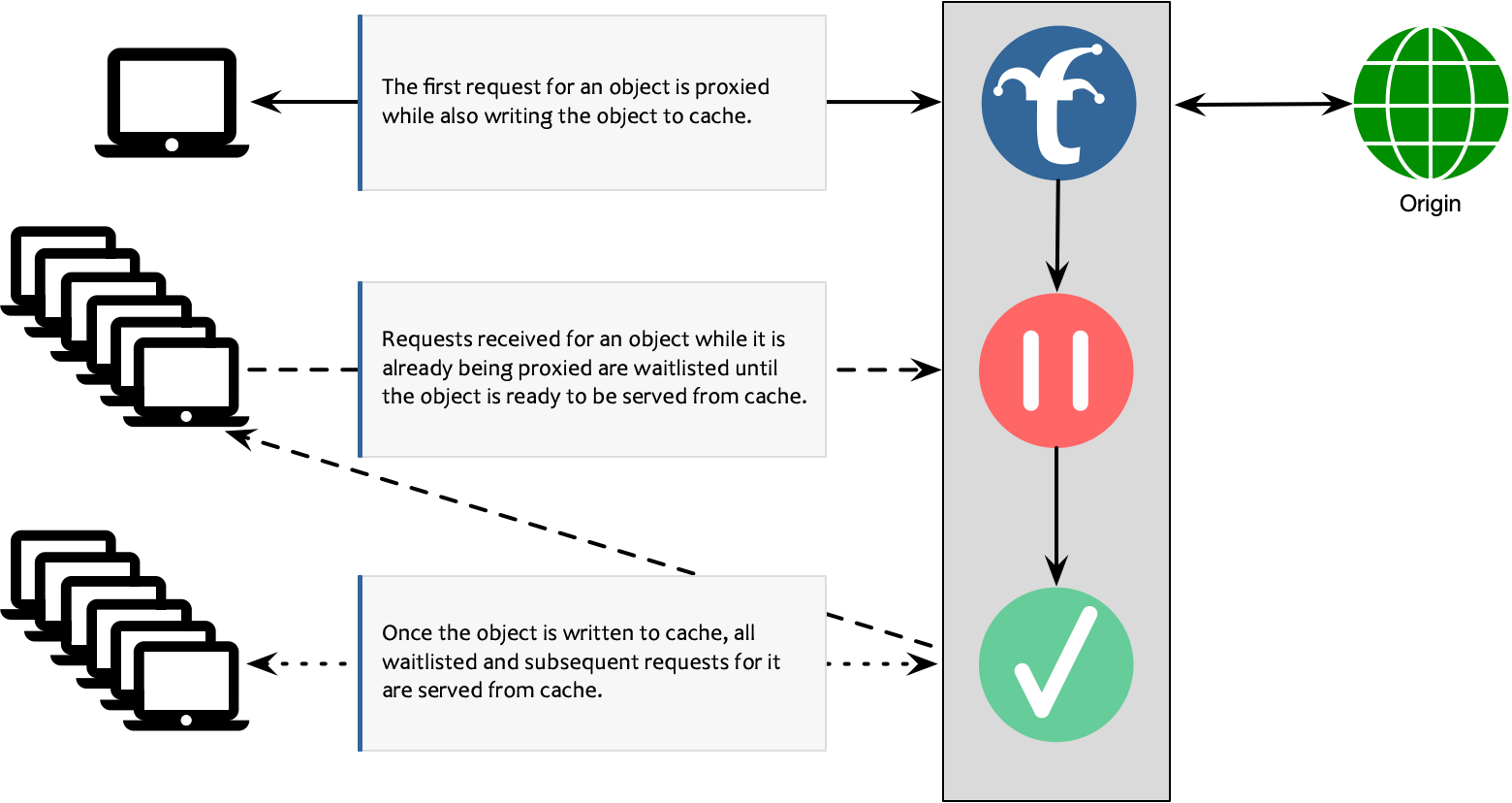
Basic Collapsed Forwarding is the default functionality for Trickster, and works by waitlisting all requests for a cacheable object while a cache miss is being serviced for the object, and then serving the waitlisted requests once the cache has been populated.
The feature is further detailed in the following diagram:
Progressive Collapsed Forwarding
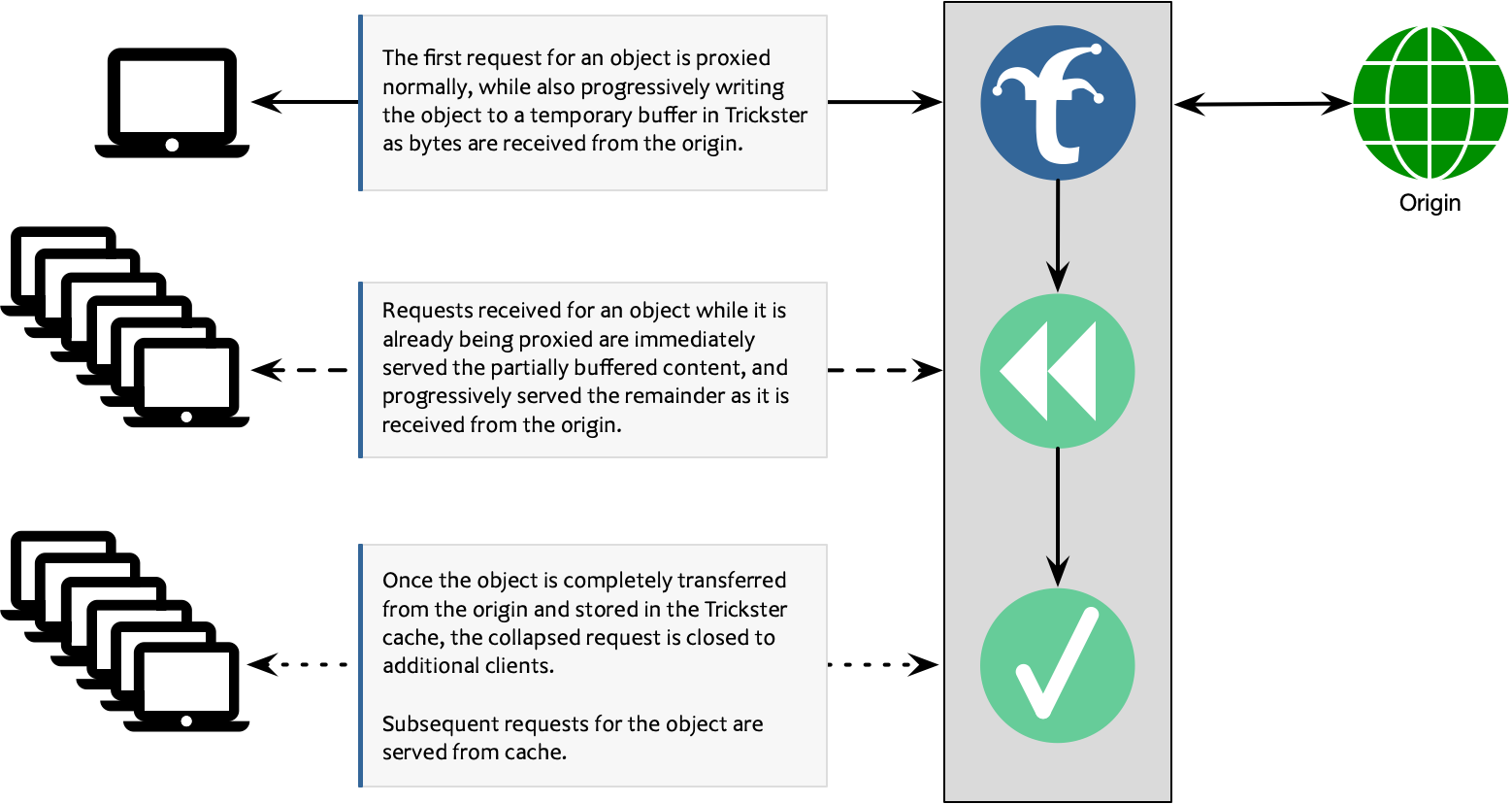
Progressive Collapsed Forwarding (PCF) is an improvement upon the basic version, in that it eliminates the waitlist and serves all simultaneous requests concurrently while the object is still downloading from the server, similar to Apache Traffic Server’s “read-while-write” feature. This may be useful in low-latency applications such as DASH or HLS video delivery, since PCF minimizes Time to First Byte latency for extremely popular objects.
The feature is further detailed in the following diagram:
PCF for Proxy-Only Requests
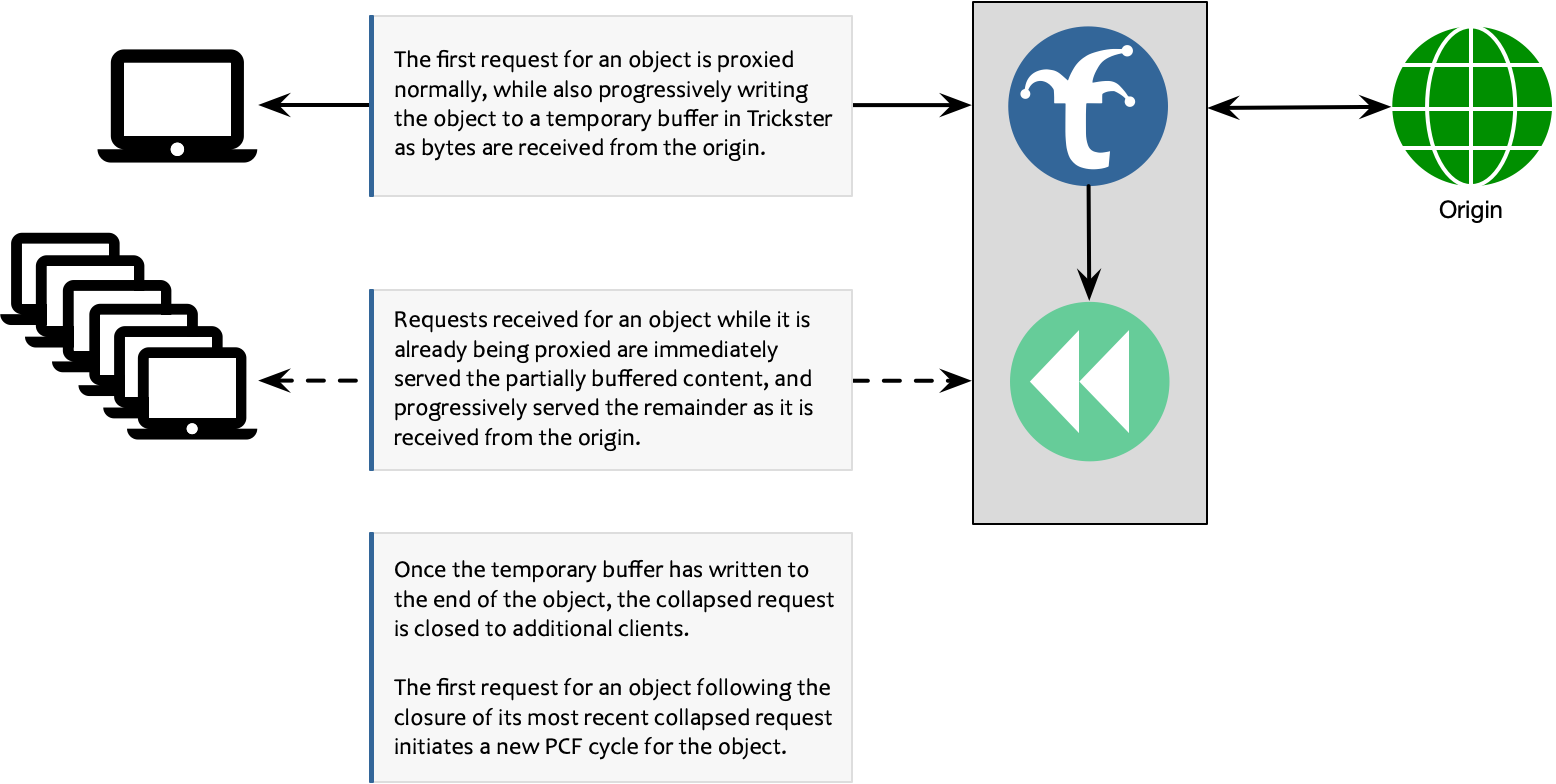
Trickster provides a unique feature that implements PCF in Proxy-Only configurations, to bring the benefits of Collapsed Forwarding to HTTP Paths that are not configured to be routed through the Reverse Proxy Cache. (See Paths documentation for more info on routing).
The feature is further detailed in the following diagram:
When collapsing is refused
Collapsing delivers the same bytes to every client that joins, which is a stronger claim than caching makes. Trickster therefore applies the shared-cache rules from RFC 9111 before fanning a response out, and refuses when any of the following holds. A refused response is still served normally; each client simply gets its own fetch.
| Condition | Reason |
|---|---|
| Method is not GET or HEAD | Collapsing a non-idempotent request would mean one of them never executed (RFC 9110 9.2.1) |
| Response status is not 200 | Partial and error responses are not safely shareable |
Cache-Control: private or no-store | Explicitly single-user (RFC 9111 5.2.2.5, 5.2.2.7) |
Response carries Set-Cookie | Per-client state; sharing it would disclose it across users |
Request carried Authorization without public, s-maxage or must-revalidate on the response | RFC 9111 3.5 |
Vary: *, or a Vary field not listed in the path’s cache_key_headers | Two joiners could legitimately deserve different bytes |
Content-Type: text/event-stream | An event stream is per-subscriber, not a shared object |
Response is larger than the backend’s max_object_size_bytes | The shared buffer is bounded by that limit |
The default is to refuse: a missed collapse costs one extra origin fetch, while an incorrect one would serve one user’s response to another.
Object sizes
A response with a known Content-Length is buffered exactly. A response of
unknown length – a chunked transfer, which is common for live video manifests
and segments – is buffered as it arrives, growing up to the backend’s
max_object_size_bytes. A collapsed transfer that exceeds that limit is aborted
for every attached client rather than being silently truncated.
If the origin fails or ends a body early, every client attached to that collapse receives a failed response. An incomplete object is never presented as complete and is never written to cache.
How to enable Progressive Collapsed Forwarding
When configuring path configs as described in Paths Documentation add collapsed_forwarding: progressive in any path config using the proxy or proxycache handlers.
Example:
origins:
  test:
    paths:
      - path: /test_path1/
        match_type: prefix
        handler: proxycache
        collapsed_forwarding: progressive
      - path: /test_path2/
        match_type: prefix
        handler: proxy
        collapsed_forwarding: progressive
See the example.full.yaml for more configuration examples.
How to test Progressive Collapsed Forwarding
An easy way to test PCF is to set up your favorite file server to host a large file(Lighttpd, Nginx, Apache WS, etc.), In Trickster turn on PCF for that path config and try make simultaneous requests. If the networking between your machine and Trickster has enough bandwidth you should see both streaming at the equivalent rate as the origin request.
Example:
- Run a Lighttpd instance or docker container on your local machine and make a large file available to be served
- Run Trickster locally
- Make multiple curl requests of the same object
You should see the speed limited on the origin request by your disk IO, and your speed between Trickster limited by Memory/CPU