This is the multi-page printable view of this section. Click here to print.
Routing & Load Balancing
1 - Application Load Balancer
Trickster 2.x provides an Application Load Balancer that is easy to configure and provides unique features to aid with Scaling, High Availability and other applications. The ALB supports several balancing Mechanisms:
| Mechanism | Config | Provides | Description |
|---|---|---|---|
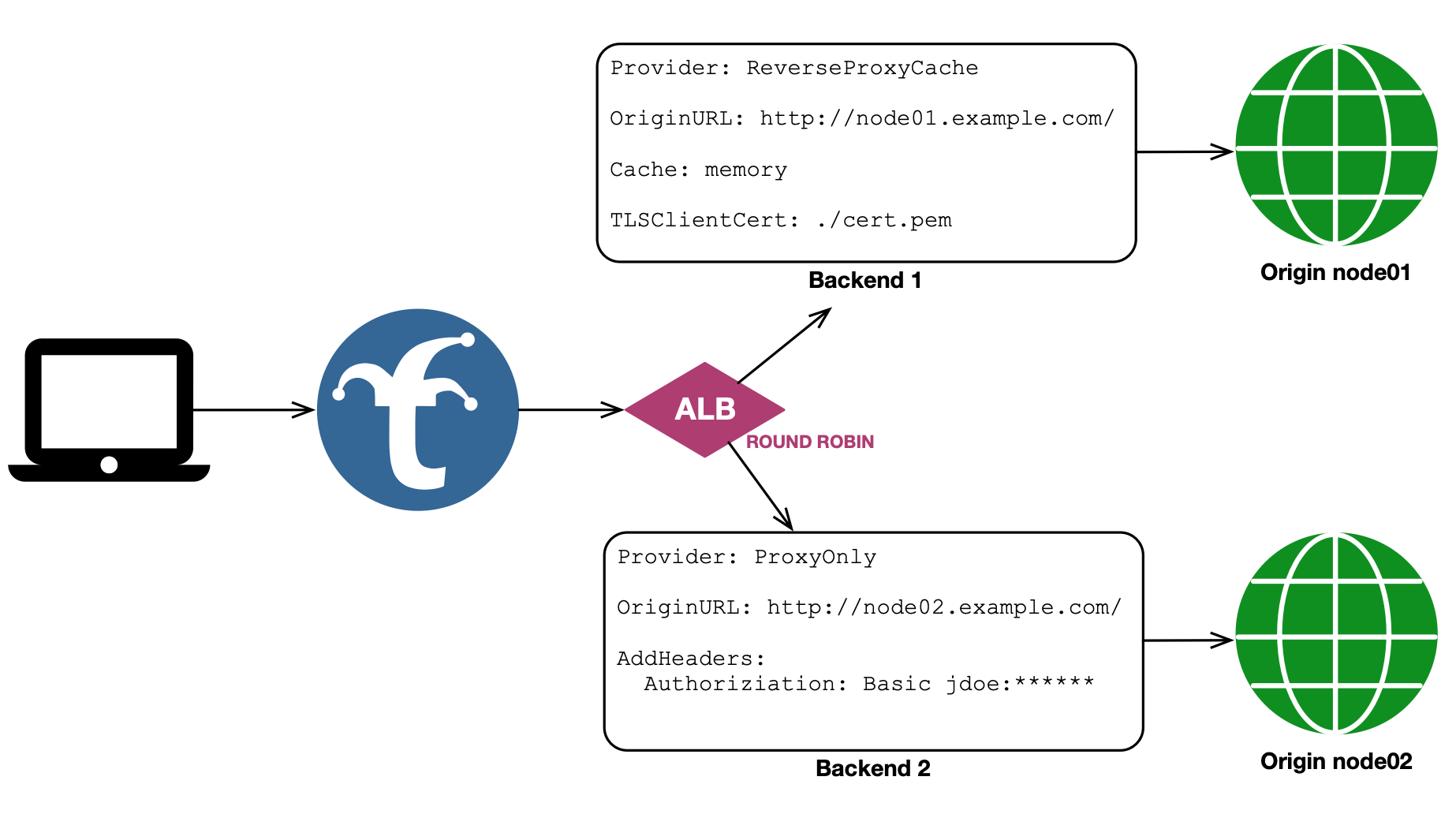
| Round Robin | rr | Scaling | a basic, stateless round robin between healthy pool members |
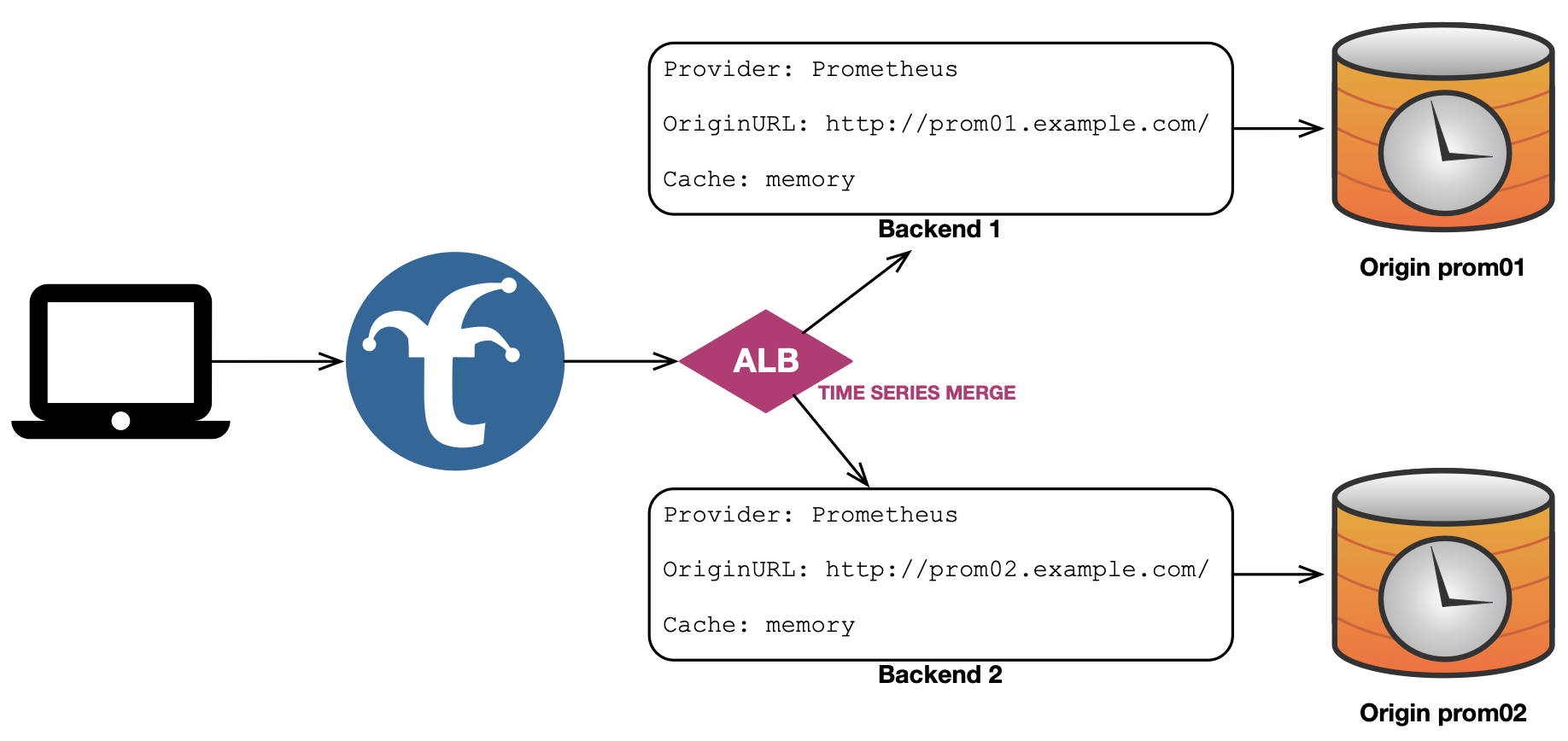
| Time Series Merge | tsm | Federation | uses scatter/gather to collect and merge data from multiple replica tsdb sources |
| First Response | fr | Speed | fans a request out to multiple backends, and returns the first response received |
| First Good Response | fgr | Speed | fans a request out to multiple backends, and returns the first response received with a status code < 400 |
| Newest Last‑Modified | nlm | Freshness | fans a request out to multiple backends, and returns the response with the newest Last-Modified header |
| User Router | ur | Control | Inspects the credentials in the Request and routes it based on the Username |
Integration with Backends
The ALB works by applying a Mechanism to select one or more Backends from a list of Healthy Pool Members, through which to route a request. Pool member names represent Backend Configs (known in Trickster 0.x and 1.x as Origin Configs) that can be pre-existing or newly defined.
All settings and functions configured for a Backend are applicable to traffic routed via an ALB - caching, rewriters, rules, tracing, TLS, etc.
In Trickster configuration files, each ALB itself is a Backend, just like the pool members to which it routes. This makes it possible to configure infinite loops (e.g., where ALB1 has ALB2 in its pool, and ALB2 has ALB1 in its pool). However, at startup Trickster will validate ALB configurations by following all ALBs’ possible paths, and exit with a startup failure if any infinite loops are detected.
In addition to (or instead of) a static pool list, an ALB’s pool membership can be discovered and kept current automatically at runtime — from Kubernetes, the AWS, Google Cloud and Azure APIs, the Docker Engine, the Consul or Nomad service registries, DNS records, an HTTP endpoint, or a watched member-list file. See ALB Autodiscovery.
Mechanisms Deep Dive
Each mechanism has its own use cases and pitfalls. Be sure to read about each one to understand how they might apply to your situation.
Basic Round Robin
A basic Round Robin rotates through a pool of healthy backends used to service client requests. Each time a client request is made to Trickster, the round robiner will identify the next healthy backend in the rotation schedule and route the request to it.
The Trickster ALB is intended to support stateless workloads, and currently does not support Sticky Sessions or other advanced ALB capabilities.
Weighted Round Robin
Trickster supports Weighted Round Robin with a first-class integer weight on pool entries. A pool entry may be a plain backend name (weight 1) or a mapping with an explicit weight:
pool:
  - node01            # weight 1
  - name: node02
    weight: 3         # receives 3 of every 4 requests
Apportionment is exact: over any totalWeight consecutive requests against a stable healthy pool, each member is selected exactly weight times. Weights also carry through from autodiscovery sources that convey them (DNS SRV record weights, member-file weight fields); see ALB Autodiscovery.
The legacy workaround of repeating a member name multiple times in the pool list still functions, but explicit weights replace it and are preferred.
Weights apply to mechanisms that select a single member per request (round robin). Fan-out mechanisms (fr, fgr, nlm, tsm) dispatch to every healthy member regardless of weight.
More About Our Round Robin Mechanism
Trickster’s Round Robin Mechanism works by maintaining an atomic uint64 counter that increments each time a request is received by the ALB. With uniform weights, the ALB performs a modulo operation on the request’s counter value, with the denominator being the count of healthy backends in the pool; the resulting value, ranging from 0 to len(healthy_pool) - 1, indicates the assigned backend based on the counter and current pool size. With mixed weights, the modulo denominator becomes the pool’s total weight, and each member owns a contiguous weight-sized span of that rotation. Selection remains lock- and allocation-free in both forms.
Example Round Robin Configuration
backends:

  # traditional Trickster backend configurations

  node01:
    provider: reverseproxycache # will cache responses to the default memory cache
    path_routing_disabled: true # disables frontend request routing via /node01 path
    origin_url: https://node01.example.com # make requests with TLS
    tls: # this backend might use mutual TLS Auth
      client_cert_path: ./cert.pem
      client_key_path: ./cert.key

  node02:
    provider: reverseproxy      # requests will be proxy-only with no caching
    path_routing_disabled: true # disables frontend request routing via /node02 path
    origin_url: http://node-02.example.com # make unsecured requests
    request_headers: # this backend might use basic auth headers
      Authoriziation: "basic jdoe:${NODE_02_AUTH_TOKEN}"

  # Trickster 2.x ALB backend configuration, using above backends as pool members

  node-alb:
    provider: alb
    alb:
      mechanism: rr # round robin
      pool:
        - node01 # as named above; weight 1
        - node02
        # to weight the pool, use the mapping form on any entry:
        # - name: node02
        #   weight: 2 # node02 would receive 2 of every 3 requests
Here is the visual representation of this configuration:
Time Series Merge
The Time Series Merge mechanism supports both High Availability and federation. Each physical backend represents one logical data shard. Set the backend-level replica_group option to the same value on physical backends that are HA replicas of that shard. TSM first coalesces those replicas, using configured pool order to resolve overlapping points and later replicas to fill gaps, and then reduces the distinct logical shards.
When a TSM pool member is itself an ALB (for example, a round-robin ALB over
Prometheus backends), set replica_group on that immediate nested ALB. Trickster
uses the wrapper as the replica-group boundary while delegating TSM planning and
finalization to its terminal Prometheus provider. Other ALBs and non-TSM
providers cannot set an explicit replica group.
When replica_group is omitted, it defaults to the backend name, so existing configurations continue to treat every backend as a distinct shard. Explicitly set it for HA pools that use non-idempotent aggregations such as sum, count, or avg; otherwise replicas will be counted as separate data.
Replica grouping is backend-global, not ALB-specific. A backend cannot be a replica in one ALB and a disjoint shard in another; define a second backend entry if both views are required. Partially overlapping datasets are not representable: one backend belongs to one logical shard for all TSM queries. Injected labels remain useful output and routing metadata, but they do not establish replica provenance.
If replicas disagree at the same logical point, the first configured member wins deterministically and Trickster records a conflict metric and warning log. A failed replica does not make a response partial when another replica covers its group. If an entire logical group is unavailable, the response is marked partial and includes a warning.
For request paths that are not mergeable by the configured time series provider, TSM does not fan the request out. Those requests are dispatched directly to the first live pool target. The same first-live-target fallback is used when a request cannot be prepared for the merge path.
Merge Strategy
Within each configured replica group, TSM deduplicates values when merging series with identical labels — for each timestamp, only one replica value is kept. Across different groups it uses the query’s merge strategy.
For Federation use cases where backends hold different, non-overlapping data, Trickster automatically selects a merge strategy per query by parsing it with the upstream Prometheus PromQL parser and inspecting the outermost aggregation operator. No configuration is required. Because selection uses the parsed expression, redundant parentheses, comments, whitespace, keyword case, and by/without placement do not change the selected strategy. This is particularly important for PromQL aggregation queries like sum() or avg(), which strip labels from results and cause series from different backends to appear identical.
| Outer Operator | Trickster Merge Behavior |
|---|---|
sum | Sum of values per unique label set + timestamp |
count | Sum of values per unique label set + timestamp |
count_values | Sum of values per unique label set + timestamp |
min | Minimum value per unique label set + timestamp |
max | Maximum value per unique label set + timestamp |
group | Deduplicate per unique label set + timestamp |
avg | Dual queries (avg→sum and avg→count); weighted arithmetic mean per unique label set + timestamp |
topk, bottomk | Query the inner expression across backends, merge it, then apply final top/bottom-k selection per timestamp and aggregation group |
stddev, stdvar | Pool shard-local count, mean, and variance states, then finalize the global population variance or standard deviation |
quantile | Query the inner expression, merge all float samples globally, then calculate the exact quantile per timestamp and aggregation group |
limit_ratio | Apply Prometheus-compatible label-hash sampling, globally finalizing a supported inner aggregation when necessary |
limitk | Query the inner expression, merge it globally, then retain the first k samples in stable TSM series order per timestamp and aggregation group |
sum, count, or count_values followed by or vector(0) | Sum of values per unique label set + timestamp |
| (none) | Deduplicate (default) |
For avg queries, Trickster issues two concurrent sub-queries per backend shard — one rewriting the outer avg to sum and another to count — then computes a true weighted arithmetic mean (sum_total / count_total) per series per timestamp. This avoids the skew introduced by a naïve avg-of-averages when backends have different data cardinalities.
When an outer aggregation’s input contains a nested aggregation, binary expression, or function that needs globally complete input, Trickster retains the aggregation’s established merge strategy and adds a warning. This fail-open behavior preserves correct results when the input series are colocated while noting that results can be inaccurate when matching series are split across shards.
For sum, count, or count_values followed by or vector(0), Trickster sends the complete expression to each backend and sums the results, because a backend without matching series contributes only the explicit zero. This requires an aggregation input that each backend can evaluate independently: no nested aggregation, binary expression, or function that needs globally complete input. When the or uses on(...) or ignoring(...) label matching, this applies only to sum or count without by or without grouping; other forms use the warning fallback described below.
For topk and bottomk, Trickster sends the inner expression to each backend, merges those inner results using the inner expression’s merge strategy, then applies the final rank-and-trim step per timestamp and aggregation group. This prevents each backend’s local topk/bottomk result from being weighted equally during the merge. If the inner expression is avg, Trickster still uses the weighted sum/count rewrite before applying the final rank. This also applies when the rank aggregation is wrapped in sort() or sort_desc().
For stddev and stdvar, Trickster requests the shard-local count, mean, and population variance and pools those states before finalizing the requested global value. Native histograms are excluded from this float-only calculation. Supported already-aggregated inner expressions such as count, min, max, and group are merged globally before the outer variance aggregation.
For quantile, Trickster sends the inner expression to every backend, globally merges supported inner aggregations, ignores native-histogram samples, and calculates Prometheus’s exact sort-and-interpolate value independently for each timestamp and group. Exact quantiles require every relevant float sample, so their fanout responses can be substantially larger than shard-local quantiles and remain subject to the configured response-capture limits. A capture-limit failure is returned rather than silently substituting an approximate result.
For limit_ratio, selection uses the same complete-label-set hash threshold as Prometheus. Supported inner aggregations are merged before the ratio is applied; shard-local expressions can be sampled by each backend because the hash decision for a given label set is independent of shard placement.
For limitk, Trickster reproduces the current Prometheus evaluator’s first-visited algorithm over TSM’s stable merged-series order: lexicographic JSON serialization of the complete label set, followed by the series name. Selection is independent for every timestamp and aggregation group, retains complete labels and both float and native-histogram samples, and does not rank candidates by value or label hash.
Prometheus does not define a canonical storage visitation order for limitk. A separate Prometheus deployment whose storage returns the same series in a different order may therefore select different labels. Trickster guarantees the requested cardinality, grouping, and repeatability for the same merged input, and fanout completion order does not affect the result. limitk remains an experimental PromQL operator, so this compatibility contract may change with Prometheus.
For an unsupported inner expression, Trickster retains the established per-shard fallback and injects a warnings entry in the Prometheus response body to alert the caller that results may be inaccurate.
The same deduplicating fallback and warning apply when an aggregation is not the query’s outermost operation (for example, histogram_quantile(0.9, sum by (le) (rate(x_bucket[5m])))), when an aggregation is combined with a binary expression other than the supported or vector(0) form, and when the query cannot be parsed as PromQL, such as a query that uses another dialect’s extensions.
When a non-dedup strategy is in effect and backends have injected labels configured, those labels are automatically stripped before merging. This ensures series from different backends hash identically for aggregation, and the injected labels do not appear in the response.
Native Histograms
Native histogram samples are preserved through the merge rather than being numerically aggregated. When a timestamp has a histogram on one backend and a float sample on another (or histograms on both), the histogram value is kept as-is — numeric aggregators like sum only apply across float samples. This prevents mixed-type series from being corrupted into garbage values when backends return a mix of float and histogram samples at the same timestamp.
Max Query Range Limitation
Trickster ALB supports enforcing a max_query_range duration on ALB backends. For details on how to configure and use query range limits, see the Query Range Limits documentation.
Providers Supporting Time Series Merge
Trickster currently supports Time Series Merging for the following TSDB Providers:
| Provider Name |
|---|
| Prometheus |
We hope to support more TSDB’s in the future and welcome any help!
Example TS Merge Configuration
backends:

  # prom01a and prom01b are redundant and poll the same targets
  prom01a:
    provider: prometheus
    replica_group: prom01
    origin_url: http://prom01a.example.com:9090
    prometheus:
      labels:
        region: us-east-1

  prom01b:
    provider: prometheus
    replica_group: prom01
    origin_url: http://prom01b.example.com:9090
      labels:
        region: us-east-1

  # prom-alb-01 scatter/gathers to prom01a and prom01b and merges responses for the caller.
  # Enforces a max 14-day time range limit on all incoming merge requests.
  prom-alb-01:
    provider: alb
    max_query_range: 14d
    alb:
      mechanism: tsm # time series merge
      pool:
        - prom01a
        - prom01b

  # prom02 and prom03 poll unique targets but produce the same metric names as prom01a/b
  prom02:
    provider: prometheus
    origin_url: http://prom02.example.com:9090
      labels:
        region: us-east-2

  prom03:
    provider: prometheus
    origin_url: http://prom03.example.com:9090
      labels:
        region: us-west-1

  # prom-alb-all scatter/gathers prom01a/b, prom02 and prom03 and merges their responses
  # for the caller. The merge strategy is automatically selected per-query based on the
  # outer PromQL aggregation operator. Injected labels are automatically stripped before
  # merging so that series from different backends are combined correctly. Because prom01a
  # and prom01b are in the same replica_group, their values are de-duplicated before being
  # merged/reduced with prom02 and prom03.
  prom-alb-all:
    provider: alb
    alb:
      mechanism: tsm
      pool:
        - prom01a
        - prom01b
        - prom02
        - prom03
Here is the visual representation of a basic TS Merge configuration:
First Response
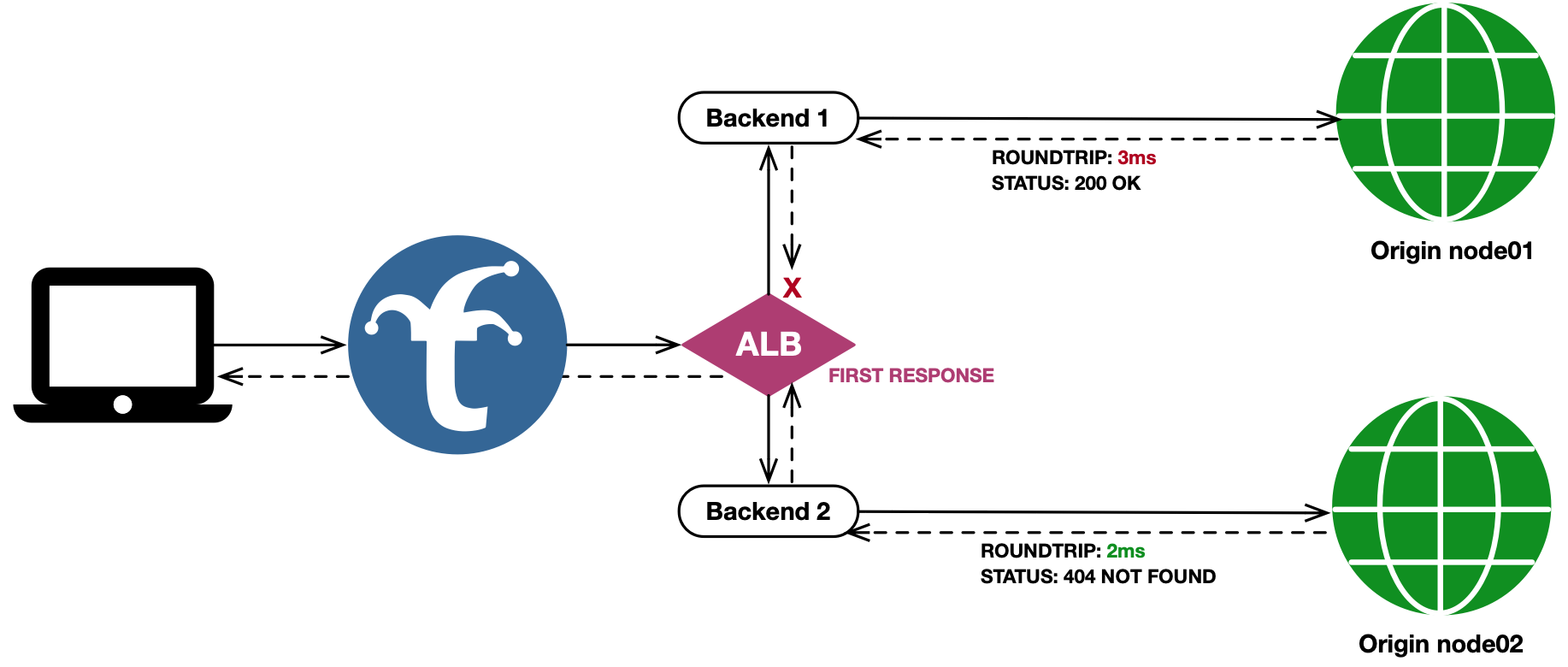
The First Response mechanism fans a request out to all healthy pool members, and returns the first response received back to the client. All other fanned out responses are cached (if applicable) but otherwise discarded. If one backend in the fanout has already cached the requested object, and the other backends do not, the cached response will return to the caller while the other backends in the fanout will cache their responses as well for subsequent requests through the ALB.
This mechanism works well when using Trickster as an HTTP object cache fronting multiple redundant origins, to ensure the fastest response possible is delivered to downstream clients - even if the HTTP Response Code indicates an error in the request or by the first backend to respond.
First Response Configuration Example
backends:
  node01:
    provider: reverseproxycache
    origin_url: http://node01.example.com

  node02:
    provider: reverseproxycache
    origin_url: http://node-02.example.com

  node-alb-fr:
    provider: alb
    alb:
      mechanism: fr # first response
      pool:
        - node01
        - node02
Here is the visual representation of this configuration:
First Good Response
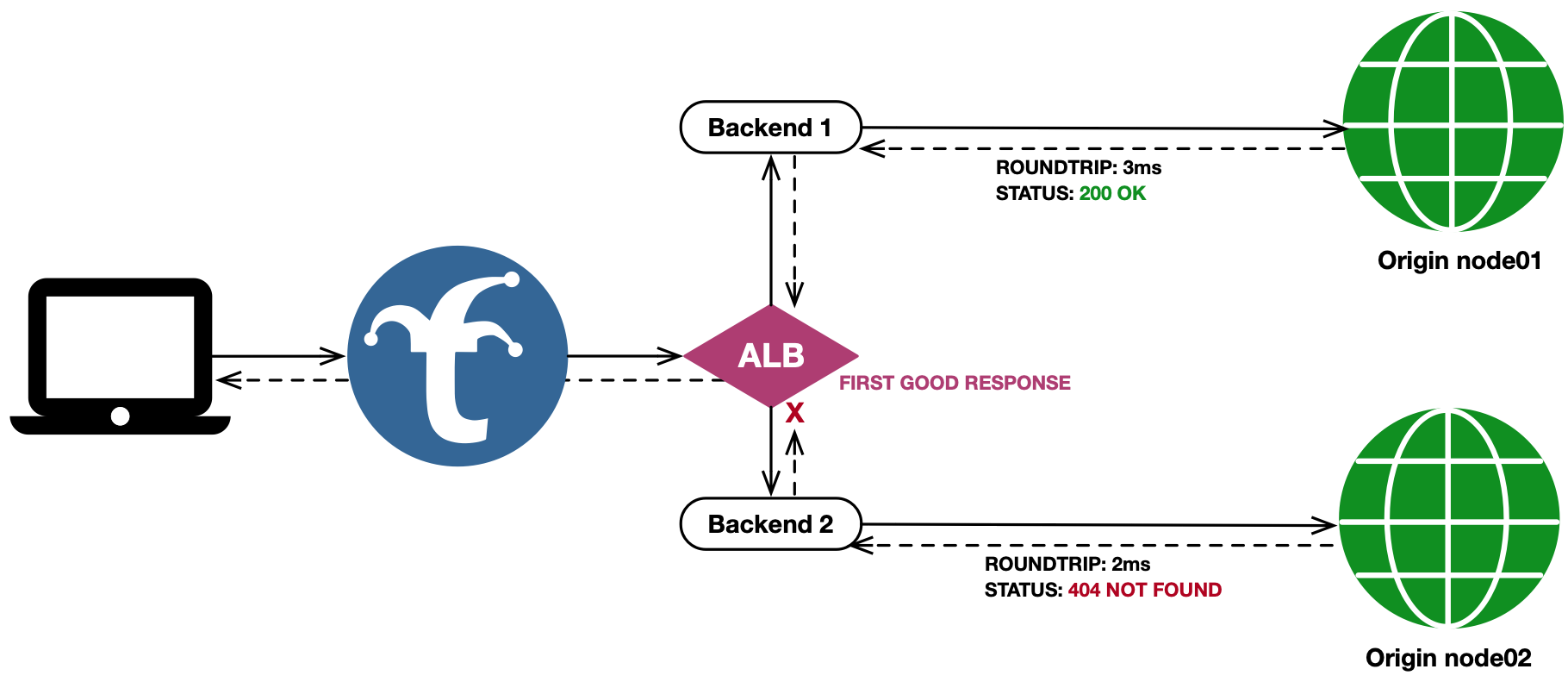
The First Good Response (fgr) mechanism acts just as First Response does, except that it waits to return the first response with an HTTP Status Code < 400. If no fanned out response codes are in the acceptable range once all responses are returned (or the timeout has been reached), then the healthiest response, based on min(all_responses_status_codes), is used.
This mechanism is useful in applications such as live internet television. Consider an operational condition where an object may have been written to Origin 1, but not yet written to redundant Origin 2, while users have already received references to and begin requesting the object in a separate manifest. Trickster, when used as an ALB+Cache in this scenario, will poll both backends for the object and cache the positive responses from Origin 1 for serving subsequent requests locally, while a negative cache configuration will avoid potential 404 storms on Origin 2 until the object can be written by the replication process.
Custom Good Status Codes List
By default, fgr will return the first response with a status code < 400. However, you can optionally provide an explicit list of good status codes using the fgr.status_codes configuration setting, as shown in the example below. When set, Trickster will return the first response to be returned that has a status code found in the configured list.
First Good Response Configuration Example
negative-caches:
  default: # by default, backends use the 'default' negative cache
    "404": 500 # cache 404 responses for 500ms

backends:
  node01:
    provider: reverseproxycache
    origin_url: http://node-01.example.com

  node02:
    provider: reverseproxycache
    origin_url: http://node-02.example.com

  node-alb-fgr:
    provider: alb
    alb:
      mechanism: fgr # first good response
      pool:
        - node01
        - node02
      fgr:
        status_codes: [ 200, 201, 204 ] # only consider these codes when selecting a response
Here is the visual representation of this configuration:
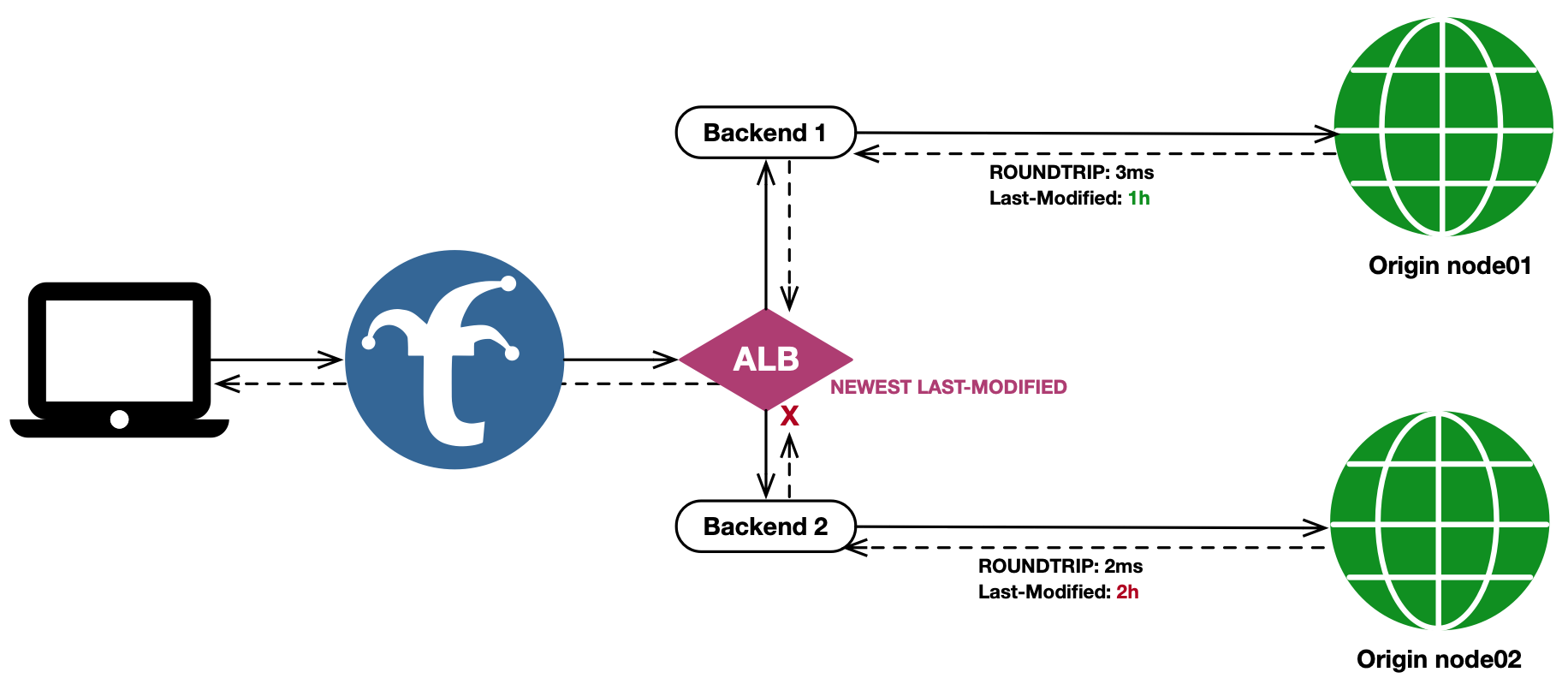
Newest Last-Modified
The Newest Last-Modified mechanism is focused on providing the user with the newest representation of the response, rather than responding as quickly as possible. It will fan the client request out to all backends, and wait for all responses to come back (or the ALB timeout to be reached) before determining which response is returned to the user.
If at least one fanout response has a Last-Modified header, then any response not containing the header is discarded. The remaining responses are sorted based on their Last Modified header value, and the newest value determines which response is chosen.
This mechanism is useful in applications where an object residing at the same path on multiple origins is updated frequently, such as a DASH or HLS manifest for a live video broadcast. When using Trickster as an ALB+Cache in this scenario, it will poll both backends for the object, and ensure the newest version between them is used as the client response.
Note that with NLM, the response to the user is only as fast as the slowest backend to respond.
Newest Last-Modified Configuration Example
backends:
  node01:
    provider: reverseproxycache
    origin_url: http://node01.example.com

  node02:
    provider: reverseproxycache
    origin_url: http://node-02.example.com

  node-alb-nlm:
    provider: alb
    alb:
      mechanism: nlm # newest last modified
      pool:
        - node01
        - node02
Here is the visual representation of this configuration:
User Router
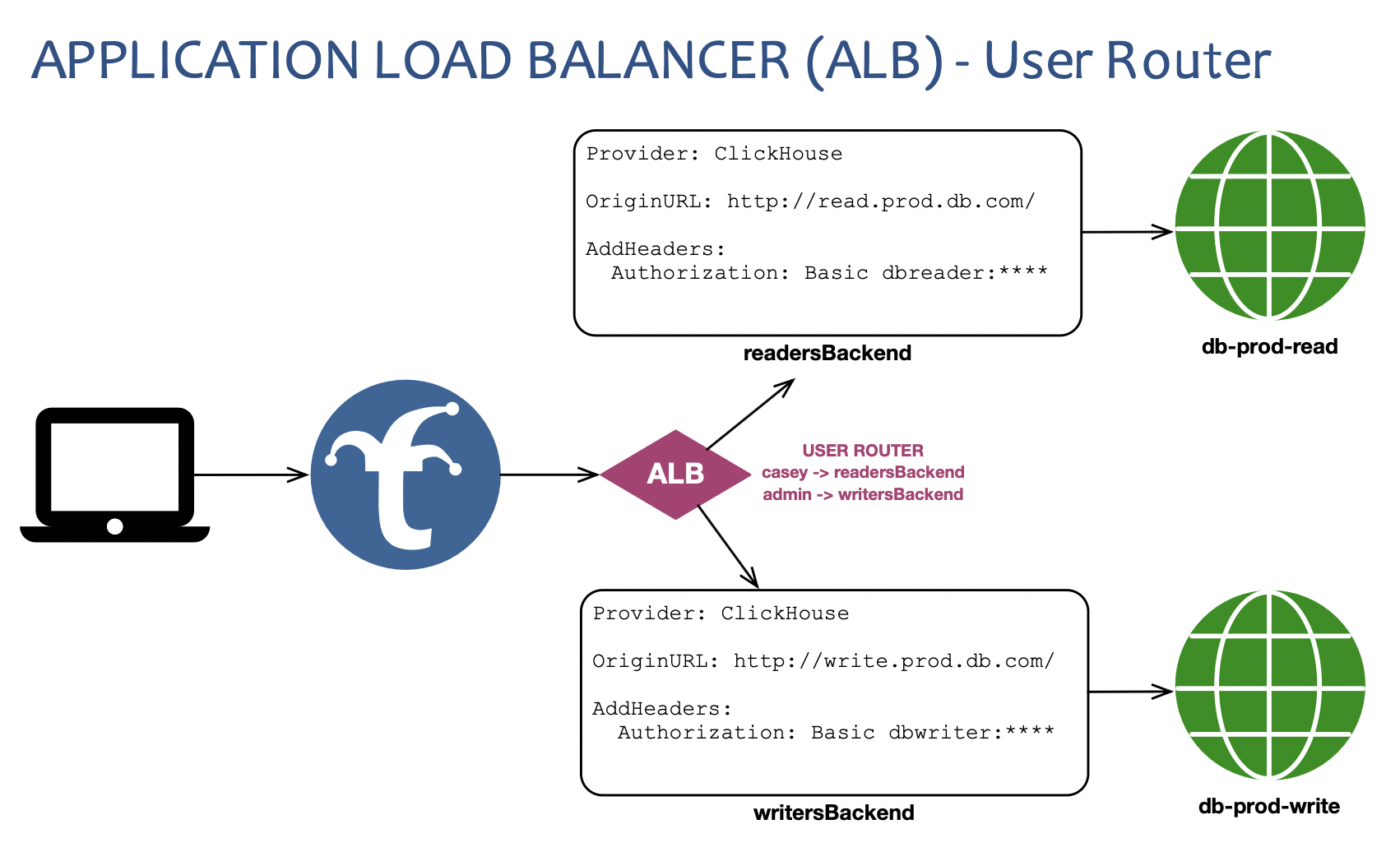
The User Router mechanism is used to control a Request’s destination Backend based on the username in the request. A default Backend (for no-user and users not in the manifest) can be configured, as well as a Backend per-user.
Native MySQL listeners use a deliberately narrower User Router topology than
HTTP backends: one authenticated listener-facing User Router may select only
direct terminal MySQL backends, selection is sticky for the session, and
to_user/to_credential remapping is rejected. See the
MySQL Provider Guide for the complete
authentication, routing, health, cache-identity, and no-route contract.
When a User Router ALB is configured to use an Authenticator, the ALB can also modify a Request’s credentials before passing it off to the destination Backend. In the graphic below, user casey will be routed to the readersBackend, which proxies to a read-only database server with the dbreader credentials; while user taylor will be routed to the writersBackend, which proxies to a read-write database server with the dbwriter credentials. Here is the example configuration corresponding to the graphic:
Credential replacement is applied only when the user’s configured to_backend target is selected. When a request instead uses default_backend - because the username has no mapping, the mapping does not name a usable runtime target, or the mapped target is unavailable - the request retains its inbound credentials. If a user should receive replacement credentials when routed to the same Backend that also serves as the default, set that Backend explicitly as the user’s to_backend.
backends:
  readersBackend:
    provider: clickhouse
    origin_url: http://read.prod.db.com:8123/

  writersBackend:
    provider: clickhouse
    origin_url: http://write.prod.db.com:8123/

  click-lb-01:
    provider: alb
    authenticator_name: dbUsers
    alb:
      mechanism: ur # User Router Mechanism
      user_router: # User Router-specific configs
        default_backend: readersBackend # optional - users not in the list will route here, origin will 401
        users:
          casey:
            to_user: dbreader # replaces user casey with dbreader in the request's Authorization header
            to_credential: ${DB_READER_PW} # replaces credential in the Authorization header with this env
            to_backend: readersBackend # explicit selection applies casey's credential replacement
          taylor:
            to_user: dbwriter # replaces user taylor with dbwriter in the request's Authorization header
            to_credential: ${DB_WRITER_PW} # replaces credential in the Authorization header with this env
            to_backend: writersBackend # taylor is sent to the writers backend

authenticators:
  dbUsers:
    provider: clickhouse # use the clickhouse authenticator
    users_file: /path/to/user-manifest.csv # this file should include casey and taylor users
    users_file_format: csv # required when users_file is set
Supported Backend Provider Types
The User Router mechanism supports all Backend provider types for default_backend and to_backend values, including other User Router ALBs.
However, config validation will fail if:
- there are any possible infinite loops between backends configured
- users could ultimately be routed to different non-virtual (ALB/Rule) backend types by the same User Router ALB. The final ultimate route for all users must be of the same type (regardless of how many additional hops through ALBs and Rules the request would take).
- In other words: user1 cannot be ultimately routed to a
clickhousebackend and user2 be ultimately routed to aprometheusbackend by the same User Router ALB.
- In other words: user1 cannot be ultimately routed to a
User Router without an Authenticator
If a User Router ALB does not use an Authenticator, you can still configure user-specific Backend routes. In these cases Trickster will observe (but not authenticate) the username in the request and route based on the observed username. However, Trickster will exit with a validation failure on startup if a User Router ALB that does not utilize an Authenticator is configured to swap credentials. In short: users must be positively authenticated by a Trickster Authenticator for credential swapping to be permitted by the User Router ALB.
When a User Router ALB doesn’t use an Authenticator, Trickster uses the final destination Backend provider type to select a default Authenticator (operating in observe-only mode / no users manifest) for username observation. For clickhouse-destined User Routers, the observe only Authenticator provider is clickhouse. For all other backend provider types, the default the observe only Authenticator provider is basic (Basic Auth).
to_user / to_credential vs Backend Path Header Injection
It is still possible to insert credentials to a Backend proxy request using the request_headers Backend Path config. But any request_headers alterations configured for auth-related headers (e.g., Authorization) are performed by the Backend after being handled by a User Router; so they would overwrite any user-specific to_user and to_credential transformations performed by the User Router ALB.
Default Backend
As shown in the example config above, you can provide a default_backend config to a User Router, and users who are not in the user router list will be routed to this backend.
If you do not supply a default_backend, users who are not in the manifest will receive a default response of 502 Bad Gateway. You can customize the default response code by setting no_route_status_code to a value between 400 and 599 as in this example:
backends:
  prod-01:
    provider: reverseproxy
    origin_url: https://example.com/

  users-lb-01:
    provider: alb
    alb:
      mechanism: ur
      authenticator_name: all-users # not shown for brevity, see above examples
      user_router:
        no_route_status_code: 401 # unauthorized response for users not in allow list
        users: # allowed users
          casey:
            to_backend: prod-01
          taylor:
            to_backend: prod-01
          kris:
            to_backend: prod-01
User Router ALB Backend Pool and Health Checking
The User Router does not rotate through or fan out to a pool of Backends like
the other ALB mechanisms. A healthy mapped target is selected directly. When a
mapped target is unavailable, the request uses the healthy default_backend
without applying the mapped target’s credential replacement. If neither target
is available, the router uses its configured no-route response.
That fallback applies to HTTP requests. A native MySQL session whose username
has an explicit mapping fails with a MySQL availability error when that mapped
terminal is unavailable; it is never redirected to default_backend. Only an
unmapped MySQL username may use the configured default terminal.
You can configure a User Router ALB’s backend destinations to be other ALBs with mechanisms that utilize healthchecked pools.
Bounding Per-Member Response Captures
ALB mechanisms that fan out (TSM, FR, FGR, NLM) buffer each pool member’s response in memory before merging or selecting a winner. Without a cap, one misbehaving upstream returning an oversized body can OOM the proxy – an N-way fanout multiplies that by N.
Trickster applies a default cap of 256 MiB per response. A member whose body exceeds the cap is treated as a partial failure: the merged response carries an X-Trickster-Result: phit marker and the trickster_alb_fanout_failures_total{mechanism, reason="truncated"} metric increments.
Override the cap at the backend or ALB level:
backends:
  default:
    max_capture_bytes: 67108864  # 64 MiB, applies to all backends (Prometheus, ClickHouse, ALB members, etc.)

  prom-alb-tsm:
    provider: alb
    alb:
      mechanism: tsm
      max_capture_bytes: 16777216  # 16 MiB, ALB-specific override
      pool:
        - prom01
        - prom02
The ALB-level value takes precedence over the backend-level value, which in turn takes precedence over the 256 MiB default.
Bounding Aggregate In-Flight Captures
max_capture_bytes caps each member’s response individually; a fanout to N members can still buffer up to N * max_capture_bytes in flight. For deployments with large pools or low memory ceilings, set max_fanout_capture_bytes to cap the aggregate buffer across all in-flight slots in a single fanout call. Slots dispatched after the aggregate budget would go negative are fail-fasted (marked Failed, no capture buffer allocated) before the upstream handler runs; the merge sees them as partial failures and the existing fallback path handles it.
backends:
  prom-alb-tsm:
    provider: alb
    alb:
      mechanism: tsm
      max_capture_bytes: 16777216         # 16 MiB per member
      max_fanout_capture_bytes: 67108864  # 64 MiB total across all in-flight slots
      pool:
        - prom01
        - prom02
        - prom03
        - prom04
max_fanout_capture_bytes defaults to 0 (no aggregate cap). Pick a value matching what your trickster instance can afford to buffer per request, independent of pool size.
Maintaining Healthy Pools With Automated Health Check Integrations
Health Checks are configured per-Backend as described in the Health documentation. Each Backend’s health checker will notify all ALB pools of which it is a member when its health status changes, so long as it has been configured with a health check interval for automated checking. When an ALB is notified that the state of a pool member has changed, the ALB will reconstruct its list of healthy pool members before serving the next request.
Health Check States
A backend will report one of three possible health states to its ALBs: unavailable (-1), unknown (0), or available (1).
Health-Based Backend Selection
Each ALB has a configurable healthy_floor value, which is the threshold for determining which pool members are included in the healthy pool, based on their instantaneous health state. The healthy_floor represents the minimum acceptable health state value for inclusion in the healthy pool. The default healthy_floor value is 0, meaning Backends in a state >= 0 (unknown and available) are included in the healthy pool. Setting healthy_floor: 1 would include only available Backends, while a value of -1 will include all backends in the configured pool, including those marked as unavailable.
Backends that do not have a health check interval configured will remain in a permanent state of unknown. Backends will also be in an unknown state from the time Trickster starts until the first of any configured automated health check is completed. A pool member in a permanent unknown state can never reach available, so a healthy_floor: 1 ALB whose members lack health checks would have an empty pool and return 502 for every request. To avoid that, Trickster resets such an ALB’s effective floor to 0 at startup, emits a warning naming the ALB and the un-probed members, and sets the trickster_alb_pool_floor_reset{backend_name} gauge to 1. Configure a health check interval on those members if you want healthy_floor: 1 to apply.
Setting healthy_floor below 0 admits members the probe has confirmed unavailable, not just members in the transient unknown state. If your goal is to keep traffic flowing during the cold-start window before the first probes complete, lower the pool members’ recovery_threshold so they transition out of unknown faster – don’t lower the floor. When healthy_floor < 0 Trickster emits a startup warning and sets the trickster_alb_pool_admits_failing{backend_name} gauge to 1.
Example ALB Configuration Routing Only To Known Healthy Backends
backends:
  prom01:
    provider: prometheus
    origin_url: http://prom01.example.com:9090
    healthcheck:
      interval: 1000ms # enables automatic health check polling for ALB pool reporting

  prom02:
    provider: prometheus
    origin_url: http://prom02.example.com:9090
    healthcheck:
      interval: 1000ms

  prom-alb-tsm:
    provider: alb
    alb:
      mechanism: tsm   # times series merge healthy pool members
      healthy_floor: 1 # only include Backends reporting as 'available' in the healthy pool
      pool:
        - prom01
        - prom02
All-Backends Health Status Page
Trickster 2.x provides a global health status page available at http://trickster:metrics-port/trickster/health or (the configured health_handler_path).
The global status page will display the health state about all backends configured for automated health checking. Here is an example configuration and a possible corresponding status page output:
backends:
  proxy-01:
    provider: reverseproxy
    origin_url: http://server01.example.com
    # not configured for automated health check polling

  prom-01:
    provider: prometheus
    origin_url: http://prom01.example.com:9090
    healthcheck:
      interval: 1000ms # enables automatic health check polling every 1s

  flux-01:
    provider: inflxudb
    origin_url: http://flux01.example.com:8086
    healthcheck:
      interval: 1000ms # enables automatic health check polling every 1s
$ curl "http://${trickster-fqdn}:8481/trickster/health"

Trickster Backend Health Status            last change: 2020-01-01 00:00:00 UTC
-------------------------------------------------------------------------------

prom-01      prometheus   available

flux-01      influxdb     unavailable since 2020-01-01 00:00:00 UTC

proxy-01     proxy        not configured for automated health checks

-------------------------------------------------------------------------------
You can also provide a 'Accept: application/json' Header or query param ?json
JSON Health Status
As the table footer from the plaintext version of the health status page indicates, you may also request a JSON version of the health status for machine consumption. The JSON version includes additional detail about any Backends marked as unavailable, and is structured as follows:
$ curl "http://${trickster-fqdn}:8481/trickster/health?json" | jq

{
  "title": "Trickster Backend Health Status",
  "updateTime": "2020-01-01 00:00:00 UTC",
  "available": [
    {
      "name": "flux-01",
      "provider": "influxdb"
    }
  ],
  "unavailable": [
    {
      "name": "prom-01",
      "provider": "prometheus",
      "downSince": "2020-01-01 00:00:00 UTC",
      "detail": "error probing target: dial tcp prometheus:9090: connect: connection refused"
    }
  ],
  "unchecked": [
    {
      "name": "proxy-01",
      "provider": "proxy"
    }
  ]
}
2 - ALB Autodiscovery
Autodiscovery keeps an ALB pool’s membership current at runtime:
instead of hand-maintaining a pool list, Trickster watches a discovery
source and adds, updates, and drains pool members as the source changes —
with no config reload or listener restart. Discovered members are cloned
from a designated template backend, so they inherit its caching, TLS,
health check, path, and timeout configuration.
Supported Discovery Providers
| provider | discovers | change detection |
|---|---|---|
kubernetes | endpointslices, services or pods via the Kubernetes API | watch (event-driven) |
dns_srv | SRV records | poll |
dns_a | A/AAAA records | poll |
file | a member-list file | filesystem notify + poll |
http_sd | a member-list HTTP endpoint | poll (ETag-aware) |
consul | Consul service instances | blocking query (event-driven) |
nomad | Nomad’s native service registry | blocking query (event-driven) |
aws | EC2 instances or ECS tasks, by aws.service | poll |
gcp | Compute Engine instances, by gcp.service | poll |
azure | Virtual Machines, by azure.service | poll |
docker | Docker Engine containers | poll |
For other services, users are generally served by the file provider (any
external service-discovery tool can emit the member list), by
http_sd (the universal adapter — a few lines of
glue serving a member list, with no Trickster change), or by the DNS
providers (e.g. Consul’s DNS interface, cloud private DNS zones, Docker’s
embedded DNS). Developers can add providers against a simple interface; see
the provider authoring guide.
Configuration Overview
Autodiscovery has three configuration parts:
- a named discoverer in the top-level
discoverysection — the provider and its connection-level settings (Kubernetes client, DNS resolver). Multiple ALBs can share one discoverer, and therefore one client/watch/resolver stack. - a template backend — a normal backend definition marked
is_template: true. Templates are never routed, never eligible foris_default, never static pool members, and don’t require anorigin_url; they exist to be cloned per discovered member. - the ALB’s
alb.discoveryblock — which discoverer to use, a provider-specificquerydescribing what to select, the template to clone, and guardrail options.
discovery:
  in-cluster:
    provider: kubernetes
    kubernetes:
      in_cluster: true

backends:
  prom-template:
    provider: prometheus
    is_template: true
    cache_name: default
    healthcheck:
      interval: 5s

  prom-alb:
    provider: alb
    alb:
      mechanism: tsmerge
      discovery:
        discoverer_name: in-cluster
        template_backend: prom-template
        query:
          kind: endpointslices
          namespace: monitoring
          service: prometheus
          port: web
A discovery-backed ALB may also list static pool members; discovered
members are additive to them. Static pool entries (and discovered members
from sources that convey weights) support integer weights for the
round_robin mechanism:
pool:
  - static-member          # weight 1
  - name: bigger-member
    weight: 3
Discoverer Connection Options
Each entry in the top-level discovery section declares a provider and
that provider’s connection-level block:
| provider | block | options |
|---|---|---|
kubernetes | kubernetes | in_cluster (default true) or kubeconfig path — mutually exclusive; plus qps, burst, user_agent, timeout |
dns_srv, dns_a | dns | resolver (host:port; default: system resolver), interval (poll cadence, default 30s, min 1s; record TTLs act as a floor) |
file | file | poll_interval (stat-poll fallback cadence, default 30s, min 1s) |
http_sd | http + http_sd | connection settings in the shared http block (below); http_sd.format selects the member-list document: trickster (default) or prometheus |
consul | http + consul | connection settings in the shared http block; consul.datacenter, namespace, partition, wait, allow_stale, only_passing, warning_is_ready |
nomad | http + nomad | connection settings in the shared http block; nomad.namespace, region, wait, allow_stale |
aws | aws (+ optional http) | aws.service (required: ec2 or ecs), region, and the credential fields; the endpoint is derived, so http.endpoint is an optional override |
gcp | gcp (+ optional http) | gcp.service (required; gce), gcp.project (from the metadata server when unset) and credentials_file; the endpoint is the Compute API, so http.endpoint is an optional override |
docker | docker (+ optional http) | docker.api_version; the endpoint defaults to the well-known socket, so http.endpoint is an optional override (unix:// or tcp://) |
azure | azure (+ optional http) | azure.service (required; vm), azure.subscription_id (required), credentials and cloud; the endpoint comes from the cloud, so http.endpoint is an optional override |
A block is only valid on its own provider’s entries; anything else fails startup.
The shared http block
Providers that discover members by polling an HTTP endpoint share one
connection block rather than each defining its own, so that configuring a
second such provider does not mean learning a second vocabulary. It is
required by http_sd, and rejected on providers that do not poll HTTP.
| option | meaning |
|---|---|
endpoint | base URL of the service to poll (http/https, host required) |
interval | poll cadence (default 30s, min 1s) |
timeout | bound on a single poll (default 10s, min 100ms) |
tls | outbound client TLS: client_cert_path/client_key_path, certificate_authority_paths, insecure_skip_verify |
headers | headers set on every request; where a registry’s credential is a bespoke header (X-Consul-Token, X-Nomad-Token), it goes here |
username, password | static HTTP Basic credential |
bearer_token | sent as Authorization: Bearer <token> |
bearer_token_file | path re-read before each poll, so a rotated credential is picked up without a restart — prefer this over bearer_token for anything that expires |
follow_redirects | default false; a redirect away from the configured endpoint is surfaced rather than chased |
username/password and the bearer-token fields are mutually exclusive,
as are the two bearer-token forms: a config that sets both fails startup
instead of silently preferring one, which is how an operator ends up
debugging a 401 against a config that looks correct.
Providers whose normal poll includes a server-side wait (blocking queries)
need timeout comfortably above that wait. There is no second,
client-level timeout underneath it that could cut a long poll short.
Template Backends
The template_backend is an ordinary backend definition marked
is_template: true. A discovered member overrides exactly the template’s
name, origin_url (and its derived scheme/host/path-prefix, with
the member’s path prefix falling back to the template’s), and replica
group (see below); the member’s weight applies to its pool entry. Every
other option — cache settings, TLS client configuration, healthcheck,
paths, request rewriters, authenticator, timeouts, concurrency limits,
tracing — is inherited from the template.
Templates are excluded from everything that applies only to live
backends: they are never routed, cannot be is_default, cannot appear in
a static ALB pool, and do not require an origin_url. A template must
use an origin-serving provider (not alb or rule), and a TSM-merged or
replica_group_label-using ALB requires a time-series-merge-capable
template provider.
The alb.discovery Block
| option | description | default |
|---|---|---|
discoverer_name | name of a discoverer in the top-level discovery section (required) | |
template_backend | name of a backend with is_template: true (required) | |
query | provider-specific selection (required; see each provider below) | |
min_members | reject snapshots that would shrink the discovered membership below this count, keeping the last-good pool (guards against source blips returning empty results). 0 disables. | 0 |
debounce_window | coalesce membership changes arriving within this window into one pool update, damping flapping sources. 0 disables. | 0 |
startup_policy | retry starts the ALB with only its static members and keeps retrying the discoverer; fail fails startup when the discoverer is unavailable | retry |
health_mode | probe: discovered members inherit the template’s active health check. provider: the discoverer’s readiness reporting (currently Kubernetes only) drives member health instead of active probes | probe |
Health and Readiness Semantics
In probe mode, each discovered member gets its own health check from the
template’s healthcheck config, and the ALB’s healthy_floor applies
exactly as it does to static members. If the template has no probe
interval and the floor requires passing probes, the floor is reset to 0
with a loud warning (as with static members).
A new member’s first probe runs the moment it is registered, and a member
the provider reports ready is admitted to the pool immediately, ahead
of that first result. This matters for rolling deploys: an orchestrator
retires the old workload on the very readiness signal that announced the
new one, so a pool that held the newcomer in unknown until its own probe
completed would have no admissible member in between, and every request in
that window would fail with a 502 even though a healthy workload was
serving. From its first result on, the probe governs the member exactly as
it does an established one: a member the provider reports not-ready, or
one whose readiness the provider does not convey, waits for its first
passing probe as before.
In provider mode, readiness reported by the discoverer maps onto member
health: ready members enter as passing (1), not-ready and terminating
members as failing (-1), readiness-unknown members as unchecked (0) — so a
healthy_floor of 1 excludes members until the provider reports them
ready.
Members a provider reports as shutting down (terminating Kubernetes endpoints, deletion-stamped pods) are removed from the snapshot entirely, so they drain from the pool before the workload is killed — enabling zero-error rolling deploys. On removal, a member’s in-flight requests complete, its health check stops, its metrics series are deleted, and its idle upstream connections close after the configured drain timeout.
TSM Replica Groups
When the ALB uses the Time Series Merge
mechanism, discovered members participate in replica_group semantics
three ways, in priority order:
Per-member groups from the discovery source (highest priority): the Kubernetes provider can read a configured label from each discovered workload via
query.replica_group_label, andfileprovider entries may carry areplica_groupfield. Members sharing a group value are treated as HA replicas of one logical shard and coalesced; distinct values are distinct shards, merged. This handles sharded-HA topologies (e.g., Thanos-style Prometheus pairs) discovered with a single selector:backends: prom-alb: provider: alb alb: mechanism: tsmerge discovery: discoverer_name: in-cluster template_backend: prom-template query: kind: endpointslices namespace: monitoring service: prometheus port: web replica_group_label: prometheus/shardA
replica_groupset on the template backend: inherited by every member without a source-conveyed group — all such members are HA replicas of one shard (the common HA-pair case).Neither (default): each member is its own replica group, i.e. its own logical shard — a pure federation/merge of every member.
For the pods and service kinds the label is read from the discovered
Pod or Service itself. For endpointslices, endpoints don’t carry pod
labels, so setting replica_group_label joins a Pod watch in the query’s
namespace to resolve each endpoint’s target pod (see the RBAC note below);
an endpoint whose pod isn’t yet observed joins ungrouped and regroups
automatically when the pod appears. A member whose group changes is
rebuilt in place under the same name.
Because replica_group is only meaningful on time-series backends,
configuration validation requires a TSM-capable template_backend
whenever the ALB mechanism is tsmerge or replica_group_label is set.
The DNS providers convey no grouping metadata; use the template-level
group (mode 2) or the file provider for grouped non-Kubernetes pools.
Query Vocabulary
Every ALB’s alb.discovery.query block is drawn from one shared vocabulary.
A field set for a provider that does not accept it fails startup rather
than being silently ignored, so a query aimed at the wrong provider is a
config error rather than an empty pool.
| field | kubernetes | dns_srv | dns_a | file | http_sd | consul | nomad | aws | gcp | azure | docker |
|---|---|---|---|---|---|---|---|---|---|---|---|
kind | ● | ||||||||||
namespace | ● | ||||||||||
service | ● | ● | ● | ● | |||||||
selector | ● | ||||||||||
srv_name | ● | ||||||||||
hostname | ● | ||||||||||
path | ● | ● | |||||||||
filter | ● | ● | ● | ||||||||
filters | ● | ● | |||||||||
tags | ● | ● | ● | ● | ● | ||||||
cluster | ● | ||||||||||
network | ● | ||||||||||
address_type | ● | ● | ● | ● | |||||||
port | ● | ● | ● | ● | ● | ● | |||||
port_label | ● | ● | ● | ● | |||||||
scheme | ● | ● | ● | ● | ● | ● | ● | ● | ● | ● | |
replica_group_label | ● | ● | ● | ● | ● | ● |
Most fields mean the same thing everywhere:
scheme—http(default) orhttpsfor the member’s origin URL.port— a static port applied to every member.port_label— reads the port from the provider’s own metadata namespace: an EC2 or Azure tag, a GCE label (then instance metadata), a Docker container label. It wins overportper member, so a fleet can share one static default with individual machines overriding it.address_type—private(default),public, oripv6. Which address to take where a resource has several.replica_group_label— reads a TSM replica group from the same namespace asport_label.tags— narrows by tag/label presence, and is a conjunction: every listed tag must be present.filter/filters— provider-native selection evaluated server-side.filteris an expression string (Consul, Nomad, GCE);filtersis a name→values map (AWSFilter.N, Docker’s filter document). These are passed through, so an expression the upstream does not understand fails the refresh loudly rather than matching nothing.
Hosts versus endpoints is the distinction that decides whether a port is
required. A cloud inventory API returns hosts — aws service: ec2,
gcp, and azure return addresses with no port, so one of port or
port_label is required. Kubernetes and docker return endpoints
that carry their own ports, so a port is optional there and is resolved
from the object when unambiguous.
The kubernetes Provider
The kubernetes provider watches the cluster via the API server (shared
informers; watch-driven, no polling) and supports three query kinds.
Connection options:
discovery:
  my-cluster:
    provider: kubernetes
    kubernetes:
      in_cluster: true              # use the pod's service account (default)
      # kubeconfig: /path/to/kubeconfig   # or run against a remote cluster
      qps: 20                       # sustained API request rate (default 20)
      burst: 40                     # API request burst allowance (default 40)
      timeout: 10s                  # bounds one-shot API calls (default 10s)
      # user_agent: my-trickster/1  # default: trickster/<version> (<os>/<arch>)
in_cluster and kubeconfig are mutually exclusive; with neither set,
in-cluster is assumed.
qps and burst are the client-side rate limit on API requests. The
defaults are raised over the client-go defaults (5 and 10), which are sized
for a one-shot CLI rather than a process that watches many objects.
timeout bounds a single one-shot API call, such as the connectivity
preflight run under startup_policy: fail. It is deliberately not applied
to the REST client as a whole, whose timeout would also truncate the
long-running watch streams the informers depend on.
Shared Watches
Discoverers that agree on the connection (API server, credentials, identity) and on the query’s server-side filtering (namespace, label selector, field selector) share one set of informers, so several ALBs selecting the same Service cost the API server one watch rather than one each. A watch is released when the last subscription using it stops, so unsubscribing one ALB never disturbs another. Nothing needs to be configured for this; it follows from the discoverer and query values being identical.
Startup Preflight
When any ALB bound to a kubernetes discoverer sets startup_policy: fail,
the discoverer contacts the API server’s /version endpoint before any
watch is established, bounded by timeout. Informers are lazy, so without
this check an unreachable API server is indistinguishable from a Service
with no endpoints yet: the process would start clean and serve an empty
pool. Under the default startup_policy: retry the preflight is skipped and
the discoverer keeps watching for the API server to come back.
Query Kinds
endpointslices (default) discovers the ready endpoint addresses of a
named Service — the pod IPs behind it — and is the right choice for
routing around the Service’s own load balancing:
query:
  kind: endpointslices
  namespace: monitoring
  service: prometheus
  port: web          # port name or number; optional when the service has one port
service discovers the ClusterIP of each Service matching a label
selector (or one named Service), one member per Service:
query:
  kind: service
  namespace: monitoring
  selector:
    app: prometheus
  port: 9090
pods discovers pod IPs directly by label selector, without requiring
a Service (the original ask of issue #609):
query:
  kind: pods
  namespace: monitoring
  selector:
    app: prometheus
  port: web
namespace defaults to the pod’s own namespace when running in-cluster.
Port and Scheme Resolution
port may be a named port, a number, or omitted when the target declares
exactly one port; ambiguity is logged and the object skipped. The member
scheme comes from query.scheme if set; otherwise a declared
appProtocol: https on the selected port, or a trickstercache.org/scheme
annotation on the watched Service/Pod, selects https; the default is
http.
Zero-Error Rolling Deploys
Terminating endpoints are removed from the discovered membership as soon
as the change is observed, so members drain out ahead of pod deletion.
One piece belongs to the workload, though: Kubernetes marks an endpoint
terminating and signals the container at the same moment, so — as with
any EndpointSlice consumer, kube-proxy included — the pod must keep
serving briefly while its removal propagates. Give discovered workloads a
short preStop delay (a few seconds comfortably covers Trickster’s
sub-second pickup):
lifecycle:
  preStop:
    sleep:         # native sleep action (Kubernetes >= 1.30); images with
      seconds: 5   # a shell can use exec with command: ["sleep", "5"]
Without it, an instantly-exiting container can produce a brief window of connection errors during rollouts — regardless of what is consuming the EndpointSlices.
RBAC
The provider needs only list and watch on the resources your query kinds use — it never reads Secrets or ConfigMaps and never writes:
query kind | apiGroup | resource | verbs |
|---|---|---|---|
endpointslices | discovery.k8s.io | endpointslices | list, watch |
service | "" (core) | services | list, watch |
pods | "" (core) | pods | list, watch |
Queries are namespace-scoped, so a namespaced Role/RoleBinding per
watched namespace is sufficient and preferred:
apiVersion: rbac.authorization.k8s.io/v1
kind: Role
metadata:
  name: trickster-autodiscovery
  namespace: monitoring
rules:
  - apiGroups: ["discovery.k8s.io"]
    resources: ["endpointslices"]
    verbs: ["list", "watch"]
---
apiVersion: rbac.authorization.k8s.io/v1
kind: RoleBinding
metadata:
  name: trickster-autodiscovery
  namespace: monitoring
subjects:
  - kind: ServiceAccount
    name: trickster
    namespace: trickster
roleRef:
  kind: Role
  name: trickster-autodiscovery
  apiGroup: rbac.authorization.k8s.io
Add services and/or pods rules only for the kinds you configure. Note
that using replica_group_label with the endpointslices kind joins a
Pod watch, so it additionally requires pods list/watch in the query’s
namespace. RBAC cannot scope below the resource level, so the grant covers
all objects of that resource in the bound namespace. Out-of-cluster
(kubeconfig-based) discoverers need the same permissions for their user or
service account.
The dns_srv Provider
The dns_srv provider polls SRV records. SRV target and port map to the
member address; SRV weight maps to the member’s load-balancing weight; and
only the highest-priority tier (the lowest priority value present in the
answer) becomes members — lower tiers are treated as standby capacity
managed on the DNS side.
discovery:
  corp-dns:
    provider: dns_srv
    dns:
      resolver: 10.0.0.53:53   # optional; default: the system resolver
      interval: 30s            # poll cadence (default 30s)

backends:
  my-alb:
    provider: alb
    alb:
      mechanism: rr
      discovery:
        discoverer_name: corp-dns
        template_backend: my-template
        query:
          srv_name: _prometheus._tcp.example.com
          # scheme: https      # optional; default http
Record TTLs act as a floor on the poll cadence: an answer is never
re-resolved before its shortest TTL expires, so interval is the most
frequent the provider will query. Resolution failures keep the last-good
membership; an authoritative empty answer empties it.
The dns_a Provider
The dns_a provider resolves a hostname’s A and AAAA records, with a
fixed port and scheme from the query. This covers round-robin DNS,
headless-service-style DNS outside Kubernetes, Docker’s embedded DNS, and
Consul’s DNS interface without a bespoke provider:
query:
  hostname: prometheus.service.consul
  port: 9090           # required
  # scheme: https      # optional; default http
The dns connection options, poll cadence, TTL floor, and failure
semantics are the same as dns_srv.
The file Provider
Note: like Prometheus’s file_sd, the file provider is the universal
integration point — anything that can write a file (cron, sidecar,
consul-template, your deploy tooling) can drive an ALB pool.
The provider watches a local YAML or JSON member-list file and applies it atomically on change:
discovery:
  external-sd:
    provider: file
    # file:
    #   poll_interval: 30s   # stat-poll fallback cadence (default 30s)

backends:
  my-alb:
    provider: alb
    alb:
      mechanism: rr
      discovery:
        discoverer_name: external-sd
        template_backend: my-template
        query:
          path: /etc/trickster/members.yaml
The file is a list of members:
- name: prom-1            # optional; defaults to the address
  address: 10.0.0.1:9090  # required host:port
- name: prom-2
  scheme: https           # optional; default http
  address: 10.0.0.2:9090
  path_prefix: /base      # optional
  weight: 3               # optional; default 1
  replica_group: shard-0  # optional; TSM replica group (see above)
Writers should replace the file atomically (write to a temp file in the same directory, then rename). A file that fails to read or parse keeps the last-good membership; an empty file is a valid, empty membership.
Change Detection
The provider uses two mechanisms together (via Trickster’s shared filesystem watcher), so updates are never missed:
- Filesystem notification (on the file’s parent directory, debounced): near-instant pickup of writes, atomic renames, and symlink swaps on local filesystems; a directory watch dropped by deletion or recreation is automatically re-armed.
- A content-comparing poll of the file (
file.poll_interval, default30s, minimum1s): the guaranteed fallback wherever notification is unreliable or unavailable.
Guidance for Kubernetes-mounted member files:
- ConfigMap / Secret volume mounts: kubelet applies updates with an atomic symlink swap inside the mount directory, which generates inotify events — notification works, and updates are picked up promptly. Note that kubelet itself syncs ConfigMap content periodically (typically up to a minute), which usually dominates end-to-end latency.
subPathmounts of a ConfigMap/Secret: Kubernetes never updates these after pod start — no mechanism (notification or polling) can see a change. Mount the directory, not asubPath.- Network- or FUSE-backed volumes (NFS PVs, some CSI drivers):
inotify generally does not observe writes made by other clients, so the
stat poll is the effective update mechanism — set
file.poll_intervalto the freshness your deployment needs. emptyDir/hostPathwritten by a sidecar in the same pod: notification works.
The poll compares file content (not timestamps), so any change is
detected within one poll_interval regardless of filesystem timestamp
granularity.
The http_sd Provider
http_sd fetches a member list from an HTTP endpoint. It is the universal
adapter: any service-discovery system Trickster has no in-tree provider for
can feed it through a few lines of glue that serve a member list, with no
Trickster change and no restart.
discovery:
  fleet:
    provider: http_sd
    http:
      endpoint: https://sd.example.com
      interval: 15s
      bearer_token_file: /var/run/secrets/sd-token
    http_sd:
      format: trickster

backends:
  prom-template:
    provider: prometheus
    is_template: true
  prom-alb:
    provider: alb
    alb:
      mechanism: tsm
      discovery:
        discoverer_name: fleet
        template_backend: prom-template
        query:
          path: /pools/prometheus
The query’s path is optional and is appended to the endpoint, so one
server can serve a different member list per ALB while they share the
discoverer’s connection settings. The query’s scheme supplies the scheme
for prometheus-format targets, which are bare host:port; native-format
entries carry their own and override it.
Formats. trickster is the same document the file provider reads and
is the default:
- name: prom-1
  scheme: https
  address: 10.0.0.1:9090
  path_prefix: /base
  weight: 2
  replica_group: shard-0
prometheus is the document Prometheus’s own file_sd and http_sd
consume, so an existing endpoint can be pointed at Trickster unchanged:
[{"targets": ["10.0.0.1:9090"], "labels": {"env": "prod"}}]
A group’s __scheme__ label overrides the query scheme, letting one
endpoint serve mixed-scheme members. Note that the Prometheus format cannot
express weight or replica_group — deployments that need weighted
pools or TSM replica groups want the native format.
The format is named explicitly rather than sniffed. The two documents are structurally distinguishable, but guessing means a typo in one format can parse as a valid, wrong membership in the other, and the cost of guessing wrong is a silently drained pool.
Efficiency. Requests carry X-Prometheus-Refresh-Interval-Seconds, as
Prometheus’s does, so servers that generate member lists on demand can pace
their own work. ETag is honored: an unchanged membership costs one
conditional request and a 304, with no re-parse and no snapshot. The
validator is only stored after a document parses, so a rejected document
can never be confirmed as current by a later 304.
Failure. A transport error, an unexpected status, an oversized body
(the limit is 16 MiB), or a document that will not parse all keep the
last-good membership and are logged once per failure streak and counted on
trickster_discovery_refresh_errors_total. An endpoint that
authoritatively returns no members ([]) is a valid membership and is
applied, so a scaled-to-zero pool can be reported as such.
The consul Provider
consul reads service instances from Consul’s health endpoint. It is
event-driven rather than polled: each request is a Consul blocking
query, so the server parks it until the service changes or wait elapses.
A membership change is observed within a round trip instead of within a
poll interval, and a stable service costs one parked connection rather
than a request per interval.
discovery:
  consul-dc1:
    provider: consul
    http:
      endpoint: http://127.0.0.1:8500
      # a rotated ACL token; Consul accepts the Authorization Bearer scheme
      # as an equivalent to its own X-Consul-Token header
      bearer_token_file: /var/run/secrets/consul-token
    consul:
      datacenter: dc1
      wait: 5m          # how long a blocking query parks; 1s–10m
      allow_stale: true # answer from any server, not only the leader

backends:
  prom-template:
    provider: prometheus
    is_template: true
  prom-alb:
    provider: alb
    alb:
      mechanism: tsm
      health_mode: provider   # Consul's own checks decide readiness
      discovery:
        discoverer_name: consul-dc1
        template_backend: prom-template
        query:
          service: prometheus
          tags: [production]
          # filter: 'Service.Meta.version == "2"'
          # replica_group_label: shard   # read from the service's Meta
Readiness. Consul reports per-instance check status, so this is the
first provider outside kubernetes that can honestly answer “is this member
ready”, which makes health_mode: provider meaningful for VM and container
fleets. An instance’s readiness is its worst check: all passing is
ready, critical and maintenance are not ready, and warning is ready by
default (matching how Consul treats warning for DNS) — set
warning_is_ready: false to drain warning instances instead. A status a
future Consul release introduces is treated as not-ready rather than
ignored.
Failing instances are reported as NotReady rather than omitted, so that an
ALB using the default health_mode: probe can decide for itself and a
wholly-unhealthy service does not look like an empty one. Set
only_passing: true to have Consul filter them out server-side instead.
Weights. Consul’s own Weights.Passing / Weights.Warning map onto
member weights, including the passing/warning distinction — an operator who
has already told Consul the relative capacity of each instance does not have
to tell Trickster again.
Addresses. A service that registers its own address overrides its node’s, which is how sidecars and containers with their own routable address are represented. An instance with no usable address or port fails the whole refresh rather than being silently dropped, so a pool never quietly shrinks because of a catalog change nobody noticed.
Labels. Members carry service, service_id, node, datacenter,
status, and tags (comma-bracketed, as ,a,b,). Service metadata is
carried as meta_<key> so that an operator-defined key cannot shadow a
Trickster-assigned label.
Timeouts. http.timeout must outlast consul.wait, because a blocking
query legitimately takes that long. Its default is derived from the wait
rather than shared with the other HTTP providers (Consul adds up to
wait/16 of its own jitter, which the margin covers), and a config that
sets it too low is rejected at startup rather than producing a stream of
timeouts. http.interval is not the poll cadence here — with blocking
queries there is no cadence — it is the retry delay after a failure.
The nomad Provider
nomad reads service instances from Nomad’s native service registry
(Nomad 1.3+). Like consul it is event-driven, using the same HashiCorp
blocking-query protocol, so a membership change is observed within a round
trip rather than within a poll interval.
discovery:
  nomad-eu:
    provider: nomad
    http:
      endpoint: http://127.0.0.1:4646
      # a rotated ACL token; Nomad accepts the Authorization Bearer scheme
      # as an equivalent to its own X-Nomad-Token header
      bearer_token_file: /var/run/secrets/nomad-token
    nomad:
      namespace: default
      region: eu-1
      wait: 5m
      allow_stale: true

backends:
  prom-alb:
    provider: alb
    alb:
      discovery:
        discoverer_name: nomad-eu
        template_backend: prom-template
        query:
          service: prometheus
          tags: [production]
          # filter: 'JobID == "monitoring"'
Native registry, not Consul. This reads the registry a job selects with
provider = "nomad" in its service block. Jobs that register into Consul
instead are discovered with the consul provider, and that is the more
capable choice where it applies: Nomad’s service endpoint carries no
per-instance check state, so members are reported ReadyUnknown and
health_mode: provider falls back to Trickster’s own probes. A deployment
that wants discovery-conveyed readiness should register its services into
Consul.
Tags filter client-side. Unlike Consul’s catalog endpoint, Nomad’s
service endpoint has no tag parameter, so query.tags is applied by
Trickster after the response arrives. It is a conjunction — every listed tag
must be present. query.filter is passed through to Nomad and evaluated
server-side.
Labels. Members carry service, service_id, job_id, alloc_id,
node_id, namespace, datacenter, and tags (comma-bracketed). The
allocation and job identifiers are what an operator needs to trace a member
back to the workload that registered it.
Timeouts work exactly as for consul: http.timeout must outlast
nomad.wait, its default is derived from the wait, and http.interval is
the retry delay after a failure rather than a poll cadence.
The aws Provider
aws discovers members from an AWS API, selected by aws.service: ec2
for instances, ecs for tasks. It is required — with more than one AWS
API supported, defaulting would be an arbitrary guess at which one you
meant, so a config that omits it fails at startup. Further AWS sources
arrive as new service values rather than new providers, inheriting this
provider’s credentials, signing, pagination and options.
discovery:
  fleet:
    provider: aws
    aws:
      service: ec2      # required: ec2 or ecs
      region: us-east-1
      # credentials omitted: use the standard chain (IRSA, instance
      # profile, environment, shared config). See docs/aws.md.
    http:
      interval: 60s   # instance inventories change slowly; poll gently

backends:
  prom-alb:
    provider: alb
    alb:
      discovery:
        discoverer_name: fleet
        template_backend: prom-template
        query:
          filters:
            tag:service: [prometheus]
            instance-state-name: [running]
          port_label: trickster-port   # read the port from an EC2 tag
          address_type: private        # private (default), public, or ipv6
          # port: 9090                 # or a static port for every member
          # replica_group_label: shard
Credentials, region resolution and IAM are documented once in
AWS Integration. The IAM principal needs
ec2:DescribeInstances.
Hosts, not endpoints. An instance inventory returns hosts with several addresses and no port, so two query fields exist that the registry providers do not need:
address_type—private(default),public, oripv6— selects which of the instance’s addresses becomes the member address.port_label— names an EC2 tag whose value is the member’s port.portsupplies a static one. At least one is required, and they compose: where both are set, the tag wins per instance andportis the fallback, which is what makesport_labelsafe to adopt incrementally across a fleet.
Selection. filters is passed to EC2 as Filter.N, evaluated
server-side — use tag:<key> to filter on a tag value, and any other
DescribeInstances filter
name. tags additionally requires the presence of tag keys, applied after
the response arrives.
Instance state. running is Ready and pending is NotReady.
Instances that are shutting-down, stopping, stopped or terminated
are omitted entirely rather than reported unready, so they drain from
pools before they stop answering — the same rule the kubernetes provider
applies to terminating endpoints. A state a future EC2 release introduces is
treated as not-ready rather than assumed healthy.
Instances that cannot become members are excluded, not fatal. An
instance with no port_label tag and no static port, or with no address
of the requested type, is skipped and logged (once, until the set of
excluded instances changes) rather than failing the refresh. This differs
deliberately from the consul and nomad providers, where a malformed
entry fails the whole refresh: a service registry contains only instances of
the service, so a bad entry means the API is broken, while an EC2 inventory
routinely contains hosts that simply are not tagged yet. Failing there would
drain a working pool because of one unrelated instance.
Labels. Members carry instance_id, instance_type, instance_state,
image_id, availability_zone, vpc_id, subnet_id, architecture,
private_ip, public_ip, private_dns and public_dns. Instance tags are
carried as tag_<Key>, prefixed so an operator-defined tag cannot shadow a
Trickster-assigned label. The Name tag becomes the member name, falling
back to the instance id.
Endpoint. Derived from the region and service
(https://ec2.<region>.amazonaws.com). Set http.endpoint to override it
for a VPC endpoint, a FIPS endpoint, or a test double; a region is required
when it is not overridden, because the endpoint is built from it.
service: ecs
Discovers ECS tasks, including Fargate, which service: ec2
structurally cannot see — a Fargate task has no EC2 instance behind it.
discovery:
  tasks:
    provider: aws
    aws:
      service: ecs
      region: us-east-1
    http:
      interval: 30s

backends:
  prom-alb:
    provider: alb
    alb:
      discovery:
        discoverer_name: tasks
        template_backend: prom-template
        query:
          cluster: prod           # ECS cluster; the account default when unset
          service: prometheus     # ECS service name; optional
          port_label: trickster-port
          # port: 9090            # or a static port for every task
The IAM principal needs ecs:ListTasks and ecs:DescribeTasks.
awsvpc only. Each task in awsvpc mode has its own elastic network
interface, so DescribeTasks alone yields a routable address. That is the
only mode Fargate offers and the default for new EC2-launch-type services.
Under bridge or host networking the address belongs to the container
instance rather than the task, and resolving it would take two further API
calls, a second signing service and broader IAM — so such tasks are
excluded with a reason saying so rather than silently missing. If you
need bridge or host mode, say so and it can be added.
Tags must be propagated. port_label reads an ECS task tag, and ECS
does not copy service tags onto tasks unless the service is created with
--propagate-tags SERVICE. Trickster asks DescribeTasks for tags
explicitly (include: [TAGS]); if port_label finds nothing, check the
propagation setting first.
Task state. RUNNING is Ready; PROVISIONING, PENDING and
ACTIVATING are NotReady; DEACTIVATING, STOPPING, DEPROVISIONING
and STOPPED are omitted entirely, so tasks drain from pools before they
stop answering. Container health is only reported when the task definition
declares a health check — UNHEALTHY is NotReady, and UNKNOWN or absent
is treated as ready, because the alternative would make every
un-instrumented task permanently unusable.
Selection is by cluster and service; filters and address_type are
rejected for ecs, since ECS selects by cluster rather than by instance
attribute and an awsvpc task has exactly one address. tags still filters on
tag presence after the response arrives.
Labels. Members carry task_arn, task_id, cluster,
task_definition, group, launch_type, availability_zone,
task_status and health_status, plus task tags as tag_<Key>. The Name
tag becomes the member name, falling back to the task id.
Churn. A task that disappears between ListTasks and DescribeTasks is
ordinary churn; it is reported as an exclusion rather than silently
shrinking the pool.
The gcp Provider
gcp reads a Google Cloud API named by gcp.service. The provider is
named for the cloud rather than for Compute Engine, matching aws — Google
Cloud APIs outside Compute Engine belong here too, and would sit oddly under
a provider called gce.
service is required even though gce is the only value today. A
default added now could never be removed, and every service added later
would then be reached by opting out of a value the operator never chose.
A value names the product an operator would recognize, not the API that
serves it — the same convention as aws.service. That matters here: Cloud
Load Balancing is served by the Compute API alongside instances, so naming
these for the API would collide where naming them for the product does not.
service: gce
Discovers Google Compute Engine instances through the Compute API’s
instances.aggregatedList, which covers every zone in the project in
one paged call — so no zone list has to be configured or kept current.
discovery:
  fleet:
    provider: gcp
    gcp:
      service: gce               # required
      project: my-project        # from the metadata server when unset
      # credentials_file: /etc/trickster/sa.json   # ADC when unset
    http:
      interval: 60s              # instance inventories change slowly

backends:
  prom-alb:
    provider: alb
    alb:
      discovery:
        discoverer_name: fleet
        template_backend: prom-template
        query:
          filter: 'labels.role = "prometheus" AND status = "RUNNING"'
          tags: [http-server]     # network tags, matched on presence
          port_label: port        # instance label, or metadata key
          address_type: private   # private (default), public, or ipv6
          # port: 9090            # or a static port for every member
          # replica_group_label: shard
Credentials. Leaving credentials_file empty selects Application
Default Credentials: GOOGLE_APPLICATION_CREDENTIALS, gcloud user
credentials, Workload Identity on GKE, or the instance metadata server
on GCE. Prefer those over a key file wherever the platform offers one.
Credentials resolve lazily and only successes are cached, so Trickster
starts even when the metadata server is briefly unreachable and a momentary
failure does not permanently disable discovery.
credentials_file must be a service account key. The credential type is
required rather than taken from the file: an external_account or
impersonated_service_account configuration can name an arbitrary token URL
or local executable, so accepting whichever type a file happens to declare
would hand credential resolution somewhere unintended. For user credentials,
use ADC instead of this field.
The IAM principal needs compute.instances.list on the project — the
roles/compute.viewer role includes it. The OAuth scope requested is
compute.readonly; Trickster never mutates a project.
Project. Taken from gcp.project, then from the credentials, then from
the metadata server when Trickster runs on GCE. It is deliberately not
required in config, because reading it from the metadata server is the
idiomatic deployment.
Hosts, not endpoints, exactly as for aws service: ec2:
address_type chooses the address and port/port_label supplies the
port, with the label winning per instance and the static port as fallback.
port_label reads an instance label first, then instance metadata —
both are key/value namespaces on a GCE instance, and a deployment already
carrying the value in metadata does not have to move it.
Instance status. RUNNING is Ready; PROVISIONING, STAGING and
REPAIRING are NotReady; STOPPING, SUSPENDING, SUSPENDED and
TERMINATED are omitted entirely, so instances drain from pools before
they stop answering. A status a future Compute Engine release introduces is
treated as not-ready rather than assumed healthy.
Selection. filter is a GCE filter expression, evaluated server-side.
tags matches GCE network tags, which are names without values, so it
filters on presence. Requests set returnPartialSuccess, so one unreachable
zone contributes no instances rather than failing the whole refresh.
Labels. Members carry instance_id, instance_name, status, zone,
machine_type, network, subnetwork, private_ip, public_ip, and
tags (comma-bracketed). Instance labels are carried as label_<key>,
prefixed so a user-defined label cannot shadow a Trickster-assigned one.
Resource URLs are shortened to their last segment, since a member label full
of https://www.googleapis.com/compute/v1/... is unreadable.
The azure Provider
azure reads an Azure Resource Manager API named by azure.service.
service is required even though vm is the only value today, for the
same reason as aws.service and gcp.service: a default added now could
never be removed.
service: vm
Discovers Virtual Machines, joining them to their network interfaces to resolve addresses.
discovery:
  fleet:
    provider: azure
    azure:
      service: vm                # required
      subscription_id: 00000000-0000-0000-0000-000000000000  # required
      # resource_group: prod-rg  # narrows every list; recommended
      # credentials omitted: use the managed identity of the VM or AKS pod
      # tenant_id: ...           # with a service principal:
      # client_id: ...
      # client_secret: ...
      # federated_token_file: /var/run/secrets/azure/tokens/azure-identity-token
      # cloud: public            # public (default), usgovernment, china
      # power_state: false       # one extra list call; see Readiness
    http:
      interval: 60s              # vm inventories change slowly

backends:
  prom-alb:
    provider: alb
    alb:
      discovery:
        discoverer_name: fleet
        template_backend: prom-template
        query:
          tags: [prometheus]     # vm tag names, matched on presence
          port_label: port       # a vm tag holding the port
          # port: 9090           # or a static port for every member
          # address_type: private # private (default), public, or ipv6
          # replica_group_label: shard
Credentials. Leaving the credential fields empty selects the managed
identity of the Azure VM or AKS pod Trickster runs on, via the instance
metadata service; set client_id alone to select a user-assigned
identity. On AKS with workload identity, set federated_token_file to
the projected token path — the platform writes and rotates that file, so
Trickster holds no secret, and the file is re-read on every token
acquisition. A client_secret service principal is the fallback where
neither is available; it is redacted from config dumps and the management
API.
There is deliberately no credential chaining. A configured credential that fails is an error, not a reason to quietly fall back to the instance metadata service and authenticate as a different principal.
Permissions. The principal needs only Reader on the subscription, or
on the resource group named by resource_group. The specific actions are
Microsoft.Compute/virtualMachines/read and
Microsoft.Network/networkInterfaces/read, plus
Microsoft.Network/publicIPAddresses/read when address_type: public.
power_state: true additionally requires read at subscription scope,
even with resource_group set — see Readiness.
If discovery finds nothing, check resource provider registration first.
A subscription where Microsoft.Compute is not registered answers the VM
list with HTTP 200 and an empty result, not an error, so the pool is
silently empty. New subscriptions start unregistered. Trickster detects this
case and logs it, but the fix is outside Trickster:
az provider register -n Microsoft.Compute && az provider register -n Microsoft.Network
Clouds. cloud selects both the ARM endpoint and the Entra ID login
endpoint together, since keeping two URLs consistent by hand is exactly the
kind of thing that silently half-works. http.endpoint overrides the ARM
endpoint alone, for a private ARM proxy or a test server.
API versions. ARM requires an explicit api-version on every request,
so both are pinned rather than omitted: compute_api_version (default
2024-07-01) for the VM list and network_api_version (default
2024-05-01) for interfaces and public addresses. Pinning means the
response shape cannot change under Trickster when Microsoft ships a new
version. Override either to move forward deliberately.
The join. An Azure VM carries no address. Addresses live on network
interfaces, which the VM references by resource id, and a public address is
a further reference from the interface to a publicIPAddresses resource. A
refresh is therefore two list calls — three with address_type: public —
joined in memory. Resource ids are matched case-insensitively, because
Azure treats them that way and the casing genuinely differs between APIs; a
VM’s interface reference commonly spells the resource group differently from
the interface list. A VM whose references resolve to nothing is excluded
with a message saying so specifically, since that is the symptom a broken
join produces.
resource_group is worth setting on a large subscription: it narrows every
list rather than enumerating thousands of machines to find a handful.
Hosts, not endpoints, exactly as for aws service: ec2 and gcp
service: gce: address_type chooses the address and port/port_label
supplies the port, with the tag winning per VM and the static port as
fallback. VM tags are matched case-insensitively, as Azure treats them,
so a machine tagged Role is found by a query for role.
Readiness. Off by default, ReadyUnknown for every member. The VM list
carries provisioning state, not power state, and a provisioned VM may be
stopped — reporting Ready on that basis would assert something Azure never
said. Setting power_state: true requests the instance view, which makes
running VMs Ready and removes stopped ones from membership entirely so
they drain from pools. The cost is one extra list call per refresh, not one
call per VM: the whole-subscription list accepts statusOnly=true and
returns every machine’s instance view at once. Trickster’s own active health
checks are the alternative, and cover the case either way.
statusOnly is a parameter of the subscription-wide list only. The
resource-group-scoped list accepts it, returns 200, and silently ignores
it, so Trickster always issues this one call at subscription scope — which
is why power_state: true needs subscription-scope read even when
resource_group is set. If the status list ever comes back with no instance
view for any machine, the refresh fails and keeps the last-good
membership rather than reading every VM as stopped and emptying the pool.
Labels. Members carry vm_name, vm_id, location, vm_size,
resource_group, private_ip, public_ip, and power_state when
requested. VM tags are carried as tag_<key>, prefixed so a user-defined
tag cannot shadow a Trickster-assigned label.
The docker Provider
docker discovers containers through the Docker Engine API’s
GET /containers/json, polled on http.interval.
discovery:
  containers:
    provider: docker
    docker: {}                 # api_version: v1.41 by default
    http:
      # endpoint: unix:///var/run/docker.sock   # the default
      # endpoint: tcp://dockerhost:2376         # remote daemon; add a tls block
      interval: 30s

backends:
  prom-alb:
    provider: alb
    alb:
      discovery:
        discoverer_name: containers
        template_backend: prom-template
        query:
          filters:
            label: [com.example.discover=yes]
          # network: backend      # required only when a container is on several
          # port: 9090            # or port_label, when the container exposes several
          # address_type: private # private (default), public, or ipv6
          # replica_group_label: com.example.shard
Endpoint. Taken from http.endpoint, defaulting to
unix:///var/run/docker.sock. Both the unix:// and tcp:// forms
DOCKER_HOST uses are accepted, so one can be pasted into the other. A
tcp:// endpoint takes its client TLS from the shared http.tls block —
that is how a remote daemon’s mutual TLS is configured — and becomes
https on the wire when one is present. TLS on a unix:// endpoint is
rejected rather than ignored.
Access. Trickster needs read access to the Docker socket, which on most
hosts means membership of the docker group. That access is equivalent to
root on the host, so prefer a read-only socket proxy in production over
mounting the socket directly. Trickster only ever issues GET /containers/json.
API version. Pinned to v1.41 (Docker 20.10 and later) rather than
left off. An unversioned request binds to whatever the daemon’s newest
version happens to be, so the response shape would change under Trickster
when the host upgrades Docker. Override with docker.api_version to use a
newer one.
Endpoints, not hosts. Unlike the cloud providers, the Engine API
reports ports, so port is not required. A container exposing exactly
one TCP port resolves automatically; one exposing several is excluded with
a reason naming the candidates, rather than having a guess made for it. UDP
ports are never candidates, which is what makes the single-port case common
in practice — a container exposing one TCP port beside two UDP ports is
unambiguous. port_label reads the port from a container label and wins
over a static port per container.
Addresses. address_type: private (the default) uses the container’s IP
on its network, with the container-internal port. public uses the host
binding instead — the address and port are taken from the same binding, so
a container publishing one port on 127.0.0.1 and another on 0.0.0.0 does
not produce a mismatched pair. A wildcard binding (0.0.0.0 or ::) is not
dialable, so it resolves to 127.0.0.1. ipv6 uses the container’s global
IPv6 address.
Networks. A container on exactly one network needs no network. One on
several must name which, rather than having a map iteration pick — that
would differ between polls and churn the pool. A container attached to no
network is excluded.
Readiness. State: running is required; every other state leaves
membership entirely, so containers drain from pools as they stop. Health
comes from the container’s HEALTHCHECK: healthy is Ready, unhealthy
and starting are NotReady, and a container with no healthcheck
declared is ReadyUnknown, not Ready — the daemon knows the process
started, not that it is serving, and Trickster’s own health checks cover
that. Note that GET /containers/json reports health only inside its
human-readable Status string; the per-container inspect that carries a
structured Health object would cost one request per container per poll.
Selection. filters is passed to the Engine API as its own filter
document and evaluated server-side, so the daemon does the narrowing:
label, name, status, health, network, ancestor and the rest. A
filter name the daemon does not recognize is a 400 and fails the refresh
loudly, rather than being ignored into a silently empty pool. When the query
sets no status filter, status: [running] is added, so a host with a long
history of exited containers is not listed in full every poll.
Labels. Members carry container_id (short form), container_name,
image, state, network and private_ip. Container labels are carried
as label_<key>, prefixed so a user-defined label cannot shadow a
Trickster-assigned one — Compose’s own labels arrive as
label_com.docker.compose.service and the like.
Upstream Permissions
Every provider is read-only; Trickster never mutates a discovery source. The least privilege each needs:
| provider | required access |
|---|---|
kubernetes | list + watch on the resources your query kinds touch — see RBAC |
consul | an ACL token with service:read (and node:read) for the queried services |
nomad | an ACL token with read-job on the namespace |
aws (ec2) | ec2:DescribeInstances |
aws (ecs) | ecs:ListTasks, ecs:DescribeTasks (add ec2:DescribeInstances for EC2-launch-type tasks) |
gcp | compute.instances.list — roles/compute.viewer includes it |
azure | Reader on the subscription or resource group; power_state: true needs it at subscription scope |
docker | read access to the Engine socket (the docker group, or a read-only socket proxy) |
http_sd | whatever the endpoint itself requires; see connection options |
Credentials are never required in config where the platform can supply
them: aws uses the standard credential chain (IRSA, instance profile,
environment), gcp uses Application Default Credentials (Workload Identity
on GKE, the instance service account on GCE), and azure uses the managed
identity of the VM or AKS pod. Prefer those over stored secrets wherever
they are available — see each provider’s section. Secrets that are
configured (aws.secret_key, azure.client_secret) redact themselves from
config dumps and the management API.
Observing Discovered Members
Discovered members appear on the health status page
alongside static pool members, under their generated backend names
(<alb-name>-<member-name>), tagged with their provider, owning ALB, and
discoverer (e.g., prometheus (prom-alb via in-cluster)).
Membership additions and removals are logged at info with the member name
and origin (credentials embedded in origin URLs are masked), and the full
membership is logged at debug on every change; all autodiscovery log
events carry scope=discovery for easy filtering. Per-ALB member-count,
member-change, snapshot-result, and refresh-staleness metrics — and
per-discoverer refresh-error counters — are documented in
metrics.md. When the ALB has a tracing_name configured,
each membership reconcile cycle is traced as an alb.discovery.reconcile
span via the standard tracing subsystem; the request hot
path is never traced by discovery.
3 - Rule Backend
The Rule Backend is not really a true Backend; it only routes inbound requests to other configured Backends, based on how they match against the Rule’s cases.
A Rule is a single inspection operation performed against a single component of an inbound request, which determines the Next Backend to send the request to. The Next Backend can also be a rule Backend, so as to route requests through multiple Rules before arriving at a true Backend destination.
A rule can optionally rewrite multiple portions of the request before, during and after rule matching, by using request rewriters, which allows for powerful and limitless combinations of request rewriting and routing.
Rule Parts
A rule has several required parts, as follows:
Required Rule Parts
input_source- The part of the Request the Rule inspectsinput_type- The source data typeoperation- The operation taken on the input sourcenext_route- The Backend Name indicating the default next route for the Rule if no matching cases. Not required ifredirect_urlis provided.redirect_url- The fully-qualified URL to issue as a 302 redirect to the client in the default case. Not required ifnext_routeis provided.
Optional Rule Parts
input_key- case-sensitive lookup key; required when the source isheaderor URLparaminput_encoding- the encoding of the input, which is decoded prior to performing the operationinput_index- when > -1, the source is split into parts and the input is extracted from parts[input_index]input-delimiter- when input_index > -1, this delimiter is used to split the source into parts, and defaults to a standard space (’ ‘)ingress_req_rewriter name- provides the name of a Request Rewriter to operate on the Request before rule execution.egress_req_rewriter name- provides the name of a Request Rewriter to operate on the Request after rule execution.nomatch_req_rewriter name- provides the name of a Request Rewriter to operate on the Request after rule execution if the request did not match any cases.max_rule_executions- limits the number of rules a Request is passed through, and aborts with a 400 status code when exceeded. Default is 16. The first rule a request reaches sets its budget from this value; each later rule it passes through may lower the budget but not raise it.
input_source permitted values
| source name | example extracted value |
|---|---|
| url | https://example.com:8480/path1/path2?param1=value |
| url_no_params | https://example.com:8480/path1/path2 |
| scheme | https |
| host | example.com:8480 |
| hostname | example.com |
| port | 8480 (inferred from scheme when no port is provided) |
| path | /path1/path2 |
| params | ?param1=value |
| param | (must be used with input_key as described below) |
| header | (must be used with input_key as described below) |
| has_param | true or false: whether the query parameter named by input_key is present, even if empty |
| has_header | true or false: whether the header named by input_key is present, even if empty |
input_type permitted values and operations
| type name | permitted operations |
|---|---|
| string (default) | prefix, suffix, contains, eq, md5, sha1, modulo, rmatch |
| num | eq, le, ge, gt, lt, modulo |
| bool | eq |
Rule Cases
Rule cases define the possible values are able to alter the Request and change the next route.
Case Parts
Required Case Parts
matches- A string list of values applicable to this case.next_route- The Backend Name indicating the next route for the Rule when a request matches this Case. Not required ifredirect_urlis provided.redirect_url- The fully-qualified URL to issue as a 302 redirect to the client when the Request matches this Case. Not required ifnext_routeis provided.
Optional Case Parts
req_rewriter name- provides the name of a Request Rewriter to operate on the Request when this case is matched.
Example Rule - Route Request by Basic Auth Username
In this example config, requests routed through the /example path will be compared against the rules and routed to either the Reader cluster or the Writer cluster. Curling http://trickster-host/example/path would route to the reader or writer cluster based on a provided Authorization header.
rules:
  example-user-router:
    # default route is reader cluster
    next_route: example-reader-cluster

    input_source: header
    input_key: Authorization
    input_type: string
    input_encoding: base64 # Authorization: Basic <base64string>
    input_index: 1         # Field 1 is the <base64string>
    input_delimiter: ' '   # Authorization Header field is space-delimited
    operation: prefix      # Basic Auth credentials are formatted as user:pass,
                           # so we can check if it is prefixed with $user:
    cases:
      - matches: # writers
          - 'johndoe:'
          - 'janedoe:'
        next_route: example-writer-cluster

backends:
  example:
    provider: rule
    rule_name: example-user-router

  example-reader-cluster:
    provider: rpc
    origin_url: 'http://reader-cluster.example.com'

  example-writer-cluster:
    provider: rpc
    origin_url: 'http://writer-cluster.example.com'
    path_routing_disabled: true  # restrict routing to this backend via rule only, so
                                 # users cannot directly access via /example-writer-cluster/
Example Rule - Route Request by Path Regex
In this example config, requests routed through the /example path will be compared against the rules and routed to either the Reader cluster or the Writer cluster. Curling http://trickster-host/example/reader and http://trickster-host/example/writer would route to the reader or writer cluster by matching the path.
rules:
  example-user-router:
    # default route is reader cluster
    next_route: example-reader-cluster

    input_source: path
    input_type: string
    operation: rmatch      # perform regex match against the path to see if it matches 'writer
    operation_arg: '^.*\/writer.*$'
    cases:
      - matches:
          - 'true' # rmatch returns true when the input matches the regex; update next_route
        next_route: example-writer-cluster

backends:
  example:
    provider: rule
    rule_name: example-user-router

  example-reader-cluster:
    provider: rpc
    origin_url: 'http://reader-cluster.example.com'

  example-writer-cluster:
    provider: rpc
    origin_url: 'http://writer-cluster.example.com'
    path_routing_disabled: true  # restrict routing to this backend via rule only, so
                                 # users cannot directly access via /example-writer-cluster/
Example Rule - Rewrite a Hostname From a Regex Capture
An rmatch rule makes its numeric and named capture groups available to the matched case and egress request rewriters. This example routes a request containing a three-character tenant label and prefixes the destination hostname with that tenant.
request_rewriters:
  tenant-host:
    instructions:
      - [ 'hostname', 'set', '${tenant}.writer.example.com' ]

rules:
  tenant-router:
    next_route: example-reader-cluster
    input_source: path
    input_type: string
    operation: rmatch
    operation_arg: '\{mylabel="(?P<tenant>[a-z0-9]{3})"\}'
    cases:
      - matches: [ 'true' ]
        req_rewriter_name: tenant-host
        next_route: example-writer-cluster

backends:
  example:
    provider: rule
    rule_name: tenant-router

  example-reader-cluster:
    provider: rpc
    origin_url: 'http://reader-cluster.example.com'

  example-writer-cluster:
    provider: rpc
    origin_url: 'http://writer-cluster.example.com'
    path_routing_disabled: true
For input_source: path, matching uses Go’s decoded URL.Path. For example, %7Bmylabel%3D%22abc%22%7D is matched as {mylabel="abc"} and ${tenant} expands to abc. ${0} represents the complete regex match, while ${1} represents the first capture group. See Request Rewriters for token lifetime and safety details.